





rojarrolla
Members
-
Joined
-
Last visited
-
Thank you so much it is not very common to use Uraid as a VM in ESXI, however, that is my case. And since I´ve configured the ESXI server to shut down when power fails, I needed ESXI to have the ability to shut it down gracefully so the drives won't get damaged. I hope this works fine. At least now ESXI detects this VM with VMWARE tools.
-
Well I see that I'm not alone on this, did you find a way ? I am not interested in using the datastore for the VMS, but rather as a repository for Templates or isos. If I try to connect Vsphere with unraid I get this message: "Operation failed, diagnostics report: Mount failed: Unable to complete Sysinfo operation. Please see the VMkernel log file for more details.: The NFS server denied the mount request" Thanks!
-
-
Hi, I am currently using my unraid server for VEEAM backups. Has any of you enabled a share to use it as a Linux Hardened Repository to use it with VEEAM? If so, how did you do it? Thanks!
-
Hello Guys, here is the explanation I got when reading this error. "Unraid StatusNotice [TOWER] - array health report [FAIL]Array has 4 disks (including parity & cache)warning Parity - ST10000NM0226_E_ZA21794D0000J651V8A0_35000c50086bb8633 (sdc) - active 34 C (disk has read errors) [NOK] Disk 1 - ST10000NM0226_E_ZA21796H0000J7167T4Z_35000c50086bb826f (sdf) - active 37 C [OK] Disk 2 - ST10000NM0226_E_ZA21AAH10000C7258S57_35000c50093ae2913 (sde) - active 39 C [OK] Cache - OCZ-TRION150_26OB318DK1CU (sdb) - active 27 C [OK] Parity is valid Last checked on Sun 07 Nov 2021 08:16:47 PM PST (today), finding 0 errors. Duration: 10 hours, 27 minutes, 10 seconds. Average speed: 263.9 MB/s" If click on the error it takes me to the Main tab. Should I replace the parity disk? My diagnostics are attached. Haven't rebooted. Thanks. tower-diagnostics-20211109-1351.zip
-
OK. Let me see. Yes I do want to keep all the data in those disks. However the Gui is making nonsense stufff. What I ended up doing is going back to 6.8 Version and now, it seems to be responding more, but, since I'm running some Rsyncs every night I will keep an eye on it hoping that 6.10 will be released soon... Is there any date yet? Thx. both.
-
In my case I got this: "Unraid StatusNotice [TOWER] - array health report [FAIL]Array has 4 disks (including parity & cache)warning Parity - ST10000NM0226_E_ZA21794D0000J651V8A0_35000c50086bb8633 (sdc) - active 34 C (disk has read errors) [NOK] Disk 1 - ST10000NM0226_E_ZA21796H0000J7167T4Z_35000c50086bb826f (sdf) - active 37 C [OK] Disk 2 - ST10000NM0226_E_ZA21AAH10000C7258S57_35000c50093ae2913 (sde) - active 39 C [OK] Cache - OCZ-TRION150_26OB318DK1CU (sdb) - active 27 C [OK] Parity is valid Last checked on Sun 07 Nov 2021 08:16:47 PM PST (today), finding 0 errors. Duration: 10 hours, 27 minutes, 10 seconds. Average speed: 263.9 MB/s" If click on the error it takes me to the Main tab. Should I replace the parity disk?
-
Hello to all, I have same issue, and some strange issues with my unraid. So, I would like to make a "clean" install again, but, I have many shares and data in the array and I don't want to loose any information. Is there a simple way to back it up to make the new install that recognizes drives, shares, network settings and dockers? Thanks!
-
Kind of, A SAS controller is a device that can interact and control SAS drives (Serial Attached SCSI) Are Enterprise level devices used in, as you have guessed servers. As far as dell Poweredge R320 T320 goes, the PERC Cards (SAS Controllers) are actually LSI cards flashed with a Dell proprietary software, that, as far as I know, is not compatible to Unraid. So, either you flash your card to LSI (you can google it and get a lot of results) or you installed one already flashed. (Was my case). Otherwise you can not use the hot swap drives. Those SAS cards, can also handle sata hard and ssd drives to. I am not familiar to HP servers, I don't know what kind of SAS controller they have. My advice is first to find out if those SAS cards are compatible to Unraid, and then go and get the server. My second advice would be to get a DELL T320 T420 R320 R420, there are many on sale at ebay for a reasonable price and have their PERC cards, it is not that difficult, however, if you make a mistake you can brick the sas controller. I have a H310 card and it can manage up to 8 drives (but my chasis is for 8 3.5" drives), and depending on the chasis you can go up to 16 drives, that depends on the server's chasis backplane. Cheers.
-
I've Never used Letsencript. If I want to use SWAG is the same install and config? Thanks.
-
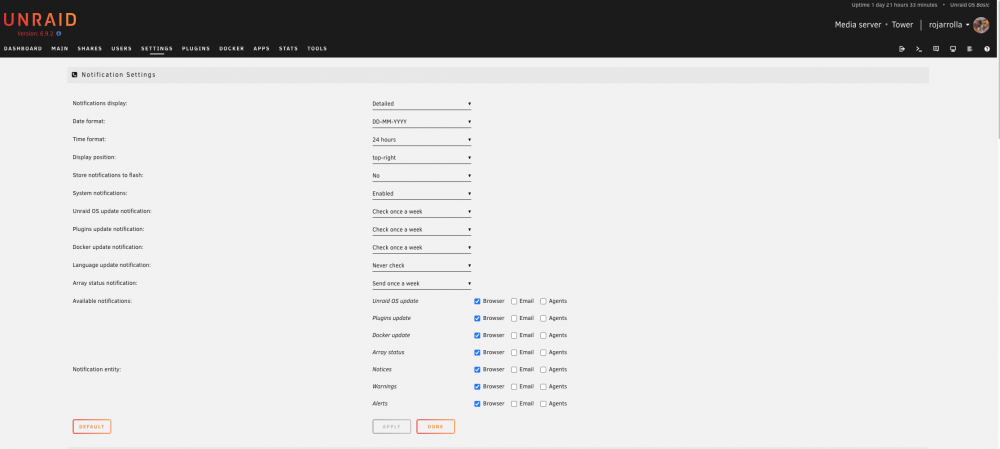
I just cant find it on 6.9.2:
-
Rsync works very well, however it is not real time. I've Seen GDrive2, but it syncs to Google. Is there an app that works like that? Thanks
-
I will tell you what I know. Maybe it will give you some information. Something similar happened to me, I lost my cache drive too and restored the .img file from the CA Backup/Restore. But, mine was 6 days old. My Nextcloud worked after restoring, however, files stored in the cache drive, were not passed on to the array. I could recover them, but, when the user was running the nextcloud client from her computer, she got a lot of synching errors. So I had to erase and upload again everything. My best advice is to backup realtime or at least daily the Database (I use MariaDB), The containers and synch the files to another NAS. I hope this helps you at least something.
-
Hello, I have a similar issue. I've experiencing some problems to reach the WebUi. I have "solved" by restarting the services like this: /etc/rc.d/rc.php-fpm restart /etc/rc.d/rc.nginx restart I have 2 Networks, the 192.168.100.X and the 192.168.2.X. I can not access the WebUi through the 192.168.2.X network, however, windows can access the shares and Nextcloud service is working fine and even remotely. Through the 192.168.100.X network, I can reach the WebUI. I have rebooted the server and it is the same. Here is my config file. I hope you can give me a hint. Thanks. tower-diagnostics-20211004-1113.zip
-
Thanks for the tip. Is there a way to have it backed up real time?


