bigbangus
Members
-
Joined
-
Last visited
Everything posted by bigbangus
-
Done and thank you again for your help and all you've done for the Unraid community. Much appreciated.
-
@ich777 recommended I open a bug report based on our conversation here Please see diagnostics attached. If the dev team has time to look at it I'd be very grateful. Basically, going from 6.9.2 -> 6.10rc2 gives me a code43 on my primary GPU passthrough for any new or previously existing Win10 VM and any new Win11 VM. I've tried everything I can think of (see thread above) and nothing seems to fix the issue. I've rolled back to 6.9.2 in the meantime, but if you need any further diagnostics I'm happy to upgrade again and try some things out to provide more information. Thanks! unraidnas-diagnostics-20211103-1340 (1).zip
-
This didn't work either. Did a full factorial on all the options here. Even created a Win11 VM and it shows code43 too. I've lost all hope. I'm going back to 6.9.2 that seems to work just fine. Thanks for the help @ich777 @alturismo
-
According to my motherboard, it's x4 only in the second slot. So from what I can read that's probably a more significant loss when playing games?
-
I’m game for whatever. When you say new VM without vfio are you saying create a new template, new template and image or new template and/or image without vfio binding any GPU? Sent from my iPhone using Tapatalk
-
Yeah pretty sure. It's an option on some other B550M boards but not mine Also tried legacy boot this morning to see if that solves it, but no luck.
-
From the manual Sent from my iPhone using Tapatalk
-
It's definitely the 1660Ti on the console when I boot, but I'm trying to maintain my 1660Ti on the primary slot for best performance in VM (x16 slot). All was working in 6.9.2 and then stopped in 6.10. Just don't know what to look at to solve it. Would rather not make the 1050Ti primary. Seems backwards to put the fast card in the slower slot?
-
So my BIOS doesn't seem to expose an option to select primary GPU so I've had to keep video=efifb:off for that reason I think. See Diagnostics attached. Thank you for your help. unraidnas-diagnostics-20211103-1340.zip
-
Hey @ich777 any thoughts on what I can try to fix my passthrough in 6.10? Should I try to make a custom 6.10 with an older libvert version if that's even possible using your docker?
-
I don't think the Nvidia driver matters when you are passing the GPU through from what I gather. It's just for when you are using a GPU in dockers and such like Plex/Frigate etc...
-
Has anyone experienced issues passing a primary Nvidia GPU once upgrading to 6.10RC1 or RC2? In my case it's a 1660Ti in the primary slot. Everything was working fine in 6.9.2 using a combination of methods (below), but nothing can fix my Code 43 in Windows 10 in Unraid 6.10. The VM log doesn't report any issues, but the Code 43 persists. If I roll back to 6.9.2 the VM works fine. What I've done to make my primary GPU passthrough work in 6.9.2 IOMMU: Enabled, vfio bind all the GPU devices (VGA+Audio+USB+USB) append "video=efifb:off" to the syslinux configuration (this was the game changer for 6.9 and prior) dump the vbios using @SpaceInvaderOne 's awesome script (thanks!) Tried ifx440 and Q35 no difference Did the VM xml edit multifunction trick with preserving the slot assignment to the VM for all 4 GPU devices again thx @SpaceInvaderOne Nothing can get it working in 6.10. I'm stumped.
-
Yeah I thought about that, but then again it used to work with the standard access settings so I figure I'm missing something else. Is there a way to learn about and test permission settings from within a docker?
-
Anybody? I'm new to dockers and just don't understand why duplicati is now plagued with access restrictions.
-
Ah thank you. Another case of RTFM. # Required: list of roles for this stream. valid values are: detect,record,rtmp # NOTICE: In addition to assigning the record, and rtmp roles, # they must also be enabled in the camera config.
-
Anybody update to 0.9.1 yet? I've followed the documentation to fix all the breaking changes in my config, but I get some warnings. For each camera I get this on startup: [2021-10-06 12:10:20] frigate.app WARNING : Camera XXXXXX has record enabled, but record is not assigned to an input. And when I try to use birdseye view in the GUI, some of my cameras are blank and show this warning in the log: [2021-10-06 13:09:08] frigate.output WARNING : Unable to copy frame XXXXXXX1633536757.444885 to birdseye. Otherwise, all my person detection with Home Assistant still works as intended so I have no issues. Just some warnings and not sure why. Config below: mqtt: host: x.x.x.x port: xxxx topic_prefix: frigate client_id: frigate user: mqtt password: xxxxxxxxxxx stats_interval: 60 cameras: uvc_cam1: detect: enabled: true width: 1920 height: 1080 fps: 5 rtmp: enabled: true snapshots: enabled: true timestamp: true bounding_box: true retain: default: 10 objects: person: 30 ffmpeg: inputs: - path: rtsp://xxxxxxxxx roles: - detect - rtmp motion: mask: - 0,370,483,366,487,201,654,204,980,215,988,0,0,0 - 1352,1080,1555,695,1419,606,1309,667,1205,785,1122,850,947,819,764,715,419,1080 zones: driveway: coordinates: 1561,1080,1634,872,1685,695,906,459,589,545,215,435,0,390,0,1080 uvc_cam2: detect: enabled: true width: 1920 height: 1080 fps: 5 rtmp: enabled: true snapshots: enabled: true timestamp: true bounding_box: true retain: default: 10 objects: person: 30 ffmpeg: inputs: - path: rtsp://xxxxxxxxx roles: - detect - rtmp motion: mask: - 0,85,395,85,395,0,0,0 - 1920,0,1920,275,1781,224,1617,250,1450,191,1276,171,1074,156,982,52,778,0 zones: patio: coordinates: 1920,1080,0,1080,0,366,468,208,915,247,1126,126,1589,178,1694,196,1920,258,1920,265 objects: track: - person - dog - cat uvc_cam3: detect: enabled: true width: 1920 height: 1080 fps: 5 rtmp: enabled: true snapshots: enabled: true timestamp: true bounding_box: true retain: default: 10 objects: person: 30 ffmpeg: inputs: - path: rtsp://xxxxxxxx roles: - detect - rtmp motion: mask: - 0,385,220,222,470,174,631,150,712,0,348,0,0,0 - 1920,0,1920,213,1830,222,1773,297,1696,295,1566,231,1559,119,1418,115,1242,96,1099,96,972,42,953,0 - 1632,1080,1439,735,1267,621,1096,568,919,562,745,571,553,646,354,766,237,904,204,1080 zones: backyard: coordinates: 190,132,0,464,0,1080,137,1080,263,797,510,629,750,562,1025,535,1309,577,1643,1015,1840,906,1623,575,1570,441,1607,335,1531,243,1556,117,1429,86,764,137,216,222 objects: track: - person - dog - cat uvc_cam4: detect: enabled: true width: 1920 height: 1080 fps: 5 rtmp: enabled: true snapshots: enabled: true timestamp: true bounding_box: true retain: default: 10 objects: person: 30 ffmpeg: inputs: - path: rtsp://xxxxxxxx roles: - detect - rtmp motion: mask: - 0,83,350,86,348,0,0,0 zones: sidegate: coordinates: 720,1080,1169,1080,854,240,728,137,631,147,644,257 objects: track: - person - dog - cat uvc_cam5: detect: enabled: true width: 1920 height: 1080 fps: 5 rtmp: enabled: true snapshots: enabled: true timestamp: true bounding_box: true retain: default: 10 objects: person: 30 ffmpeg: inputs: - path: rtsp://xxxxxxxxx roles: - detect - rtmp motion: mask: - 0,83,350,86,348,0,0,0 zones: sidefence: coordinates: 609,1080,1337,1080,741,309,567,287 objects: track: - person - dog - cat record: enabled: true retain_days: 0 events: max_seconds: 300 pre_capture: 2 post_capture: 2 retain: default: 10 objects: track: - person - car - dog - cat ffmpeg: hwaccel_args: - -c:v - h264_cuvid detectors: coral: type: edgetpu device: usb
-
My duplicati container is struggling with permissions everywhere it seems like. I get the following error after every backup when it tries to run the "run-after-script" 2021-10-05 09:39:15 -04 - [Warning-Duplicati.Library.Modules.Builtin.RunScript-ScriptExecuteError]: Error while executing script "/scripts/duplicati_pushover": ApplicationName='/scripts/duplicati_pushover', CommandLine='', CurrentDirectory='', Native error= Access denied Furthermore, when I try to restore a backup just to test the system, it gives me an access permission error and doesn't write the data. What's the deal? Command: root@localhost:# /usr/local/emhttp/plugins/dynamix.docker.manager/scripts/docker run -d --name='duplicati' --net='bridge' --cpuset-cpus='1,3,4,13,15,16' -e TZ="America/New_York" -e HOST_OS="Unraid" -e 'PUID'='99' -e 'PGID'='100' -p '8200:8200/tcp' -v '/mnt/user/appdata/tmp/':'/tmp':'rw' -v '/mnt/disks/':'/backups':'rw,slave' -v '/mnt/user':'/source':'ro' -v '/mnt/user/backups/scripts/':'/scripts':'ro' -v '/mnt/remotes':'/remotes':'rw,slave' -v '/mnt/user/appdata/duplicati':'/config':'rw' 'linuxserver/duplicati' 04edf53ba0312d1d49eb44b9b8f89e274b9fbf0a17097b12b386e4bcd4b9c99b The command finished successfully!
-
Amazing work. quoting your results from the ASM1064 using an SSD array: Asmedia ASM1064 PCIe gen3 x1 (985MB/s) - e.g., SYBA SI-PEX40156 and other similar cards 2 x 450MB/s 3 x 300MB/s 4 x 225MB/s Looks like you can easily get away with 4 drives on a ASM1064 PCI 3.0 x1 if they are all magnetic.
-
So 1 year later and still no Gen 4 x1 card available. I believe the best option out there is the ASM1064 chipset (https://www.asmedia.com.tw/products-list/8a2YQ99xzaUH2qg5/58dYQ8bxZ4UR9wG5) It's Gen 3 x1 which theoretically allows for 1 GB/s total. They sell the card on amazon in variants of 4,6,8 ports for ~40$-60$ and I believe asmedia is compatible with Unraid. Although SATA 3.0 is 6 Gb/s (750MB/s), if you're using this card for the Unraid array, each drive only reaches 60MB/s or so on average so maybe you can get away with putting 4 drives or more on 1 card using this chipset. Has anyone put a ASM1064 card on their unraid server and can comment on bandwidth limitation? Does anyone know if ASMedia plans to release a Gen4 x1 chipset in the future?
-
Thanks! User error. RTFM.
-
Any way to avoid having the refresh the usb coral path in the docker template when I reboot my server? It sometimes changes if I have various devices plugged/unplugged in the usb ports. I read this https://forums.unraid.net/topic/71372-usb-passthrough-device-location-changing/ but not sure if there was a clear solution.
-
I reverted it back based on what you're saying. I think @SpaceInvaderOne mentioned it was necessary to set it on br0 with a static IP so that VM Wake-On-Lan feature works.
-
Yup that fixed it. What do you recommend as best practice here on how to set this up? Am I opening up a security risk here by enabling that? At this point just following space invader's video for the setup, but open to ideas since I'm using external db.
-
Figured it out... my docker is on br0 on a separate ip within my LAN subnet. By design, it can't ping any other docker including mariadb. Guess I need to add a rule for MariaDB or figure out another way.
-
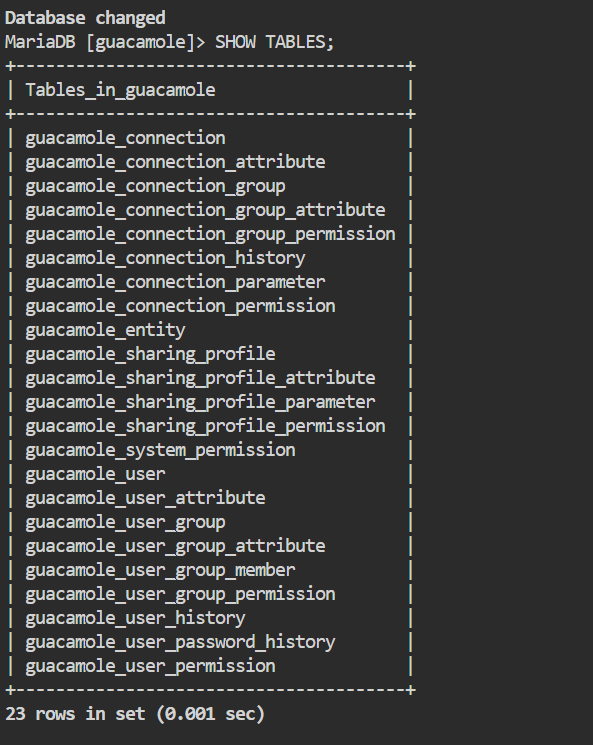
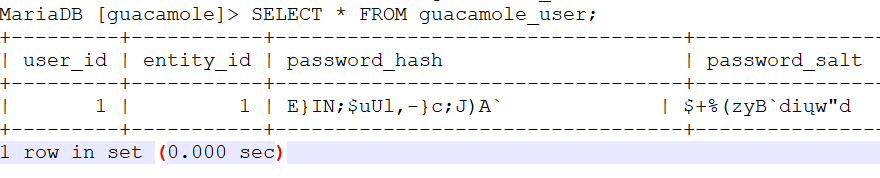
Trying to overachieve here and get Guac working with a separate MariaDB. I followed the spacer invader mariadb nextcloud instructions to make a guacamole user and db with all the privileges. Then I copied and pasted the schema instructions into mariadb console with the db selected and it seemed like it worked. Then I did the same to create the guacadmin user. But when I go to WebGUI of Guac I get an error. I've got guacamole.properties set as: guacd-hostname: localhost guacd-port: 4822 mysql-hostname: x.x.x.x (unraid server) mysql-port: 3306 (port MariaDB is running on x.x.x.x) mysql-database: guacamole mysql-username: guacamole mysql-password: <password> What am I missing? The container log doesn't show the error. Here is my docker command: root@localhost:# /usr/local/emhttp/plugins/dynamix.docker.manager/scripts/docker run -d --name='ApacheGuacamoleNoMariaDB' --net='br0' --ip='<x.x.x.x>' --privileged=true -e TZ="America/New_York" -e HOST_OS="Unraid" -e 'TCP_PORT_8080'='8080' -e 'OPT_MYSQL'='Y' -e 'OPT_SQLSERVER'='N' -e 'OPT_LDAP'='N' -e 'OPT_DUO'='N' -e 'OPT_CAS'='N' -e 'OPT_TOTP'='N' -e 'OPT_QUICKCONNECT'='N' -e 'OPT_HEADER'='N' -e 'OPT_SAML'='N' -e 'PUID'='99' -e 'PGID'='100' -v '/mnt/user/appdata/ApacheGuacamoleNoMariaDB':'/config':'rw' 'jasonbean/guacamole:latest-nomariadb' f680bbad75f308849fd002e1e88f1853a6fd4d407c104218fc044bf23571fa1c The command finished successfully! If I set OPT_MYSQL to N then it works fine. But I like the idea of a separate MariaDB like all my other containers.