






Rikul
Members
-
Joined
-
Last visited
Everything posted by Rikul
-
I fixed it changing my endpoint to nl-amsterdam
-
Here the post from reddit in extenso: I don't wanna mess around with my dns but it can be a lead....
-
Hello, I'm exactly in the same boat since a few hours...I'm running version 5.1.3-1-01. I'm using wiregard via PIA as well and got exactly the same logs after I restart the container. A far as I can tell the issue arise after my apps data backup killed the app this morning: ][binhex-qbittorrentvpn] Stopping binhex-qbittorrentvpn... done! (took 1 seconds) [22.12.2025 06:11:42][][binhex-qbittorrentvpn] Should NOT backup external volumes, sanitizing them... [22.12.2025 06:11:42][][binhex-qbittorrentvpn] Calculated volumes to back up: /mnt/user/appdata/binhex-qbittorrentvpn [22.12.2025 06:11:42][][binhex-qbittorrentvpn] Backing up binhex-qbittorrentvpn... [22.12.2025 06:11:49][][binhex-qbittorrentvpn] Backup created without issues (took 00:00:07 (hours:mins:secs)) [22.12.2025 06:11:49][][binhex-qbittorrentvpn] Verifying backup... [22.12.2025 06:11:50][][binhex-qbittorrentvpn] Verification ended without issues (took 00:00:01 (hours:mins:secs)) [22.12.2025 06:11:50][][binhex-qbittorrentvpn] Starting binhex-qbittorrentvpn... (try #1) done!Then the container restarted :2025-12-22 06:02:55,642 DEBG 'start-script' stdout output: [info] Successfully assigned and bound incoming port 2025-12-22 06:11:41,169 INFO reaped unknown pid 54 (terminated by SIGTERM) 2025-12-22 06:11:41,169 WARN received SIGTERM indicating exit request 2025-12-22 06:11:41,169 DEBG killing watchdog-script (pid 385) with signal SIGTERM 2025-12-22 06:11:41,169 INFO waiting for start-script, watchdog-script to die 2025-12-22 06:11:41,170 DEBG fd 12 closed, stopped monitoring <POutputDispatcher at 22556943999824 for <Subprocess at 22556943995664 with name watchdog-script in state STOPPING> (stdout)> 2025-12-22 06:11:41,170 DEBG fd 16 closed, stopped monitoring <POutputDispatcher at 22556943772736 for <Subprocess at 22556943995664 with name watchdog-script in state STOPPING> (stderr)> 2025-12-22 06:11:41,170 WARN stopped: watchdog-script (exit status 143) 2025-12-22 06:11:41,170 DEBG received SIGCHLD indicating a child quit 2025-12-22 06:11:41,170 DEBG killing start-script (pid 384) with signal SIGTERM Catching signal: Catching signal: SIGTERM Exiting cleanly SIGTERM Exiting cleanly 2025-12-22 06:11:42,171 DEBG fd 9 closed, stopped monitoring <POutputDispatcher at 22556944358032 for <Subprocess at 22556943557232 with name start-script in state STOPPING> (stdout)> 2025-12-22 06:11:42,171 DEBG fd 11 closed, stopped monitoring <POutputDispatcher at 22556943998864 for <Subprocess at 22556943557232 with name start-script in state STOPPING> (stderr)> 2025-12-22 06:11:42,171 WARN stopped: start-script (terminated by SIGTERM) 2025-12-22 06:11:42,172 DEBG received SIGCHLD indicating a child quit ............................. 2025-12-22 06:11:54,007 DEBG 'start-script' stdout output: [info] Successfully downloaded PIA json to generate token for wireguard from URL 'https://www.privateinternetaccess.com/gtoken/generateToken' 2025-12-22 06:11:54,009 DEBG 'start-script' stdout output: [info] Successfully generated PIA token for wireguard 2025-12-22 06:11:54,009 DEBG 'start-script' stdout output: [info] Trying to connect to the PIA WireGuard API on 'france.privacy.network'... Hope it can help to find a workaround...
-
You're running 5.1.3-1-01 that was buggy due to Qbittorrent. Try RELEASETAG=5.1.4-1-01 instead or latest.....
-
Thank you for this super comprehensive tutorial / how to for this plugin that can be tricky to fine tune.
-
I haven't seen any .lnk in my system but because everything got wipe out I could not confirm....anyway I'll do some scan on my machine just to be sure.
-
Thanks for your answer and support. I was running 5.0.2 so I need further investigation to find out what could have happened. I'm torrenting for almost 10 years and my configuration hardly change. It's the first time something like that occurs. Do you think the other malware .lnk stuff could have done something like that ? Do you know how I can scan my drives to look for potential malware / hack ?
-
Hello. I'm not sure it"s qbittorrent related but I"ve lost almost 25 To of torrents on two drives.😭 Even though I was tweaking my arr apps recently I don't think they are the culprits as even my Music folder got wipeout and I don't use Lidarr. I have around 2900 torrents running in QT. All my torrents are visible in the app even though now they are now in the "missing files" state. My download folder looks like : Download > Media > Movie, Serial, Music etc... Inside the container my host path is /mnt/user/Download/Media/ Inside Qbittorrent my default save path is /data. In my arr apps I don't move data but I copy them. I can confirm that my 2 drives where these data were copied went almost to 1 %.... so they were somehow deleted I have the recycle bin install but nothing in there. Even in my arr apps I use the bin and nothing have been moved in there. I have notice some fuse.hidden files in some subfolder telling me that it was some kind of delete action that was proceeded. From my point of view it's not a hard drive failure. My Download share use only 2 dedicated drives and they look fine. I have try to pinpoint the time when it occurred but I don't find any action in my various logs. I've started to have some errors in Qbittorrent at 2024-11-23T14:05:31 - File error alert. Torrent: XXXXX error: No such file or directory" Everything was running fine prior to that. Obviously about the same time I've got similar errors in my arrs apps : 2024-11-23 14:07:12.3|Error|DownloadedMovieImportService|Import failed, path does not exist or is not accessible by Radarr: /data/Movie/ XXXXX Ensure the path exists and the user running Radarr has the correct permissions to access this file/folder 2024-11-23 14:05:44.7|Error|DownloadedEpisodesImportService|Import failed, path does not exist or is not accessible by Sonarr: /downloads/Serial/ XXXX Ensure the path exists and the user running Sonarr has the correct permissions to access this file/folder In my unraid sylog I don't see anything suspicious around this time.... I was able to re-download some torrents using the force re-check feature and these torrents now sit where they should be. I really need to investigate and understand what could have happened to take the appropriate correction in my configuration.. Thank you for your help tower-diagnostics-20241124-1757.zip
-
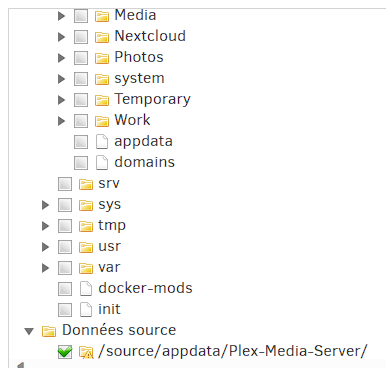
Hello, I have a similar problem although I don't use ZFS. All my shares use XFS. As far as I can tell I think that all the shares that use the old "cache only" can't see any subfolders. For information I'm using the new 6.12 feature "exclusive shares" for my appdata share and domain for my VM. My appdata is set as /mnt/user/appdata/ The others shares using the cache as primary storage and with the secondary's one as array can dispaly the subfolder. As you can see I was once able to see these subfolder and my backup routine was running fine although I have set it long time ago (unraid 6.9) Now my backup are broken as I have this error : System.IO.IOException: Backup aborted since the source path /source/appdata/Plex-Media-Server/ does not exist. Please verify that the source path exists, or remove the source path from the backup configuration, or set the allow-missing-source option. Any guess ?
-
Hello, Have you manage to fix this issue ? I have a similar problem. My Windows 11 VM with GPU passtrough used to work fine with Unraid 6.9. I haven't made any change to my xml and since 6.11 when I shutdown the VM Unraid is unreachable forcing me to do a hard reboot. I use the same virtual harddisk for another VM without gpu passtrough and I have no issue on shutdown. Maybe it's a hint.
-
Merci pour ce Tuto. Je n'ai pas encore testé car je cherche à installer Wordpress via ce tuto https://technicalramblings.com/blog/how-to-set-up-a-wordpress-site-with-letsencrypt-and-mariadb-on-unraid/. Quels sont les avantages de ce docker par rapport à l'autre méthode ? Peut-on installer plusieurs sites Internet avec ce Docker ? J'imagine qu'on peut facilement accéder à Worpress depuis l'extérieur avec swag et un sous-domaine, mais comment faire avec un domaine principal si on utilise duckdns? Merci pour ce travail
-
So with a reverse proxy I can access externaly trough 9443. My reverse proxy was configured with swag. Internaly, trough 9080 I got the time out error, but I got acess trough 9443. All my torrents and my config match the previous container.
-
I confirm it works with me. Thank you
-
Thanks for your work. For now I'm sticking with my conf as it's working. It's strange that it works with a reverse proxy and not internaly....maybe something with the nginx conf ?
-
Hello, I'm struggling as well since the update as I can't access rutorrent from my local network (timed out) when the vpn (pia) is active. No problem when the vpn is turn off. I've tried the couple tricks discussed above : remove torrent.rc, reconfigured my openvpn.... I've dowgrade to previous tag and ru torrent went back to life. Now I'm tring to configure the lastest release with mitigate success..... I've checked the logs but I can't spot any errors. By the way rtorrent is running as I can see my torrents seeding... My new torrent.rc match exactly the new one generated after the new update....but no luck with local network access. So I've tried to set a reverse proxy and it worked ! (Thanks to @Cessquill). So we might have a hint....


