





thecode
Community Developer
-
Joined
-
Last visited
Everything posted by thecode
-
It looks like it is not related to the docker if that is the case, once it communicates with the dongle everything else is not related to the docker or template. You can try to create an issue here: https://github.com/dresden-elektronik/deconz-rest-plugin If you want you can provide log from the docker console and I can try to see if it shows something which can hint what is the problem.
-
So what is not working? as I see your device is detected
-
Start by posting the output from: ls /dev/serial/by-id
-
Yes, thanks!
-
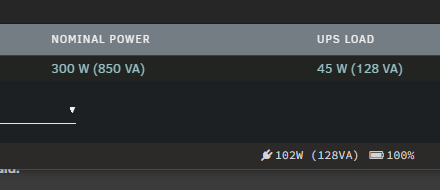
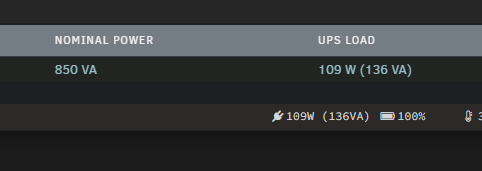
Hi, The update to separate apparent power and real in 2023.07.23a is great, however if the UPS capacity is manually adjusted under display settings the footer shows incorrect real power (the value on the dashboard and on the settings page is correct) Example with a UPS that uses the default values: Setting the capacity to "auto" the values are identical: I hope this can be looked at, Thanks
-
Indeed, tried to look at it, but as you wrote before it needs major rewrite, most of my experience is with backend and not with frontend and I have limited time now, I can fix broken logic, but too busy for a complete rewrite. If someone have time to fix it, I can still validate the changes and release a new version. I will also try to look at it again when I have more time.
-
3 messages up, this is broken in 6.12, there was an attempt to fix it but it didn't work correctly.
-
The original developer stopped the development, I tried to mainly keep it working. Fixing the docker order requires more effort than my available time right now. If someone is willing to debug and fix it I would be able to merge the changes and release a new version.
-
Dashboard folders is removed in the latest plugin release, if you still see folders on the dashboard you are not in the latest version. Yes, the dashboard folders were broken for a long time, I did minor fixes, but it needs bigger rewrite to be displayed correctly. I agree, I think basic folders functionally (not everything in this plugin) should be included by default. I assume soon Unraid 6.12 will be released and a thread for next version feature requests will start so it would be a good place to raise this.
-
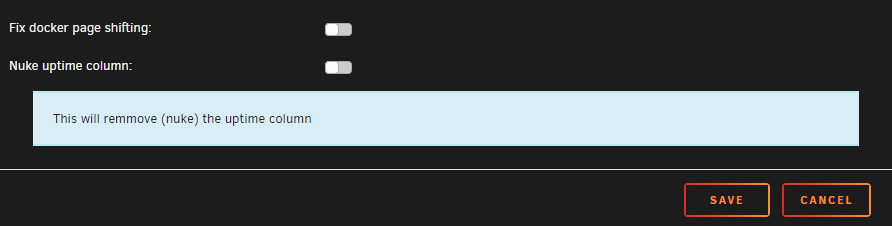
For `autostart` there is a workaround for now: Disable `Nuke uptime column`. To do this edit any folder and under "GLOBAL SETTINGS" disable this feaure.
-
May 27 19:46:24 Tower kernel: ------------[ cut here ]------------ May 27 19:46:24 Tower kernel: WARNING: CPU: 14 PID: 0 at net/netfilter/nf_conntrack_core.c:1210 __nf_conntrack_confirm+0xa4/0x2b0 [nf_conntrack] May 27 19:46:24 Tower kernel: Modules linked in: xt_CHECKSUM ipt_REJECT nf_reject_ipv4 ip6table_mangle ip6table_nat iptable_mangle vhost_net tun vhost vhost_iotlb tap xt_nat xt_tcpudp veth macvlan xt_conntrack xt_MASQUERADE nf_conntrack_netlink nfnetlink xfrm_user xfrm_algo iptable_nat nf_nat nf_conntrack nf_defrag_ipv6 nf_defrag_ipv4 xt_addrtype br_netfilter xfs nfsd auth_rpcgss oid_registry lockd grace sunrpc md_mod tcp_diag inet_diag ipmi_devintf nct6775 nct6775_core hwmon_vid ip6table_filter ip6_tables iptable_filter ip_tables x_tables bridge stp llc bonding tls igb wmi_bmof amd64_edac edac_mce_amd edac_core ast drm_vram_helper drm_ttm_helper kvm_amd ttm kvm drm_kms_helper drm crct10dif_pclmul crc32_pclmul crc32c_intel ghash_clmulni_intel nvme ipmi_ssif sha512_ssse3 backlight aesni_intel crypto_simd cryptd k10temp rapl i2c_piix4 ccp joydev agpgart syscopyarea nvme_core i2c_algo_bit sysfillrect input_leds led_class sysimgblt ahci i2c_core fb_sys_fops libahci wmi acpi_ipmi ipmi_si button acpi_cpufreq May 27 19:46:24 Tower kernel: unix [last unloaded: igb] May 27 19:46:24 Tower kernel: CPU: 14 PID: 0 Comm: swapper/14 Not tainted 6.1.29-Unraid #1 May 27 19:46:24 Tower kernel: Hardware name: To Be Filled By O.E.M. To Be Filled By O.E.M./X470D4U, BIOS P4.20 04/14/2021 May 27 19:46:24 Tower kernel: RIP: 0010:__nf_conntrack_confirm+0xa4/0x2b0 [nf_conntrack] May 27 19:46:24 Tower kernel: Code: 44 24 10 e8 e2 e1 ff ff 8b 7c 24 04 89 ea 89 c6 89 04 24 e8 7e e6 ff ff 84 c0 75 a2 48 89 df e8 9b e2 ff ff 85 c0 89 c5 74 18 <0f> 0b 8b 34 24 8b 7c 24 04 e8 18 dd ff ff e8 93 e3 ff ff e9 72 01 May 27 19:46:24 Tower kernel: RSP: 0018:ffffc900004c0838 EFLAGS: 00010202 May 27 19:46:24 Tower kernel: RAX: 0000000000000001 RBX: ffff88814475bb00 RCX: 6e3da13a7a70d951 May 27 19:46:24 Tower kernel: RDX: 0000000000000000 RSI: 0000000000000001 RDI: ffff88814475bb00 May 27 19:46:24 Tower kernel: RBP: 0000000000000001 R08: f6d76cfe22f280ce R09: 9395485eac213268 May 27 19:46:24 Tower kernel: R10: 1b72093f3249bd7d R11: ffffc900004c0800 R12: ffffffff82a0e440 May 27 19:46:24 Tower kernel: R13: 00000000000024ed R14: ffff8881447da000 R15: 0000000000000000 May 27 19:46:24 Tower kernel: FS: 0000000000000000(0000) GS:ffff889fbeb80000(0000) knlGS:0000000000000000 May 27 19:46:24 Tower kernel: CS: 0010 DS: 0000 ES: 0000 CR0: 0000000080050033 May 27 19:46:24 Tower kernel: CR2: 0000147f2c859c80 CR3: 00000001303ce000 CR4: 0000000000350ee0 May 27 19:46:24 Tower kernel: Call Trace: May 27 19:46:24 Tower kernel: <IRQ> May 27 19:46:24 Tower kernel: ? nf_nat_inet_fn+0xc0/0x1a8 [nf_nat] May 27 19:46:24 Tower kernel: nf_conntrack_confirm+0x25/0x54 [nf_conntrack] May 27 19:46:24 Tower kernel: nf_hook_slow+0x3d/0x96 May 27 19:46:24 Tower kernel: ? ip_protocol_deliver_rcu+0x164/0x164 May 27 19:46:24 Tower kernel: NF_HOOK.constprop.0+0x79/0xd9 May 27 19:46:24 Tower kernel: ? ip_protocol_deliver_rcu+0x164/0x164 May 27 19:46:24 Tower kernel: ip_sabotage_in+0x52/0x60 [br_netfilter] May 27 19:46:24 Tower kernel: nf_hook_slow+0x3d/0x96 May 27 19:46:24 Tower kernel: ? ip_rcv_finish_core.constprop.0+0x3e8/0x3e8 May 27 19:46:24 Tower kernel: NF_HOOK.constprop.0+0x79/0xd9 May 27 19:46:24 Tower kernel: ? ip_rcv_finish_core.constprop.0+0x3e8/0x3e8 May 27 19:46:24 Tower kernel: __netif_receive_skb_one_core+0x77/0x9c May 27 19:46:24 Tower kernel: netif_receive_skb+0xbf/0x127 May 27 19:46:24 Tower kernel: br_handle_frame_finish+0x438/0x472 [bridge] May 27 19:46:24 Tower kernel: ? br_pass_frame_up+0xdd/0xdd [bridge] May 27 19:46:24 Tower kernel: br_nf_hook_thresh+0xe5/0x109 [br_netfilter] May 27 19:46:24 Tower kernel: ? br_pass_frame_up+0xdd/0xdd [bridge] May 27 19:46:24 Tower kernel: br_nf_pre_routing_finish+0x2c1/0x2ec [br_netfilter] May 27 19:46:24 Tower kernel: ? br_pass_frame_up+0xdd/0xdd [bridge] May 27 19:46:24 Tower kernel: ? NF_HOOK.isra.0+0xe4/0x140 [br_netfilter] May 27 19:46:24 Tower kernel: ? br_nf_hook_thresh+0x109/0x109 [br_netfilter] May 27 19:46:24 Tower kernel: br_nf_pre_routing+0x236/0x24a [br_netfilter] May 27 19:46:24 Tower kernel: ? br_nf_hook_thresh+0x109/0x109 [br_netfilter] May 27 19:46:24 Tower kernel: br_handle_frame+0x27a/0x2e0 [bridge] May 27 19:46:24 Tower kernel: ? br_pass_frame_up+0xdd/0xdd [bridge] May 27 19:46:24 Tower kernel: __netif_receive_skb_core.constprop.0+0x4fd/0x6e9 May 27 19:46:24 Tower kernel: __netif_receive_skb_list_core+0x8a/0x11e May 27 19:46:24 Tower kernel: netif_receive_skb_list_internal+0x1d2/0x20b May 27 19:46:24 Tower kernel: gro_normal_list+0x1d/0x3f May 27 19:46:24 Tower kernel: napi_complete_done+0x7b/0x11a May 27 19:46:24 Tower kernel: igb_poll+0xd88/0xf8e [igb] May 27 19:46:24 Tower kernel: __napi_poll.constprop.0+0x2b/0x124 May 27 19:46:24 Tower kernel: net_rx_action+0x159/0x24f May 27 19:46:24 Tower kernel: __do_softirq+0x129/0x288 May 27 19:46:24 Tower kernel: __irq_exit_rcu+0x5e/0xb8 May 27 19:46:24 Tower kernel: common_interrupt+0x9b/0xc1 May 27 19:46:24 Tower kernel: </IRQ> May 27 19:46:24 Tower kernel: <TASK> May 27 19:46:24 Tower kernel: asm_common_interrupt+0x22/0x40 May 27 19:46:24 Tower kernel: RIP: 0010:cpuidle_enter_state+0x11d/0x202 May 27 19:46:24 Tower kernel: Code: 1f 70 a0 ff 45 84 ff 74 1b 9c 58 0f 1f 40 00 0f ba e0 09 73 08 0f 0b fa 0f 1f 44 00 00 31 ff e8 a3 2e a5 ff fb 0f 1f 44 00 00 <45> 85 e4 0f 88 ba 00 00 00 48 8b 04 24 49 63 cc 48 6b d1 68 49 29 May 27 19:46:24 Tower kernel: RSP: 0018:ffffc900001c7e98 EFLAGS: 00000246 May 27 19:46:24 Tower kernel: RAX: ffff889fbeb80000 RBX: ffff888107ff0400 RCX: 0000000000000000 May 27 19:46:24 Tower kernel: RDX: 000002b27a78a2f1 RSI: ffffffff8208fc95 RDI: ffffffff8209019e May 27 19:46:24 Tower kernel: RBP: 0000000000000002 R08: 0000000000000002 R09: 0000000000000002 May 27 19:46:24 Tower kernel: R10: 0000000000000020 R11: 00000000000008fe R12: 0000000000000002 May 27 19:46:24 Tower kernel: R13: ffffffff823233c0 R14: 000002b27a78a2f1 R15: 0000000000000000 May 27 19:46:24 Tower kernel: ? cpuidle_enter_state+0xf7/0x202 May 27 19:46:24 Tower kernel: cpuidle_enter+0x2a/0x38 May 27 19:46:24 Tower kernel: do_idle+0x18d/0x1fb May 27 19:46:24 Tower kernel: cpu_startup_entry+0x1d/0x1f May 27 19:46:24 Tower kernel: start_secondary+0xeb/0xeb May 27 19:46:24 Tower kernel: secondary_startup_64_no_verify+0xce/0xdb May 27 19:46:24 Tower kernel: </TASK> May 27 19:46:24 Tower kernel: ---[ end trace 0000000000000000 ]--- tower-diagnostics-20230527-2123.zip
-
The original developer stopped the development, I was trying to mainly maintain bug fixes, however I am busy in the next month. If someone wants to fix it feel free to make a PR and I will release a new version.
-
I can confirm that your suggested change resolves the error, Also tested that the condition is running correctly with this change
-
No, but it is still on my TODO list 🙂
-
Thanks for updating back, I use Home Assistant but if you can reach the Phoscon UI the docker is working. I would try getting help in Domoticz forums
-
This is a support thread for the community app docker template, it doesn't look like you are using the template, the default options in the template has VNC mode already set, please first try it, otherwise try to ask for support in the https://github.com/deconz-community/deconz-docker repo
-
See my previous answer here, there were multiple users with the same problem which resolved by re-installing the plugin:
-
I have removed them in 6.11, see https://github.com/Squidly271/docker.folder/pull/3 for details, they were broken, couldn't get them to work correctly, so you may left with lines that stay stuck on the dashboard.... Code for drawing them is still there, if anyone have time to fix it, let me know. I may return to this in the future if I have time
-
Short answer would be from a flash drive backup (which you should do periodically anyhow) Long answer, there is no simple way to recover it, you can follow the steps here Flash should be FAT so many tools can undelete files from there, I am not sure it worth the effort
-
I helped debugging the same issue few posts ago, something did not reinstall the plugin correctly, please try the following: Backup your current config, you can find it in the flash drive share: flash\config\plugins\docker.folder\folders.json flash\config\plugins\docker.folder\folders-vm.json Uninstall the plugin, make sure the directory above is empty, and reinstall the plugin. Check if it is working, if it is you can try to restore the backup files above.
-
It is working on 6.11.2
-
The forked version is bugfixes needed for 6.11, you can't run it on 6.9.2 and won't have any benefit. CA will automatically install the correct version for your OS.
-
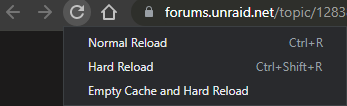
That is not an error, it is just printed in red 🤷♂️ About the UI this happens when switching from older version to a newer version, it should be resolved by clearing the browser cache. If you use Chrome, press F12, right click the reload button and select "Empty Cache and Hard Reload"
-
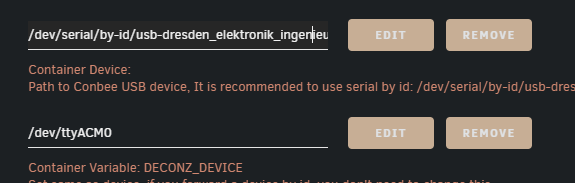
The USB port is correct, however you need to keep the deCONZ device with /dev/ttyACM0
-
This usually happens if there is another app using this port. Can you try to change to a different port and check? what else do you see in the log? I have just tested using host network with port 9080 without issues on my test server.




