LTM
Members
-
Joined
-
Last visited
Everything posted by LTM
-
Is this Telegraf RC2? I am trying to fix this without starting from scratch but I am leaning towards just deleting all of my config files and starting new again.
-
I also have the same problem. Rolling back did not help. I ended up disabling [[inputs.smart]] altogether in telegraf.conf for me to get mostly everything to work again.
-
I am also getting [telegraf] Error running agent: could not initialize input inputs.smart: smartctl not found: verify that smartctl is installed and it is in your PATH (or specified in config): provided path does not exist: [] Switching to :latest does not fix the problem. I have also tried :1.16 and :1.16.3 with the same result.
-
Just putting the Github issue here. More active than these forums. https://github.com/haugene/docker-transmission-openvpn/issues/1463 Some people have had success changing the PIA login details to the ones you use to log in (p#######) instead of the 'PPTP/L2TP/SOCKS' username and password (x#######). It took like an hour, but this eventually did the trick for me.
-
I am having the same issue as Xed. I have it set up with a custom network. I had to revert back to 2.14 for things to start working again.
-
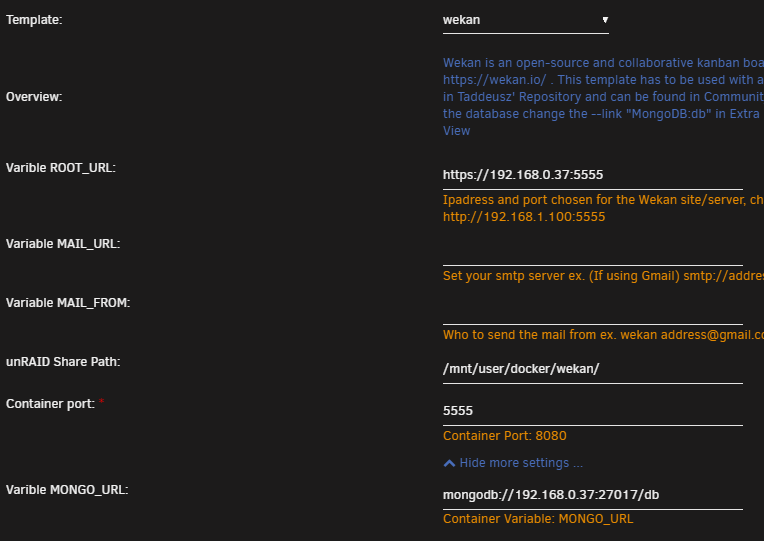
Forgive me as I am completely new to unRAID so I am probably missing something completely simple. I am not able to get this container running. I am trying to get the container running behind a reverse proxy (NPM) and have the following settings: I am getting this error: /usr/bin/docker: links are only supported for user-defined networks. See '/usr/bin/docker run --help'. The command failed. I have tried the various methods for links including --link mongodb://db --link mongodb://192.168.0.37/db mongodb://db mongodb://192.168.0.37/db All of them have resulted with the same error. My other question will be that I am going to try and transfer my database from another instance (in the process of going from Ubuntu Server with Docker to unRAID) to this one. Is there a way that I can just transfer the database or maybe export it from my old server to the new one? Or would it be best for me to start fresh?