





binhex
Community Developer
-
Joined
-
Last visited
Everything posted by binhex
-
This is a minecraft limitation sadly, the core of minecraft is single threaded only, thus a lot of people who wish to run minecraft with a lot of users tend to go with processors with high clock speeds as opposed to lots of cores, see here.
-
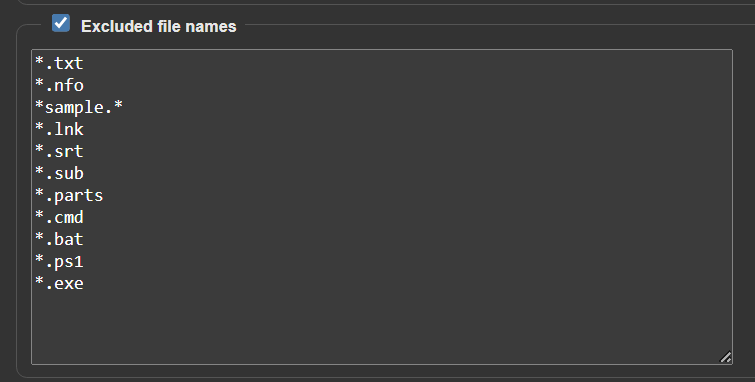
WARNING I am seeing an influx of malware via torrents using the trick of creating the payload as a mkv file with a 'lnk' extension (Windows Link) , if you double click what appears to be a video file (windows hides lnk extension) on a Windows machine then the embedded script will run creating an executable from the payload ('video' file), see here, and here and here for a few examples of people reporting this. Best way to stop this is to set qbittorrent to exclude lnk files from downloading, you can do this by going to Tools/Options/Downloads tab then tick 'exclude file names' and enter in the extensions you do not want to download (will be unselected automatically for you in the files list for the torrent). This is what i have set, up to you what extensions you want to ignore so tailor to your liking, but i would highly recommend putting in *.lnk as a bare minimum:- Note:- You may notice that you start seeing torrents listed in qbittorrent with 0 bytes downloaded but your status is set to seeding, this means the torrent contained only file extensions listed in the exclude file names list and thus you downloaded 0 bytes, simply delete the torrent and move on, example:- As you can see from the above stats, there is a scary number of people downloading this, probably triggered via sonarr.

-
As its a stream you may need to add in a port with connection type UDP, give that a shot.
-
Check you have performed all the steps in Q24 from the following link:- https://github.com/binhex/documentation/blob/master/docker/faq/vpn.md
-
Intermittent issues on PIA end most probably, keep trying.
-
Please see Q24 from the following link:- https://github.com/binhex/documentation/blob/master/docker/faq/vpn.md
-
Please see Q24 from the following link:- https://github.com/binhex/documentation/blob/master/docker/faq/vpn.md
-
By the looks of this article I would say it is advisable to update, yes:- https://sharpsec.run/rce-vulnerability-in-qbittorrent/ AFAIK there have been no attacks in the wild yet, but it's better to be safe than sorry (i have updated).
-
@plantsandbinary This is your first issue:- Note how the container port 8080 is not the same as the host port 8128, Please see Q4:- https://github.com/binhex/documentation/blob/master/docker/faq/qbittorrentvpn.md

-
Please pull down latest, i have a workaround in place for now (the issue is with screen v5)
-
I'm not suggesting it's in use, what I'm saying is that this image does not work if you specify a static IP for the container AND the IP address you have specified is also in the LAN_NETWORK range (which it is), it is designed to work in a bridge network (network of container and LAN are different), glad it's working in bridge mode.
-
@nerbonne OK so taken a look, the issue is that you are specifying an IP address for the docker container that also exists within the LAN, from your command execution.txt file:- --net='br0' --ip='10.10.6.184' So your options are:- Switch to 'bridge' network, this image was designed around bridge network and is setup to use this. Switch to wireguard (noted you are using openvpn), this should (when last tested) permit LAN access to the web ui with your configuration. Create a secondary VLAN that is separate to your LAN range and use that specify an IP for the container
-
Multiple people have the same symptom, as in the inability to view the web ui, this does not mean they have the same problem, in most cases they do not, there are literally dozens of reasons for the vpn tunnel to not come up (web ui will not load until the tunnel is up to prevent ip leakage), i shall take a look at your specific problem when i get some free time (it's late here).
-
investigating this. Edit - Looks like a timing issue with upstream, re-kicked off the image build and i now see 5.0.1 is installed, please pull the latest image and try again.
-
This is because the web ui link will be using the default value for the port, to fix it click on 'edit' for the container, then toggle 'advanced view' and then change the value for 'WebUI' to the web ui port you want, for example:- http://[IP]:[PORT:18080] Note sure what is going on for your second question, can you post some more screenshots showing the issue.
-
That is the issue in a nutshell, Please see Q23 from the following link:- https://github.com/binhex/documentation/blob/master/docker/faq/vpn.md
-
OK so in a nutshell the deluge dev's are saying a bump in the version a Python module called 'twisted' that deluge relies upon is causing the issue, their workaround for now is to downgrade twisted, this is sadly easier said than done when you are using a rolling distro such as arch linux. I will have a think about it and see if i can come up with a workaround for now, but the real fix is for the deluge dev's to fix the incompatibilities with the latest version of twisted with deluge.
-
check for database corruption, see Q4:- https://github.com/binhex/documentation/blob/master/docker/faq/plex.md
-
I would advise against this, VPN providers sometimes block name lookup until the tunnel is established, this can lead to a catch-22 situation - cannot create tunnel as cannot resolve name, cannot resolve name as you cannot create the tunnel, instead set NAME_SERVERS to '1.1.1.1' then try again. If you are using pihole for DNS then it's likely you are blocking or redirecting name server lookup to your pihole, ensure this is not the case and name server lookup on port 53 is permitted.
-
The above images have just been rebuilt with more aggressive cache clean up, sizes are now back to expected sizes, please pull down the newly built image for lidarr (and any of the others from the above list).
-
I will take a look at the image, as for the chown that should not take that long and I would suspect is due to the docker storage driver issue as mentioned above. Edit- if you can tell me where you are seeing the cached files then that would be helpful
-
i am running the same command on startup and i see the same buffer overflow message, not sure exactly when this started but it seems, for now at least, to not cause any side effects that i have noticed, i shall do some more digging, for now ignore it.
-
As you are probably picking up a new base image and the layers for the application it will be larger than normal, subsequent pulls will be smaller until a new base is republished again. Thr slow startup will probably be due to a docker issue with a specific docker driver which manifests itself during chmod/chown, i assume you are not an unraid user right?.
-
As you are probably picking up a new base image and the layers for the application it will be larger than normal, subsequent pulls will be smaller until a new base is republished again. Edit - looks like it maybe due to cached build files, investigating further
-
Cheers!, recommended, so you will now see this post at the top of the thread.





