binhex
Community Developer
-
Joined
-
Last visited
Everything posted by binhex
-
what is the URL you are going to in your web browser?, if you are left clicking the docker container and selecting web ui it is possible its sending you to the wrong port number.
-
https://forums.unraid.net/topic/155853-support-binhex-flaresolverr/page/2/#findComment-1478510
-
word of warning, if you do go down the wipe and do it again route i have drastically changed the template to make it more user friendly, so things will look a bit different.
-
TBH i am considering backing out the change to add in the shared docker volume, it causes a lot of support with the CA Appdata backup, so for now i would ignore it. FYI the default value is simply what will be shown in the unraid web ui if you were using the latest template (which you aren't), keep in mind no changes whatsoever get pushed to users when the template changes.
-
And if you try opening the URL with chrome redirection does happen, right?
-
this was designed to share the incoming port assignment when having multiple containers sharing the same vpn network, if you aren't doing this or do not need an incoming port for any of the apps then you can ignore this. CA appdata backup does not support docker volumes, thus it (incorrectly) shows an error, just ignore the error or delete the shared docker volume if you dont need it.
-
non issue, ignore that, check its not database corruption:- Q4:- https://github.com/binhex/documentation/blob/master/docker/faq/plex.md
-
it is.
-
not that im aware of no, and i use this container myself with android minecrft pe and xbox minecraft, no issue seen. no ive never used non default ports but there are no restrictions in the container, i make NO use of iptables or any other firewall mechanism. So im assuming by this that you do have iptables in place somewhere?, if so make sure you also have OUTPUT rules too otherwise communication will not work.
-
The advantage of sharing network is that ALL traffic is routed over the VPN irrespective of protocol, whereas privoxy will only route http(s), so on a practical level this means things like DNS queries from nzbhydra will go over the VPN, whereas with privoxy this will not be the case. Also do keep in mind not all applications support proxy (most don't), so again this is where sharing the network of a VPN enabled container has the advantage. Having said all of that, use of a proxy is simple when compared to the additional effort required to configure apps to use a shared network.
-
ignore it, CA backup (or whatever its called now) does not know how to deal with docker volumes.
-
Did you accidently click on a malware laden .lnk file using Windows?, if so there is a possibility this is the source of the issue, do a full AV scan. P.S. Please do note opening lnk files from unraid console/terminal will NOT infect a linux machine, the code embedded in the malware payload is a batch file, which simply won't execute on linux.
-
That's odd!, i can hit http://<my ip>:32400 and i get auto redirection to http://<my ip>:32400/web/index.html what browser are you using? any wacky extensions that could be blocking redirection?.
-
Have a look at Q4 to rule out DB corruption:- https://github.com/binhex/documentation/blob/master/docker/faq/plex.md
-
super dooper!, no need to 'let me know' though as everything is automated on my side
-
This is not how this image works, it wont cycle through multiple openvpn config files, instead if you want to multiple remote endpoints then specify them in a single config file - Please see Q20 from the following link:- https://github.com/binhex/documentation/blob/master/docker/faq/vpn.md
-
That is because for some weird reason those are not folders they are files, what is the host path set to for /media for the container?
-
Sorry not at the moment, no.
-
Sorry for your loss, there is nothing included in this image which will by default delete torrents and/or data, but there was a vulnerability flagged with qBittorrent that affects all versions up to (not including) v5.0.1, so i guess it's possible you got hacked and somebody maliciously deleted the torrents and data:- https://forums.unraid.net/topic/75539-support-binhex-qbittorrentvpn/page/164/#findComment-1487478 If you are running v5.0.1 and above then it won't be this and you will need to look at other avenues.
-
nope, that is not possible with this image at present.
-
this looks interesting, post screenshots for all your settings for the container - left click plex icon, click 'edit' then select 'show more settings' at the bottom and then screenshot all the settings and post here.
-
i suspect you have incorrectly defined the umask, but I will need to see a log to help further, please see the following link:- https://github.com/binhex/documentation/blob/master/docker/faq/help.md#unraid-users Its inside the container, not on your host.
-
Nope wireguard does not support multiple remote endpoints
-
yes, see here:- https://forums.unraid.net/topic/75539-support-binhex-qbittorrentvpn/page/162/#findComment-1482951
-
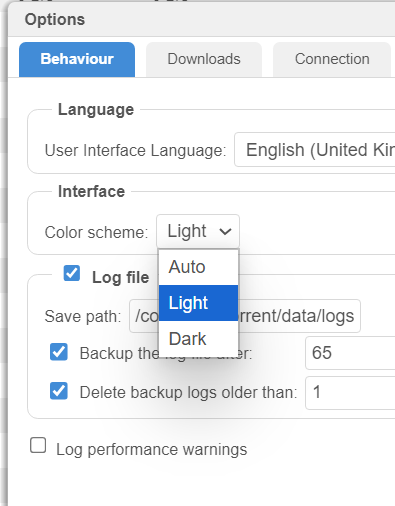
i know a lot of you will be happy to see this, 5.0.2 now has the option for dark or light theme.