Jackeldk
Members
-
Joined
-
Last visited
-
Unpackerr logo is missing webgui: unpackerr: Could not download icon https://raw.githubusercontent.com/wiki/davidnewhall/unpackerr/images/logo.png
-
Mar 21 08:53:42 Home nginx: 2023/03/21 08:53:42 [crit] 8307#8307: ngx_slab_alloc() failed: no memory Mar 21 08:53:42 Home nginx: 2023/03/21 08:53:42 [error] 8307#8307: shpool alloc failed Mar 21 08:53:42 Home nginx: 2023/03/21 08:53:42 [error] 8307#8307: nchan: Out of shared memory while allocating message of size 9209. Increase nchan_max_reserved_memory. Mar 21 08:53:42 Home nginx: 2023/03/21 08:53:42 [error] 8307#8307: *1284811 nchan: error publishing message (HTTP status code 500), client: unix:, server: , request: "POST /pub/disks?buffer_length=1 HTTP/1.1", host: "localhost" Mar 21 08:53:42 Home nginx: 2023/03/21 08:53:42 [error] 8307#8307: MEMSTORE:00: can't create shared message for channel /disks Mar 21 08:53:43 Home nginx: 2023/03/21 08:53:43 [crit] 8307#8307: ngx_slab_alloc() failed: no memory Mar 21 08:53:43 Home nginx: 2023/03/21 08:53:43 [error] 8307#8307: shpool alloc failed Mar 21 08:53:43 Home nginx: 2023/03/21 08:53:43 [error] 8307#8307: nchan: Out of shared memory while allocating message of size 9209. Increase nchan_max_reserved_memory. Mar 21 08:53:43 Home nginx: 2023/03/21 08:53:43 [error] 8307#8307: *1284819 nchan: error publishing message (HTTP status code 500), client: unix:, server: , request: "POST /pub/disks?buffer_length=1 HTTP/1.1", host: "localhost" Mar 21 08:53:43 Home nginx: 2023/03/21 08:53:43 [error] 8307#8307: MEMSTORE:00: can't create shared message for channel /disks and so on cant seem to figure out what i causing this and how to fix it.. so please unraid gurus, help me. home-diagnostics-20230321-1134.zip
-
Anyone here has problems with newest version of glances.. log gives me this. Traceback (most recent call last): File "/usr/lib/python3.10/site-packages/docker/api/client.py", line 268, in _raise_for_status response.raise_for_status() File "/usr/lib/python3.10/site-packages/requests/models.py", line 1021, in raise_for_status raise HTTPError(http_error_msg, response=self) requests.exceptions.HTTPError: 404 Client Error: Not Found for url: http+docker://localhost/v1.41/images/b6f0331d14234c3f6d849a50400944ed565a18479d36120a32aedbfde773730d/json The above exception was the direct cause of the following exception: Traceback (most recent call last): File "/usr/lib/python3.10/runpy.py", line 196, in _run_module_as_main return _run_code(code, main_globals, None, File "/usr/lib/python3.10/runpy.py", line 86, in _run_code exec(code, run_globals) File "/usr/lib/python3.10/site-packages/glances/__main__.py", line 19, in <module> glances.main() File "/usr/lib/python3.10/site-packages/glances/__init__.py", line 179, in main start(config=core.get_config(), args=core.get_args()) File "/usr/lib/python3.10/site-packages/glances/__init__.py", line 108, in start mode = GlancesMode(config=config, args=args) File "/usr/lib/python3.10/site-packages/glances/webserver.py", line 31, in __init__ self.stats.update() File "/usr/lib/python3.10/site-packages/glances/stats.py", line 216, in update self._plugins[p].update() File "/usr/lib/python3.10/site-packages/glances/plugins/glances_plugin.py", line 1114, in wrapper ret = fct(self, *args, **kw) File "/usr/lib/python3.10/site-packages/glances/plugins/glances_plugin.py", line 1131, in wrapper ret = fct(*args, **kw) File "/usr/lib/python3.10/site-packages/glances/plugins/glances_docker.py", line 255, in update container_stats['Image'] = container.image.tags File "/usr/lib/python3.10/site-packages/docker/models/containers.py", line 40, in image return self.client.images.get(image_id.split(':')[1]) File "/usr/lib/python3.10/site-packages/docker/models/images.py", line 335, in get return self.prepare_model(self.client.api.inspect_image(name)) File "/usr/lib/python3.10/site-packages/docker/utils/decorators.py", line 19, in wrapped return f(self, resource_id, *args, **kwargs) File "/usr/lib/python3.10/site-packages/docker/api/image.py", line 251, in inspect_image return self._result( File "/usr/lib/python3.10/site-packages/docker/api/client.py", line 274, in _result self._raise_for_status(response) File "/usr/lib/python3.10/site-packages/docker/api/client.py", line 270, in _raise_for_status raise create_api_error_from_http_exception(e) from e File "/usr/lib/python3.10/site-packages/docker/errors.py", line 39, in create_api_error_from_http_exception raise cls(e, response=response, explanation=explanation) from e docker.errors.ImageNotFound: 404 Client Error for http+docker://localhost/v1.41/images/b6f0331d14234c3f6d849a50400944ed565a18479d36120a32aedbfde773730d/json: Not Found ("no such image: b6f0331d14234c3f6d849a50400944ed565a18479d36120a32aedbfde773730d: No such image: sha256:b6f0331d14234c3f6d849a50400944ed565a18479d36120a32aedbfde773730d")
-
bin looking at this crafty and i kinda like it. say i run a binhex-minecraftserver and has been for some time, users like it and have build a lot. can i import that into crafty and get the cool thing there and still run my old server ?
-
back tracked to 1.16.5-02 then i worked again.
-
after an update a few days ago, this error started. 2021-03-25 19:12:52,527 DEBG 'start-script' stderr output: 2021/03/25 19:12:52 Basic Authentication Succeeded: 192.168.1.165:56976 2021-03-25 19:12:52,528 DEBG 'start-script' stderr output: 2021/03/25 19:12:52 192.168.1.165:56976 304 GET / 2021-03-25 19:12:52,542 DEBG 'start-script' stderr output: 2021/03/25 19:12:52 Basic Authentication Succeeded: 192.168.1.165:56976 2021-03-25 19:12:52,542 DEBG 'start-script' stderr output: 2021/03/25 19:12:52 Basic Authentication Succeeded: 192.168.1.165:56975 2021/03/25 19:12:52 192.168.1.165:56975 200 GET /auth_token.js 2021-03-25 19:12:52,543 DEBG 'start-script' stderr output: 2021/03/25 19:12:52 Basic Authentication Succeeded: 192.168.1.165:56977 2021-03-25 19:12:52,543 DEBG 'start-script' stderr output: 2021/03/25 19:12:52 192.168.1.165:56977 304 GET /js/gotty.js 2021-03-25 19:12:52,546 DEBG 'start-script' stderr output: 2021/03/25 19:12:52 192.168.1.165:56976 304 GET /js/hterm.js 2021-03-25 19:12:52,586 DEBG 'start-script' stderr output: 2021/03/25 19:12:52 New client connected: 192.168.1.165:57153 2021-03-25 19:12:52,587 DEBG 'start-script' stderr output: 2021/03/25 19:12:52 Command is running for client 192.168.1.165:57153 with PID 181 (args="-x minecraft"), connections: 1 2021-03-25 19:12:52,587 DEBG 'start-script' stderr output: 2021/03/25 19:12:52 192.168.1.165:57153 101 GET /ws 2021-03-25 19:12:52,591 DEBG 'start-script' stderr output: 2021/03/25 19:12:52 Command exited for: 192.168.1.165:57153 2021-03-25 19:12:52,591 DEBG 'start-script' stderr output: 2021/03/25 19:12:52 Connection closed: 192.168.1.165:57153, connections: 0 2021/03/25 19:12:52 read tcp 172.17.0.2:8222->192.168.1.165:57153: use of closed network connection
-
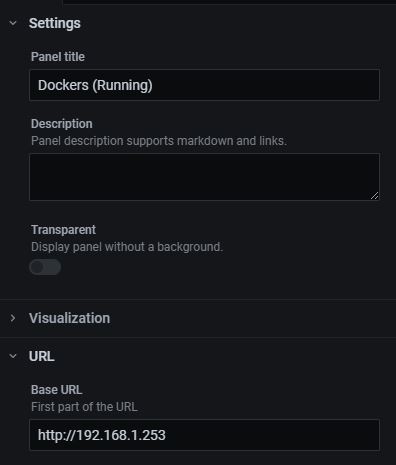
yes unraid api docker made and setup via webui. i get info via link and yes data source is also made. added api/getServers to my ip.. and now it works.
-
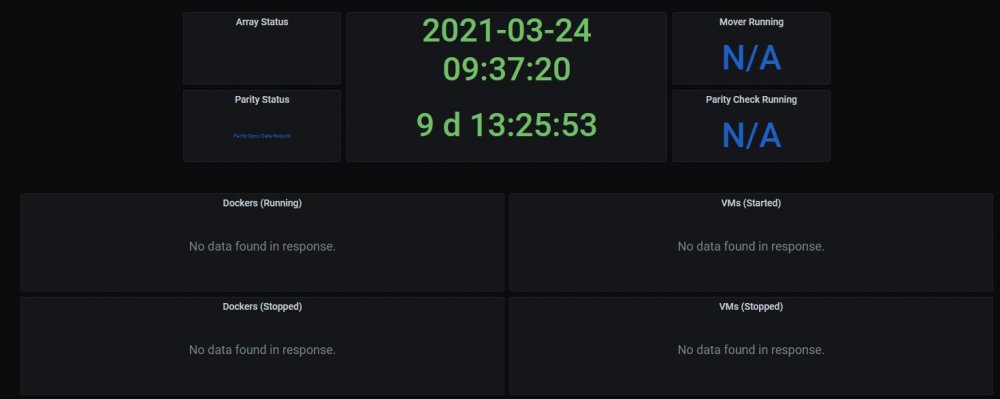
i got ssd's to work, and everything else is running great. but i cant get it to pickup data from unraid API. it keeps saying "No data found in response." tryed to correct ip's and all but nothing.