





fiR3W4LL
Members
-
Joined
-
Last visited
Everything posted by fiR3W4LL
-
Hi @gamingloser @agvv20 I encountered more or less the same issue with other Mods. I dont know what it triggers but couldnt finde a solution. I know that does not help. Maybe finde some more time as soon all my server work correctly. Regards
-
Hi @iveoles Sorry for that late reply. Had some issues with all my servers and couldnt take a look. Im glad that you could managed it by yourself. I encountered more or less the same issue with other Mods. I dont know what it triggers but couldnt finde a solution. Regards
-
Hi @skylerstupid Could you share maybe your savegame? So i could have a look? Regards
-
Hi Guys My Server isnt working correctly at this moment. Ill check that after the holydays. But did you try this already ? Regards
-
Hi @Aoshi sorry for tha late reply, have a hard time right now. Did you check my last report from the 26. Feb? As i created the docker for Unraid had the same problem and could resolve that with it!? Otherwise ill check that asap
-
Hoi @Archonw Sorry anstrengende Zeit. Ich werde es nochmal versuchen, denn vorgestern hab ich alles mal überflogen und nochmal probiert. Irgendwie klappt es nicht und hat immer wieder Probleme mit Handschake und TLS failure oder so was ähnliches. Mag mich nicht mehr erinnern. Werde dies heute Abend nochmal probieren.
-
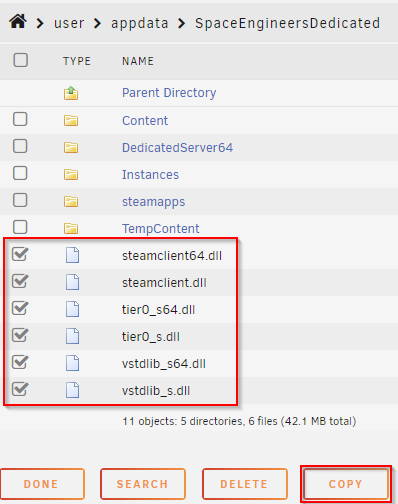
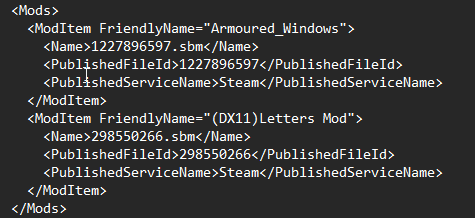
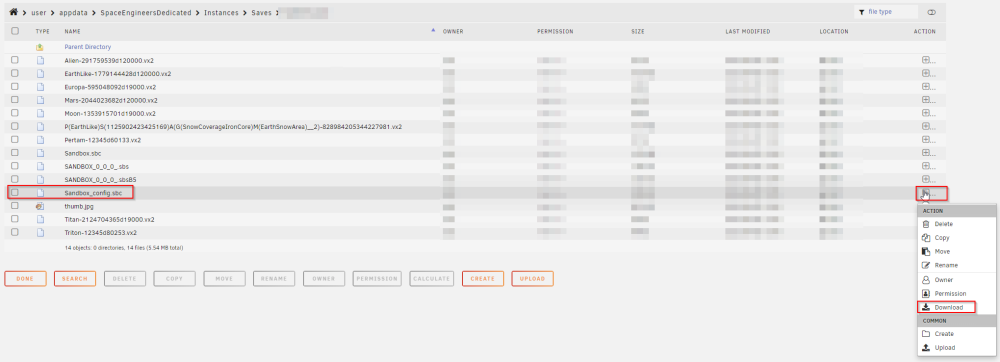
Did you follow this steps? In order for the server to start, there are still a few steps that need to be taken. After the Docker has been installed and all files have been downloaded. Stop the server, go to user/appdata/SpaceEngineersDedicated/Instances. Upload the SpaceEngineers-Dedicated.cfg there. In the file itself, you can change the following parameters yourself. Under Administrator you can enter your SteamID, the GroupID of Steam if the server is only intended for a certain group. ServerName - Your server name that you want to find in the overview. WorldName - The name of the world Then continue: in the folder Saves you create a new folder with Docker Star System IMPORTANT: If you have changed the WorldName in the CFG before, enter the corresponding name. Then go into the folder and upload all the files that are stored in my GitHub account under Docker Star System. INFO: The port 27017 was defined by me because I had already occupied the standard port of 27016. If you want to change this, you can find the entry in the SpaceEngineers-Dedicated.cfg under Serverport. After that, you should be able to start the server.
-
On which Game? Space or Empy?
-
Hoi @Archonw Ich werde mir dies am Abend genauer anschauen. Ich habe einen iPhone somit kann ich es noch mit IOS ausprobieren. Werde mich danach bei dir wieder melden. Freundliche Grüsse
-
Hoi @Archonw Danke für deine Bemühungen, wann und wo hast du die iP des Unraid Servers hitnerlegt? Ich konnte nun lustigerweise auf HTTPS umstellen, aber bekomme weiterhin errors in den Logfiles. Zudem den Einstieg auf HTTPS funktioniert auch nur über den Browser, über die Apps funktionierts nicht.
-
nö ist im eigenen VLAN aber die Freigabe wurde erstellt Ja ist die selbe ip
-
Nö es kommt connection refused und im Log kommt folgende Meldung: [17-02-2023 00:02:25.503][rustls::conn][ERROR] TLS alert received: AlertMessagePayload { level: Fatal, description: CertificateUnknown, } [17-02-2023 00:02:25.503][rocket_http::tls::listener][WARN] tls handshake with IP failed: received fatal alert: CertificateUnknown [17-02-2023 00:02:25.503][rustls::conn][ERROR] TLS alert received: AlertMessagePayload { [17-02-2023 00:02:25.503][rocket_http::tls::listener][WARN] tls handshake with IP failed: received fatal alert: CertificateUnknown [17-02-2023 00:02:50.423][rocket_http::tls::listener][WARN] tls handshake with IP failed: received corrupt message [17-02-2023 00:03:42.758][rocket_http::tls::listener][WARN] tls handshake with IP failed: tls handshake eof
-
über die IP
-
Besten Dank für die Aktualisierung Funktioniert weiterhin nicht ERR_CONNECTION_REFUSED Aber der Container startet immerhin korrekt nun Edit: tls handshake with "Client-IP" failed: tls handshake eof
-
Ich habe auch einiges probiert, jedoch ohne erfolg
-
Hi @Archonw Besten Dank für die Anleitung. Irgendwie bin ich zu dumm aber mir erscheint nun die folgende Meldung in den Logs: Kann somit den Container nicht starten, fehlen evtl. noch schritte in der Anleitung oder wie gesagt, es kann sein dass ich zu dumm bin Besten Dank Freundliche Grüsse

-
Unfortunately, I don't have that option either. But can I ask what problems you have? Because you don't have much to do in the console.
-
hmmmmm da hab ich mich wohl zu extrem darauf verlassen. Aber glaube kommt etwas hin.... werde mich noch etwas schlau machen wie ich dem gerecht werden kann. Aber gem. mein MyStorm Adapter werden ca 100w von beiden Servern inkl. Switch und 3 Ubiquiti AC-Pros
-
phuuuu so viele Vorgaben weiss nicht ob ich allem gerecht werde Keine Maus, Tastatur sowie Bildschrim angeschlossen, da ich alles übers IPMI bis Unraid startet erledigen kann. Bis auf die NVME sind alle Platten auf Standby. Lüfter kappe ich nun nicht ab, aber sind BeQuiet SIlent Wings 3 - 8Stück drehen mit 50% Im Bios habe ich nur die PCI Steckplätze deaktivert und die IGPU Aktiviert, somit keine Stromsparfunktionen eingeschaltet oder ähnliches Komponenten: Supermicro X13SAE-F 2x NVME 1TB von Seagate Firecuda 520 1x NVME 500GB von Seagate Firecuda 520 5x Toshiba MG08 16TB 1x Seagate Ironwolf 8TB BeQuiet Dark Rock TF2 4x Kingston 32GB ECC DDR5 Sticks Verwendetes OS: Unraid 6.11.1 aktuell noch Idle verbrauch gem. USV: 23 W mit oder ohne laufende Docker (aktive Docker, PLEX, Vaultwarden, UNIFI, Tautulli, JD2, NGX)
-
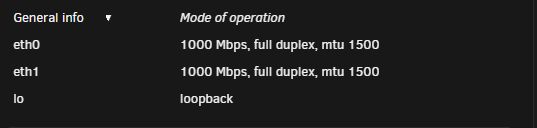
Hoi Zäme Tatsächlich liegt es am Switch. Er kann wohl 10G aber nicht 2.5G somit liegt es nicht am Server sondern am Switch. Besten Dank
-
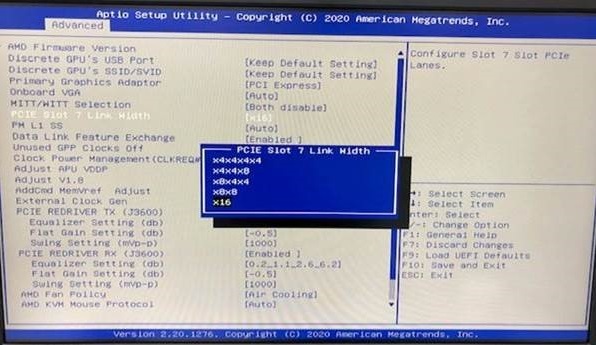
Ich habe auch nur dass gesehen mehr kann ich auch nicht sagen, evtl. wirds durch allen verfügbaren PCI anschlüsse inkl. NVME verteilt!?
-
war auch überrascht bei der Suche Werde ich bei Vollendung messen. Benötige noch ein 2.5G Netzwerkkarte damit die 2 Server zusammen verbunden werden können, Datenaustausch. Sind dann ca. 2-3 Watt mehr.
-
Gem. Beschreibung sind die ECC Unbuffered, heisst für mich mit ECC? -> KSM48E40BD8KM-32HM
-
Hi Zusammen Ich hab ein Supermicro X13SAE-F mit I225-V Nic aber irgendwie wird es nur mit 1G erkannt. Bin bei V 6.11.5 und irgendwie klappts nicht. Muss man seitens Unraid was anpassen? Ich hab das System gestern zusammen gebaut und den USB Stick von der letzten Konfig übernommen. Also keine neu Installation. Interessant ist dass am selben 10Gbit Port an der Switch benutzt wird wie vorhin mit dem alten Mobo, der konnte jedoch 10Gbit
-
Hmmmmm..... könnte nur für den 2l2t nachschauen. Aber ich vermute dass der X570D4U die selben Einstellungen hat wie der mit 2l2t


