Kvo1087
Members
-
Joined
-
Last visited
Everything posted by Kvo1087
-
Can someone help me with the setup here? I am trying to get my configuration figured out but i must be doing something wrong. 1. I setup the wallet with my nicehash wallet address 2. pool address: us2.ethermine.org:4444 3. Pool Pass: x the rest of the options I left standard from the phoenix install in ich777 CA I dont know if having it as host / bridge matters i am not very unraid savvy. What I noticed is that when I run the Phoenix miner app with the 4444 port it returns the error: pool login failed invalid user provided. the same happens on port 14444. if i change to 5555 it says connection closed by the pool. launching the phoenixstats webui give the error: Warning: Invalid argument supplied for foreach() in /var/www/html/index.php on line 113 I cant find an actual config file and I dont even know what I am putting in wrong to begin with. any help would be greatly appreciated.
-
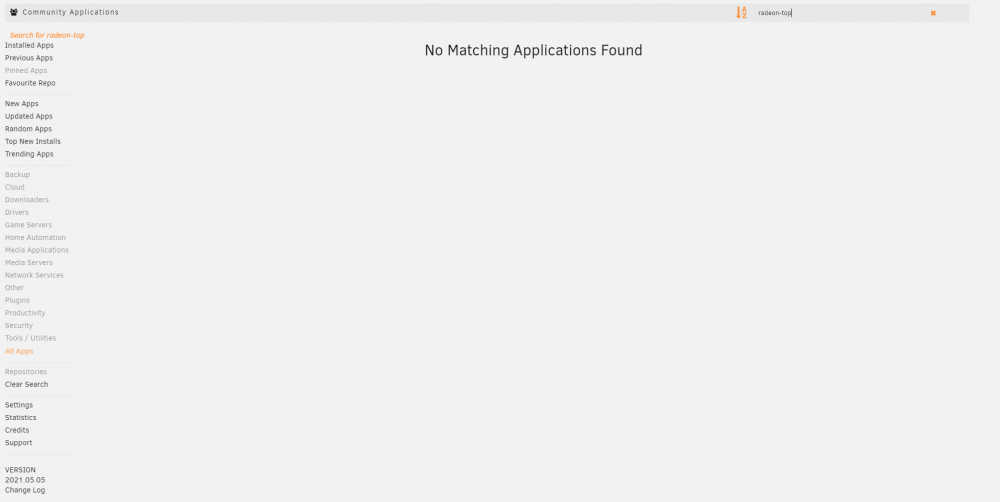
I have the CA plugin and updated but it does not return any results when searching for radeon top. sorry for all the screenshots
-
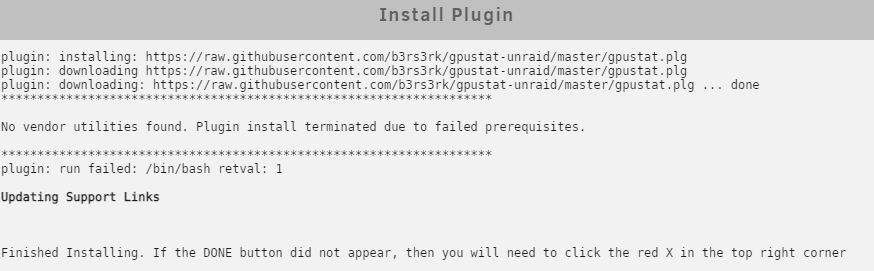
can someone help me out? i have a vega 64 frontier edition that im trying to setup on my server for mining till plex encoding starts to work for AMD but when i try to install GPU statistics from the CA it throws the following error and I am not sure how to proceed
-
I am trying to run a valheim server with very simple setup but this is the output in the logs when I start it up: ---ValheimPlus v0.9.6 up-to-date--- ---Server ready--- ---Starting Backup daemon--- ---Start Server--- ---with Valheim Plus--- ---Update Check for Valheim enabled, running automatically every 60 minutes.--- [S_API] SteamAPI_Init(): Loaded local 'steamclient.so' OK. CAppInfoCacheReadFromDiskThread took 4 milliseconds to initialize CApplicationManagerPopulateThread took 0 milliseconds to initialize (will have waited on CAppInfoCacheReadFromDiskThread) RecordSteamInterfaceCreation (PID 71): SteamGameServer013 / RecordSteamInterfaceCreation (PID 71): SteamUtils009 / Setting breakpad minidump AppID = 892970 RecordSteamInterfaceCreation (PID 71): SteamGameServer013 / GameServer RecordSteamInterfaceCreation (PID 71): SteamUtils009 / Utils RecordSteamInterfaceCreation (PID 71): SteamNetworking006 / Networking RecordSteamInterfaceCreation (PID 71): SteamGameServerStats001 / GameServerStats RecordSteamInterfaceCreation (PID 71): STEAMHTTP_INTERFACE_VERSION003 / HTTP RecordSteamInterfaceCreation (PID 71): STEAMINVENTORY_INTERFACE_V003 / Inventory RecordSteamInterfaceCreation (PID 71): STEAMUGC_INTERFACE_VERSION014 / UGC RecordSteamInterfaceCreation (PID 71): STEAMAPPS_INTERFACE_VERSION008 / Apps [S_API FAIL] Tried to access Steam interface SteamNetworkingUtils003 before SteamAPI_Init succeeded. RecordSteamInterfaceCreation (PID 71): SteamNetworkingUtils003 / RecordSteamInterfaceCreation (PID 71): SteamNetworkingSockets008 / even after 30 minutes i cannot see the server showing up and I am wondering if this line is the issue: [S_API FAIL] Tried to access Steam interface SteamNetworkingUtils003 before SteamAPI_Init succeeded. I tried changing to ports 2466-2468 because my router was giving an error with the original ports when i forward them but the problem persists. I also made sure to install the valheim plus information in the correct areas but I am not very knowledgable in unraid and making things work. very new here.
-
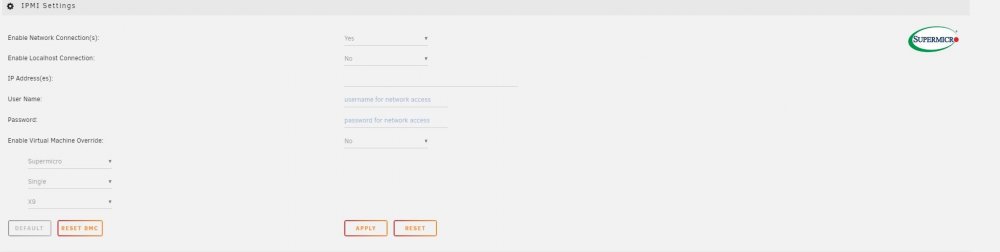
Hey guys I got the Virtual Machine override turned on and it was able to connect successfully but my fans are still running at full speed all the time. Fan control is on and i have the max and min fan speed % set but it is like the settings are applied to the board at all. am i missing something?
-
Hi Guys! i have been fighting with my Supermicro X9DRi-LN4F+ for a couple days now and finally got IPMITool to work after a bios and firmware update. i tried to follow the instructions on the first page here setting my lower thresholds down around 100-200 for my noctua fans and turning the fan mode to full speed on the motherboard to run this pluggin. unfortunately right now the fans still run full speed all the time and if i change the fan mode it goes back to cycling from low rpm to max speed every few seconds. any help would be greatly appreciated. i think my main issue might be that i cant get the virtual machine overide to work. it defaults to no and if i change it to yes everything is greyed out and i cant fill it in. then i hit apply and it goes back to "no" on the setting. I'll attach a picture for reference If i could get the fan speed minimum and maximum settings to work in the fan control section that would be my greatest desire. i currently have it set based on cpu temp with max fan speed 80% and min 35%. they are definitely going full speed...