





xyzeratul
Members
-
Joined
-
Last visited
Everything posted by xyzeratul
-
I did it........with mix results, the docker not from CA is fine, but some dockers from CA are running to all kind of problems, mostly the "nginx proxy manager": bad gate way, config not working.... have to clean the whole app data and reinstall and setup, also one docker "Alist" icon is missing, I can see the icon in CA but no matter how I install and config it, it just won't show up my docker page.
-
Thank you, I just worry about my docker container setting gets mess up or something worse, tho the config should be fine if I don't touch appdata.
-
well, there is one docker container in my setup, which is not from CA, what would happen to it?
-
Sorry my description of the problem was confusing, my dock.img isn't growing bigger right now cuz misconfiguration, but I'd rather switching it from btrfs format to directory format, to keep the rasonable docker img size and able to shrink down when possible. But I already have some docker container setup and running, so I'd like to know if it's possible to swtiching docker format like this, and what would be lost during the switch?
-
I made a mistake on my new unraid server, cause my new machine has a very small SSD as main drive(16G) for docker and VM, I planned to set the docker disk format as directory format, but forgot it when I setup docker, now it's in btrfs format, which would took a lot space and grow ever bigger. Now this server already has a few docker canitaner running, I'd like to know could I switch to the directory format and what would lose during the switch?
-
me too, once it go tho NPM, none of dynamic app info can be displayed, could not even test the connection in config
-
So it's intended, Thank you, I just want to make sure it's not something mess up in my end, other than this, everything else working correctly.
-
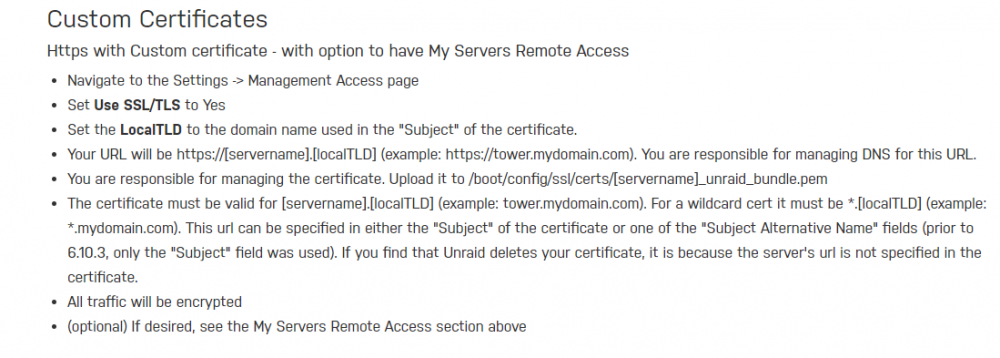
Base on the wiki, I should use: This does sort of work, but like I mentioned the 1st post, change my custom certifcates' name to [servername]_unraid_bundle.pem, SSL working but no ca info displayed in unraid at all. If I change ca name to certificate_bundle.pem, SSL still working and all ca info displayed correctly except for the Certificate expiration. So which one is the correct way for custom certificates?
-
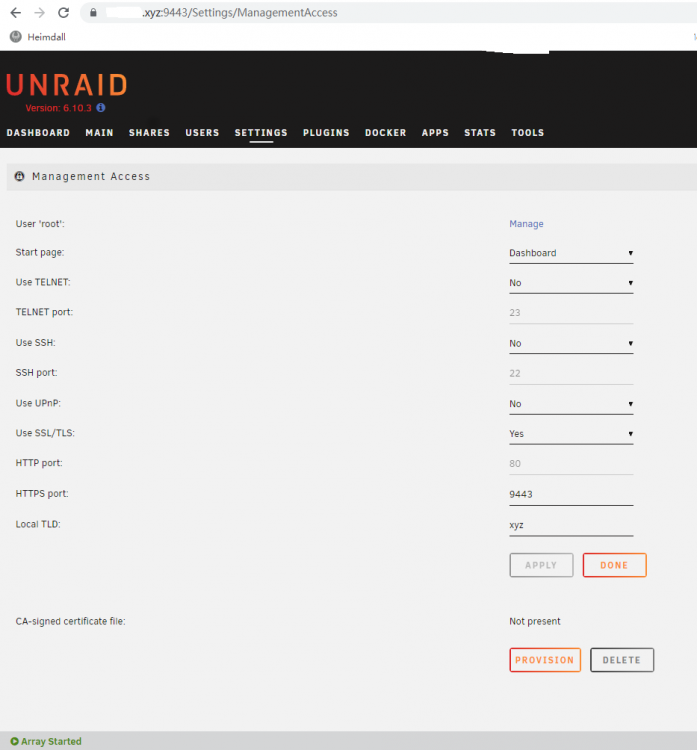
update: found the problem, need to correct the name to certificate_bundle.pem, since old xxxx_unraid_bundle doesn't work anymore. But there is another question, the Certificate expiration: still showing: DNS Propagation is PENDING. Is this normal? I remember in 6.92 it can show the correct expire date.
-
Hi, I just upgraded one of my NAS from 6.9.2 to 6.10.3, everything else works fine, but the unraid reset my remote access back to lan ip, so I set the remote ddns acess to the original one, but it doesn't take my ssl ca certification like before. I menually rename my ca in flash drive, ssl connection is back and ca is correct in my browser, but still no ca info in unraid, no idea this is intended in new version or I am doing something wrong?
-
My company's server has a webdav share for me, which I like to mount on my unraid server like other smb shares, but I can't find any clear way to do it, unraid seems only support smb or nfs share, is there any docker app or plugin for this?
-
So these features are here but not in web UI or android app? Sorry I don't use iOS myself, if so you really need to improve these fuction to web ui first.
-
Easiest photo backup tool I ever use, but also the most limited photo management tool, hope dev can add more management features like location, date or even facial recognition.
-
+1 Yes, this is the most useful feature that lacking right now, yes I use docker and mc, mc can only support some basic op, none of these come close to Synology or even Qnap. When I control 2 of my NAS( one DS918+ and one unraid) from remote location, I truly feel how a simple file manager set 2 OS apart, the experence is not even at same level: I can easily serach, copy, cut and past 1000+ files in DSM via a nice web UI, with all the files transfer happening in the local machine itself, turn off my laptop and go to sleep. in unraid it's nearly impossible, at lest I can't find a way to do that.
-
Yes, I tested my certs with docker app running on this nas, all correct and working. Just unraid itself won't go with NPM.
-
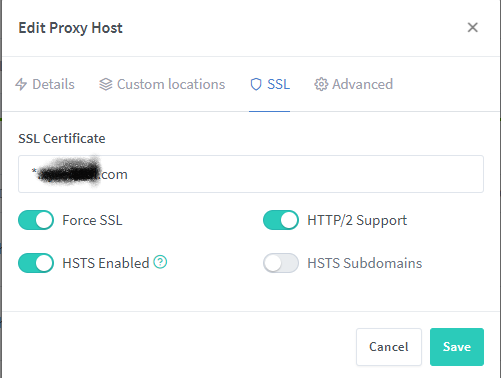
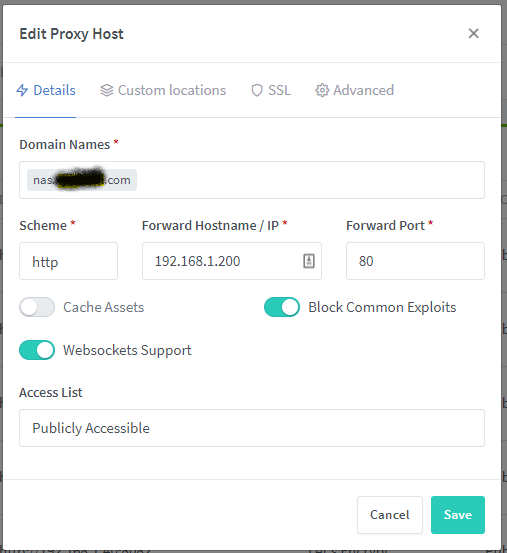
I just install NPM on my openwrt router, it works mostly fine, but I can't setup a working proxy hosts for my unraid server management page, I can setup other apps of this unraid sever just fine, like filebrowser and emby, all with Let's Encrypt ssl cert. When setup unraid itself, I setup like this : it won't recognize my ssl cert, it directly jump to nas.****.com/main, showing: NET::ERR_CERT_AUTHORITY_INVALID If anyone knows the problem or solution, please help. Thank you
-
I'd say lanraragi is a much better choice, I tried hpx long time ago, totally a mess in UI management. Maybe I should give it another go, see how things improved in one year.



