




.png.18314773a21e506e5ec17684895a0cd5.png)
gamerkonks
Members
-
Joined
-
Last visited
Everything posted by gamerkonks
-
I've found exFAT more convenient, as it's compatible with Windows, macOS and PS4. Ideally I'd like to be able to plug them directly into the machines, as well as be able to share the disks over the network via Unraid.
-
I've run into another issue. I have a few unassigned devices mounted, some exFAT, some NTFS. I noticed from my Windows 10 client, with the exFAT drives, I could create files, but not rename or delete them over SMB. I would get a "request not supported" error. Although I could modify / delete files on those drives using Krusader. Eventually I found some posts on another forum related to issues with vfs_fruit and exFAT. I had Enhanced macOS interoperability set to Yes. I changed it to No and tried again. Now I can r/w to the exFAT drives over SMB, but I can't export my time machine share as such. My guess is that having enhanced masOS interoperability enabled adds vfs_fruit to smb-settings.conf, which also requires vfs_catia and vfs_streams_xattr. According to documentation, the file system that is shared with this vfs_streams_xattr must support xattrs. Which I guess exFAT does not? If this is the case, is there anyway for read/write to work for exFAT drives over SMB while having masOS interoperability enabled?
-
Hi there, I'm having an issue where my external USB hard drive will all of a sudden cause high IO wait on my system. The last time it happened was yesterday (10/01/22) at around 12:36 In Syslog the first relevant message I see is Jan 10 12:36:33 TheNAS kernel: usb 6-1: reset SuperSpeed Gen 1 USB device number 2 using xhci_hcd The only files on the drive are chia plots for farming. I only have necessary shares included in the cache dirs plugin, so that shouldn't be accessing the drive. When it happens I am unable to unmount the drive from the Web UI and the only fix seems to be to physically unplug the drive. How can I diagnose the root cause of the issue? Could it be hardware related, (cable, drive, port)? Thanks thenas-diagnostics-20220110-2348.zip
-
That must be it. I did get an error saying the flash drive was read only last time I booted, but it seems fine now.
-
Does anyone know what would cause an unclean shutdown when shutting down with the array stopped?
-
Yeah, I had to update the values directly in the config file.
-
I think so, but as a test, I've removed groups from my user and the rule and getting the same problem. My access control is this default_policy: deny rules: ## Rules applied to everyone - domain: "*.duckdns.org" policy: one_factor
-
Hi there, I'm trying to get Authelia up and running. I'm using it with SWAG, using the default authelia-server.conf and authelia-location.conf. When I try and access an application that is reverse proxied and setup to use authelia, it correctly goes to the Authelia login page. When I log in correctly, it seems to redirect successfully, but without any session info (the user name is blank), and I end up at the Authelia login page again. I've tried removing redis from the config to see if in memory session handling would make a difference, but no change. Relevant log belong. Thanks. time="2021-12-28T23:51:14+11:00" level=debug msg="Check authorization of subject username= groups= ip=x.x.x.x and object https://xxx.duckdns.org/ (method GET)." time="2021-12-28T23:51:14+11:00" level=info msg="Access to https://xxx.duckdns.org/ (method GET) is not authorized to user <anonymous>, responding with status code 401" method=GET path=/api/verify remote_ip=x.x.x.x time="2021-12-28T23:51:20+11:00" level=debug msg="Mark 1FA authentication attempt made by user 'test'" method=POST path=/api/firstfactor remote_ip=x.x.x.x time="2021-12-28T23:51:20+11:00" level=debug msg="Successful 1FA authentication attempt made by user 'test'" method=POST path=/api/firstfactor remote_ip=x.x.x.x time="2021-12-28T23:51:20+11:00" level=debug msg="Check authorization of subject username=test groups=admins,dev ip=x.x.x.x and object https://xxx.duckdns.org/ (method )." time="2021-12-28T23:51:20+11:00" level=debug msg="Required level for the URL https://xxx.duckdns.org/ is 1" method=POST path=/api/firstfactor remote_ip=x.x.x.x time="2021-12-28T23:51:20+11:00" level=debug msg="Redirection URL https://xxx.duckdns.org/ is safe" method=POST path=/api/firstfactor remote_ip=x.x.x.x time="2021-12-28T23:51:20+11:00" level=debug msg="Check authorization of subject username= groups= ip=x.x.x.x and object https://xxx.duckdns.org/ (method GET)." time="2021-12-28T23:51:20+11:00" level=info msg="Access to https://xxx.duckdns.org/ (method GET) is not authorized to user <anonymous>, responding with status code 401" method=GET path=/api/verify remote_ip=x.x.x.x
-
I'll try out your elasticsearch container. I'm currently using the elasticsearch container with the tag elasticsearch:5.6.14. Hopefully I'll be able to copy all my old indexes over.
-
Disappointed by the locked features in v2, but can't manage to get v1.5 working again. Had to remove security from ElasticSearch5 to get it working again, apparently that's a paid feature now? And then had to run docker exec -it diskover bash pip3 install 'click==7.1.2' --force-reinstall exit docker restart diskover To get diskover 1.5 to stop throwing errors in the log. You need to reapply this every time you make a change to the docker template or if it updates though. If I try and go to the Web UI for diskover 1.5, I get a server error 500.
-
Thanks, I think I've got it working, just waiting on the first index to build. I think it may be because the crontab file has the first line commented out. It's defaulted to 3am everyday, remove the "#" and save it and check if it builds a new index at 3am.
-
Here's my template for v1.x I might need some help getting v2.x set up. I'd like to give it a go.
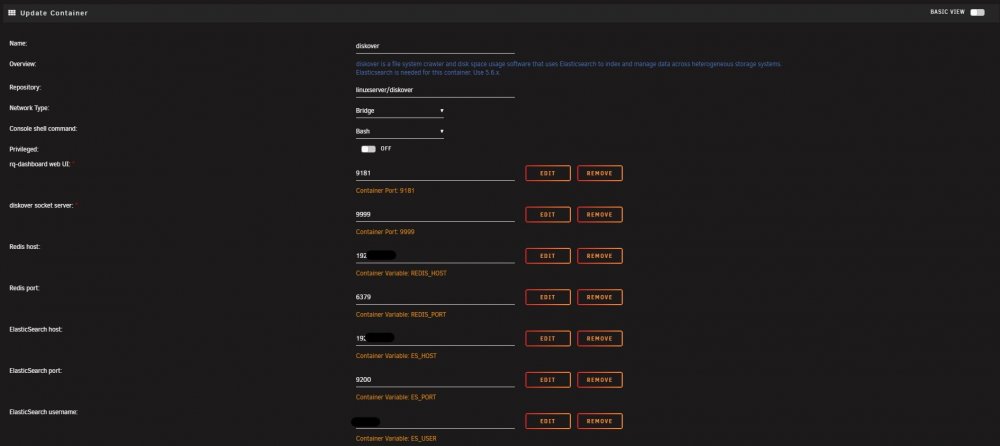
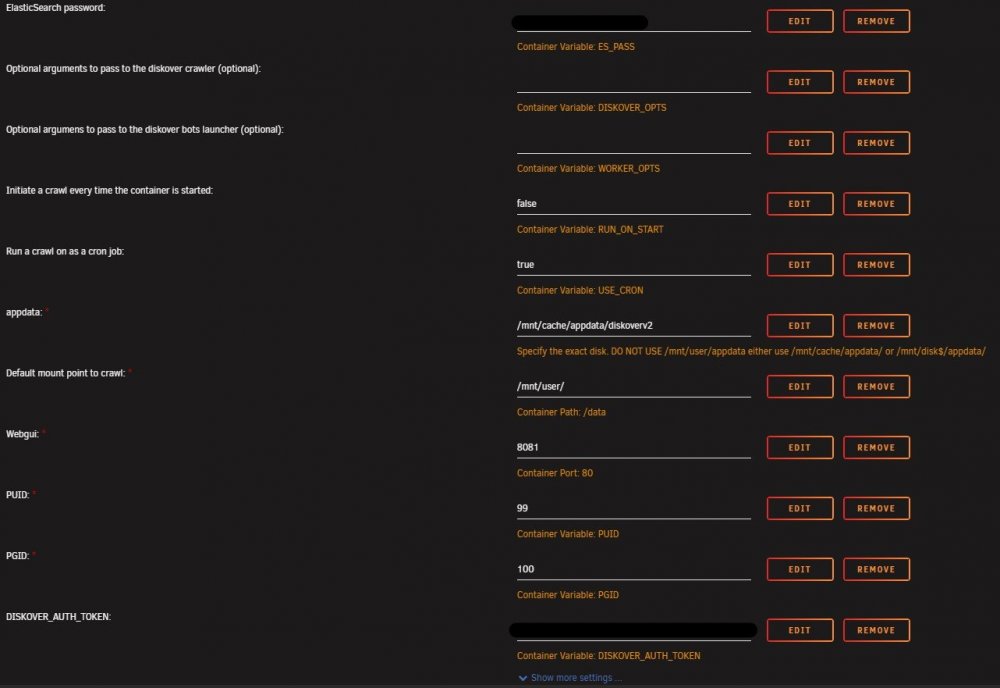
-
Seems to have been updated to v2 now. You'll need to update the config to a new folder to let it continue.
-
Any chance of a diskover v2 docker container? Any way to request?
-
I'm getting the same error in the diskover logs as well. I also see that diskover is constantly using 6-8% CPU. I've also noticed that the diskover github page is no longer available and in "elasticsearch info" and "Elasticsearch health / index sizes" in the diskover admin page, I get this. { "error" : { "root_cause" : [ { "type" : "security_exception", "reason" : "current license is non-compliant for [security]", "license.expired.feature" : "security" } ], "type" : "security_exception", "reason" : "current license is non-compliant for [security]", "license.expired.feature" : "security" }, "status" : 403 } I can login to elasticsearch without any error.
-
Thanks for this. Followed the instructions exactly and worked perfectly!
-
Sorry if this is a dumb question, but I've run the command to install the json api plugin in the docker console, then restarted grafana, but it's not coming up in the plugins list. Is there something that I'm missing?
.thumb.png.17851aece2a22632d74cf27bdb68bec5.png)


