





DiscoverIt
Members
-
Joined
-
Last visited
Everything posted by DiscoverIt
-
Which BMC version are you on? SM has begun restricting fan control from 3rd party control.
-
Is this the proper venue for requesting additional case-models into the OS? Credits to need4swede for the Vectors. hakocore-unraid-vectors.zip
-
Completely normal and expected if a container does not respect user mapping.
-
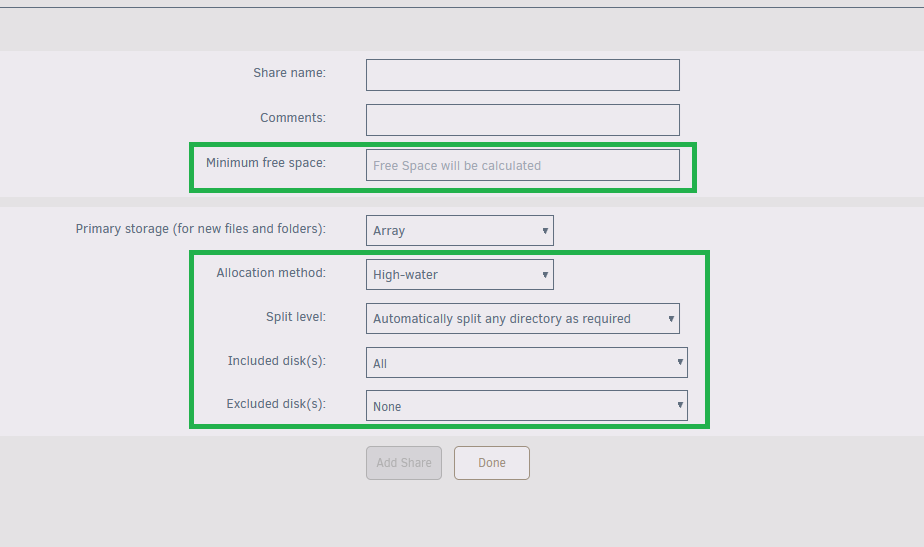
I'd like to propose that Unraid modify common workflows and add an Advanced View for more fine grained control where feasible. This example is for adding a share but really applies anywhere that a setting or field is useful, but not often modified, in an attempt to streamline and cleanup the workflow. Adding a Share. The items in Green represent more advanced settings that ideally don't need to be changed unless you know what you're doing. A further suggestion would be to bring in SMB settings to the add share so that immediately upon adding the share a user could use the share without further modification.
-
Is the removal of the pre-clear report a new(er) addition to the workflow before the signature can be removed via the subsequent red x click?
-
Where do you see that I want to add a formatted drive to a parity protected array? That string of text was never typed by me. The intention is that if a drive is acquired the most common way to test the drive is to leverage a pre-clear operation. I found a way to format the drive but it has become incredibly convoluted. Since all status went to the footer (which by the way why did that change occur?), you first hover over the symbol, click the red x to need to remove the pre-clear report, click the red X on the main page, enter in Yes, and only then does the UI element change to allow Format.
-
Preclear is often done as a test before a drive is used either in a parity protected array, pool, or elsewhere. Destructive mode is enabled with the Plus addon installed. There appears to no longer be a mechanism to format a drive with a pre-clear signature.
-
Is /flash/logs a new dir structure?
-
Is there a new bug that once pre-cleared you cannot format or use the drive?

-
Can we get a toggle to enable/disable the creation of datasets? Moving files between shares (that are datasets) are essentially separate filesystems which eliminates the instant move of a file.
-
It seems the webui allows any file type (ovpn) to be uploaded when importing a config. Uploading an OpenVPN will cause the webui for VPN settings to crash and fail to load. It would be a good idea to verify the file upload before saving to config by ensuring it complies with the minimum required fields.
-
What’s the fix then? One cannot force all development of container images off DockerHub. While some have moved to GHCR the vast majority of still valid images reside on DockerHub.
-
Pushing a new user into command line is not a valid solution. The problem is this new change will impact most new unraid install roll out.
-
That is a workaround indeed. However a permanent fix should be discussed since Unraid is tailored for new Linux users and docker is a key feature pillar.
-
https://docs.docker.com/docker-hub/usage/ tldr; 10 pulls an hour unauthenticated. Can we get fields on docker settings page to input authentication information?
-
Drop in here your export and mount lines.
-
Why do these patches require a reboot? At that point why not just release a patchfix release and increment the versioning?
-
Obviously best fix is for LT to create a dedicated SSH settings page for all these settings.
-
Modifications to daemon core config files is not a suggested work flow. It’s the reason why apt and other package managers ask how to proceed when the daemon gets updated. This way any changes to the core config file are allowed by the maintainer without breaking your config. It’s also the reason why default sshd config contains this include statement on nearly every distro, except unraid.
-
That's way too complicated of an approach. Go the linux correct route with an override to the included file. nano /boot/config/ssh/sshd_custom.conf PermitRootLogin prohibit-password PasswordAuthentication no PubkeyAuthentication yes nano /boot/config/go sed -i '1i Include /etc/ssh/sshd_custom.conf\n' /etc/ssh/sshd_config /etc/rc.d/rc.sshd restart Reboot or cp -r /boot/config/ssh/sshd_custom.conf /etc/ssh/sshd_custom.conf && /etc/rc.d/rc.sshd restart
-
it seems the mover process will create a dataset on the zpool when sending data to it if a base dir does not exist. Is there a way to change this behavior or have a setting added to the share for yes/no on the creation of a dataset? zfs datasets are great in some regards, but if you frequently have n+1 shares where you want to shift data from share to share it will require full re-write of the data being moved.
-
In theory there is now at any given moment a potential for 4 stable releases? Current stable options: 6.12.15 6.12.15+patch (not existent but could) 7.0 7.0+patch (not existent but could) Is it going to be whether or not a reboot is required is what determines a patch in the plugin sense vs a patchfix release? Or will this only be used for versions no longer supported per the new licensing? It just has an odd mouth feel that 6.12.15 is a patch release but you could also have 6.12.15+patch. Maybe 6.12.15 should be renamed a bug fix release (major.minor.bugfix+patch)?
-
How does the plugin remove stored patches fixed with a new release?
-
Its a your mileage may vary situation. I'm simply suggesting the sshd_config.d/*.conf approach as its a more correct mentality. Nearly all distros have gone this approach as the individual values in this file override what is present in the base sshd_config file. The blanket override approach is dangerous because if required upstream changes to the config occur they will not be represented automatically in your custom sshd_config file.
-
the problem is that rc.sshd actually generates part of the sshd_config dynamically. A better approach would be to prepend the following into the config and restart the daemon Include /etc/ssh/sshd_config.d/*.conf Then instead of a full sshd_config file create a custom.conf with only the values you want modified.



