





DiscoverIt
Members
-
Joined
-
Last visited
Everything posted by DiscoverIt
-
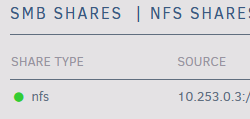
The mechanism for UD to check if a mount is active appears flawed. This NFS export does not exist but I suspect the presence of files within the dir structure is what the status indicator is based off of. Ideally this should be based off a system level indicator such as showmount or df.

-
After upgrading to 6.12.1 from 6.12.0, NFS does not seem to come up. I am using a custom exports file within exports.d but 'exportfs -rv' isn't throwing any errors on a config issue. Dropping back to 6.12.0 seems to work as expected. I don't see anything in the changelog that changed NFS or its underlying dependencies? root@Bakery:~# showmount -e clnt_create: RPC: Program not registered Jun 20 14:57:26 Bakery rpc.statd[28411]: Failed to read /var/lib/nfs/state: Success
-
Fracturing a small community provides zero improvement. (Un)fortunately it appears Reddit has clarified it’s inactive moderator policy so if it stays closed too much longer someone could request control.
-
So when is the power tripping mod going to eat their pride and open the subreddit? At this point their pride is doing nothing but destroying the community many have helped curate.
-
It's been well documented that NFS v3 and UnRaid never play nicely and throw Stale File Handle errors when the mover initiates with cache:yes/prefer selected. On 6.11.x this was relatively trivial to remedy by manually forcing vers=4.2 on the client side. With 6.12-rc2 this doesn't seem to be enough anymore. I've noticed that when the mover initiates (similar to pre 6.12 w/ NFS vers=3) the nfs client throws a stale file handle error which requires unmounting and remounting of the export. Is there a mount option or export option I'm missing to prevent these from occuring or is this the same issue just being exposed now in 6.12-rc2? "backups" share NFS settings 10.253.0.2(rw,no_root_squash) systemd Mount on Remote Box [Unit] Description=Mount NFS Share DefaultDependencies=no Conflicts=umount.target After=systemd-networkd-wait-online.service Wants=systemd-networkd-wait-online.service Before=umount.target [Mount] What=10.253.0.1:/mnt/user/backups Where=/nfs/backups Type=nfs Options=vers=4.2,rsize=1048576,wsize=1048576 [Install] WantedBy=multi-user.target As a stop-gap I'm running a systemd timer on the remote box to exec this shell script every 30s. #!/bin/bash for directory in $(df 2>&1 | grep '10.253.0' | awk '{print ""$6"" }' | tr -d \:) do status=`stat $directory 2>&1 | grep -i "stale"` if [ "${status}" != "" ]; then folder=$(echo "$directory" | rev | cut -d"/" -f1 | rev) umount -l "$directory" systemctl start nfs-$folder.mount /root/discord_notify.sh "SFH Detected" "The mount point $folder experienced a stale file handle and was remounted" fi done
-
That indeed is the solution. Thanks! I had to make a custom.exports file in /boot/config, use the go-file to copy into /etc/exports.d/ and it seems to be working!
-
Is there a built in way to programmatically watch, append, pause, or otherwise be notified when the /etc/exports file is dynamically generated? I have 3 custom exports which presently need to be manually added into the exports file and reloaded. It seems like mundane actions cause the recreation of the /etc/exports file from the information found within individual share settings.
-
On the last few revisions to 6.11 there seems to be a bug related to stored browser cache. If a user attempts to start an array (in this case with keyfile based encryption) this pop-up dialog emerges once the array starts. If the user selects resend Unraid will go into a stale configuration error mode and requires a reboot to address. Clicking cancel allows the webui to refresh and all is well. Is there an option to disable or prevent locally storing webui cache? Being a local or lan based interface only is there even an immediate need for a caching system? Edit // Changed to Urgent based on pinned description of a breaking issue.
-
Upgraded to 6.10.1 from 6.9.2 and encountered a few issues tied to internal permissions. Initially thought it was tied to just docker but basic commands like rsync and mv from terminal trigger permission hiccups as well with errors such as update_known_hosts: hostfile_replace_entries failed for /root/.ssh/known_hosts: Operation not permitted mv -f /path/to/new/dir/made/on/6.10 /path/to/existing/dir/ error out with a permission error when removing the /path/to/new/file/made/on/6.10 dir mv: cannot remove '/path/to/new/dir/made/on/6.10': Directory not empty Poked around /etc/group /etc/passwd and nothing immediately jumps out at me. Did notice folders which were 777 become 755 after upgrade but I don’t have proof just anecdotal memory of things I had to fix today. Down graded to 6.9.2 and all appears well. The issue seems to lie when you are dealing with new directories created on 6.10.1 and dealing with 6.9.2 and older directories. It's almost like the new folders being created are being created with improper permissions through possibly the ACL?
-
Similar to the Samba extra configuration box but a field for extra NFS exports. The file '/etc/exports' is dynamically generated and does not survive reboots or any NFS based changes to a share. The ability to append custom exports would be incredibly helpful.
-
Is there anyway to create custom NFS exports within the UI? It looks like /etc/exports is dynamically generated during array start and anytime a share with an NFS export has it's NFS settings modified. Looking at SMB settings there is an SMB extra conf field which performs a similar function but for SMB based connections. Does something similar exist for NFS exports?
-
Thanks for the help, I’ll have to dig into the entry point mindset more to see if there’s a better way to handle this. Obviously a webui would be ideal but my skill set is CLI and not web dev. I’ll have to write up a feature request. The web terminal runs on JS so it shouldn’t be too crazy of an ask to process arguments. Although I’m thinking it might open security concerns as I can see a bad actor hiding https://fileserver/webterminal?’rm -rf *’ in a concealed link.
-
The script within the container loads a saved screen session of a program running in the container. Focused on the webui field as it’s modifiable but not sure if I can pass arguments into the web terminal from the address bar. Unless is the context menu per container editable now?
-
Correct but from the console an additional command is required to load the saved screen. Trying to simplify the process of getting to the saved screen. I can either docker exec -it container shellscript or use console context and type shellscript. Both are essentially the same but I’m trying to make a two part process a single action.
-
Thanks, two approach’s to the same result requiring entry into a terminal and then executing the command. It’s not possible to modify that specific context menu so pre-loading the command for a single click wouldn’t be feasible unfortunately.
-
I have a custom container which is interacted with via a screen session within the container. Manually opening the terminal via https://unRAID/webterminal and issuing 'docker exec -it container shellscript' works as expected but is there a way to tie this to the WebUI context menu of the container? Maybe something like this? https://unRAID/webterminal?'docker exec -it container shellscript'


