





Caennanu
Members
-
Joined
-
Last visited
-
Good day all, Been looking into the stability of my unraid machine, which been having some issues as of late. This is probably one of more posts to come as i come across issues. So.. i was checking the logs after my unraid server decided to 'crash' when updating a VM (different topic). And what i found were numerous refused mount requests for things comming from my local pc. Now i recognize the things it wants to mount, they exist and i use them. However, i do not use them FROM the server / network (to my knowledge). So my question is.... How do i analyse this? because this shouldn't happen in the first place. The only thing i have done, is mapped an SMB share as a network drive.
-
Been using this container for a while. Since the last update, i keep getting a bad gateway when trying to connect to webui (both through nginx as direct). Other dockers can be accessed through nginx properly, no issues in the logs visible. Any help would be appreciated. ----- So, appearantly i have to acces it via https. But the container template doesn't show any mapping for that. By default it has a 4743 routing to 80. Should i add a 443 routing to 443? if so, how? i can't seem to set a target in the template. --- it works again, changed nothing...
-
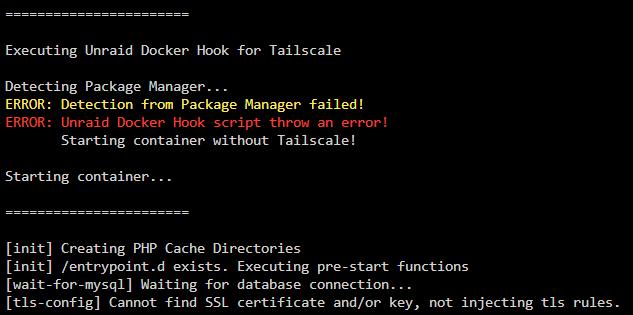
Hi there! Yesterday i've upgraded from 6.x to 7.x to use the new tailscale integration, among other things. Now some dockers install it without an issue, i'm however having issues installing it to my pterodactyl panel docker. I've simply selected to use tailscale. Haven't altered anything besides that switch. I'm getting this error: Detecting Package Manager... ERROR: Detection from Package Manager failed! ERROR: Unraid Docker Hook script throw an error! Starting container without Tailscale! Starting container... Repository: ccarney16/pterodactyl-panel:latest Any help would be appreciated.
-
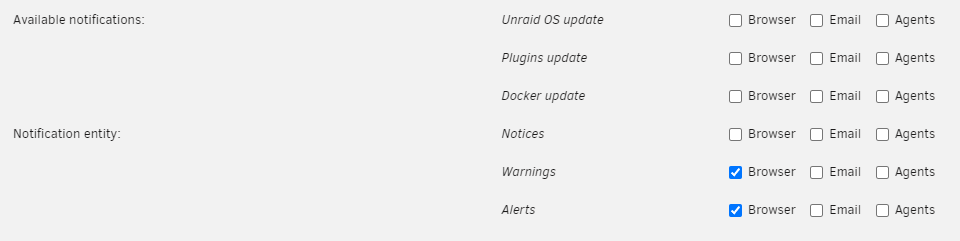
Maybe i'm necro'ing an old thread but since it was one of the first ones google found for me: Settings > Notification settings > Uncheck 'Browser' for the ones you want off your wall.
-
Hey Guys, Been using crushftp for a bit now, a lil on the down low. The webgui and ftp clients connect just fine, is why i haven't run into an issue yet. However, since i want to start serving the files via an webpage, i need to find the files. Even tho i set the FTP folder variable, i cannot find the uploaded files i can find using the webgui. So i'm wondering, where are the files and folders etc. stored? It seems to be like an in-memory thing?
-
NAT aside, i've got another question / request. The other day pterodactyl screwed itsself up due to improper updating of the deamon. Eventually was able to fix this, but it resulted in multiple folders used by the docker containers to get other permissions, which caused the servers not to start because they didn't have write permissions. (i fixed this because of having a backup that also had the permissions) So my question is: can the guide be expanded to include troubleshooting steps on what to do when folder and file permissions specific to pterodactyl are botched? (i would offer a suggestion / write-up if i knew how to actually fix this, but i don't :()
-
i think you have the same problem as me. you do not have the option to enable hair-pin nat or nat loopback. I bet if you are on the same LAN as the server, the node elements will work just fine.
-
So to give an extra update. I have now installed nginx and followed the written guide, aside of the fact i'm feeling like the writeup is missing something (setting up a node reverse proxy without telling the panel where to find it?), it still isn't working externally. i can acces the panel, but cannot interact with the node. My geuss is that it is because i do not have a router that supports NAT loopback. Any suggestions on how to circumvent this? (i feel like this is the issue, but since its not in the 'assumptions' part, i cannot say with certainty).
-
So... its been a while. but i'm attempting to gain acces to the files and stats of the servers externally, without using an reverse proxy. Friends are able to connect to the panel, can see the servers. They can see the files, but when it comes to editting or viewing the console page, there is an error. I have tried to open the ports for the deamon externally to no avail. My thinking is that it won't work, because external users cannot use the internal docker network. Could this cause the issues where the deamon bits of the panel are not accesible? If so, how would i go about 'fixing' this?
-
Well, whaddaya know... Updated to 6.12 stable. And had the same issue. I had to reboot my router, as my static route wouldn't take hold. This allowed me to acces LAN, but nothing outside of it. Maybe that is the issue on your end too?
-
Alright, i do not know exactly what an hotspot does... (i know its function, but not its technical details). It sounds like the android phone creates a virtual network. Kind of like a WAN port. Creating a different subnet for the ipad. Can you check if the ipad gets an ip in the same range of your local network, and if it is the same. if that ip address is reserved from your own dhcp?
-
Allright. Can you connect to the unraid server via its DNS address, or only via its ip address? If the latter. its likely something in your DNS settings.
-
My best guess is that your windows is on the same if not similar subnet, and the phone is not.
-
Good day all, I've been using wireguard for a while, and always had the issue that i cannot acces the internet while connected to the VPN. Previously this was an non issue, as i didn't actually needed it, it recently however has become an issue. Now, i'm geussing since i used the quickstart guide, i should post here. So let me start with explaining the layout of my network. Starting from the ISP going in. From the ISP side, i have a WAN box (Ubiquiti EdgeRouter-12). - I use this to connect my optical connection directly to my network. This ER also serves as my firewall / DHCP server. - It runs the DHCP for 4 Vlan's (something with not wanting CCTV and IoT mixed in a network) The ER has a static route to my ICX 6450-48P, which serves as my router. - Primary reason for this is because the routing capacity of the ER is lacking - secondary reason, i need PoE ports more than the ER can supply, and i already had the ER - Third reason, the ICX has no WAN ability From the ICX, i connect to another ICX via a single 10gb fiber connection. Which has the unraid box behind it. The 2nd ICX is in switch mode. Firewall ruling disables acces between the different subnet, and the CCTV camera's have 1 hour of acces to the internet a week for only time synchronisation. On unraid i run dockers for pihole and lancache. Which effectively are my internal DNS servers. This should be a nice to know, but not a requirement as i don't need these for DNS purposes when using Wireguard. Troubleshooting steps: Changed connection types, which didn't yield any results (logical, but worth a shot) Changed DNS from local to 8.8.8.8, no notable results Added allowed ip's equal to the subnets of my Vlan's with the /24 notation, no notable results. When doing a tracert to a (both DNS and IP), i get a result only from my unraid box, everything after that times out. So my understanding is that the internet requests do not leave the unraid server. Which leads me to believe i'm missing a link between the server and the router. Am i assuming correctly? (NAT issue?) --- Solved --- After adding the static route not only to the ICX router but also to the ER (WAN), it works. So maybe one could adjust the write up, that the static routing needs to be in other places as well when there is a split configuration?
-
+1 for me. I'd love this so i have 1 place to manage all!
