





ozma64
Members
-
Joined
-
Last visited
Everything posted by ozma64
-
Like i have said, I cannot connect a monitor. there is no video output on my server
-
I have no other USB devices connected to my Server, just the Internal HDDs and SSDs
-
Unfortunately, I am unable to access the CLI too, the Server will not give a network connection and it has no console/video output device either. I just recently reformated and reinstalled the Unraid USB though.. I did back up the old USB files before doing so. But as for a diagnostic, i have no idea how to generate one without a video output of some sort
-
I tried removing all of the plugins files i added and that is not working either...
-
I thought the RTL8125 Drivers Plugin may have been the issue, however, even when i removed it's folder from /config/plugins/, that didnt give me access back either... (There was no .plg file for it)
-
Well, I just got done installing my plugins back into my server. However, now after i rebooted my server it will no longer give me access. I hear the Beep Alert i have configured sounding off that the array has started, but i am unable to ping the server or access it. I tried safe mode yesterday and that caused this same issue, however, when i rebooted again it let me in.. but this time it is not letting me in no matter how many times i reboot... Im starting to feel like im playing whack a mole here... I pulled my Flash drive and plugged it into my PC. My Network settings are just fine and the boot config is defaulted to Unraid OS GUI Mode. I was going to update the OS to Beta3 but this happened now... Im at a complete loss.. These are not the only issues this server has been giving me lately... Im thinking i need to just reformat reinstall my entire Unraid Flash Drive and start fresh. But i am afraid that is going to end up deleting all my data on my array... Any ideas on how i can get back into my server so i can test Beta3?
-
Thank you for that advisement. Im currently working on reinstalling my plugin after having tested removing them all. Once I am done, i will try that. Also, i have already confirmed the same issue on 3 Browsers including Firefox. Firefox is my default browser as well.
-
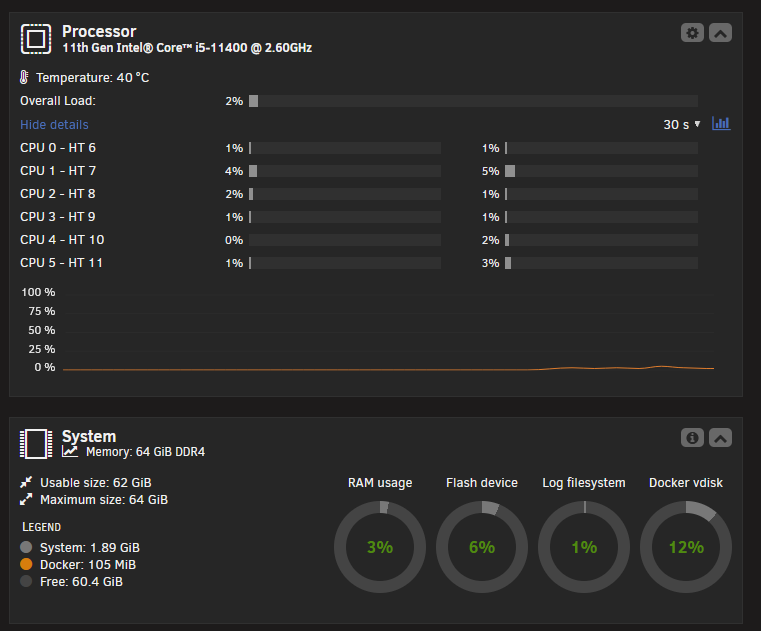
I tried 7.2.0 beta1 and the slowness on the GUI is still affecting my server. The CPU and Memory are perfectly fine. The server runs fine, its only loading things that takes forever. My Plex Docker Server is also having the same issues. Loading Libraries and starting movies or skipping through the movie takes extended time to load, but once loaded it runs fine with no hiccup. TOP via CLI shows no CPU Wait time as well. For the Unraid GUI, the issue is like the initial poster's issue. The pages load, but the details on the CPU/Memory, Shares, and the Array Drives take between 30 seconds to 2 minutes to load and sometimes they dont load that information at all. As i had previously stated, i do not have this Unraid Connect Plugin installed either. I also have the same slowness in loading on Firefox, Chrome, and Edge. Im at a total loss on what could be causing this issue. Anyone have any ideas I could check into? Here is my Plugin List as well (I have already tested removing all of these Plugins and the issue remains): Appdata Backup CA Auto Turbo Write Mode CA Auto Update Applications CA Cleanup Appdata Community Applications Dynamix Active Streams Dynamix Auto Fan Control Dynamix Cache Directories Dynamix Date Time Dynamix File Integrity Dynamix S3 Sleep Dynamix System Buttons Dynamix System Information Dynamix System Statistics Dynamix System Temperature Fix Common Problems RTL8125 Drivers SwapFile Unassigned Devices Unassigned Devices Plus Unassigned Devices Preclear unbalanced User Scripts multimediaserv-diagnostics-20250927-0806.zip

-
I am having this same problem, however, I have never installed the Unraid Connect plugin. I will try installing to beta.
-
Life kept me busy and I just recently was able to get a brand new PSU swapped in and now parity checks are completing without issues. Thank you for the assistance. I am going to rework my JBOD set up and get a more powerful PSU for my drives. Right now im using two 400Watt SFX form factor PSUs to power 12 drives.. (6 on each).. I think I figured out why the "known working" PSU from the other JBOD rig was not working, the drives it was powering were all 1TB drives, where the Rig with failing drives held four 6TB drives in it... I suppose the higher capacity took more power to spin them then the 1TB drives.. I think this model of PSU, though theoretically able to support the total wattage for 6 drives by far, just isnt able to push enough power out on it's two SATA Cables for it... Welp, buy cheap... get cheap... I bought a 1000 Watt PSU with 4 Cables for SATA and PREF. I think im going to add 4 more drives and split the power to 4 drives per cable... this beefier PSU "should" handle more power per line than the tiny PSUs.... hopefully.
-
Thank you for confirming this for me. Since i have replaced all the cabling and the HBA, im going to get a new and larger PSU for the JBOD box i made. I was using a small 400 Watt SFX form factor PSU for it.. Thought that would be more than enough to run 6 of my hard drives on... so either it wasnt, or it is failing. Ill let you know if that fixes it once i receive it in the mail and get it hooked up.
-
Here is the smart report for the drive that dropped offline within the diagnostics i provided. Sorry for the long wait, Life pulled me away. Please let me know if there is anything unusual. multimediaserv-smart-20250505-1947.zip
-
Well, i tested with another PSU, but it was an older one that was working in another rig.. Ill order a new one and see what happens then. Still waiting on the Preclears to end, ill update once i got the smart reports
-
While this preclear runs to completion, i would like to ask something regarding the Disk dropping offline... Why would this be happening only during the Parity Syncs/Checks? It doesnt happen at all during preclears that reads, erases, and zeros the entire disk... The disk stays online the whole time with not even a hiccup, but the moment i put it into the array and run a sync/check... it pops offline and errors out... Any ideas off the top of your head? Ill get the Smart Reports as soon as i can, i dont wanna disturb it until the Preclears finish.
-
Well i started a new preclear to reset the drives to try again, i did reboot the server already though. Once the preclear is over, ill run another extended SMART test and provide you with an update. It should be done in about 43 hours or so. Ill also check the power again, maybe one of the SATA Power Extensions i have is going bad...
-
I just added them to the original post as i forgot to pull them initially. Here they are again though. multimediaserv-diagnostics-20250502-2125.zip
-
So, in honesty and transparency.. I'm about at my wit's end with Unraid and about to move to TrueNAS due to this issue... I recently lost 15TB of data as 3 of my hard drives started to fail on my Unraid server. I initially thought it was bad cabling or a power issue; however, I have not only replaced the 3 hard drives, i also replaced all cabling leading from the hard drives to the HBA and i have also replaced the HBA as well. I also tested with a known working power supply from another rig and was experiencing the same issues. Unfortunately, I am continuing to get the same Read Errors during Parity Sync that eventually killed the file table and forced the drives into an "Unmountable: No file system" state that wouldn't even recover after using the xfs repair tool. I have ran a full suite of preclears on each of the disks, running 3 cycles of pre-read, erase, zeroing, and post-read on each of the hard drives. Each preclear ended perfectly fine with no errors being thrown or any issues occurring at all. I ran both short and extended SMART tests on each hard drive and even those came back completed with no issues detected. I have even tried pulling my two parity drives from the array and running a new Config so that i could run a preclear on them as well. Just in case maybe the parity was corrupted and could give it a fresh start with a fresh parity sync after re-adding them to the array after their preclears. This also failed with the same drives dropping out and spinning down during the sync due to read errors. And they are literally brand new. I have no idea what is causing this issue, My most recent attempt had 1 drive start throwing errors and then the other 2 soon followed. Again, All cabling is new, HBA is new, and the Hard Drives are new, but I'm having the same issue as the old hard drives and cabling. Does anyone have any idea what may be causing this issue? Syslogs and Diagnostics are attached. (Diagnostics were made after removing the failed drives and parity drives from the array again). multimediaserv-syslog-20250503-0011.zip multimediaserv-diagnostics-20250502-2125.zip
-
I honestly dont see how it is unrealistic to expect more than 2 drives to fail when you get up to 15 - 30 drives on a group. Especially on situations where faulty hardware could cause corruptions over multiple disks. or power faults as well. Developers can do as they wish, i know there is nothing anything we can do to change that so im not sitting here demanding that it be implemented.. Im just saying call it as it is.. its not unrealistic.. they just dont want to do it. Whether it is too complicated or just stubbornness. But like i said, its their software. they can do as they like. even if it is foregoing something a lot of people could benefit from.
-
I am sure that this may have been brought up before many times. But Unraid seriously needs to allow for increased Parity drive counts... 2 is just not enough when you get larger drive counts. I had a fault occur that corrupted 3 drives on my array and now i have lost 15TB of data.. i would say at least 1 Parity drive per 5 Data drives at minimum should be allowed
-
Resetting the Dashboard through Tile Manager still doesnt stop the Dashboard from resetting each time it is closed out. I agree with NachoServer... Depending on browser side options to store settings is an extremely poor way to do this. The Dashboard worked perfectly fine beforehand and now having my layout completely scrambled every time i close, after having literal years of it being just fine, is rather annoying. I know it is just system information but this sounds like a setting that could quite easily be stored within the OS itself so it honestly makes no sense... A lot of people clear their cookies automatically whenever they close there browsers, it keeps a lot of browsing issues in check.. So doing this seems counter productive..
-
Thank you
-
How do you open the Tile Manager? i do not see any Settings menu for it. Im running 6.12.4
-
That was my first thought however my CPU usage is typically setting around 0% to 10% while in the WebGUI. I also clean my Server out on a regular basis and keep a large box fan against it in case temps where the issue as well. My CPU is typically between 25C to 45C and and my hard drives are typically between 25C to 35C So i dont see temps being hte issue.. so i figured that there was a bug in it... So under the idea of a possible bug, i upgraded the OS from 6.9.2 to 6.12.3 however that cause my Fans to start ramping up to full blast even whenever i wasnt even logged into the WebGUI... so i have downgraded back down to 6.9.2... ------------------------------------------------------------------------- I dont use a GPU in my server, it is fully remote operated from my PC and has no containers or VMs that would necessitate a GPU.. Do you think testing i should try a driver anyways to see what happens? Im not seeing any of my cores getting pinned to 100%. At most, 1 random core will hit about 10% whenever i reload my WebGUI.
-
This issue is still ongoing for me. I do not have the slightest clue on the cause.. Does anyone have a possible idea?
-
I have been having an issue on my unraid server where my Fans will be running just fine indefinitely while the WebGUI is never open. However, if i should ever pull up the webGUI, after a few minutes the fans will suddenly max out on there speed, making my server start to scream. This will either happen intermittently, maxing out then after several seconds to a few minutes cutting back down to normal speed again, just to do it all over again a few moments later... Or it will max out my fan speed and just leave it there permanently until i disconnect power and Power drain the system (Just rebooting the system does not resolve the issue if the fan speed locks at max, it HAS to be pulled from power to reset). If the fans only max out intermittently, it will stop cycling up to max speed if i close out all webGUI windows. So as long as the webGUI remains close, my server is quiet as a mouse.. Has anyone else had this issue? And if so, have you found a resolution for this??
