JimmyGerms
Members
-
Joined
-
Last visited
-
@binhex , would you mind giving a breakdown of how you were using flaresolverr and byparr on the same network as privoxyvpn? Did you mean flarsolverr for example was using --net=container:binhex-privoxyvpn? If so, I cannot get this to work inside prowlarr. The privoxy is up but flaresolverr can never get through and times out. I've tried the wireguard and openvpn setup with PIA and put port 8191 in the input, but to no avail. Am I misunderstanding? Would love to understand what I'm doing wrong!
-
Just tested it out on my system with my 9207-8i in the PCI-E x16 top slot and I didn't have to mess with CSM, just disabling fast boot and I can see all drives in unRAID. Wonder why it's different for you?
-
I'll hook up my LSI 9207-8i HBA a little later today and see if I get any abnormalities. For now though, did you disable "fast boot" in bios? Also, try out enabling CSM. I can't remember if this helped on my current server or not. Need to play around and see.
-
For anyone that has a 13900k, does unraid report it as 2970 MHz for the base clock speed on this board? I'm not sure what's causing this but it's also causing me not to hit my full turbo either. Always just short.

-
Sounds great! Also, I posted in another thread about the multi thread performance. I’m getting the same thing if I mess with any voltage or load line with this board. My performance is cut nearly in half. My bios is up to date as well. I’m having a heck of a time under-volting and keeping similar performance as default auto. I tried the other micro code setting thinking it was the whole intel disabling under-volting deal but still no go.
-
I'm at my wits end. I am trying to under-volt the board to give me some thermal headroom on the 13900k but I cannot get good performance. Anything I touch with ACLL, DCLL, Actual Voltage or Global Voltage immediately drops performance by half. In Cinebench R23 I get 16k instead of the 35-36k when set at default auto settings (But I hit 100 degrees). Intel XTU also is all greyed out so I cant even test adjust there...no idea what is going on. UnderVolt Protection is disabled too. I'm on latest BIOS and read a thread about switching microcode as well which I've done but same results. What the hell is the correct way to do it on this board?
-
@firstTimerCould you post images of all your BIOS settings for the power saving options. I cannot get this to work, unraid crashes with powertop after a few minutes. I'm wondering if I got a bunk bios setting. P.S. This is an awesome write-up!
-
For anyone who is using the Kingston 32gig 4800 RAM (KSM48E40BD8KM-32HM), is there an XMP profile selection for you? I'm curious if I'm just overlooking where the option is or do these modules not have an XMP? EDIT: Has anyone done any CPU undervolting? If so, do you use the "Actual VRM Core Voltage" setting? There's no documentation in the manual for that one
-
@Omid take a look at this PDF for a password reset within windows or linux. Section is called "How to Reset the IPMI expansion card login password" https://dlcdnets.asus.com/pub/ASUS/mb/Add-on_card/IPMI_EXPANSION_CARD/IPMI_Expansion_Card_FAQ_EN.pdf?model=IPMI EXPANSION CARD
-
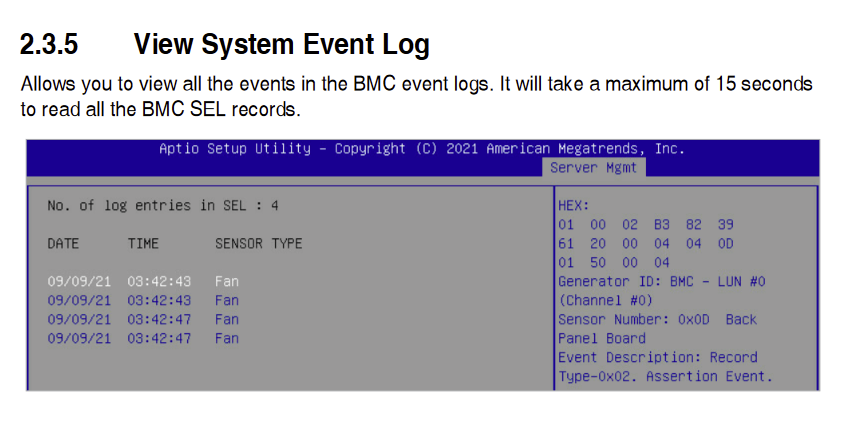
Haha yup! Currently reading that. Also, I'd love to donate to your time if you set out on this journey, let me know how I can help. Take it to DM maybe? EDIT: Oh boy, I think it's going to be a bit of trial and error...I'll have to reboot to bios and see if I can get some logs to spew out. The web interface doesn't provide the hex and other details like this screenshot.
-
Not a clue currently, working to figure that out. Not much documentation out there yet for the Asus-w680-ace-ipmi. Any tips on where to start? Doesn't look like there's a simple command to print or anything to trace in the logs so far.
-
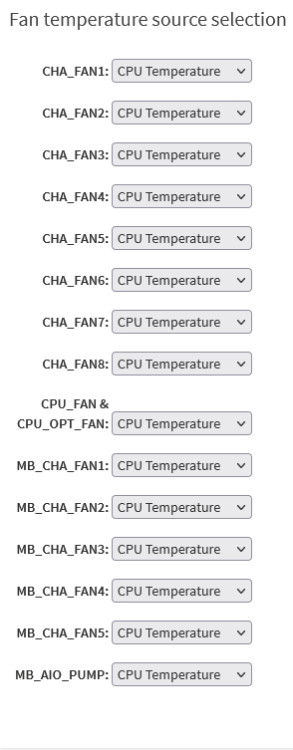
Yup, totally see those and I see that in the code. Is there a way to expand or add a board if I figure out the values or is it more complicated then that? One downside to this board is I cannot control the front side fans (only testing this setup with 2 fans so far) with the temps of the HDDs and I'm lookin to work that in. root@Sandrock:/# ipmisensors ID | Name | Type | Reading | Units | Event 32 | CPU_FAN | Fan | 600.00 | RPM | 'OK' 33 | CPU_OPT_FAN | Fan | N/A | RPM | N/A 34 | MB_CHA_FAN1 | Fan | N/A | RPM | N/A 35 | MB_CHA_FAN2 | Fan | N/A | RPM | N/A 36 | MB_CHA_FAN3 | Fan | N/A | RPM | N/A 37 | MB_CHA_FAN4 | Fan | N/A | RPM | N/A 38 | MB_CHA_FAN5 | Fan | N/A | RPM | N/A 43 | MB_AIO_PUMP | Fan | N/A | RPM | N/A 44 | CHA_FAN1 | Fan | 960.00 | RPM | 'OK' 45 | CHA_FAN2 | Fan | N/A | RPM | N/A 46 | CHA_FAN3 | Fan | N/A | RPM | N/A 47 | CHA_FAN4 | Fan | N/A | RPM | N/A 48 | CHA_FAN5 | Fan | N/A | RPM | N/A 49 | CHA_FAN6 | Fan | N/A | RPM | N/A 50 | CHA_FAN7 | Fan | N/A | RPM | N/A 51 | CHA_FAN8 | Fan | N/A | RPM | N/A
-
@SimonF would it be possible to get the ASUSTeK Pro WS W680-ACE IPMI board supported? I'm looking at the code on github and I'm not quite sure where to start to get it implemented. How do you obtain all these raw values...if that's even the first step? Is there a way to provide our own fan.cfg setup and have the plugin go off that? I see there's an override setting for the Fan tab but I can't get it to detect any fans correctly after that.
-
Under "Monitor" in the bios you can switch it over to IPMI. Hope that helps!
-
Yup, but changing the source to look at HDD or HDD pool. Doesn't look like there's a default way. Only other options in here are temp probes.