





Nelo3D
Members
-
Joined
-
Last visited
Everything posted by Nelo3D
-
a top level folder with the same name as the share is considered to be part of that share if it is on ANY array disk OR pool regardless of the settings for the share. That was the key. I have renamed the folders and now the shares are correct. I will keep this in mind in the future. Thank you very much!
-
Yes Yes, the share and the new folder in the pool have the same name.
-
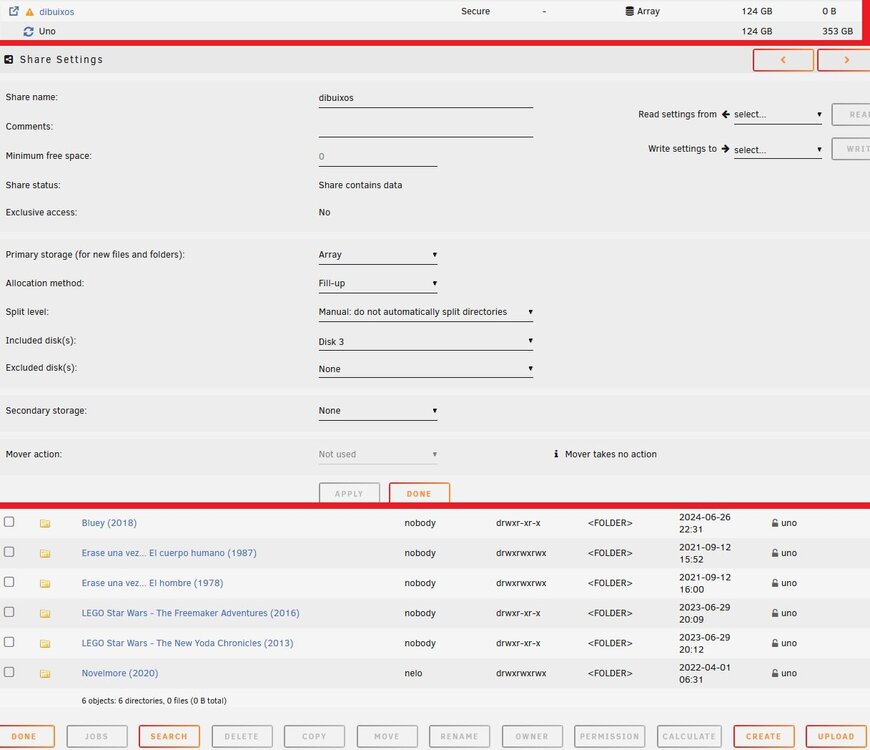
Hi all! I had a share “dibuixos” on a disk inside the array “disk3”. I copied all the files to a folder on a disk in pool “one”. I deleted the files from the share/array folder in "disk3". But it won't let me delete the share. If I click on browse share, it shows me the files. As you can see, in the shares page, the column "storage" says array, but in the "compute" line shows "uno" For some reason “user/dibuixos” points to the new folder that is in “uno”. How do I unlink the share from the new location in “one”? Thank you!
-
I think that my error was not click on Profile/Save... Thanks!
-
Ok, thanks. I will try with any checkbox.
-
Exactly as the screenshot. In the logs I don't see any error. Thanks in advance.
-
I have set the email config for SMTP notifications in LuckyBackup, and the test is OK. But, I didn't get the email after the task execution. What I'm missing? Thank you.
-
He publicado una nueva versión (y en modo texto) aprovechando la nueva actualización de FileRun en https://feedback.filerun.com/en/communities/1/topics/1347-unraid-docker-guide
-
¿Has configurado el proxy? Creo que está leyendo solicitudes no encriptadas como encriptadas. El proxy por puerto 443 hay que configurarlo después de configurar FileRun para que escuche tráfico HTTPS. Entra por IP en vez de por el proxy.
-
Cualquier duda/problema indícalo, y si es necesario actualizo las instrucciones.
-
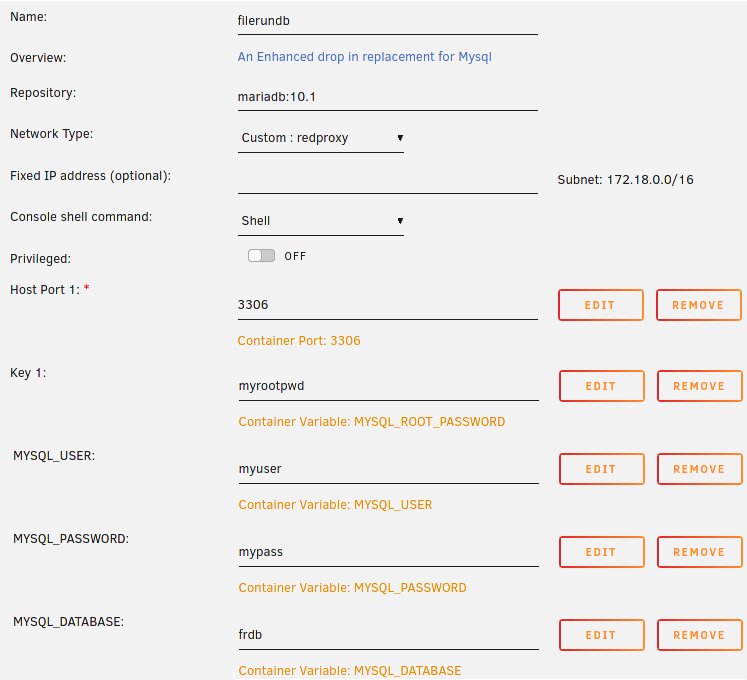
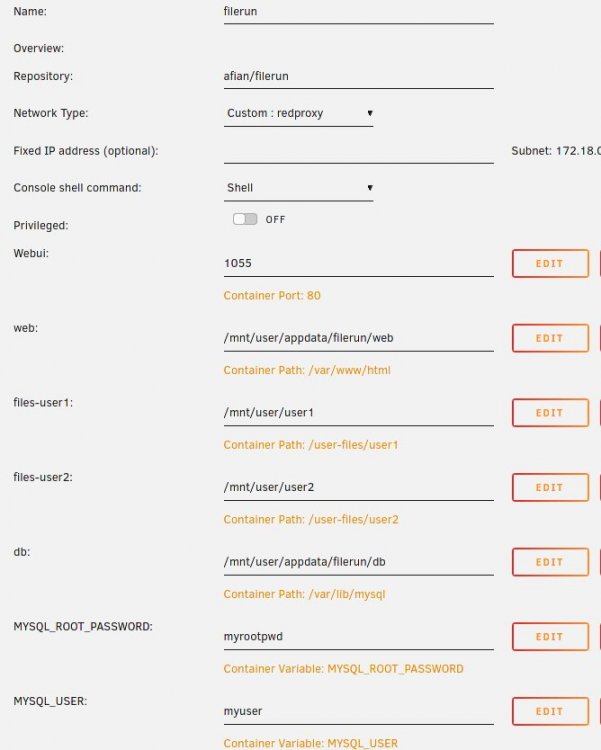
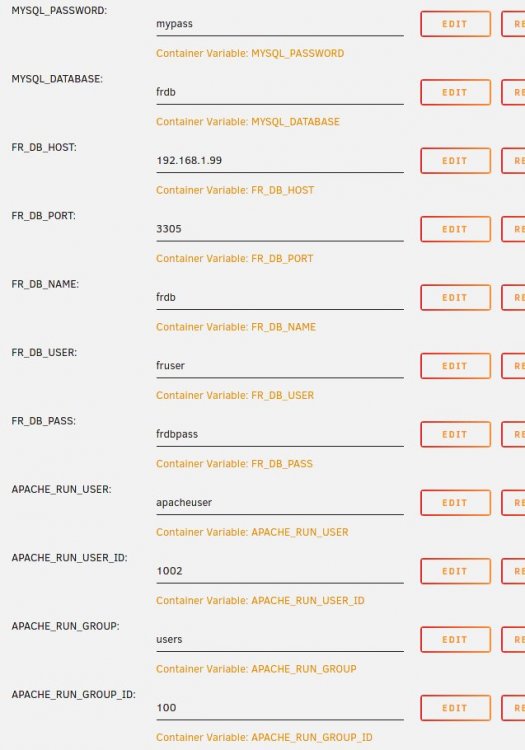
Hola a todos! Un compañero me ha pedido ayuda para desplegar FileRun (https://www.filerun.com/) en Docker, y me he animado a hacer esta mini guía. Lo primero, es que FileRun necesita una base de datos, así que vamos a montar MariaDB en Docker. Usamos la etiqueta 10.1, recomendada por FileRun en la documentación. El resto de parámetros son autoexplicativos y complemtamente libres. Pero hay que recordarlos, para utilizarlos en el contenedor de FileRun. Bien, ahora creamos el contenedor de FileRun. En mi caso, quería tener dos usuarios, y quería que cada uno pudiera acceder a su carpeta por SMB. Entonces, no podía montar un share para los dos, y tuve que montar dos shares. Y en el contenedor de FileRun, mapeamos las dos carpetas. Pero las dos deben estar dentro de la carpeta user-files del contenedor. Aquí vemos que la página de FileRun estará en el puerto 1055. Y vemos que usará la red redproxy, que es como se llama la red donde tengo SWAG, y todos los servicios "públicos". Los usuarios y contraseñas de MYSQL, deben ser los que indicamos en el contenedor de MariaDB. Continuamos: El puerto, nombre de la base de datos... Deben ser los que indicamos en el contenedor de MariaDB. Luego hay que indicar los datos de Apache. He creado un usuario, que tiene el ID 1002. Esto es así porque este usuario debe tener todos los permisos en los dos shares creados para los dos usuarios, para poder subir y modificar ficheros. Yo además tengo cambiados los paths por defecto de la Papelera y de los Thumbnails que crea FilerRun, pero con esto ya podemos empezar. Una vez se arranque FileRun, creará la BBDD él solo y toda la estructura necesaria. Si hay algún problema, podemos verlo en el log del contenedor. Muy importante lo del proxy, porque para registrar FileRun es necesario un dominio. Aquí está el conf de SWAG que utilizo para acceder a filerun.miserver.com, e incluye las líneas de GeoIP que habrá que quitar si no se utiliza: # make sure that your dns has a cname set for filerun server { listen 443 ssl; listen [::]:443 ssl; server_name filerun.*; include /config/nginx/ssl.conf; client_max_body_size 0; # GeoIP if ($allow_list = yes) { set $allowed_country yes; } if ($allowed_country = no) { return 444; } # enable for ldap auth, fill in ldap details in ldap.conf #include /config/nginx/ldap.conf; location / { # enable the next two lines for http auth #auth_basic "Restricted"; #auth_basic_user_file /config/nginx/.htpasswd; # enable the next two lines for ldap auth #auth_request /auth; #error_page 401 =200 /login; include /config/nginx/proxy.conf; resolver 127.0.0.11 valid=30s; set $upstream_app filerun; set $upstream_port 80; set $upstream_proto http; proxy_pass $upstream_proto://$upstream_app:$upstream_port; } } Bueno, espero no haberme dejado nada, hace bastante tiempo que lo tengo en marcha y puede que se me haya pasado algo. Espero que lo disfrutéis!!! EDIT: Comentar que no hace falta hacer nada en MariaDB, FileRun cuando arranque verá que es una instalación nueva, y creará la base de datos él solo.
-
Enhorabuena Eugeni! Pedazo de fichaje habéis hecho 😉
-
Are the Telegram notifications working in this container?
-
One process are stuck in 100% of use since yesterday. root 7774 99.8 0.0 3648 2892 ? R Feb02 1991:57 vi /tmp/mc-root/mail.ya2gU7




