PlanetDyna
Members
-
Joined
-
Last visited
Everything posted by PlanetDyna
-
Meines Wissens keine technische Veränderung.
-
Hallo zusammen, ein Großteil meiner Dateien sind verschwunden. Alle Ordner sind vorhanden, jedoch deren Inhalt nicht. Was mir zudem noch auffällt: Nahezu sämtliche Ordner haben das gleiche Erstellungsdatum erhalten. Kann hier bitte jemand weiterhelfen? Vielen Dank im Voraus PD
-
Maybe I have been choosen the wrong PCIe ACS override setting?
-
@Community Developer: Sorry - I cant understand. What is interesting: If I use the old XML file at least one interface of the network card is recognised?
-
Exactly! I downloaded the image from the official OPNsense site. I cannot execute the command in the installation routine and cannot complete it without a network card.
-
Thank you again, ghost82. The new XML-Version is working. But it shows "no interfaces found". Do you know why?
-
Thank you, ghost82. After importing getting "XML error: Attempted double use of PCI Address 0000:03:00.0". Iam using seabios becuase on my machine OPNsense won't boot with ovmf.
-
Can somone please help me? I removed the Bridge-NIC and one interface of my 4-port-NIC appears. But not the other ones. I dont know how to edit the XML in the right way. I also changed ACS override to "Downstream". Is that right? <?xml version='1.0' encoding='UTF-8'?> <domain type='kvm'> <name>effefe</name> <uuid>1e4b4549-c679-a436-be30-8f04aab895c3</uuid> <metadata> <vmtemplate xmlns="unraid" name="Linux" icon="linux.png" os="linux"/> </metadata> <memory unit='KiB'>1048576</memory> <currentMemory unit='KiB'>1048576</currentMemory> <memoryBacking> <nosharepages/> </memoryBacking> <vcpu placement='static'>6</vcpu> <cputune> <vcpupin vcpu='0' cpuset='0'/> <vcpupin vcpu='1' cpuset='6'/> <vcpupin vcpu='2' cpuset='2'/> <vcpupin vcpu='3' cpuset='8'/> <vcpupin vcpu='4' cpuset='4'/> <vcpupin vcpu='5' cpuset='10'/> </cputune> <os> <type arch='x86_64' machine='pc-q35-5.1'>hvm</type> </os> <features> <acpi/> <apic/> </features> <cpu mode='host-passthrough' check='none' migratable='on'> <topology sockets='1' dies='1' cores='3' threads='2'/> <cache mode='passthrough'/> </cpu> <clock offset='utc'> <timer name='rtc' tickpolicy='catchup'/> <timer name='pit' tickpolicy='delay'/> <timer name='hpet' present='no'/> </clock> <on_poweroff>destroy</on_poweroff> <on_reboot>restart</on_reboot> <on_crash>restart</on_crash> <devices> <emulator>/usr/local/sbin/qemu</emulator> <disk type='file' device='disk'> <driver name='qemu' type='raw' cache='writeback'/> <source file='/mnt/user/domains/effefe/vdisk1.img'/> <target dev='hdc' bus='virtio'/> <boot order='1'/> <address type='pci' domain='0x0000' bus='0x03' slot='0x00' function='0x0'/> </disk> <disk type='file' device='cdrom'> <driver name='qemu' type='raw'/> <source file='/mnt/user/isos/OPNsense-21.7.1-OpenSSL-dvd-amd64.iso'/> <target dev='hda' bus='sata'/> <readonly/> <boot order='2'/> <address type='drive' controller='0' bus='0' target='0' unit='0'/> </disk> <controller type='usb' index='0' model='ich9-ehci1'> <address type='pci' domain='0x0000' bus='0x00' slot='0x07' function='0x7'/> </controller> <controller type='usb' index='0' model='ich9-uhci1'> <master startport='0'/> <address type='pci' domain='0x0000' bus='0x00' slot='0x07' function='0x0' multifunction='on'/> </controller> <controller type='usb' index='0' model='ich9-uhci2'> <master startport='2'/> <address type='pci' domain='0x0000' bus='0x00' slot='0x07' function='0x1'/> </controller> <controller type='usb' index='0' model='ich9-uhci3'> <master startport='4'/> <address type='pci' domain='0x0000' bus='0x00' slot='0x07' function='0x2'/> </controller> <controller type='sata' index='0'> <address type='pci' domain='0x0000' bus='0x00' slot='0x1f' function='0x2'/> </controller> <controller type='pci' index='0' model='pcie-root'/> <controller type='virtio-serial' index='0'> <address type='pci' domain='0x0000' bus='0x02' slot='0x00' function='0x0'/> </controller> <controller type='pci' index='1' model='pcie-root-port'> <model name='pcie-root-port'/> <target chassis='1' port='0x10'/> <address type='pci' domain='0x0000' bus='0x00' slot='0x02' function='0x0' multifunction='on'/> </controller> <controller type='pci' index='2' model='pcie-root-port'> <model name='pcie-root-port'/> <target chassis='2' port='0x11'/> <address type='pci' domain='0x0000' bus='0x00' slot='0x02' function='0x1'/> </controller> <controller type='pci' index='3' model='pcie-root-port'> <model name='pcie-root-port'/> <target chassis='3' port='0x12'/> <address type='pci' domain='0x0000' bus='0x00' slot='0x02' function='0x2'/> </controller> <controller type='pci' index='4' model='pcie-root-port'> <model name='pcie-root-port'/> <target chassis='4' port='0x13'/> <address type='pci' domain='0x0000' bus='0x00' slot='0x02' function='0x3'/> </controller> <controller type='pci' index='5' model='pcie-root-port'> <model name='pcie-root-port'/> <target chassis='5' port='0x14'/> <address type='pci' domain='0x0000' bus='0x00' slot='0x02' function='0x4'/> </controller> <controller type='pci' index='6' model='pcie-root-port'> <model name='pcie-root-port'/> <target chassis='6' port='0x15'/> <address type='pci' domain='0x0000' bus='0x00' slot='0x02' function='0x5'/> </controller> <controller type='pci' index='7' model='pcie-root-port'> <model name='pcie-root-port'/> <target chassis='7' port='0x16'/> <address type='pci' domain='0x0000' bus='0x00' slot='0x02' function='0x6'/> </controller> <controller type='pci' index='8' model='pcie-root-port'> <model name='pcie-root-port'/> <target chassis='8' port='0x17'/> <address type='pci' domain='0x0000' bus='0x00' slot='0x02' function='0x7'/> </controller> <serial type='pty'> <target type='isa-serial' port='0'> <model name='isa-serial'/> </target> </serial> <console type='pty'> <target type='serial' port='0'/> </console> <channel type='unix'> <target type='virtio' name='org.qemu.guest_agent.0'/> <address type='virtio-serial' controller='0' bus='0' port='1'/> </channel> <input type='tablet' bus='usb'> <address type='usb' bus='0' port='1'/> </input> <input type='mouse' bus='ps2'/> <input type='keyboard' bus='ps2'/> <graphics type='vnc' port='-1' autoport='yes' websocket='-1' listen='0.0.0.0' keymap='de'> <listen type='address' address='0.0.0.0'/> </graphics> <video> <model type='qxl' ram='65536' vram='65536' vgamem='16384' heads='1' primary='yes'/> <address type='pci' domain='0x0000' bus='0x00' slot='0x01' function='0x0'/> </video> <hostdev mode='subsystem' type='pci' managed='yes'> <driver name='vfio'/> <source> <address domain='0x0000' bus='0x03' slot='0x00' function='0x0'/> </source> <address type='pci' domain='0x0000' bus='0x04' slot='0x00' function='0x0'/> </hostdev> <hostdev mode='subsystem' type='pci' managed='yes'> <driver name='vfio'/> <source> <address domain='0x0000' bus='0x03' slot='0x00' function='0x1'/> </source> <address type='pci' domain='0x0000' bus='0x05' slot='0x00' function='0x0'/> </hostdev> <hostdev mode='subsystem' type='pci' managed='yes'> <driver name='vfio'/> <source> <address domain='0x0000' bus='0x04' slot='0x00' function='0x0'/> </source> <address type='pci' domain='0x0000' bus='0x06' slot='0x00' function='0x0'/> </hostdev> <hostdev mode='subsystem' type='pci' managed='yes'> <driver name='vfio'/> <source> <address domain='0x0000' bus='0x04' slot='0x00' function='0x1'/> </source> <address type='pci' domain='0x0000' bus='0x07' slot='0x00' function='0x0'/> </hostdev> <memballoon model='none'/> </devices> </domain>
-
Quick question: SSH shows "proftpd.conf" is unwirtable. What should I do to fix it/able to make changes? Thank you!
-
Hey Folks, I use WireGuard-Easy from weejewel in a Docker instance. Everything works fine so far. However, not the iptables. I want the client (10.8.0.2) to have exclusive access to one IP address (192.168.12.2). A web service is running on 192.168.12.2. All other connections are to be rejected. Can you tell me what the correct entries are for the iptables? What I tested: All chains (INPUT, FORWARD, OUTPUT) Drop. iptables --append INPUT --protocol all --src 10.8.0.2 --dst 192.168.12.2 --jump ACCEPT iptables --append OUTPUT --protocol all --src 10.8.0.2 --dst 192.168.12.2 --jump ACCEPT Many greetings PD
-
Sorry - can you explain in other words what "stbale" means?
-
Hey Folks. Quick question: When running Filebot I got: "Skipping AMC script invocation: input folder not stable". You know how to fix? Best regards
-
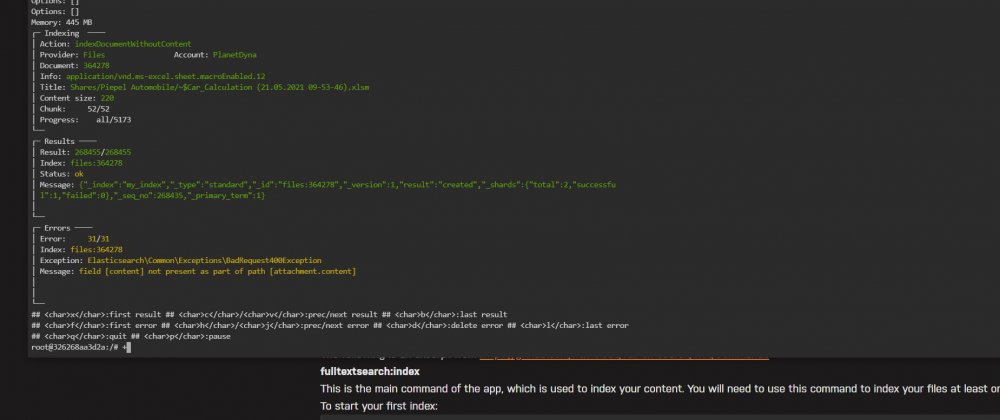
Can someone tell me whats wrong here? Test is running great - but no results appears in nextcloud search.