





PlanetDyna
Members
-
Joined
-
Last visited
Everything posted by PlanetDyna
-
I updated to Unraid 7 - now ProFTPD is no longer starting. Someone can help me?
-
Thank you. But also this isnt working.
-
Having the same error. Also when downloading the file via wget.
-
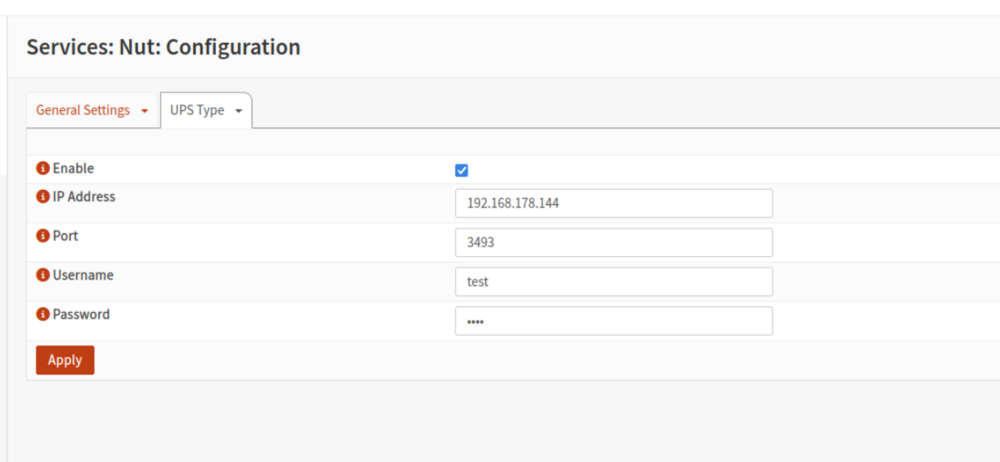
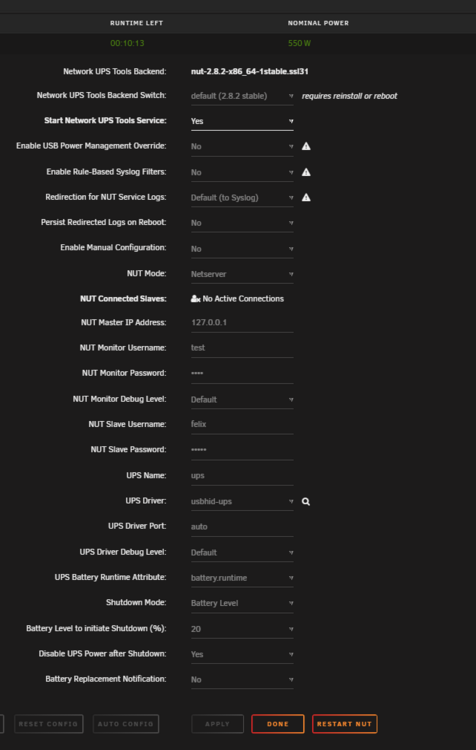
Someone know why I cant connect to the NUT-Server via OPNsense?
-
I am trying to use LDAP with Authentik. Does anyone have it running and can tell me the port I need to bind in the docker container? Best PlanetDyna
-
Someone got the new B580 working? I tried different kernel but nothing works.
-
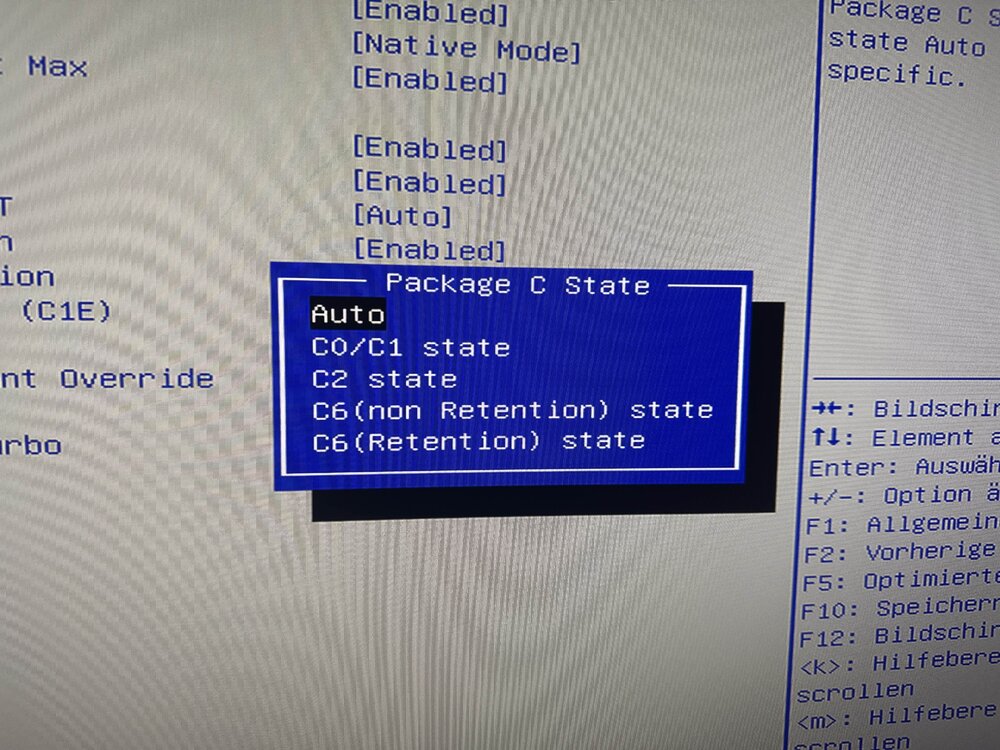
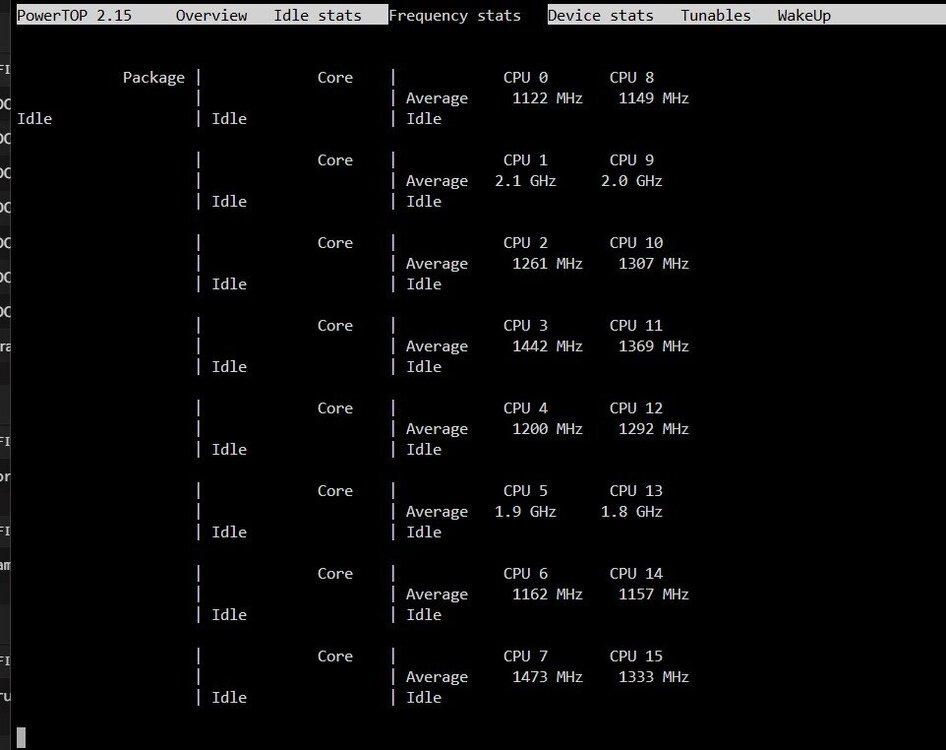
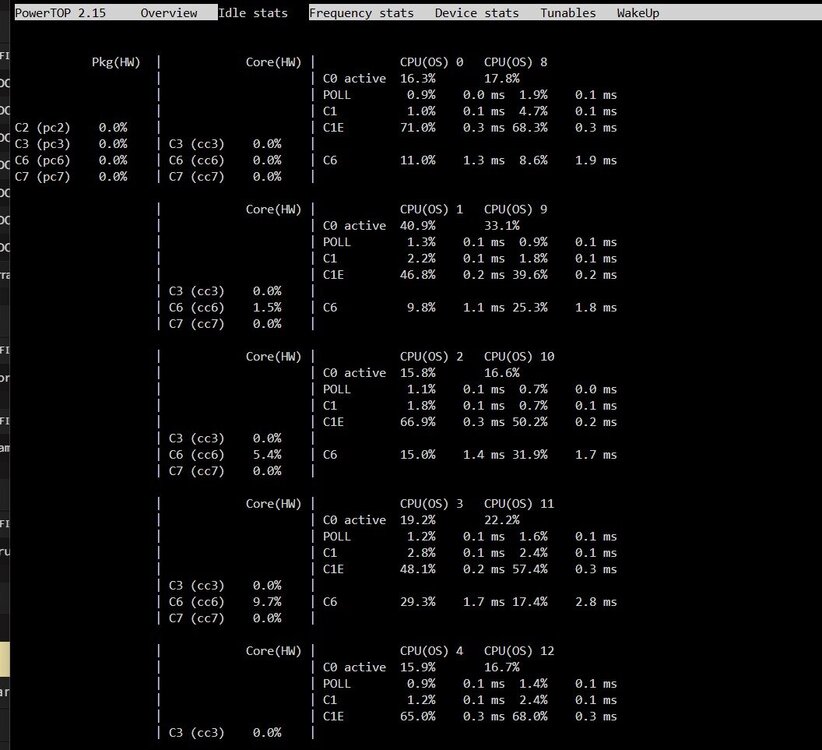
Awesome tool @mgutt. My xeon w3-2435 does not seem to take over the power saving setting. Or is it a display error? I am using an ASUS WS W790-ACE motherboard. Package C State is used "Auto".

-
Thank you very much!
-
When mover is running I got: "No space left on device" But its not full. Anyone can help me? tower-diagnostics-20241106-0154.zip
-
You found a solution?
-
Is this also working with current nexrcloud version? I don't think so?
-
My array does not spin down although most of it is in cache pools. Does anyone have an idea? unraid-diagnostics-20241009-1005.zip
-
I got the same error @chris1259. You found a solution?
-
Someone can help me whats the problem? Aug 20 23:05:50 Tower emhttpd: shcmd (10053937): /usr/local/sbin/mover start |& logger -t move & Aug 20 23:05:50 Tower move: Usage: /usr/local/sbin/mover.old start [-e] <disk_name> Aug 20 23:05:50 Tower move: /usr/local/sbin/mover.old stop|status Aug 20 23:05:50 Tower move: <disk_name> must match pattern 'disk[0-9]*' Aug 20 23:06:02 Tower kernel: loop: Write error at byte offset 3471380480, length 4096. Aug 20 23:06:02 Tower kernel: I/O error, dev loop2, sector 6780040 op 0x1:(WRITE) flags 0x100000 phys_seg 2 prio class 0 Aug 20 23:06:02 Tower kernel: BTRFS error (device loop2): bdev /dev/loop2 errs: wr 125922, rd 0, flush 0, corrupt 0, gen 0 Aug 20 23:06:09 Tower kernel: loop: Write error at byte offset 20879126528, length 4096. Aug 20 23:06:09 Tower kernel: I/O error, dev loop2, sector 40779544 op 0x1:(WRITE) flags 0x100000 phys_seg 1 prio class 0 Aug 20 23:06:09 Tower kernel: BTRFS error (device loop2): bdev /dev/loop2 errs: wr 125923, rd 0, flush 0, corrupt 0, gen 0
-
Someone knows why I got this error? Alread installed the official qnap driver.
-
Someone can tell me how to change e-mail attachment fetch interval?
-
Thank you. I will test it next days! Working! I missed change connection-type to "TCP/HTTP".
-
Someone can have a quick look?
-
Its maybe my WireGuard OPNsense Setup. Any ideas?
-
Nobody can help me?
-
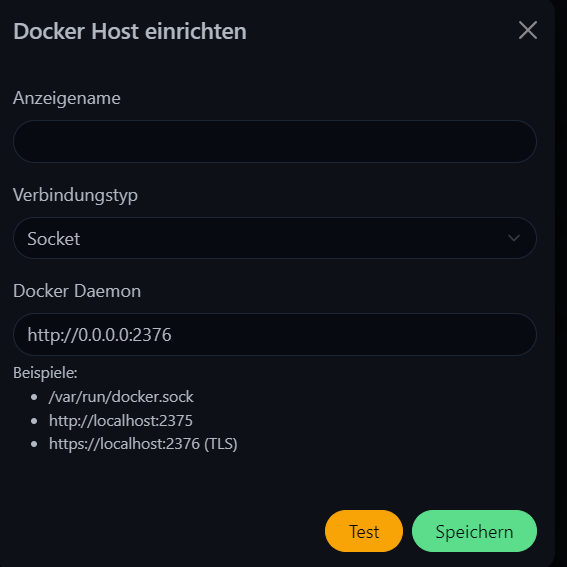
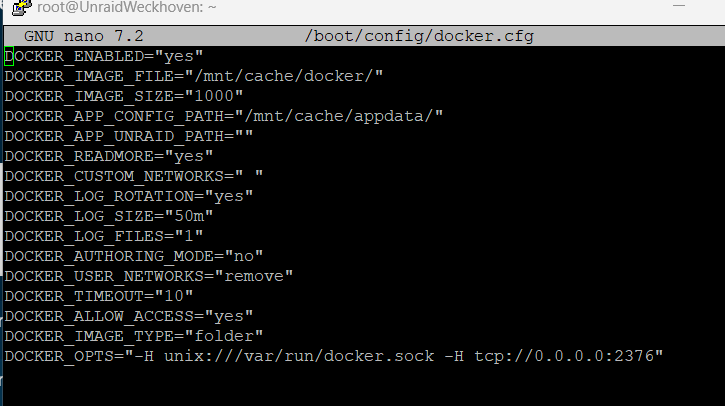
Its not working unfourtunately. Something wrong?
-
I have noticed that I always have to restart the container so that peers are displayed as online. Is this a known problem?
-
Poste ich heute noch. Habe jedoch folgendes Problem jetzt: Häufig wird nur der Ton ausgegeben uns kein Bild. Verwendet wird OBS auf einer Windows VM und eine zusätzlicheR Docker um den RTMP-Stream in einer m3u8 wiedergeben zu können.
-
Someone can tell me what to edit that I get an sound output device? <?xml version='1.0' encoding='UTF-8'?> <domain type='kvm'> <name>NEW</name> <uuid>6c3b0459-92d1-4e0e-96d6-0d6820c3aada</uuid> <metadata> <vmtemplate xmlns="unraid" name="Windows 11" icon="windows11.png" os="windowstpm"/> </metadata> <memory unit='KiB'>8388608</memory> <currentMemory unit='KiB'>8388608</currentMemory> <memoryBacking> <nosharepages/> </memoryBacking> <vcpu placement='static'>16</vcpu> <cputune> <vcpupin vcpu='0' cpuset='0'/> <vcpupin vcpu='1' cpuset='8'/> <vcpupin vcpu='2' cpuset='1'/> <vcpupin vcpu='3' cpuset='9'/> <vcpupin vcpu='4' cpuset='2'/> <vcpupin vcpu='5' cpuset='10'/> <vcpupin vcpu='6' cpuset='3'/> <vcpupin vcpu='7' cpuset='11'/> <vcpupin vcpu='8' cpuset='4'/> <vcpupin vcpu='9' cpuset='12'/> <vcpupin vcpu='10' cpuset='5'/> <vcpupin vcpu='11' cpuset='13'/> <vcpupin vcpu='12' cpuset='6'/> <vcpupin vcpu='13' cpuset='14'/> <vcpupin vcpu='14' cpuset='7'/> <vcpupin vcpu='15' cpuset='15'/> </cputune> <os> <type arch='x86_64' machine='pc-i440fx-7.1'>hvm</type> <loader readonly='yes' type='pflash'>/usr/share/qemu/ovmf-x64/OVMF_CODE-pure-efi-tpm.fd</loader> <nvram>/etc/libvirt/qemu/nvram/6c3b0459-92d1-4e0e-96d6-0d6820c3aada_VARS-pure-efi-tpm.fd</nvram> </os> <features> <acpi/> <apic/> <hyperv mode='custom'> <relaxed state='on'/> <vapic state='on'/> <spinlocks state='on' retries='8191'/> <vendor_id state='on' value='none'/> </hyperv> </features> <cpu mode='host-passthrough' check='none' migratable='on'> <topology sockets='1' dies='1' cores='8' threads='2'/> <cache mode='passthrough'/> </cpu> <clock offset='localtime'> <timer name='hypervclock' present='yes'/> <timer name='hpet' present='no'/> </clock> <on_poweroff>destroy</on_poweroff> <on_reboot>restart</on_reboot> <on_crash>restart</on_crash> <devices> <emulator>/usr/local/sbin/qemu</emulator> <disk type='file' device='disk'> <driver name='qemu' type='raw' cache='writeback'/> <source file='/mnt/user/domains/NEW/vdisk1.img'/> <target dev='hdc' bus='virtio'/> <serial>vdisk1</serial> <boot order='1'/> <address type='pci' domain='0x0000' bus='0x00' slot='0x04' function='0x0'/> </disk> <disk type='file' device='cdrom'> <driver name='qemu' type='raw'/> <source file='/mnt/user/isos/22631.2428.Nickel-X64-DE-CLIENTCORE.iso'/> <target dev='hda' bus='ide'/> <readonly/> <boot order='2'/> <address type='drive' controller='0' bus='0' target='0' unit='0'/> </disk> <disk type='file' device='cdrom'> <driver name='qemu' type='raw'/> <source file='/mnt/user/isos/virtio-win-0.1.240-1.iso'/> <target dev='hdb' bus='ide'/> <readonly/> <address type='drive' controller='0' bus='0' target='0' unit='1'/> </disk> <controller type='pci' index='0' model='pci-root'/> <controller type='ide' index='0'> <address type='pci' domain='0x0000' bus='0x00' slot='0x01' function='0x1'/> </controller> <controller type='virtio-serial' index='0'> <address type='pci' domain='0x0000' bus='0x00' slot='0x03' function='0x0'/> </controller> <controller type='usb' index='0' model='ich9-ehci1'> <address type='pci' domain='0x0000' bus='0x00' slot='0x07' function='0x7'/> </controller> <controller type='usb' index='0' model='ich9-uhci1'> <master startport='0'/> <address type='pci' domain='0x0000' bus='0x00' slot='0x07' function='0x0' multifunction='on'/> </controller> <controller type='usb' index='0' model='ich9-uhci2'> <master startport='2'/> <address type='pci' domain='0x0000' bus='0x00' slot='0x07' function='0x1'/> </controller> <controller type='usb' index='0' model='ich9-uhci3'> <master startport='4'/> <address type='pci' domain='0x0000' bus='0x00' slot='0x07' function='0x2'/> </controller> <interface type='bridge'> <mac address='52:54:00:16:69:44'/> <source bridge='virbr0'/> <model type='virtio-net'/> <address type='pci' domain='0x0000' bus='0x00' slot='0x02' function='0x0'/> </interface> <serial type='pty'> <target type='isa-serial' port='0'> <model name='isa-serial'/> </target> </serial> <console type='pty'> <target type='serial' port='0'/> </console> <channel type='unix'> <target type='virtio' name='org.qemu.guest_agent.0'/> <address type='virtio-serial' controller='0' bus='0' port='1'/> </channel> <input type='tablet' bus='usb'> <address type='usb' bus='0' port='1'/> </input> <input type='mouse' bus='ps2'/> <input type='keyboard' bus='ps2'/> <tpm model='tpm-tis'> <backend type='emulator' version='2.0' persistent_state='yes'/> </tpm> <audio id='1' type='none'/> <hostdev mode='subsystem' type='pci' managed='yes'> <driver name='vfio'/> <source> <address domain='0x0000' bus='0x85' slot='0x00' function='0x0'/> </source> <rom file='/mnt/user/domains/217350.rom'/> <address type='pci' domain='0x0000' bus='0x00' slot='0x05' function='0x0'/> </hostdev> <hostdev mode='subsystem' type='pci' managed='yes'> <driver name='vfio'/> <source> <address domain='0x0000' bus='0x85' slot='0x00' function='0x1'/> </source> <address type='pci' domain='0x0000' bus='0x00' slot='0x06' function='0x0'/> </hostdev> <memballoon model='none'/> </devices> </domain>
-
@alturismo Ich verwende bereits den Kernel 6.3.13 und die ARC läuft einwandfrei. Den Audio-Chip zu einer VM durchzureichen ist nochmal was anderes? Über IOMMU Groups das zu erzwingen ist auch keine Möglichkeit?



