





ogi
Members
-
Joined
-
Last visited
-
I'm having a head-scratcher of an issue, and could use some suggestions. My plex server becomes unresponsive after running for about a day, maybe a little longer, but the container is still running. Over that day, the Plex server will consume all available CPU. There is nothing going on the server in terms of activity (no playback, conversions, scans, etc) top - 19:59:26 up 2 days, 12:24, 0 user, load average: 14.18, 12.29, 10.02 Tasks: 10 total, 1 running, 9 sleeping, 0 stopped, 0 zombie %Cpu(s): 10.4 us, 25.1 sy, 0.0 ni, 64.5 id, 0.0 wa, 0.0 hi, 0.0 si, 0.0 st MiB Mem : 370807.8 total, 5692.8 free, 14802.9 used, 359324.8 buff/cache MiB Swap: 0.0 total, 0.0 free, 0.0 used. 356004.9 avail Mem PID USER PR NI VIRT RES SHR S %CPU %MEM TIME+ COMMAND 86 nobody 20 0 4849040 277072 58532 S 1378 0.1 5d+0h Plex Media Serv The server is currently responsive, but if history has anything to say, it won't be for much longer. Looking at my Plex Media Server.log file, I do have a handful of errors, but nothing I would think would cause this behavior. Here's a sampling of the errors I'm having: # these messages get more and more prominent indicating to me that there is a deterioration of service WARN - Held transaction for too long (/home/runner/actions-runner/_work/plex-media-server/plex-media-server/Library/MetadataCollection.cpp:525): 0.630000 seconds # a whole lot of... ERROR - Failed to get color palette: Empty pixels when quantize ERROR - Failed to get color palette: Empty pixels when quantize ERROR - Failed to select colors # after a while... MyPlex: Invalid response when mapping state (code=429): # Also some ERROR - [Req#6a064] Unknown metadata type: folder WARN - [Req#6a064] QueryParser: Invalid field 'contentDirectoryID' found, ignoring. WARN - [Req#6a064] QueryParser: Invalid field 'pinnedContentDirectoryID' found, ignoring. # then getting more deterioration WARN - [Req#6a0fc] SLOW QUERY: It took 300.000000 ms to retrieve 1 items. # get occasional WARN - NAT: PMP, got an error: Not Supported by gateway. # got ~8 of these ERROR - [CreditsDetectionManager] Mis-matching media items detected, skipping ERROR - [CreditsDetectionManager] Mis-matching media items detected, skipping ERROR - [CreditsDetectionManager] Mis-matching media items detected, skipping ERROR - [CreditsDetectionManager] Mis-matching media items detected, skipping ERROR - [CreditsDetectionManager] Mis-matching media items detected, skipping ERROR - [CreditsDetectionManager] Detection is unsupported with multi-part media items ERROR - [CreditsDetectionManager] Mis-matching media items detected, skipping ERROR - [CreditsDetectionManager] Mis-matching media items detected, skipping ERROR - [CreditsDetectionManager] Mis-matching media items detected, skipping I'm happy to provide other log info, but the other log files are very small in comparison Browsing some of the other logs, other things that caught my eye, in `com.plexapp.system.log` WARNING (data:179) - Error decoding with simplejson, using demjson instead (this will cause a performance hit) - Expecting property name enclosed in double quotes: line 26 column 1 (char 1078) ... CRITICAL (runtime:1128) - Exception in thread named 'refresh_servers' (most recent call last): File "/usr/lib/plexmediaserver/Resources/Plug-ins-a0bfb8370/Framework.bundle/Contents/Resources/Versions/2/Python/Framework/components/runtime.py", line 1126, in _start_thread f(*args, **kwargs) File "/usr/lib/plexmediaserver/Resources/Plug-ins-a0bfb8370/System.bundle/Contents/Code/peerservice.py", line 169, in refresh_servers servers_el = self.get_servers_el() File "/usr/lib/plexmediaserver/Resources/Plug-ins-a0bfb8370/System.bundle/Contents/Code/peerservice.py", line 165, in get_servers_el return XML.ElementFromURL('http://127.0.0.1:32400/servers', cacheTime = 0) File "/usr/lib/plexmediaserver/Resources/Plug-ins-a0bfb8370/Framework.bundle/Contents/Resources/Versions/2/Python/Framework/api/parsekit.py", line 344, in ElementFromURL method=method, File "/usr/lib/plexmediaserver/Resources/Plug-ins-a0bfb8370/Framework.bundle/Contents/Resources/Versions/2/Python/Framework/api/networkkit.py", line 67, in _http_request req = self._core.networking.http_request(url, *args, **kwargs) File "/usr/lib/plexmediaserver/Resources/Plug-ins-a0bfb8370/Framework.bundle/Contents/Resources/Versions/2/Python/Framework/components/networking.py", line 352, in http_request return HTTPRequest(self._core, url, data, h, url_cache, encoding, errors, timeout, immediate, sleep, opener, follow_redirects, method) File "/usr/lib/plexmediaserver/Resources/Plug-ins-a0bfb8370/Framework.bundle/Contents/Resources/Versions/2/Python/Framework/components/networking.py", line 119, in __init__ self.load() File "/usr/lib/plexmediaserver/Resources/Plug-ins-a0bfb8370/Framework.bundle/Contents/Resources/Versions/2/Python/Framework/components/networking.py", line 159, in load f = self._opener.open(req, timeout=self._timeout) File "/usr/lib/plexmediaserver/Resources/Python/python27.zip/urllib2.py", line 435, in open response = meth(req, response) File "/usr/lib/plexmediaserver/Resources/Python/python27.zip/urllib2.py", line 548, in http_response 'http', request, response, code, msg, hdrs) File "/usr/lib/plexmediaserver/Resources/Python/python27.zip/urllib2.py", line 473, in error return self._call_chain(*args) File "/usr/lib/plexmediaserver/Resources/Python/python27.zip/urllib2.py", line 407, in _call_chain result = func(*args) File "/usr/lib/plexmediaserver/Resources/Python/python27.zip/urllib2.py", line 556, in http_error_default raise HTTPError(req.get_full_url(), code, msg, hdrs, fp) HTTPError: HTTP Error 503: Service Unavailable DEBUG (networking:144) - Requesting 'http://resources-cdn.plexapp.com/hashes.json' ERROR (networking:197) - Error opening URL 'http://resources-cdn.plexapp.com/hashes.json' CRITICAL (runtime:1299) - Exception getting hosted resource hashes (most recent call last): File "/usr/lib/plexmediaserver/Resources/Plug-ins-a0bfb8370/Framework.bundle/Contents/Resources/Versions/2/Python/Framework/components/runtime.py", line 1291, in get_resource_hashes json = self._core.networking.http_request("http://resources-cdn.plexapp.com/hashes.json", timeout=5).content File "/usr/lib/plexmediaserver/Resources/Plug-ins-a0bfb8370/Framework.bundle/Contents/Resources/Versions/2/Python/Framework/components/networking.py", line 243, in content return self.__str__() File "/usr/lib/plexmediaserver/Resources/Plug-ins-a0bfb8370/Framework.bundle/Contents/Resources/Versions/2/Python/Framework/components/networking.py", line 221, in __str__ self.load() File "/usr/lib/plexmediaserver/Resources/Plug-ins-a0bfb8370/Framework.bundle/Contents/Resources/Versions/2/Python/Framework/components/networking.py", line 159, in load f = self._opener.open(req, timeout=self._timeout) File "/usr/lib/plexmediaserver/Resources/Python/python27.zip/urllib2.py", line 435, in open response = meth(req, response) File "/usr/lib/plexmediaserver/Resources/Python/python27.zip/urllib2.py", line 548, in http_response 'http', request, response, code, msg, hdrs) File "/usr/lib/plexmediaserver/Resources/Python/python27.zip/urllib2.py", line 473, in error return self._call_chain(*args) File "/usr/lib/plexmediaserver/Resources/Python/python27.zip/urllib2.py", line 407, in _call_chain result = func(*args) File "/usr/lib/plexmediaserver/Resources/Python/python27.zip/urllib2.py", line 556, in http_error_default raise HTTPError(req.get_full_url(), code, msg, hdrs, fp) HTTPError: HTTP Error 404: Not Found I've searched the logs for the word "corruption" but haven't noticed it, regardless, I did do most of the steps to repair the database as per the wiki. I'm open to other suggestions. Have a good holiday season! EDIT: I just went ahead and deleted the `extrafanart` and `extrathumbs` directories everywhere, I think they're a hold over from my kodi/xbmc days and I saw a few references to those in the logs. EDIT 2: Had the same issue still after the above, I backed up the database and am rebuilding it from scratch to see if that helps. EDIT 3: Tried a new database construction, but was still getting ...less than ideal behavior. Eventually changed from transcoding to RAM to the cache drive, everything seems to be working fine. Curious if there was some change on the unraid side regarding the use of /tmp. Will see if this server runs for a while without issue and report back. EDIT 4: Nope, server is still dying after ~6 hours of uptime.... getting to be the end of the day my time, so I'm going to call it a night. I'm attaching the log from Plex Media Server with debug enabled in case anyone else has a clue of what to look for. Plex Media Server.1.log EDIT 5: Saw my sab docker container had a HUGE download queue that was just ...stuck. sab was set to /dev/shm If Sab was pre-allocating space on there, it would consume a ton of memory and I could see it causing issues elsewhere. I've switched sab to use my cache SSD for unpacking, but it will be another day before I can see if the behavior in Plex Server has changed.
-
Hey folks, This thread is full of posts about suggested changes to smb-extra.conf and smb-fruit.conf and reports of conflicting outcomes. I wanted to create a post with the settings that I'm using that's getting the best results I've seen in some time. For context, I have a "movies" share that has ~1,000 directories. When I started tweaking stuff, it took ~6-7 minutes to load from the time I connected. At present I can load that same share in about 10 seconds and get smooth scrolling when looking in Finder (no doubt there is some caching going on). I want to point out that I think the file names smb-extra.conf and smb-fruit.conf are awful, and obscure how they're used. smb-extra.conf has the contents of placed in the `global` section of the samba config, and the contents of smb-fruit.conf are placed in every share section. So, settings that can go in `[global]` should go in smb-extra.conf and share specific configuration options should go in smb-fruit.conf. With that said, I have the following settings: smb-extra.conf vfs objects = catia fruit streams_depot log level = 3 passdb:5 auth:5 min protocol = SMB2 aio read size = 0 aio write size = 0 server multi channel support = yes interfaces = "192.168.1.32;capability=RSS,speed=1000000000" fruit:resource = file fruit:encoding = native fruit:metadata = stream fruit:appl = yes smb-fruit.conf readdir_attr:aapl_rsize = no readdir_attr:aapl_finder_info = no readdir_attr:aapl_max_access = no Hope this helps someone!
-
yeah mpv doesn't give a lot of options here; I can specify a large cache but the rate of caching is just a wee bit slower than the rate of playback (and significantly slower than a file transfer). Unfortunately I'm not seeing options in mpv to tweak anything in this regard
-
So while file transfers are going fine, mpv streams are a good deal slower, best I can do via mpv stream is ~60 Mbps, which isn't quite good enough to keep up with higher quality media playback. I'm sturgling to think about what options I could change on the unraid samba side to support (slightly) faster streaming via mpv.
-
There is ...significant geographic distance. Ping duration is 218 ms (wired on both ends). I wouldn't have thought that to be a significant barrier to transfer speeds...
-
Hello folks, I could use some assistance, as I am lost as to where to go from here. I am quite some distance from my unraid server. I have a site-to-site VPN configured so I can access the unraid server from my LAN with ease. With the site-to-site VPN, using iperf3, I'm able to do about 150 Mbps transfer in either direction. Accepted connection from 192.168.3.215, port 62663 [ 5] local 192.168.1.32 port 5201 connected to 192.168.3.215 port 62664 [ ID] Interval Transfer Bitrate Retr Cwnd [ 5] 0.00-1.00 sec 716 KBytes 5.86 Mbits/sec 0 146 KBytes [ 5] 1.00-2.00 sec 12.4 MBytes 104 Mbits/sec 0 2.83 MBytes [ 5] 2.00-3.00 sec 17.5 MBytes 147 Mbits/sec 0 11.6 MBytes [ 5] 3.00-4.00 sec 17.5 MBytes 147 Mbits/sec 0 8.33 MBytes [ 5] 4.00-5.00 sec 17.5 MBytes 147 Mbits/sec 0 8.33 MBytes [ 5] 5.00-6.00 sec 18.8 MBytes 157 Mbits/sec 0 8.23 MBytes [ 5] 6.00-7.00 sec 17.5 MBytes 147 Mbits/sec 0 8.33 MBytes [ 5] 7.00-8.00 sec 18.8 MBytes 157 Mbits/sec 0 8.30 MBytes [ 5] 8.00-9.00 sec 17.5 MBytes 147 Mbits/sec 0 8.30 MBytes [ 5] 9.00-10.00 sec 17.5 MBytes 147 Mbits/sec 0 8.34 MBytes [ 5] 10.00-10.22 sec 3.75 MBytes 142 Mbits/sec 0 8.34 MBytes - - - - - - - - - - - - - - - - - - - - - - - - - [ ID] Interval Transfer Bitrate Retr [ 5] 0.00-10.22 sec 159 MBytes 131 Mbits/sec 0 sender When trying to transfer files via samba, rsync over smb, or rsync using SSH, or scp; at best I get transfer speeds of 90 Mbps. I understand iperf3 will perform faster due to less overhead, but this still seems like a significant penalty. Unfortunately, that transfer rate is just slow enough that I can't stream some of the higher bitrate content on my server. Any suggestions on how to debug where the bandwidth is being lost would be appreciated!
-
I don't think my E5-2680v2 processors can reach C8 state, would love to go into C7 tho!
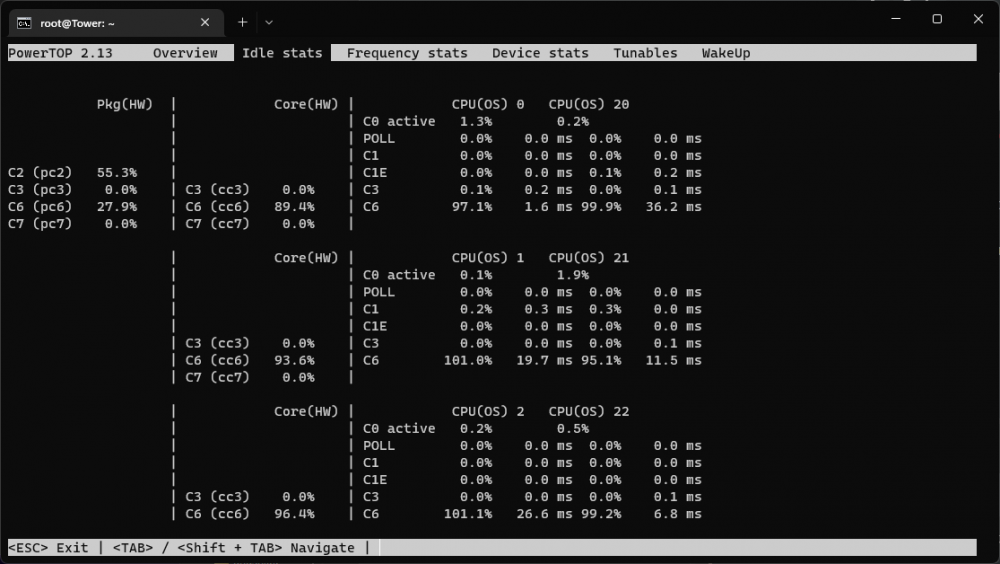
-
I'll give the LiveUSB a try in a bit and report back (might be a day or so, the garage where my server resides is absolutely cooking right now, and I don't really want to spend much time there). Regarding the HBA, is there a known HBA that can be flashed to IT mode that supports L1 support?
-
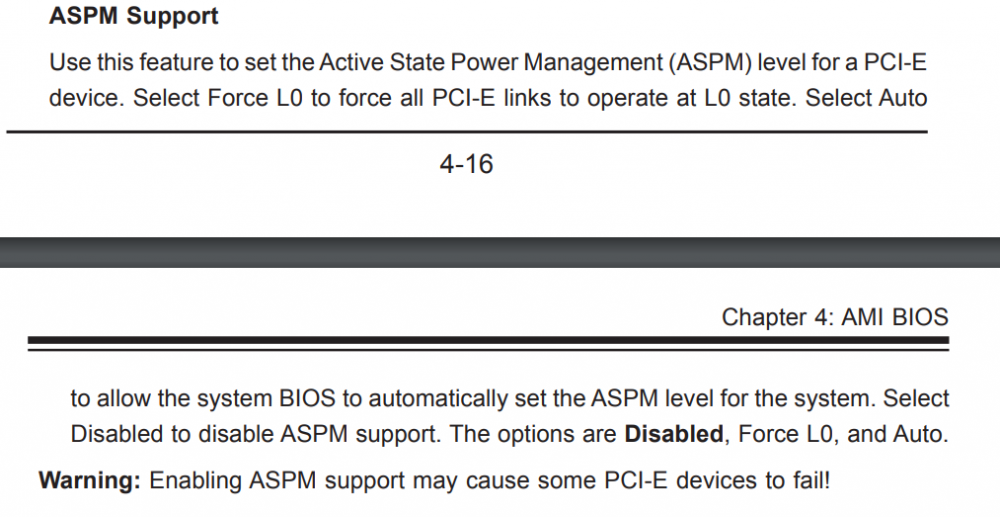
I set my BIOS ASPM option to "auto", here is the blurb in the manual about the options. I didn't actually see the Force L0 option. I also added pcie_aspm=force to the list of options in my /boot/syslinux/syslinux.cfg file root@Tower:~# cat /boot/syslinux/syslinux.cfg default menu.c32 menu title Lime Technology, Inc. prompt 0 timeout 50 label Unraid OS menu default kernel /bzimage append intel_iommu=on rd.driver.pre=vfio-pci video=vesafb:off,efifb:off isolcpus=4-9,24-29 vfio_iommu_type1.allow_unsafe_interrupts=1 initrd=/bzroot pcie_aspm=force label Unraid OS GUI Mode kernel /bzimage append isolcpus=4-9,24-29 vfio_iommu_type1.allow_unsafe_interrupts=1 initrd=/bzroot,/bzroot-gui label Unraid OS Safe Mode (no plugins, no GUI) kernel /bzimage append initrd=/bzroot unraidsafemode label Unraid OS GUI Safe Mode (no plugins) kernel /bzimage append initrd=/bzroot,/bzroot-gui unraidsafemode label Memtest86+ kernel /memtest Before the above two options, all entries when I did lspci showed ASPM disabled, with the above changes, only a handful of entries (primarily PCI bridges and my HBA) show ASPM as being disabled. I have no problem trying ubuntu; server is a bit tough to access but I'll make a go of it. Would the idea be to boot off of a liveUSB and then check ASPM status?
-
Sorry to bring a thread back from the dead; I decided that I wanted to spend time trying to minimize idle power-usage on my Supermicro Server (X9DRi-LN4F+ motherboard). I followed most of the advice here; have a handful of devices that ASPM is still disabled for here; hoping I could get some suggestions on how to address them: root@Tower:~# lspci -vv | awk '/ASPM/{print $0}' RS= | grep --color -P '(^[a-z0-9:.]+|ASPM )' 00:00.0 Host bridge: Intel Corporation Xeon E7 v2/Xeon E5 v2/Core i7 DMI2 (rev 04) LnkCap: Port #0, Speed 2.5GT/s, Width x4, ASPM L1, Exit Latency L1 <16us LnkCtl: ASPM Disabled; RCB 64 bytes, Disabled- CommClk- 00:01.0 PCI bridge: Intel Corporation Xeon E7 v2/Xeon E5 v2/Core i7 PCI Express Root Port 1a (rev 04) (prog-if 00 [Normal decode]) LnkCap: Port #0, Speed 2.5GT/s, Width x4, ASPM L1, Exit Latency L1 <16us LnkCtl: ASPM Disabled; RCB 64 bytes, Disabled- CommClk- 00:01.1 PCI bridge: Intel Corporation Xeon E7 v2/Xeon E5 v2/Core i7 PCI Express Root Port 1b (rev 04) (prog-if 00 [Normal decode]) LnkCap: Port #0, Speed 8GT/s, Width x4, ASPM L1, Exit Latency L1 <16us LnkCtl: ASPM Disabled; RCB 64 bytes, Disabled- CommClk+ 00:02.0 PCI bridge: Intel Corporation Xeon E7 v2/Xeon E5 v2/Core i7 PCI Express Root Port 2a (rev 04) (prog-if 00 [Normal decode]) LnkCap: Port #0, Speed 8GT/s, Width x16, ASPM L1, Exit Latency L1 <16us LnkCtl: ASPM L1 Enabled; RCB 64 bytes, Disabled- CommClk+ 00:03.0 PCI bridge: Intel Corporation Xeon E7 v2/Xeon E5 v2/Core i7 PCI Express Root Port 3a (rev 04) (prog-if 00 [Normal decode]) LnkCap: Port #0, Speed 8GT/s, Width x16, ASPM L1, Exit Latency L1 <16us LnkCtl: ASPM L1 Enabled; RCB 64 bytes, Disabled- CommClk+ 00:11.0 PCI bridge: Intel Corporation C600/X79 series chipset PCI Express Virtual Root Port (rev 06) (prog-if 00 [Normal decode]) LnkCap: Port #17, Speed 2.5GT/s, Width x1, ASPM L0s L1, Exit Latency L0s <64ns, L1 <1us LnkCtl: ASPM L0s L1 Enabled; RCB 64 bytes, Disabled- CommClk+ 00:1c.0 PCI bridge: Intel Corporation C600/X79 series chipset PCI Express Root Port 1 (rev b6) (prog-if 00 [Normal decode]) LnkCap: Port #1, Speed 5GT/s, Width x4, ASPM L1, Exit Latency L1 <4us LnkCtl: ASPM L1 Enabled; RCB 64 bytes, Disabled- CommClk+ pcilib: sysfs_read_vpd: read failed: No such device 02:00.0 Serial Attached SCSI controller: Broadcom / LSI SAS2308 PCI-Express Fusion-MPT SAS-2 (rev 05) LnkCap: Port #0, Speed 8GT/s, Width x8, ASPM L0s, Exit Latency L0s <64ns LnkCtl: ASPM Disabled; RCB 64 bytes, Disabled- CommClk+ 03:00.0 VGA compatible controller: NVIDIA Corporation TU104GL [Quadro RTX 4000] (rev a1) (prog-if 00 [VGA controller]) LnkCap: Port #0, Speed 8GT/s, Width x16, ASPM L0s L1, Exit Latency L0s <512ns, L1 <16us LnkCtl: ASPM L1 Enabled; RCB 64 bytes, Disabled- CommClk+ 03:00.1 Audio device: NVIDIA Corporation TU104 HD Audio Controller (rev a1) LnkCap: Port #0, Speed 8GT/s, Width x16, ASPM L0s L1, Exit Latency L0s <512ns, L1 <4us LnkCtl: ASPM L0s L1 Enabled; RCB 64 bytes, Disabled- CommClk+ 03:00.2 USB controller: NVIDIA Corporation TU104 USB 3.1 Host Controller (rev a1) (prog-if 30 [XHCI]) LnkCap: Port #0, Speed 8GT/s, Width x16, ASPM L0s L1, Exit Latency L0s <512ns, L1 <16us LnkCtl: ASPM L1 Enabled; RCB 64 bytes, Disabled- CommClk+ 03:00.3 Serial bus controller: NVIDIA Corporation TU104 USB Type-C UCSI Controller (rev a1) LnkCap: Port #0, Speed 8GT/s, Width x16, ASPM L0s L1, Exit Latency L0s <512ns, L1 <16us LnkCtl: ASPM L1 Enabled; RCB 64 bytes, Disabled- CommClk+ 04:00.0 VGA compatible controller: NVIDIA Corporation GP106GL [Quadro P2000] (rev a1) (prog-if 00 [VGA controller]) LnkCap: Port #0, Speed 8GT/s, Width x16, ASPM L0s L1, Exit Latency L0s <1us, L1 <4us LnkCtl: ASPM L1 Enabled; RCB 64 bytes, Disabled- CommClk+ 04:00.1 Audio device: NVIDIA Corporation GP106 High Definition Audio Controller (rev a1) LnkCap: Port #0, Speed 8GT/s, Width x16, ASPM L0s L1, Exit Latency L0s <1us, L1 <4us LnkCtl: ASPM L1 Enabled; RCB 64 bytes, Disabled- CommClk+ 05:00.0 Serial Attached SCSI controller: Intel Corporation C602 chipset 4-Port SATA Storage Control Unit (rev 06) LnkCap: Port #0, Speed 2.5GT/s, Width x1, ASPM L0s L1, Exit Latency L0s <64ns, L1 <1us LnkCtl: ASPM L0s L1 Enabled; RCB 64 bytes, Disabled- CommClk+ 06:00.0 Ethernet controller: Intel Corporation I350 Gigabit Network Connection (rev 01) LnkCap: Port #0, Speed 5GT/s, Width x4, ASPM L0s L1, Exit Latency L0s <4us, L1 <32us LnkCtl: ASPM L1 Enabled; RCB 64 bytes, Disabled- CommClk+ 06:00.1 Ethernet controller: Intel Corporation I350 Gigabit Network Connection (rev 01) LnkCap: Port #0, Speed 5GT/s, Width x4, ASPM L0s L1, Exit Latency L0s <4us, L1 <32us LnkCtl: ASPM L1 Enabled; RCB 64 bytes, Disabled- CommClk+ 06:00.2 Ethernet controller: Intel Corporation I350 Gigabit Network Connection (rev 01) LnkCap: Port #0, Speed 5GT/s, Width x4, ASPM L0s L1, Exit Latency L0s <4us, L1 <32us LnkCtl: ASPM L1 Enabled; RCB 64 bytes, Disabled- CommClk+ 06:00.3 Ethernet controller: Intel Corporation I350 Gigabit Network Connection (rev 01) LnkCap: Port #0, Speed 5GT/s, Width x4, ASPM L0s L1, Exit Latency L0s <4us, L1 <32us LnkCtl: ASPM L1 Enabled; RCB 64 bytes, Disabled- CommClk+ 80:00.0 PCI bridge: Intel Corporation Xeon E7 v2/Xeon E5 v2/Core i7 PCI Express Root Port in DMI2 Mode (rev 04) (prog-if 00 [Normal decode]) LnkCap: Port #8, Speed 2.5GT/s, Width x48, ASPM L1, Exit Latency L1 <16us LnkCtl: ASPM Disabled; RCB 64 bytes, Disabled- CommClk- 80:01.0 PCI bridge: Intel Corporation Xeon E7 v2/Xeon E5 v2/Core i7 PCI Express Root Port 1a (rev 04) (prog-if 00 [Normal decode]) LnkCap: Port #0, Speed 8GT/s, Width x8, ASPM L1, Exit Latency L1 <16us LnkCtl: ASPM L1 Enabled; RCB 64 bytes, Disabled- CommClk+ 80:02.0 PCI bridge: Intel Corporation Xeon E7 v2/Xeon E5 v2/Core i7 PCI Express Root Port 2a (rev 04) (prog-if 00 [Normal decode]) LnkCap: Port #0, Speed 8GT/s, Width x16, ASPM L1, Exit Latency L1 <16us LnkCtl: ASPM Disabled; RCB 64 bytes, Disabled- CommClk- 80:03.0 PCI bridge: Intel Corporation Xeon E7 v2/Xeon E5 v2/Core i7 PCI Express Root Port 3a (rev 04) (prog-if 00 [Normal decode]) LnkCap: Port #0, Speed 8GT/s, Width x16, ASPM L1, Exit Latency L1 <16us LnkCtl: ASPM L1 Enabled; RCB 64 bytes, Disabled- CommClk+ 82:00.0 Non-Volatile memory controller: Intel Corporation SSD 660P Series (rev 03) (prog-if 02 [NVM Express]) LnkCap: Port #0, Speed 8GT/s, Width x4, ASPM L1, Exit Latency L1 <8us LnkCtl: ASPM L1 Enabled; RCB 64 bytes, Disabled- CommClk+ 84:00.0 VGA compatible controller: NVIDIA Corporation TU104GL [Quadro RTX 4000] (rev a1) (prog-if 00 [VGA controller]) LnkCap: Port #0, Speed 8GT/s, Width x16, ASPM L0s L1, Exit Latency L0s <1us, L1 <4us LnkCtl: ASPM L1 Enabled; RCB 64 bytes, Disabled- CommClk+ 84:00.1 Audio device: NVIDIA Corporation TU104 HD Audio Controller (rev a1) LnkCap: Port #0, Speed 8GT/s, Width x16, ASPM L0s L1, Exit Latency L0s <1us, L1 <4us LnkCtl: ASPM L1 Enabled; RCB 64 bytes, Disabled- CommClk+ 84:00.2 USB controller: NVIDIA Corporation TU104 USB 3.1 Host Controller (rev a1) (prog-if 30 [XHCI]) LnkCap: Port #0, Speed 8GT/s, Width x16, ASPM L0s L1, Exit Latency L0s <1us, L1 <4us LnkCtl: ASPM L1 Enabled; RCB 64 bytes, Disabled- CommClk+ 84:00.3 Serial bus controller: NVIDIA Corporation TU104 USB Type-C UCSI Controller (rev a1) LnkCap: Port #0, Speed 8GT/s, Width x16, ASPM L0s L1, Exit Latency L0s <1us, L1 <4us LnkCtl: ASPM L1 Enabled; RCB 64 bytes, Disabled- CommClk+ Is this realistically the best that can be done with respect to ASPM enabling or is there further room for improvement?
-
I only had this issue with my GTX 670. I have had GPU pass through work with the Quadro RTX 4000 and a RTX 3080 FE.
-
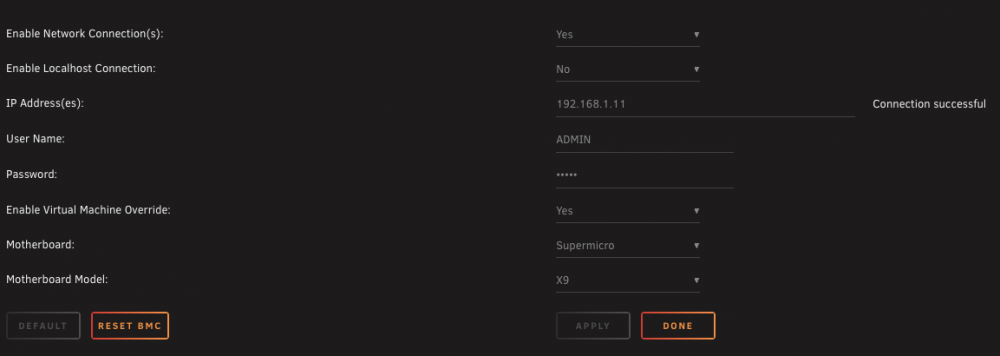
I have this same motherboard; ...that's curious why everything is grayed out...I had to specify a network connection and have it register "connection successful" before even attempting to do anything else... here's a screenshot of my settings.
-
I just implemented the suggested work around, I set the temperature limits for the hottest running drive, and set temperature limits for my array disks individually.
-
you can definitely modify the thresholds from within the app; you need to go to config settings and select sensors from the drop down. Careful removing a fan, you cannot get it back (unless you factory reset the BMC controller). On my x9 board, I can only set the thresholds on increments of 75. For example I can set a threshold at 750, or lower it to 675, but I cannot set it to 700 even.
-
Figured this had been requested before, with 167 pages in the thread, and the search results for "temperature" was still at least 3 pages.... was hard to determine what the current status is. Thanks for the suggested workaround!


