workermaster
Members
-
Joined
-
Last visited
Everything posted by workermaster
-
Sounds great, I will have a look around. My main concern was that the expander has to work together with the SAS controller but I guess that since we only use it to connect more drives to Unraid and not create ZFS or other things in Windows, that it doesn't matter what we connect. It all seems to be quite universal for when it comes to connecting more drives to Unraid.
-
Actually, I got another question. Do I need to connect that expander card with 1 or 2 cables to my 9211-8i controller? I just calculated that it would take almost 3 days to scan 10TB if the expander has 16 drives connected and 1 cable going to the SAS contoller. Would it also be possible to connect 2 cables to the controller so the bandwith to the expander doubles?
-
Sigh. Turns out that I never got a notice that somebody replied becasue I turned that off. Anyway thanks for the help. I will order that part from Ebay.
-
I had little time to research the card but am now actively trying to get one. I found this one on Ebay:https://www.ebay.com/itm/174868903384?hash=item28b6ffb5d8:g:y2gAAOSwghxhB3Eo. I assume that is the model that you recommended. I can't find any information on the internet about the maximum drive size. I have 1 10TB drive and multiple 8TB ones. Do you know if the expander supports that?
-
Did some testing and found that I do not need the plugin that @ich777 suggested. The problem seemed to be a VM template throwing errors. When I tried passing through the USB function of my GPU, the template gave me an error telling me that a device could not be found. I could not fix that error and just kept unstubbing the GPU parts to make it work again. Turns out that the solution was to just create a new template with all the parts of the GPU passed through.
-
I am willing to try and figure out what did it tomorrow. I am curious to know what exactly the problem was. Personally I think that I just messed up the way that I bound the GPU parts to VFIO and I just had to create a new VM template. But I will test that tomorrow. I am also happy to report that a Windows 11 virtual machine is feeling just as snappy as my old Windows 10 bare metal install. Previously the Windows 10 virtual machines were laggy for me. Unraid finally starts to look like a permament host option for me.
-
Thanks, I did not know that I messed that up. I was typing at the bottom of my screen and did not see that a list was shown with names. Anyway it all seems to work now. I have Unraid 6.10 RC2 running and after recreating the template and binding all parts (and motherboard audio) to my VM with the steps that @ghost82 described, it works. I have not had to use the template given to me, but I will store that one for later testing. I can now reboot the VM when I want to without rebooting the whole system. @ich777 I have a question that is not related to this topic but it is something that I have been wondering for a while. You are a community developer and I have seen a lot of work you have done. That also goes for a lot of other things other people created. What I don't understand is why Unraid by itself is so incomplete. To get everything working you need to download a whole list of community applications. Things like "Fix common problems" and "CA auto update applications" and "Unassigned devices". Why doesn't Unraid come with most of these functionalities build in? To me it seems like Unraid builds 80% of the product and the community gets to finish the last 20%. Do you happen to know why that is?
-
I think it was just the template that was messed up. I created a new VM template and gave it another name and pointed the boot drive to my NVME. I am now back in my VM on Unraid 6.10. That issue seems to be solved now. I am now in the process of binding the GPU to the VM and see if that helps. @ghost82 I will let you know what happens when I try your template. Hopefully it works with Unraid 6.10.
-
I have 6.10 running and downloaded the plugin. How do I use it? The screen stays black and the VM won't boot.
-
Thanks for your reply. I will try to do your fix later today or tomorrow. How do I attach vfio iommu groups to a VM? Currently I have attached hardware by selecting it in a dropdown menu when creating the VM template (not the xml view). The only hardware that I have selected to be isolated at boot is the NVME controller. I have done that by selecting it in the Tools -> system devices -> click checkbox of iommu group 15 and then click on "Bind selected to VFIO at boot". Is that what I need to do for the other groups as well?
-
Hi, I have not seen that yet. I have just tried upgrading to version 6.10.0-RC1 but my VM refuses to start there. It shows one core at about 85% load. The exact same problem that I have when I reboot the VM. I also noticed that when I stop the VM, the screen shows the black and white Unraid terminal text that you see when it boots. It does not do that in 6.9.2 after I shutdown a VM. I am guessing that the GPU has trouble switching from the Unraid text to being used in a VM. Since it gave me some trouble and I am expecting food to arrive in a few minutes, I have reverted back to 6.9.2 for the moment and will try your suggestion later today or tomorrow.
-
Here are the diagnostics. I have tried to pass through the whole card. The VM currently has the video and sound part of it. But I can't get the USB part to work. When I select that in the VM template then it gives me an error telling me that the usb device cannot be found. I can try to post screenshots of that. tower-diagnostics-20210822-1840.zip
-
To add more info, here is the log from the W11 VM: ErrorWarningSystemArrayLogin -boot strict=on \ -device pcie-root-port,port=0x8,chassis=1,id=pci.1,bus=pcie.0,multifunction=on,addr=0x1 \ -device pcie-root-port,port=0x9,chassis=2,id=pci.2,bus=pcie.0,addr=0x1.0x1 \ -device pcie-root-port,port=0xa,chassis=3,id=pci.3,bus=pcie.0,addr=0x1.0x2 \ -device pcie-root-port,port=0xb,chassis=4,id=pci.4,bus=pcie.0,addr=0x1.0x3 \ -device pcie-root-port,port=0xc,chassis=5,id=pci.5,bus=pcie.0,addr=0x1.0x4 \ -device pcie-root-port,port=0xd,chassis=6,id=pci.6,bus=pcie.0,addr=0x1.0x5 \ -device pcie-root-port,port=0xe,chassis=7,id=pci.7,bus=pcie.0,addr=0x1.0x6 \ -device qemu-xhci,p2=15,p3=15,id=usb,bus=pcie.0,addr=0x7 \ -device virtio-serial-pci,id=virtio-serial0,bus=pci.2,addr=0x0 \ -blockdev '{"driver":"file","filename":"/mnt/user/Plex/spaces_win_clover.img","node-name":"libvirt-3-storage","cache":{"direct":false,"no-flush":false},"auto-read-only":true,"discard":"unmap"}' \ -blockdev '{"node-name":"libvirt-3-format","read-only":false,"cache":{"direct":false,"no-flush":false},"driver":"raw","file":"libvirt-3-storage"}' \ -device virtio-blk-pci,bus=pci.3,addr=0x0,drive=libvirt-3-format,id=virtio-disk2,bootindex=1,write-cache=on \ -blockdev '{"driver":"file","filename":"/mnt/disks/ST1000LM035-1RK172_W931P0KJ/Windows11_InsiderPreview_Client_x64_en-us_22000.iso","node-name":"libvirt-2-storage","auto-read-only":true,"discard":"unmap"}' \ -blockdev '{"node-name":"libvirt-2-format","read-only":true,"driver":"raw","file":"libvirt-2-storage"}' \ -device ide-cd,bus=ide.0,drive=libvirt-2-format,id=sata0-0-0,bootindex=2 \ -blockdev '{"driver":"file","filename":"/mnt/user/isos/virtio-win-0.1.190-1.iso","node-name":"libvirt-1-storage","auto-read-only":true,"discard":"unmap"}' \ -blockdev '{"node-name":"libvirt-1-format","read-only":true,"driver":"raw","file":"libvirt-1-storage"}' \ -device ide-cd,bus=ide.1,drive=libvirt-1-format,id=sata0-0-1 \ -netdev tap,fd=33,id=hostnet0 \ -device virtio-net,netdev=hostnet0,id=net0,mac=52:54:00:e9:d6:6d,bus=pci.1,addr=0x0 \ -chardev pty,id=charserial0 \ -device isa-serial,chardev=charserial0,id=serial0 \ -chardev socket,id=charchannel0,fd=34,server,nowait \ -device virtserialport,bus=virtio-serial0.0,nr=1,chardev=charchannel0,id=channel0,name=org.qemu.guest_agent.0 \ -device vfio-pci,host=0000:0b:00.0,id=hostdev0,bus=pci.4,addr=0x0,romfile=/mnt/user/isos/vbios/6800xt.rom \ -device vfio-pci,host=0000:0b:00.1,id=hostdev1,bus=pci.5,addr=0x0 \ -device vfio-pci,host=0000:01:00.0,id=hostdev2,bus=pci.6,addr=0x0 \ -device usb-host,hostbus=7,hostaddr=2,id=hostdev3,bus=usb.0,port=1 \ -device usb-host,hostbus=7,hostaddr=3,id=hostdev4,bus=usb.0,port=2 \ -device usb-host,hostbus=5,hostaddr=2,id=hostdev5,bus=usb.0,port=3 \ -sandbox on,obsolete=deny,elevateprivileges=deny,spawn=deny,resourcecontrol=deny \ -msg timestamp=on 2021-08-22 14:38:23.850+0000: Domain id=2 is tainted: high-privileges 2021-08-22 14:38:23.850+0000: Domain id=2 is tainted: host-cpu char device redirected to /dev/pts/0 (label charserial0) 2021-08-22T14:38:26.806084Z qemu-system-x86_64: vfio: Cannot reset device 0000:0b:00.1, depends on group 21 which is not owned. 2021-08-22T14:38:26.810067Z qemu-system-x86_64: vfio: Cannot reset device 0000:0b:00.0, depends on group 21 which is not owned. 2021-08-22T14:38:26.927508Z qemu-system-x86_64: vfio: Cannot reset device 0000:0b:00.1, depends on group 21 which is not owned. 2021-08-22T14:38:26.931497Z qemu-system-x86_64: vfio: Cannot reset device 0000:0b:00.0, depends on group 21 which is not owned. This log shows a normal VM boot after I rebooted Unraid, followed by a normal reboot of just the VM, then a forcefull shutdown since the VM stopped working, Then I applied the AMD reset fix from spaceinvader and then restarted the VM. I am seeing that the log shows that it needs group 21. That is the USB part of the GPU. But I have no idea how to give that to the VM. If I select it in the VM template, then I get an error saying that it can't find the controller. And binding at boot also doesn't work since it doesn't even show up in the VM template at boot. I have no idea what this is. Do I just happen to have the one single 6800 XT in existence that has the AMD reset bug while litterally all others on the world do not?
-
I have dumped the vbios of the card with the help of the script from Spaceinvaderone. That did not change anything. The VM has the latest drivers already. I tried binding the GPU with sound and USB parts at boot but that did not work. I also read through the link you gave me. That seems to be about people who didn't get the passthrough to work. I did but I am having issues rebooting a VM. There was another person in that thread that also had reboot issues but that person mentioned that when he rebooted, Windows did actually reboot but just not show an image. My VM does not reboot. I see one cpu core at about 85% load wich does not change. The VM does not boot. Here is the new VM template that I am using: <?xml version='1.0' encoding='UTF-8'?> <domain type='kvm' id='2'> <name>Windows 11 gaming VM</name> <uuid>9ddb5e1c-fc7b-5677-070b-8bbf44d6629e</uuid> <metadata> <vmtemplate xmlns="unraid" name="Windows 10" icon="windows.png" os="windows10"/> </metadata> <memory unit='KiB'>20971520</memory> <currentMemory unit='KiB'>20971520</currentMemory> <memoryBacking> <nosharepages/> </memoryBacking> <vcpu placement='static'>12</vcpu> <cputune> <vcpupin vcpu='0' cpuset='2'/> <vcpupin vcpu='1' cpuset='10'/> <vcpupin vcpu='2' cpuset='3'/> <vcpupin vcpu='3' cpuset='11'/> <vcpupin vcpu='4' cpuset='4'/> <vcpupin vcpu='5' cpuset='12'/> <vcpupin vcpu='6' cpuset='5'/> <vcpupin vcpu='7' cpuset='13'/> <vcpupin vcpu='8' cpuset='6'/> <vcpupin vcpu='9' cpuset='14'/> <vcpupin vcpu='10' cpuset='7'/> <vcpupin vcpu='11' cpuset='15'/> </cputune> <resource> <partition>/machine</partition> </resource> <os> <type arch='x86_64' machine='pc-q35-5.1'>hvm</type> <loader readonly='yes' type='pflash'>/usr/share/qemu/ovmf-x64/OVMF_CODE-pure-efi.fd</loader> <nvram>/etc/libvirt/qemu/nvram/9ddb5e1c-fc7b-5677-070b-8bbf44d6629e_VARS-pure-efi.fd</nvram> </os> <features> <acpi/> <apic/> </features> <cpu mode='host-passthrough' check='none' migratable='on'> <topology sockets='1' dies='1' cores='6' threads='2'/> <cache mode='passthrough'/> <feature policy='require' name='topoext'/> </cpu> <clock offset='localtime'> <timer name='rtc' tickpolicy='catchup'/> <timer name='pit' tickpolicy='delay'/> <timer name='hpet' present='no'/> </clock> <on_poweroff>destroy</on_poweroff> <on_reboot>restart</on_reboot> <on_crash>restart</on_crash> <devices> <emulator>/usr/local/sbin/qemu</emulator> <disk type='file' device='disk'> <driver name='qemu' type='raw' cache='writeback'/> <source file='/mnt/user/Plex/spaces_win_clover.img' index='3'/> <backingStore/> <target dev='hdc' bus='virtio'/> <boot order='1'/> <alias name='virtio-disk2'/> <address type='pci' domain='0x0000' bus='0x03' slot='0x00' function='0x0'/> </disk> <disk type='file' device='cdrom'> <driver name='qemu' type='raw'/> <source file='/mnt/disks/ST1000LM035-1RK172_W931P0KJ/Windows11_InsiderPreview_Client_x64_en-us_22000.iso' index='2'/> <backingStore/> <target dev='hda' bus='sata'/> <readonly/> <boot order='2'/> <alias name='sata0-0-0'/> <address type='drive' controller='0' bus='0' target='0' unit='0'/> </disk> <disk type='file' device='cdrom'> <driver name='qemu' type='raw'/> <source file='/mnt/user/isos/virtio-win-0.1.190-1.iso' index='1'/> <backingStore/> <target dev='hdb' bus='sata'/> <readonly/> <alias name='sata0-0-1'/> <address type='drive' controller='0' bus='0' target='0' unit='1'/> </disk> <controller type='usb' index='0' model='qemu-xhci' ports='15'> <alias name='usb'/> <address type='pci' domain='0x0000' bus='0x00' slot='0x07' function='0x0'/> </controller> <controller type='pci' index='1' model='pcie-root-port'> <model name='pcie-root-port'/> <target chassis='1' port='0x8'/> <alias name='pci.1'/> <address type='pci' domain='0x0000' bus='0x00' slot='0x01' function='0x0' multifunction='on'/> </controller> <controller type='pci' index='2' model='pcie-root-port'> <model name='pcie-root-port'/> <target chassis='2' port='0x9'/> <alias name='pci.2'/> <address type='pci' domain='0x0000' bus='0x00' slot='0x01' function='0x1'/> </controller> <controller type='pci' index='3' model='pcie-root-port'> <model name='pcie-root-port'/> <target chassis='3' port='0xa'/> <alias name='pci.3'/> <address type='pci' domain='0x0000' bus='0x00' slot='0x01' function='0x2'/> </controller> <controller type='pci' index='4' model='pcie-root-port'> <model name='pcie-root-port'/> <target chassis='4' port='0xb'/> <alias name='pci.4'/> <address type='pci' domain='0x0000' bus='0x00' slot='0x01' function='0x3'/> </controller> <controller type='pci' index='5' model='pcie-root-port'> <model name='pcie-root-port'/> <target chassis='5' port='0xc'/> <alias name='pci.5'/> <address type='pci' domain='0x0000' bus='0x00' slot='0x01' function='0x4'/> </controller> <controller type='pci' index='6' model='pcie-root-port'> <model name='pcie-root-port'/> <target chassis='6' port='0xd'/> <alias name='pci.6'/> <address type='pci' domain='0x0000' bus='0x00' slot='0x01' function='0x5'/> </controller> <controller type='pci' index='7' model='pcie-root-port'> <model name='pcie-root-port'/> <target chassis='7' port='0xe'/> <alias name='pci.7'/> <address type='pci' domain='0x0000' bus='0x00' slot='0x01' function='0x6'/> </controller> <controller type='virtio-serial' index='0'> <alias name='virtio-serial0'/> <address type='pci' domain='0x0000' bus='0x02' slot='0x00' function='0x0'/> </controller> <controller type='sata' index='0'> <alias name='ide'/> <address type='pci' domain='0x0000' bus='0x00' slot='0x1f' function='0x2'/> </controller> <controller type='pci' index='0' model='pcie-root'> <alias name='pcie.0'/> </controller> <interface type='bridge'> <mac address='52:54:00:e9:d6:6d'/> <source bridge='br0'/> <target dev='vnet0'/> <model type='virtio-net'/> <alias name='net0'/> <address type='pci' domain='0x0000' bus='0x01' slot='0x00' function='0x0'/> </interface> <serial type='pty'> <source path='/dev/pts/0'/> <target type='isa-serial' port='0'> <model name='isa-serial'/> </target> <alias name='serial0'/> </serial> <console type='pty' tty='/dev/pts/0'> <source path='/dev/pts/0'/> <target type='serial' port='0'/> <alias name='serial0'/> </console> <channel type='unix'> <source mode='bind' path='/var/lib/libvirt/qemu/channel/target/domain-2-Windows 11 gaming VM/org.qemu.guest_agent.0'/> <target type='virtio' name='org.qemu.guest_agent.0' state='disconnected'/> <alias name='channel0'/> <address type='virtio-serial' controller='0' bus='0' port='1'/> </channel> <input type='mouse' bus='ps2'> <alias name='input0'/> </input> <input type='keyboard' bus='ps2'> <alias name='input1'/> </input> <hostdev mode='subsystem' type='pci' managed='yes'> <driver name='vfio'/> <source> <address domain='0x0000' bus='0x0b' slot='0x00' function='0x0'/> </source> <alias name='hostdev0'/> <rom file='/mnt/user/isos/vbios/6800xt.rom'/> <address type='pci' domain='0x0000' bus='0x04' slot='0x00' function='0x0'/> </hostdev> <hostdev mode='subsystem' type='pci' managed='yes'> <driver name='vfio'/> <source> <address domain='0x0000' bus='0x0b' slot='0x00' function='0x1'/> </source> <alias name='hostdev1'/> <address type='pci' domain='0x0000' bus='0x05' slot='0x00' function='0x0'/> </hostdev> <hostdev mode='subsystem' type='pci' managed='yes'> <driver name='vfio'/> <source> <address domain='0x0000' bus='0x01' slot='0x00' function='0x0'/> </source> <alias name='hostdev2'/> <address type='pci' domain='0x0000' bus='0x06' slot='0x00' function='0x0'/> </hostdev> <hostdev mode='subsystem' type='usb' managed='no'> <source> <vendor id='0x046d'/> <product id='0xc07e'/> <address bus='7' device='2'/> </source> <alias name='hostdev3'/> <address type='usb' bus='0' port='1'/> </hostdev> <hostdev mode='subsystem' type='usb' managed='no'> <source> <vendor id='0x046d'/> <product id='0xc336'/> <address bus='7' device='3'/> </source> <alias name='hostdev4'/> <address type='usb' bus='0' port='2'/> </hostdev> <hostdev mode='subsystem' type='usb' managed='no'> <source> <vendor id='0x2516'/> <product id='0x014d'/> <address bus='5' device='2'/> </source> <alias name='hostdev5'/> <address type='usb' bus='0' port='3'/> </hostdev> <memballoon model='none'/> </devices> <seclabel type='dynamic' model='dac' relabel='yes'> <label>+0:+100</label> <imagelabel>+0:+100</imagelabel> </seclabel> </domain> As you can see, I added the sound counterparts and some extra CPU cores. But other than that nothing has changed.
-
I have passed through the sound part of the card as well. Did that after I created this post. The reset bug is still there. I am using a Vbios that I downloaded from Techpowerup. I will try to dump the one from my own card. So far, I also have another problem. I am now using a Windows 11 VM (that runs waaaaay better than the previous W10) but gaming on it works somewhat. But the bad gaming performance is something for another thread. Basically the card is not being used 100% by the VM.
-
Hi all, I got a system with a RX 6800 XT GPU. I heard that when a VM is forcefully shutdown, then it can show the AMD reset bug. For some reason I always get that bug. Just rebooting the VM causes the GPU to stop working. I run a Windows 10 VM. It also happens in the Windows 11 test VM. Other relevant hardware: R7 3700X 32GB DDR4 Asus X470-f gaming motherboard. I have used the fix from Spaceinvaderone mentioned here: https://www.youtube.com/watch?v=0uZODoPQH9c But again, he mentions that this bug only happens on some occasions. I get it every single time. This makes a VM with this GPU not usable. I also found this thread but creating a new kernel did not help me: https://forums.unraid.net/topic/103897-amd-reset-bug/ It is possible though that I simply did something wrong. I followed the steps and only set the reset vendor to "true". Here is my XML: <?xml version='1.0' encoding='UTF-8'?> <domain type='kvm' id='2'> <name>Windows 11 gaming VM</name> <uuid>9ddb5e1c-fc7b-5677-070b-8bbf44d6629e</uuid> <metadata> <vmtemplate xmlns="unraid" name="Windows 10" icon="windows.png" os="windows10"/> </metadata> <memory unit='KiB'>20971520</memory> <currentMemory unit='KiB'>20971520</currentMemory> <memoryBacking> <nosharepages/> </memoryBacking> <vcpu placement='static'>8</vcpu> <cputune> <vcpupin vcpu='0' cpuset='4'/> <vcpupin vcpu='1' cpuset='12'/> <vcpupin vcpu='2' cpuset='5'/> <vcpupin vcpu='3' cpuset='13'/> <vcpupin vcpu='4' cpuset='6'/> <vcpupin vcpu='5' cpuset='14'/> <vcpupin vcpu='6' cpuset='7'/> <vcpupin vcpu='7' cpuset='15'/> </cputune> <resource> <partition>/machine</partition> </resource> <os> <type arch='x86_64' machine='pc-q35-5.1'>hvm</type> <loader readonly='yes' type='pflash'>/usr/share/qemu/ovmf-x64/OVMF_CODE-pure-efi.fd</loader> <nvram>/etc/libvirt/qemu/nvram/9ddb5e1c-fc7b-5677-070b-8bbf44d6629e_VARS-pure-efi.fd</nvram> </os> <features> <acpi/> <apic/> </features> <cpu mode='host-passthrough' check='none' migratable='on'> <topology sockets='1' dies='1' cores='4' threads='2'/> <cache mode='passthrough'/> <feature policy='require' name='topoext'/> </cpu> <clock offset='localtime'> <timer name='rtc' tickpolicy='catchup'/> <timer name='pit' tickpolicy='delay'/> <timer name='hpet' present='no'/> </clock> <on_poweroff>destroy</on_poweroff> <on_reboot>restart</on_reboot> <on_crash>restart</on_crash> <devices> <emulator>/usr/local/sbin/qemu</emulator> <disk type='file' device='disk'> <driver name='qemu' type='raw' cache='writeback'/> <source file='/mnt/user/Plex/spaces_win_clover.img' index='3'/> <backingStore/> <target dev='hdc' bus='virtio'/> <boot order='1'/> <alias name='virtio-disk2'/> <address type='pci' domain='0x0000' bus='0x03' slot='0x00' function='0x0'/> </disk> <disk type='file' device='cdrom'> <driver name='qemu' type='raw'/> <source file='/mnt/user/Plex/win10.iso' index='2'/> <backingStore/> <target dev='hda' bus='sata'/> <readonly/> <boot order='2'/> <alias name='sata0-0-0'/> <address type='drive' controller='0' bus='0' target='0' unit='0'/> </disk> <disk type='file' device='cdrom'> <driver name='qemu' type='raw'/> <source file='/mnt/user/isos/virtio-win-0.1.190-1.iso' index='1'/> <backingStore/> <target dev='hdb' bus='sata'/> <readonly/> <alias name='sata0-0-1'/> <address type='drive' controller='0' bus='0' target='0' unit='1'/> </disk> <controller type='usb' index='0' model='qemu-xhci' ports='15'> <alias name='usb'/> <address type='pci' domain='0x0000' bus='0x00' slot='0x07' function='0x0'/> </controller> <controller type='pci' index='0' model='pcie-root'> <alias name='pcie.0'/> </controller> <controller type='pci' index='1' model='pcie-root-port'> <model name='pcie-root-port'/> <target chassis='1' port='0x8'/> <alias name='pci.1'/> <address type='pci' domain='0x0000' bus='0x00' slot='0x01' function='0x0' multifunction='on'/> </controller> <controller type='pci' index='2' model='pcie-root-port'> <model name='pcie-root-port'/> <target chassis='2' port='0x9'/> <alias name='pci.2'/> <address type='pci' domain='0x0000' bus='0x00' slot='0x01' function='0x1'/> </controller> <controller type='pci' index='3' model='pcie-root-port'> <model name='pcie-root-port'/> <target chassis='3' port='0xa'/> <alias name='pci.3'/> <address type='pci' domain='0x0000' bus='0x00' slot='0x01' function='0x2'/> </controller> <controller type='pci' index='4' model='pcie-root-port'> <model name='pcie-root-port'/> <target chassis='4' port='0xb'/> <alias name='pci.4'/> <address type='pci' domain='0x0000' bus='0x00' slot='0x01' function='0x3'/> </controller> <controller type='pci' index='5' model='pcie-root-port'> <model name='pcie-root-port'/> <target chassis='5' port='0xc'/> <alias name='pci.5'/> <address type='pci' domain='0x0000' bus='0x00' slot='0x01' function='0x4'/> </controller> <controller type='pci' index='6' model='pcie-root-port'> <model name='pcie-root-port'/> <target chassis='6' port='0xd'/> <alias name='pci.6'/> <address type='pci' domain='0x0000' bus='0x00' slot='0x01' function='0x5'/> </controller> <controller type='virtio-serial' index='0'> <alias name='virtio-serial0'/> <address type='pci' domain='0x0000' bus='0x02' slot='0x00' function='0x0'/> </controller> <controller type='sata' index='0'> <alias name='ide'/> <address type='pci' domain='0x0000' bus='0x00' slot='0x1f' function='0x2'/> </controller> <interface type='bridge'> <mac address='52:54:00:e9:d6:6d'/> <source bridge='br0'/> <target dev='vnet0'/> <model type='virtio-net'/> <alias name='net0'/> <address type='pci' domain='0x0000' bus='0x01' slot='0x00' function='0x0'/> </interface> <serial type='pty'> <source path='/dev/pts/0'/> <target type='isa-serial' port='0'> <model name='isa-serial'/> </target> <alias name='serial0'/> </serial> <console type='pty' tty='/dev/pts/0'> <source path='/dev/pts/0'/> <target type='serial' port='0'/> <alias name='serial0'/> </console> <channel type='unix'> <source mode='bind' path='/var/lib/libvirt/qemu/channel/target/domain-2-Windows 11 gaming VM/org.qemu.guest_agent.0'/> <target type='virtio' name='org.qemu.guest_agent.0' state='disconnected'/> <alias name='channel0'/> <address type='virtio-serial' controller='0' bus='0' port='1'/> </channel> <input type='mouse' bus='ps2'> <alias name='input0'/> </input> <input type='keyboard' bus='ps2'> <alias name='input1'/> </input> <hostdev mode='subsystem' type='pci' managed='yes'> <driver name='vfio'/> <source> <address domain='0x0000' bus='0x0b' slot='0x00' function='0x0'/> </source> <alias name='hostdev0'/> <rom file='/mnt/user/Plex/AMD.RX6800XT.16384.201029.rom'/> <address type='pci' domain='0x0000' bus='0x04' slot='0x00' function='0x0'/> </hostdev> <hostdev mode='subsystem' type='pci' managed='yes'> <driver name='vfio'/> <source> <address domain='0x0000' bus='0x0e' slot='0x00' function='0x4'/> </source> <alias name='hostdev1'/> <address type='pci' domain='0x0000' bus='0x05' slot='0x00' function='0x0'/> </hostdev> <hostdev mode='subsystem' type='pci' managed='yes'> <driver name='vfio'/> <source> <address domain='0x0000' bus='0x01' slot='0x00' function='0x0'/> </source> <alias name='hostdev2'/> <address type='pci' domain='0x0000' bus='0x06' slot='0x00' function='0x0'/> </hostdev> <hostdev mode='subsystem' type='usb' managed='no'> <source> <vendor id='0x046d'/> <product id='0xc07e'/> <address bus='7' device='2'/> </source> <alias name='hostdev3'/> <address type='usb' bus='0' port='1'/> </hostdev> <hostdev mode='subsystem' type='usb' managed='no'> <source> <vendor id='0x046d'/> <product id='0xc336'/> <address bus='7' device='3'/> </source> <alias name='hostdev4'/> <address type='usb' bus='0' port='2'/> </hostdev> <memballoon model='none'/> </devices> <seclabel type='dynamic' model='dac' relabel='yes'> <label>+0:+100</label> <imagelabel>+0:+100</imagelabel> </seclabel> </domain>
-
Thanks for your reply. For some reason, I did not get a email notifying me of your reply. I searched for that card and found multiple ones on Ebay. They cost about 110 euro with shipping. I think that might still be worth it but am wondering how warranty would work. I will be looking into that.
-
Hi all, I have 2 LSI 9211-8i cards but when I have both of them in my Unraid system, it refuses to boot. Swapping one out for a third card (same model but different vendor? uses other heatsink and the board looks a bit different) then it does work. For a couple of reasons, I want to use just one LSI card and want to use an expander card. This however is new territory for me. I understand that the expander cards only interface with a PCIe slot for power. They also have different connectors and stuff but here is what I am having trouble with. I can't figure out if my LSI card will work with this expander: https://serverhome.nl/hp-24-slots-3gb-sas-expander-card-set-p-n-468406-b21-468405-002/?gclid=Cj0KCQjwu7OIBhCsARIsALxCUaNSagCjuwek3jED9AWaIdZp49cl7vomNl6flPVlKm1-CLf-n6WyVuAaArAzEALw_wcB. I don't mind that it isn't 6gbs but find it incredibly frustrating that for old hardware like that, there is so little information. I also can't find what the biggest drive size supported is. Can anyone tell me if that expander card will work with my LSI 9211-8i card? And if not what other sas expander should I be looking at?
-
Hi, I was wondering if the performance issues have been resolved? I have the same issue and was hoping to find a fix for it.
-
While I did not do that today, I did do that in the past. I passed through the entire motherboard NVME controller. Still laggy. My current guess is that my old GPU was the cause of most of the lag. But there is still some lag. I think that the amount of lag I saw today was acceptable and is something to be expected from a virtual machine. Bare metal is just a bit faster. When I did a Time Spy benchmark on the GPU, I got about 20.000 GPU score on bare metal and 17.000 on the vm. The vm just gives me a lot worse performance. But when I have it all up and running in a few weeks then I will try to optimize it all.
-
I tried that a little bit but still had problems. My solution was to use a second LSI card that was a slightly different model. Still a 9211-8i model but different looking. That worked. But after a few days, I decided to just have 3 drives connected to the motherboard sata ports. I am now looking into getting an SAS expander
-
Sorry for the late reply. It happened before the update as well. Quite soon after my last post, I started running Unraid om my old hardware and just used my VM that had all these problems on the new hardware. There were no problems then. So bare metal works just fine. A week ago, I got a new GPU. And since my old hardware is not fast enough for my Unraid system anymore, I decided to give it another try today to see if I could get a Windows 10 VM running. It runs much better with a few changes. I switched back to bare metal for now until my new PC case is done. Then I will make the switch back to using a VM on Unraid and put a description of my performance with the new hardware on here.
-
I saw that I never replied to you. The cards were dead. Turned out that both had burned some kind of fuse on them. Someone repaired them for me and I have one of the cards working for a few months now. The other is a spare. For some reason though, Unraid does not like it if both of them are in the system at the same time. I am now looking at an SAS expander card.
-
Worked again after a few hours. I have no idea why. Thanks for your reply.
-
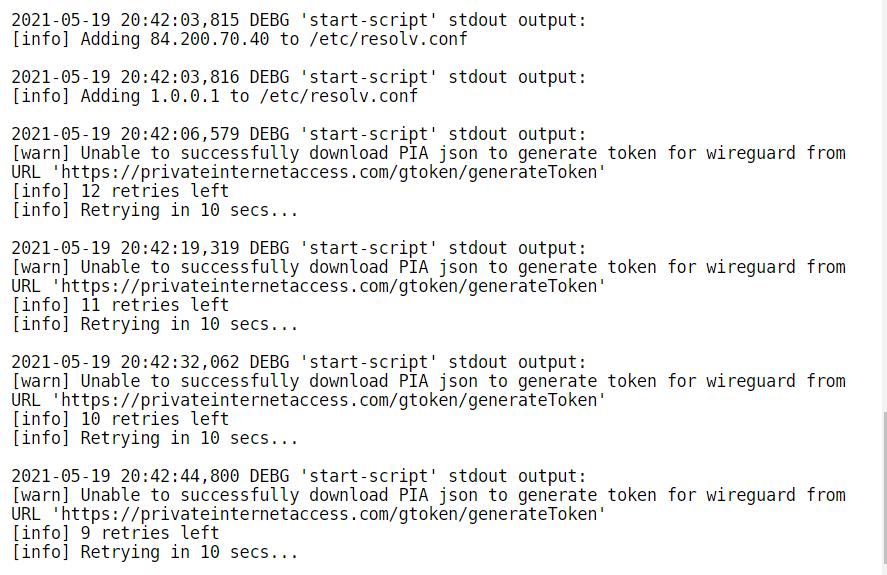
Hi, I am getting an error while trying to start the docker. I got this problem before but a reboot of the docker or even the complete system would restart it. Turning off the vpn starts the dockers. I use PIA and wireguard. It worked until a few hours ago and after I restarted my dockers it doesn't want to start. Starting the VPN client in Windows works just fine.