





workermaster
Members
-
Joined
-
Last visited
Everything posted by workermaster
-
RC2 isn't out yet. Any news on when we can expect it?
-
Could you please help me with this? I can't find the boot/extra folder on the Unraid USB drive. Where is that folder located? Found another post from you where you showed that you have to create the folder. Anyway, I am now at this part: If you don't have the "User scripts" plugin install, you need to install it at this stage and create a script which runs at the startup of the array. You should add the following content to the script (startup_script). Im not going into too much details of the script, the key thing is the last line. When you first startup the virtual machine during the runtime it will create a folder under /var/lib/libvirt/swtpm/ something like this /var/lib/libvirt/swtpm/141d5517-bb66-23b3-6373-c4288xxxxxx, you need to make sure that you copy this whole folder into the VM storage area and symlink it back on the next boot as /var/lib/libvirt/swtpm/ is not persistent. I am stuck there. I created the script and ran it manually. I thought that if I started a VM then it would create a folder somewhere. It should create a folder under the path given in the manual but where can I find the /var/lib folder? And how do I create a symlink? Any help with pictures would be greatly appreciated as this is not easy for me.
-
Hi all, I am running 6.10 RC1 but have the same problems in 6.9.2. I get the feeling that both problems are related since they show the same symptoms. Problem 1: I can't change the assigned CPU cores to Dockers from the CPU pinning setup page. I can change it by going into the Docker template and changing it there. I used to also not be able to change the cores by going into the template but that suddenly started to work again. Here is the original bug report: I closed that thread since I found out that the problems are not related to the new version. Problem 2: I can't add a share normally. I wanted to create a new share for games. It had a description, was supposed to keep 150GB free and not use disc 9. But when I create that share and click on "apply" to create it, nothing happens. No new share is created. I then tried to create a share called "Games" without anything else in it. No description, minimum free space or anything else. Also didn't work. I then tried to create a new share with a different name. I was able to create a share called "test". After that I could change the share to "Games" and add the properties I wanted to it. As you can see, both problems cause me to not be able to do something normally. But I need a workaround. Here are the diagnostics: I do not understand what is wrong. tower-diagnostics-20210920-1927.zip
-
Hi, I am experiencing this problem in 6.10 RC1. I have my CPU pinning setup like this: When I change the CPU pinning for a VM and click on "Apply" then it works just fine. The VM is shutdown, pinning changes and then it reboots. But doing the same for a Docker container does nothing. The button goes grey again and the page shows me that the pinning is changed even though the conainers have not rebooted. Reloading the page shows me that nothing has changed.
-
I have tested my system over the last few days and have only gotten 1 crash. And that happened yesterday. It looks like the crashing might not be related to the Syncthing container after all and that is was just a huge coincidence that it crashed verytime before. I have ran a memtest during the night and got 53 errors. I will be changing my memory and see if that was the cause.
-
Yesterday I created the container again. I did not change any install paths. In the container itself, I only set the GUI login credentials, changed the default folder from /home/nobody to /media/backups, added my phone as a device and synchronised the images folder. Then I took a few pictures to test if it all worked. Last night the server stopped again. However this time it was different and I have the feeling that it had nothing to do with the container. Normally the hardware is still running but this morning, I found that the server was off. When I booted it, the Windows 11 VM prompted me for the updates after a reboot with updates. I get the feeling that his incident was caused by the Windows 11 VM updating. Here are all the logfiles I could find: syslog tower-diagnostics-20210907-0851.zip supervisord.log
-
Hi, I also thought it would be very strange if there is something wrong with the container because then it would have been reported by other people, but everytime I let the container run through the night, it crashes. I took a look at the logfiles. They seem to contain quite a bit of sensitive information. I also see 6 logfiles with the same name. Just another number at the end. All of them report the same line from one of the syncronised folders. I am pretty sure that I added some folders to sync after I started experiencing the crashing but am slowly starting to doubt myself. I wanted to create the best logfiles for you so I have deleted the container and folder from my cache drive. After that I installed the container again. I have not changed anything in it. I will let it run and we will see if it crashes again this night. If it does not then I will add one folder to sync. Could it be that there is a problem because one of the folders that it needs to sync is over 500.000 files big? The memory running out does not seem likely. The system had plenty of free RAM. There is 32GB in the system (planning on upgrading to 64) of wich 20GB are for a VM, 3.5GB are for another VM and the rest is for Unraid and Dockers. I have also never run a memtest. I am currently running one. I will stop that test later today when I need the server again.
-
Hi, I recently downloaded Synchting and have found that it crashes Unraid. With crash, I mean that it locks up everything and that I can't get into the server by going to the IP address or ssh. Initially I opened this thread: and this thread: In both cases I first did not know the cause. I have found that my server keeps running just fine with the Binhex Syncthing turned off. But when I turn it on, it crahses the whole server at random times. I do not know what logfiles are needed. Could anyone please tell me what is needed in order to figure out why this container chrashes the server?
-
Since I have shutdown the Synthing Docker from Binhex, my system has not crashed again last night. So far so good. Will test this for a few more days before I contact Binhex in order to find out what causes this. I did get another email telling me the same thing as before. Something about the size of a VM not being correct.
-
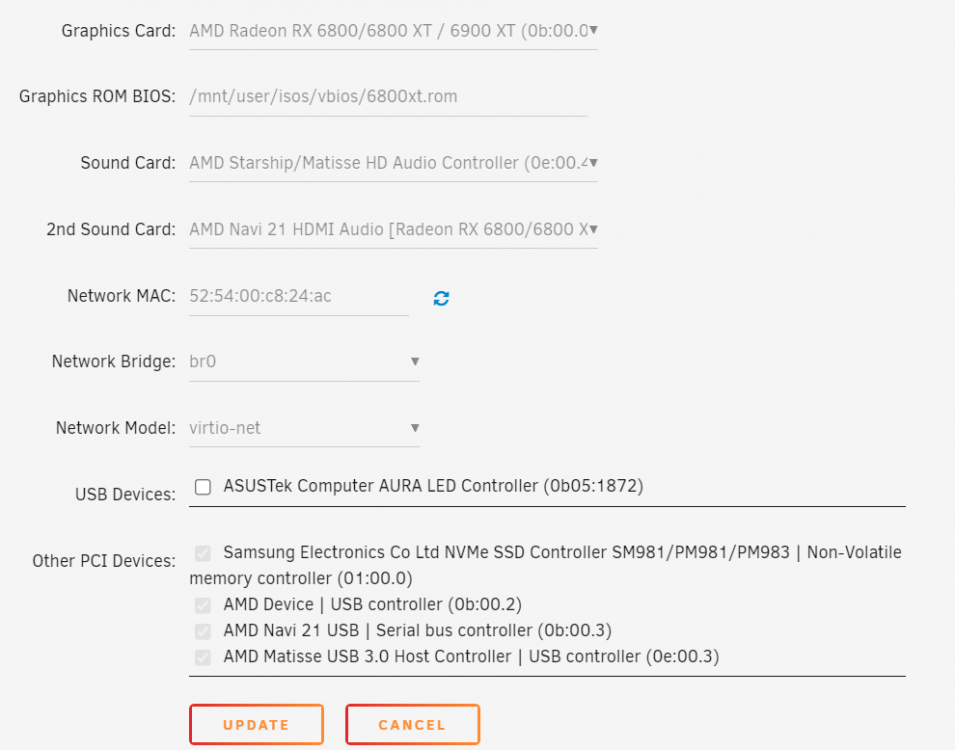
Good to hear that you found the issue. I also see that clearly my screenshot shows that my GPU also has 4 parts passed through. My mistake there.
-
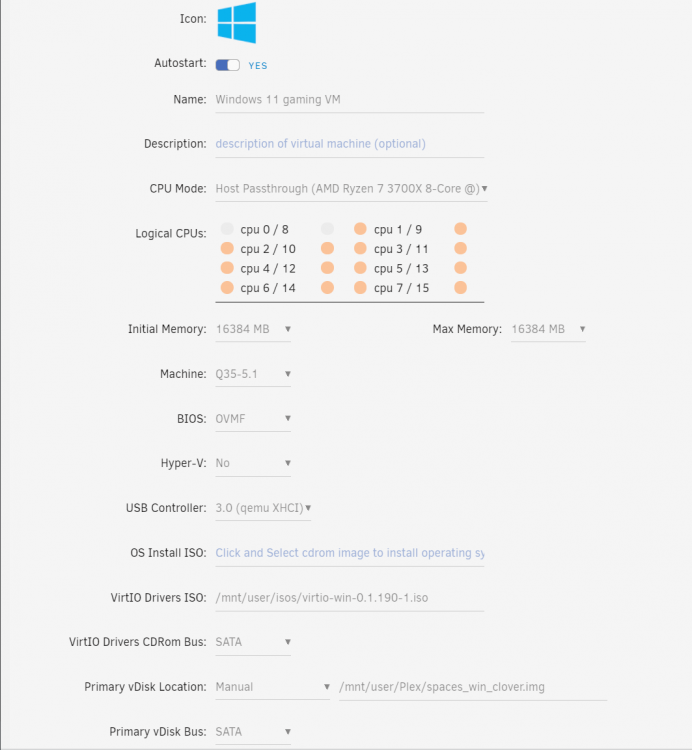
Hi, I do not have the knowledge to help you out. Sorry. But in my case it was just an issue of not creating a good VM template. You mention that you can boot the system just fine and even game, run benchmarks and stresstest it. That is great. But it crashes. The crash looks like it is caused by the AMD driver. I am also running 21.8.2 and do not have that issue. When my system did crash, the card did not ramp up it's fans but stopped them. You mention that you have 4 pieces of the GPU passed through. I thought that there only were 3. Here is a screenshot of my VM. I hope that it helps. I do not have any vendor reset things going on. It seems like my card does not have the AMD reset bug.
-
I did not get any new mail last night or the last few reboots. I did get another VM crash and last night Unraid locked up again. Very annoying that I do not have any logfiles. There appears to not be any errors logged. It all just suddenly stops. Currently I suspect that the Unraid hard lock / crash is caused by Binhex Syncthing container. The crashes did not happen before that. I also think that the VM crashes are mostly caused by buggy games. It happens when I play older assassins creed games but not when running Furmark or Prime95 (or both). I am going to leave the Syncthing container off for a few days to test that. And I am also going to try playing a newer game to see if that solves the crashing. The last few days have been rough and I am almost at the point of giving up. I have spent over 2 weeks debugging stuff to get it all running and I feel like I am close to being done but I am also very close to giving up and throwing everything in the garbage.
-
My gaming VM with 6 cores and a RX 6800 XT has crashed 3 times today. Unraid itself keeps working just fine. The problem is that when I reboot the VM, the onboard motherboard audio is not working. The VM does not see it. How would I need to go about figuring out why the VM crashes during gaming?
-
I have 3 scripts in there. One of them was for resetting my RX 6800 XT GPU. I have deleted that one since I do not need it. There is also another script for removing the 3 transcode limit on the GTX 1050 Ti for Plex. But that one doesn't work I think because I am still limited. And there is a script to dump the vbios of my GPU. At this moment the only script running is the one for removing the limiter of the 1050 Ti and that one only runs at the array startup.
-
Not that much: The server still hasn't crashed but the gaming VM has. It suddenly freezes and after a few seconds, the screen goes black. I get the feeling that I am going to run into every single problem that has ever existed.

-
That sounds good. This means that the email system works as it should. Here are the new diagnostics. tower-diagnostics-20210831-1503.zip
-
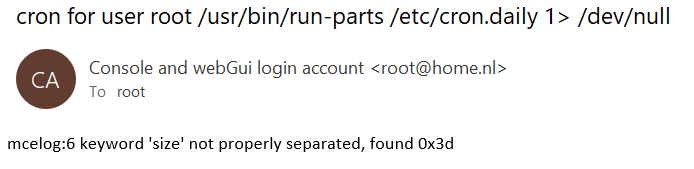
Last night I got this email: I didn't know that mcelog sends emails so it was quite scary to see this. I am wondering how it got my email address and what this error means.
-
Hi all, Earlier this year I got my Unraid system running just fine. It was running several Dockers and 2 virtual machines. After getting some trouble with the system (one VM crashing and losing the audio passthrough wich could only be fixed by a full system restart) and wanting to split the system up in 2 systems, I took it all apart and build one gaming system using the hardware that Unraid previously ran on, and a new Unraid server wich now ran on my old gaming hardware. This setup worked just fine. A few weeks ago, I got a new GPU and decided to try and see if this new GPU and Windows 11 would run smoothly on Unraid. Since it ran perfectly, I decided to consolidate both systems into one. The hardware that I use now is the same hardware as earlier this year. But now it has problems. I get random crashing. When the system crashes, it locks up. Nothing works and I can't get into Unraid at all. It requires a hard reset. This can have multiple causes but in my case it could be the Ryzen bug. I have followed the guide to disabeling global C states and have turned the PSU mode in the BIOS to "idle power" or something like that. I have also used the fix that Spaceinvaderone posted on Youtube: But my system still acts weird. I haven't had a full lockup since disabeling the C states but have had the system randomly reboot. It looked like a clean reboot. I did however, just get this error message: I downloaded the nerdpack, installed mcelog (I have no idea if that also means that it runs because I can't figure out if I need to start that logging thing somewhere) and downloaded the diagnostics. Does anyone know what the hardware error is? tower-diagnostics-20210830-2208.zip

-
Since upgrading to 6.10.0 RC1, my system has crashed a couple of times. When it happens the whole system is locked up and I have to turn off the power and turn it back on. Or just hold the powerbutton down. My issue is the same as: I do not know what logs need to be enabled or shared to properly report this. Could someone tell me what logs are needed?
-
Just that particular container. I can delete the full image but then I would have to install all the containers and settings again. That is just to much trouble for the 200MB of pictures that are now stored in the wrong location.
-
If that is the way to do it then I have already fixed it when I reinstalled the Docker yesterday. Thanks for the help!
-
Hi, I have managed to get Syncthing to use the correct file location but the problem is the files that were uploaded before I had the path set correctly. Here is the page that I followed: Near the bottom of the page, the user Salots, mentions that you have to change the path /home/etc to /media/etc. My current problem is that I don't know where exactly this /home/etc is and how I can delete the files that I have accidentally uploaded in there.
-
Hi all, I just installed Syncthing and started testing. I messed up and downloaded a lot of files to /home/unknown/deviceblabla. So I now have pictures stored in the Docker home directory. How do I acces that to delete it? I can find the Docker image on the cache drive but that is a .img file that I can't open. It is just one big file. Or do I need to download that and then somehow delete some data inside?
-
I hope it gets updates. My father is using an old system with an I5-3570 but that still runs fine and we would like to keep it. I can understand that installing might be a bit more difficult but I am hoping that Windows at least gives out the security updates.
-
Had a look around and found that the other cards are also expensive at the moment. I found the Lenovo one for about 23 euro on Amazon but it looks like it is send from China. I ordered that one and also some other parts. They will arive in a month. So all I can do now is wait.


