UNRA1DUser
Members
-
Joined
-
Last visited
Everything posted by UNRA1DUser
-
Is there maybe a CPU stress test for Unraid to test the CPU overheating? I also put my FAN Speed to 100% and the temps looked good so far. Maybe I should try another PSU.
-
The server was started shortly before 10 o'clock this morning. I logged in and entered the passphrase. Array started. Then I went to sport. About 2 hours later I open Unraid again and see that Unraid has restarted. I am at the login screen again and have to enter the passphrase to start the array. Enclosed are the logs. Does anyone have an idea? Why the Server restarted? Thanks! tower-syslog-20240312-1034.zip tower-syslog-previous-20240312-1033.zip
-
Support for Docker image Redis-Official Application: Redis - https://redis.io/ Docker Hub: https://hub.docker.com/_/redis GitHub: https://github.com/redis/redis Documentation: https://redis.io/docs/ Overview: Redis is an open-source, networked, in-memory, key-value data store with optional durability. It is written in ANSI C. The development of Redis is sponsored by Redis Labs today; before that, it was sponsored by Pivotal and VMware. According to the monthly ranking by DB-Engines.com, Redis is the most popular key-value store. The name Redis means REmote DIctionary Server. wikipedia.org/wiki/Redis This container is configured using the official redis.conf file! I have limited this Docker to 10 GB. If you want to use less or more RAM, you can change this under "Extra Parameters" -> "--memory=10G". You can also delete this value completely if you want the Docker to use as much RAM as necessary. After you started this Container the first time and the folder has been created. Stop the Server and upload the "redis.conf" file from "https://github.com/UNRA1DUser/unraid-docker-templates/blob/main/.conf/redis.conf" into your "/redis-official/conf" folder! Otherwithe this Container won´t start!
-
Sorry for my late response! Yes it´s under the 'advanced view'. I'm glad this has helped. If you remove the "mysqld --log-error=/var/log/mysql/error.log" out of the Post Arguments you wouldn´t get any kind of logs into the folder. Maybe try mysqld --log-error=/var/log/mysql/error.log --secure-file-priv=""
-
Thanks! In the OnlkyOffice Forum is no one helping. They are just telling me, that I should use a newer Docker Version and than it should work.
-
I created the following Docker with the Instructions from OnlyOffice. onlyoffice-mysql-server: mysql:8.0.29 onlyoffice-community-server: onlyoffice/communityserver:12.0.1.1748 onlyoffice-elasticsearch: onlyoffice/elasticsearch:7.16.3 onlyoffice-document-server: onlyoffice/documentserver:7.1.1.23 onlyoffice-mail-server: onlyoffice/mailserver:1.6.75 onlyoffice-control-panel: onlyoffice/controlpanel:3.1.1.467 Every Server except the onlyoffice-community-server is working as expected. If I start the community Server I get those Docker logs. sed: -e expression #1, char 52: unknown option to `s' sed: -e expression #1, char 52: unknown option to `s' sed: -e expression #1, char 52: unknown option to `s' sed: -e expression #1, char 52: unknown option to `s' sed: -e expression #1, char 52: unknown option to `s' sed: -e expression #1, char 52: unknown option to `s' sed: -e expression #1, char 52: unknown option to `s' sed: -e expression #1, char 52: unknown option to `s' sed: -e expression #1, char 52: unknown option to `s' sed: -e expression #1, char 52: unknown option to `s' sed: -e expression #1, char 52: unknown option to `s' sed: -e expression #1, char 52: unknown option to `s' sed: -e expression #1, char 52: unknown option to `s' sed: -e expression #1, char 52: unknown option to `s' sed: -e expression #1, char 52: unknown option to `s' + find /var/www/onlyoffice/WebStudio -type f -name '*.json' -exec sed -i 's_\("core.machinekey":\|"machinekey":\).*,_\1 "core_secret",_' '{}' ';' sed: -e expression #1, char 53: unknown option to `s' sed: -e expression #1, char 53: unknown option to `s' sed: -e expression #1, char 53: unknown option to `s' sed: -e expression #1, char 53: unknown option to `s' sed: -e expression #1, char 53: unknown option to `s' sed: -e expression #1, char 53: unknown option to `s' sed: -e expression #1, char 53: unknown option to `s' sed: -e expression #1, char 53: unknown option to `s' sed: -e expression #1, char 53: unknown option to `s' sed: -e expression #1, char 53: unknown option to `s' sed: -e expression #1, char 53: unknown option to `s' sed: -e expression #1, char 53: unknown option to `s' sed: -e expression #1, char 53: unknown option to `s' sed: -e expression #1, char 53: unknown option to `s' sed: -e expression #1, char 53: unknown option to `s' sed: -e expression #1, char 53: unknown option to `s' sed: -e expression #1, char 53: unknown option to `s' sed: -e expression #1, char 53: unknown option to `s' sed: -e expression #1, char 53: unknown option to `s' sed: -e expression #1, char 53: unknown option to `s' sed: -e expression #1, char 53: unknown option to `s' sed: -e expression #1, char 53: unknown option to `s' sed: -e expression #1, char 53: unknown option to `s' + for i in "${!binDirs[@]}" + find /etc/onlyoffice/communityserver -type f -name '*.[cC]onfig' -exec sed -i '/core.\machinekey/s_\(value\s*=\s*"\)[^"]*"_\1core_secret"_' '{}' ';' sed: -e expression #1, char 52: unknown option to `s' + find /etc/onlyoffice/communityserver -type f -name '*.json' -exec sed -i 's_\("core.machinekey":\|"machinekey":\).*,_\1 "core_secret",_' '{}' ';' sed: -e expression #1, char 53: unknown option to `s' sed: -e expression #1, char 53: unknown option to `s' sed: -e expression #1, char 53: unknown option to `s' sed: -e expression #1, char 53: unknown option to `s' sed: -e expression #1, char 53: unknown option to `s' sed: -e expression #1, char 53: unknown option to `s' sed: -e expression #1, char 53: unknown option to `s' sed: -e expression #1, char 53: unknown option to `s' sed: -e expression #1, char 53: unknown option to `s' sed: -e expression #1, char 53: unknown option to `s' sed: -e expression #1, char 53: unknown option to `s' + continue + sed 's/{{APP_NIGNX_KEEPLIVE}}/32/g' -i /app/config/nginx/prepare-onlyoffice + bash -c 'echo "onlyoffice ALL=(ALL) NOPASSWD: /usr/sbin/service" | (EDITOR="tee -a" visudo)' onlyoffice ALL=(ALL) NOPASSWD: /usr/sbin/service + '[' false == true ']' + systemctl enable redis-server.service Synchronizing state of redis-server.service with SysV service script with /lib/systemd/systemd-sysv-install. Executing: /lib/systemd/systemd-sysv-install enable redis-server + service redis-server start /etc/init.d/redis-server: 51: ulimit: error setting limit (Operation not permitted) Starting redis-server: redis-server. + redis-cli config set save '' OK + redis-cli config rewrite OK + redis-cli flushall OK + service redis-server stop Stopping redis-server: redis-server. + '[' SERVER == SERVICES ']' + systemctl enable monoserveApiSystem.service ++ seq 1 1 + for serverID in $(seq 1 ${APP_MONOSERVE_COUNT}) + index=1 + '[' 1 == 1 ']' + index= + systemctl enable monoserve.service + chown -R onlyoffice:onlyoffice /var/log/onlyoffice + chown -R onlyoffice:onlyoffice /var/www/onlyoffice/DocumentServerData ++ ls -alhd /var/www/onlyoffice/Data ++ awk '{ print $3 }' + '[' onlyoffice '!=' onlyoffice ']' + '[' '!' -d /var/www/onlyoffice/Data/Index/v7.16.3 ']' + mkdir -p /var/log/onlyoffice//Index + mkdir -p /var/www/onlyoffice/Data/Index/v7.16.3 ++ ls -alhd /var/www/onlyoffice/Data/Index/v7.16.3 ++ awk '{ print $3 }' + '[' elasticsearch '!=' elasticsearch ']' + chown -R elasticsearch:elasticsearch /var/log/onlyoffice//Index + dpkg -l + grep -q onlyoffice-xmppserver + sed '/web\.talk/s/value=\"\S*\"/value=\"true\"/g' -i /var/www/onlyoffice/WebStudio/web.appsettings.config + sed '/web\.chat/s/value=\"\S*\"/value=\"false\"/g' -i /var/www/onlyoffice/WebStudio/web.appsettings.config + systemctl stop onlyofficeRadicale System has not been booted with systemd as init system (PID 1). Can't operate. Failed to connect to bus: Host is down + systemctl stop onlyofficeTelegram System has not been booted with systemd as init system (PID 1). Can't operate. Failed to connect to bus: Host is down + systemctl stop onlyofficeSocketIO System has not been booted with systemd as init system (PID 1). Can't operate. Failed to connect to bus: Host is down + systemctl stop onlyofficeThumb System has not been booted with systemd as init system (PID 1). Can't operate. Failed to connect to bus: Host is down + systemctl stop onlyofficeFeed System has not been booted with systemd as init system (PID 1). Can't operate. Failed to connect to bus: Host is down + systemctl stop onlyofficeIndex System has not been booted with systemd as init system (PID 1). Can't operate. Failed to connect to bus: Host is down + systemctl stop onlyofficeJabber System has not been booted with systemd as init system (PID 1). Can't operate. Failed to connect to bus: Host is down + systemctl stop onlyofficeMailAggregator System has not been booted with systemd as init system (PID 1). Can't operate. Failed to connect to bus: Host is down + systemctl stop onlyofficeMailWatchdog System has not been booted with systemd as init system (PID 1). Can't operate. Failed to connect to bus: Host is down + systemctl stop onlyofficeMailCleaner System has not been booted with systemd as init system (PID 1). Can't operate. Failed to connect to bus: Host is down + systemctl stop onlyofficeMailImap System has not been booted with systemd as init system (PID 1). Can't operate. Failed to connect to bus: Host is down + systemctl stop onlyofficeNotify System has not been booted with systemd as init system (PID 1). Can't operate. Failed to connect to bus: Host is down + systemctl stop onlyofficeBackup System has not been booted with systemd as init system (PID 1). Can't operate. Failed to connect to bus: Host is down + systemctl stop onlyofficeStorageMigrate System has not been booted with systemd as init system (PID 1). Can't operate. Failed to connect to bus: Host is down + systemctl stop onlyofficeStorageEncryption System has not been booted with systemd as init system (PID 1). Can't operate. Failed to connect to bus: Host is down + systemctl stop onlyofficeUrlShortener System has not been booted with systemd as init system (PID 1). Can't operate. Failed to connect to bus: Host is down + systemctl stop onlyofficeThumbnailBuilder System has not been booted with systemd as init system (PID 1). Can't operate. Failed to connect to bus: Host is down + systemctl stop onlyofficeAutoCleanUp System has not been booted with systemd as init system (PID 1). Can't operate. Failed to connect to bus: Host is down + systemctl stop god System has not been booted with systemd as init system (PID 1). Can't operate. Failed to connect to bus: Host is down + systemctl enable god + systemctl stop elasticsearch System has not been booted with systemd as init system (PID 1). Can't operate. Failed to connect to bus: Host is down + systemctl stop redis-server System has not been booted with systemd as init system (PID 1). Can't operate. Failed to connect to bus: Host is down + systemctl stop mysql System has not been booted with systemd as init system (PID 1). Can't operate. Failed to connect to bus: Host is down + systemctl stop nginx System has not been booted with systemd as init system (PID 1). Can't operate. Failed to connect to bus: Host is down + systemctl stop monoserveApiSystem.service System has not been booted with systemd as init system (PID 1). Can't operate. Failed to connect to bus: Host is down + systemctl enable monoserveApiSystem.service ++ seq 1 1 + for serverID in $(seq 1 ${APP_MONOSERVE_COUNT}) + index=1 + '[' 1 == 1 ']' + index= + systemctl stop monoserve.service System has not been booted with systemd as init system (PID 1). Can't operate. Failed to connect to bus: Host is down + systemctl enable monoserve.service + '[' false == true ']' + systemctl enable onlyofficeRadicale.service + systemctl enable onlyofficeTelegram.service + systemctl enable onlyofficeSocketIO.service + systemctl enable onlyofficeThumb.service + systemctl enable onlyofficeFeed.service + systemctl enable onlyofficeIndex.service + systemctl enable onlyofficeJabber.service + systemctl enable onlyofficeMailAggregator.service + systemctl enable onlyofficeMailWatchdog.service + systemctl enable onlyofficeMailCleaner.service + systemctl enable onlyofficeMailImap.service + systemctl enable onlyofficeNotify.service + systemctl enable onlyofficeBackup.service + systemctl enable onlyofficeStorageMigrate.service + systemctl enable onlyofficeStorageEncryption.service + systemctl enable onlyofficeUrlShortener.service + systemctl enable onlyofficeThumbnailBuilder.service + systemctl enable onlyofficeAutoCleanUp.service Failed to enable unit, unit onlyofficeAutoCleanUp.service does not exist. + '[' SERVER == SERVER ']' + mv /app/config/nginx/prepare-onlyoffice /etc/nginx/sites-enabled/onlyoffice + service nginx stop * Stopping nginx nginx ...done. + systemctl enable nginx.service Synchronizing state of nginx.service with SysV service script with /lib/systemd/systemd-sysv-install. Executing: /lib/systemd/systemd-sysv-install enable nginx ++ ps auxf ++ grep cron ++ grep -v grep ++ awk '{print $2}' + PID= + '[' ONLYOFFICE-Elasticsearch-Official ']' + service elasticsearch stop elasticsearch: unrecognized service + systemctl disable elasticsearch.service Failed to disable unit, unit elasticsearch.service does not exist. + rm -f /usr/lib/systemd/system/elasticsearch.service + rm -f /etc/init.d/elasticsearch + '[' -n '' ']' + rm -dfr '/tmp/onlyoffice*' + rm -dfr '/var/run/onlyoffice/*' + rm -dfr '/var/cache/nginx/onlyoffice/*' + '[' true == true ']' + exec /lib/systemd/systemd Systemd is not working in Unraid Dockers. So I think that Docker is using systemctl instead. That should be fine. I also red on the ONLYOFFICE Page that the latest Version of Docker is needed to install it. Unraid is some versions behind the latest one. Is there a way to Update the Docker Version? Could that be the Problem? Or do you have any other Idea about it? Thanks!
-
Hi all, I am just wondering if there is a way to Update / Upgrade the Docker Version to the latest one? As I can read on the OnlyOffice Page. I need the latest Docker Version for there Dockers. Iam currently using the Unraid Version 6.12.6 Greetings
-
I just installed my 2 SSDs. I am suprised that I can also use a ZFS-Encrypted - Mirror. What is the difference between ZFS-Encrypted - Mirror and BTRFs-Encrypted - Raid 1? Is the ZFS-Encrypted - Mirror faster? My Array is configured as xfs-Encrypted. Just a site question. I have an Encrypted Cache and Array. Is the Parity disk also encrypted?
-
I have 2 M.2 SSDs with 2TB storage each. How would you set up the cache pool? I mainly have docker containers. There are also a few VMs created, but they are almost always off. - A backup is made to the array every evening using the CA Backup Appdata plugin. - The mover runs daily. - A UPS is also available. I think the best option here is raid 1. But raid 0 is a bit faster, right?
-
Support for Docker image MySQL Application: MySQL - https://www.mysql.com/ Docker Hub: https://hub.docker.com/_/mysql GitHub: https://github.com/mysql Documentation: https://dev.mysql.com/doc/ Overview: Official MySQL database container. It allows to set a database and username without using the console. #Root Password: This container creates by default a random root password on initial execution. Open Docker > MariaDB Icon > Logs > Scroll down to "GENERATED ROOT PASSWORD" to find it. #Creating database dumps docker exec some-mysql sh -c 'exec mysqldump --all-databases -uroot -p"$MYSQL_ROOT_PASSWORD"' > /mnt/user/Backups/all-databases.sql #Restoring data from dump files docker exec -i some-mysql sh -c 'exec mysql -uroot -p"$MYSQL_ROOT_PASSWORD"' < /mnt/user/Backups/all-databases.sql #Configuration without a cnf file Many configuration options can be passed as flags to mysqld. This will give you the flexibility to customize the container without needing a cnf file. For example, if you want to change the default encoding and collation for all tables to use UTF-8 (utf8mb4) just append the following to the Post Arguments: --character-set-server=utf8mb4 --collation-server=utf8mb4_unicode_ci Here is a list of all Server System Variables -> https://dev.mysql.com/doc/refman/8.0/en/server-system-variables.html #Repository tags: If you want to install a specific version of mysql, you can simply customize the repository. For example: mysql (is the same like mysql:latest) mysql:5.7 mysql:8.2.0
-
Thanks !
-
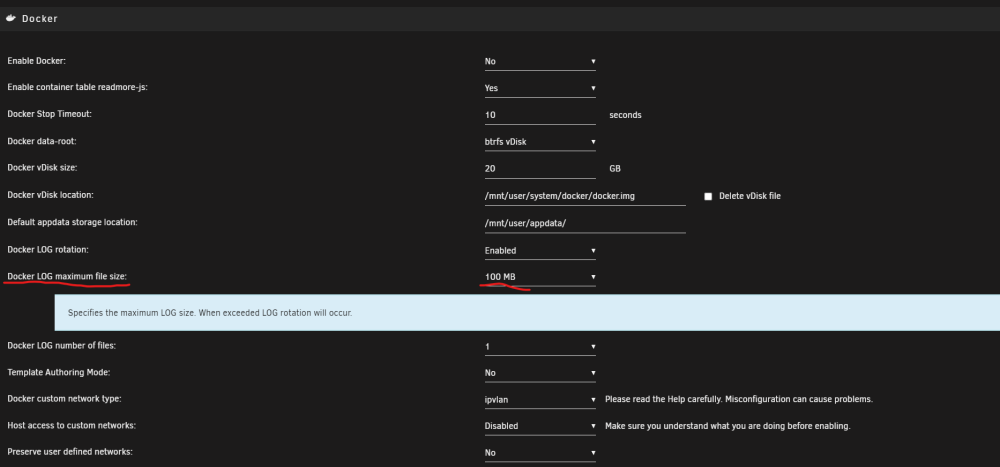
You can only see that setting if you Disable Docker. Settings -> Docker -> Enable Docker = NO After that you can switch back to YES
-
It´s a DropDown field. I can´t delete it.
-
Hi, I changed the "Docker LOG maximum file size" value and wanted to go back to the default. Can someone please tell me what the default value is? Thanks!
-
Hi all, I need some help. 1. Installing the onlyoffice-mysql-server I successfull installed the onlyoffice-mysql-server Docker without a static IP. Also changed the Passwords. Here are my logs. 2024-01-08T09:23:48.833342Z 0 [Warning] TIMESTAMP with implicit DEFAULT value is deprecated. Please use --explicit_defaults_for_timestamp server option (see documentation for more details). 2024-01-08T09:23:48.833375Z 0 [Warning] 'NO_AUTO_CREATE_USER' sql mode was not set. 2024-01-08T09:23:49.013707Z 0 [Warning] InnoDB: New log files created, LSN=45790 2024-01-08T09:23:49.056672Z 0 [Warning] InnoDB: Creating foreign key constraint system tables. 2024-01-08T09:23:49.120006Z 0 [Warning] No existing UUID has been found, so we assume that this is the first time that this server has been started. Generating a new UUID: a16acf3c-ae07-11ee-9ada-0242ac130002. 2024-01-08T09:23:49.124798Z 0 [Warning] Gtid table is not ready to be used. Table 'mysql.gtid_executed' cannot be opened. 2024-01-08T09:23:49.515176Z 0 [Warning] CA certificate ca.pem is self signed. 2024-01-08T09:23:49.617879Z 1 [Warning] root@localhost is created with an empty password ! Please consider switching off the --initialize-insecure option. 2024-01-08T09:23:53.144788Z 0 [Warning] TIMESTAMP with implicit DEFAULT value is deprecated. Please use --explicit_defaults_for_timestamp server option (see documentation for more details). 2024-01-08T09:23:53.144836Z 0 [Warning] 'NO_AUTO_CREATE_USER' sql mode was not set. 2024-01-08T09:23:53.145938Z 0 [Note] mysqld (mysqld 5.7.28) starting as process 83 ... 2024-01-08T09:23:53.149085Z 0 [Note] InnoDB: PUNCH HOLE support available 2024-01-08T09:23:53.149164Z 0 [Note] InnoDB: Mutexes and rw_locks use GCC atomic builtins 2024-01-08T09:23:53.149189Z 0 [Note] InnoDB: Uses event mutexes 2024-01-08T09:23:53.149251Z 0 [Note] InnoDB: GCC builtin __atomic_thread_fence() is used for memory barrier 2024-01-08T09:23:53.149276Z 0 [Note] InnoDB: Compressed tables use zlib 1.2.11 2024-01-08T09:23:53.149341Z 0 [Note] InnoDB: Using Linux native AIO 2024-01-08T09:23:53.149830Z 0 [Note] InnoDB: Number of pools: 1 2024-01-08T09:23:53.149941Z 0 [Note] InnoDB: Using CPU crc32 instructions 2024-01-08T09:23:53.151152Z 0 [Note] InnoDB: Initializing buffer pool, total size = 128M, instances = 1, chunk size = 128M 2024-01-08T09:23:53.156991Z 0 [Note] InnoDB: Completed initialization of buffer pool 2024-01-08T09:23:53.158653Z 0 [Note] InnoDB: If the mysqld execution user is authorized, page cleaner thread priority can be changed. See the man page of setpriority(). 2024-01-08T09:23:53.172924Z 0 [Note] InnoDB: Highest supported file format is Barracuda. 2024-01-08T09:23:53.194793Z 0 [Note] InnoDB: Creating shared tablespace for temporary tables 2024-01-08T09:23:53.194969Z 0 [Note] InnoDB: Setting file './ibtmp1' size to 12 MB. Physically writing the file full; Please wait ... 2024-01-08T09:23:53.210747Z 0 [Note] InnoDB: File './ibtmp1' size is now 12 MB. 2024-01-08T09:23:53.212602Z 0 [Note] InnoDB: 96 redo rollback segment(s) found. 96 redo rollback segment(s) are active. 2024-01-08T09:23:53.212676Z 0 [Note] InnoDB: 32 non-redo rollback segment(s) are active. 2024-01-08T09:23:53.213014Z 0 [Note] InnoDB: 5.7.28 started; log sequence number 2628227 2024-01-08T09:23:53.213268Z 0 [Note] Plugin 'FEDERATED' is disabled. 2024-01-08T09:23:53.213490Z 0 [Note] InnoDB: Loading buffer pool(s) from /var/lib/mysql/ib_buffer_pool 2024-01-08T09:23:53.217152Z 0 [Note] InnoDB: Buffer pool(s) load completed at 240108 10:23:53 2024-01-08T09:23:53.219509Z 0 [Note] Found ca.pem, server-cert.pem and server-key.pem in data directory. Trying to enable SSL support using them. 2024-01-08T09:23:53.219541Z 0 [Note] Skipping generation of SSL certificates as certificate files are present in data directory. 2024-01-08T09:23:53.220343Z 0 [Warning] CA certificate ca.pem is self signed. 2024-01-08T09:23:53.220439Z 0 [Note] Skipping generation of RSA key pair as key files are present in data directory. 2024-01-08T09:23:53.226174Z 0 [Warning] Insecure configuration for --pid-file: Location '/var/run/mysqld' in the path is accessible to all OS users. Consider choosing a different directory. 2024-01-08T09:23:53.266981Z 0 [Note] Event Scheduler: Loaded 0 events 2024-01-08T09:23:53.267218Z 0 [Note] mysqld: ready for connections. Version: '5.7.28' socket: '/var/run/mysqld/mysqld.sock' port: 0 MySQL Community Server (GPL) 2024-01-08T09:23:55.183821Z 0 [Note] Giving 0 client threads a chance to die gracefully 2024-01-08T09:23:55.183888Z 0 [Note] Shutting down slave threads 2024-01-08T09:23:55.183921Z 0 [Note] Forcefully disconnecting 0 remaining clients 2024-01-08T09:23:55.183954Z 0 [Note] Event Scheduler: Purging the queue. 0 events 2024-01-08T09:23:55.184013Z 0 [Note] Binlog end 2024-01-08T09:23:55.184803Z 0 [Note] Shutting down plugin 'ngram' 2024-01-08T09:23:55.184838Z 0 [Note] Shutting down plugin 'partition' 2024-01-08T09:23:55.184873Z 0 [Note] Shutting down plugin 'BLACKHOLE' 2024-01-08T09:23:55.184906Z 0 [Note] Shutting down plugin 'ARCHIVE' 2024-01-08T09:23:55.184940Z 0 [Note] Shutting down plugin 'PERFORMANCE_SCHEMA' 2024-01-08T09:23:55.184988Z 0 [Note] Shutting down plugin 'MRG_MYISAM' 2024-01-08T09:23:55.185017Z 0 [Note] Shutting down plugin 'MyISAM' 2024-01-08T09:23:55.185047Z 0 [Note] Shutting down plugin 'INNODB_SYS_VIRTUAL' 2024-01-08T09:23:55.185075Z 0 [Note] Shutting down plugin 'INNODB_SYS_DATAFILES' 2024-01-08T09:23:55.185106Z 0 [Note] Shutting down plugin 'INNODB_SYS_TABLESPACES' 2024-01-08T09:23:55.185132Z 0 [Note] Shutting down plugin 'INNODB_SYS_FOREIGN_COLS' 2024-01-08T09:23:55.185160Z 0 [Note] Shutting down plugin 'INNODB_SYS_FOREIGN' 2024-01-08T09:23:55.185184Z 0 [Note] Shutting down plugin 'INNODB_SYS_FIELDS' 2024-01-08T09:23:55.185211Z 0 [Note] Shutting down plugin 'INNODB_SYS_COLUMNS' 2024-01-08T09:23:55.185241Z 0 [Note] Shutting down plugin 'INNODB_SYS_INDEXES' 2024-01-08T09:23:55.185265Z 0 [Note] Shutting down plugin 'INNODB_SYS_TABLESTATS' 2024-01-08T09:23:55.185293Z 0 [Note] Shutting down plugin 'INNODB_SYS_TABLES' 2024-01-08T09:23:55.185316Z 0 [Note] Shutting down plugin 'INNODB_FT_INDEX_TABLE' 2024-01-08T09:23:55.185344Z 0 [Note] Shutting down plugin 'INNODB_FT_INDEX_CACHE' 2024-01-08T09:23:55.185376Z 0 [Note] Shutting down plugin 'INNODB_FT_CONFIG' 2024-01-08T09:23:55.185402Z 0 [Note] Shutting down plugin 'INNODB_FT_BEING_DELETED' 2024-01-08T09:23:55.185430Z 0 [Note] Shutting down plugin 'INNODB_FT_DELETED' 2024-01-08T09:23:55.185454Z 0 [Note] Shutting down plugin 'INNODB_FT_DEFAULT_STOPWORD' 2024-01-08T09:23:55.185480Z 0 [Note] Shutting down plugin 'INNODB_METRICS' 2024-01-08T09:23:55.185509Z 0 [Note] Shutting down plugin 'INNODB_TEMP_TABLE_INFO' 2024-01-08T09:23:55.185534Z 0 [Note] Shutting down plugin 'INNODB_BUFFER_POOL_STATS' 2024-01-08T09:23:55.185562Z 0 [Note] Shutting down plugin 'INNODB_BUFFER_PAGE_LRU' 2024-01-08T09:23:55.185586Z 0 [Note] Shutting down plugin 'INNODB_BUFFER_PAGE' 2024-01-08T09:23:55.185613Z 0 [Note] Shutting down plugin 'INNODB_CMP_PER_INDEX_RESET' 2024-01-08T09:23:55.185643Z 0 [Note] Shutting down plugin 'INNODB_CMP_PER_INDEX' 2024-01-08T09:23:55.185669Z 0 [Note] Shutting down plugin 'INNODB_CMPMEM_RESET' 2024-01-08T09:23:55.185698Z 0 [Note] Shutting down plugin 'INNODB_CMPMEM' 2024-01-08T09:23:55.185721Z 0 [Note] Shutting down plugin 'INNODB_CMP_RESET' 2024-01-08T09:23:55.185747Z 0 [Note] Shutting down plugin 'INNODB_CMP' 2024-01-08T09:23:55.185777Z 0 [Note] Shutting down plugin 'INNODB_LOCK_WAITS' 2024-01-08T09:23:55.185803Z 0 [Note] Shutting down plugin 'INNODB_LOCKS' 2024-01-08T09:23:55.185830Z 0 [Note] Shutting down plugin 'INNODB_TRX' 2024-01-08T09:23:55.185854Z 0 [Note] Shutting down plugin 'InnoDB' 2024-01-08T09:23:55.185917Z 0 [Note] InnoDB: FTS optimize thread exiting. 2024-01-08T09:23:55.185994Z 0 [Note] InnoDB: Starting shutdown... 2024-01-08T09:23:55.286608Z 0 [Note] InnoDB: Dumping buffer pool(s) to /var/lib/mysql/ib_buffer_pool 2024-01-08T09:23:55.287511Z 0 [Note] InnoDB: Buffer pool(s) dump completed at 240108 10:23:55 2024-01-08T09:23:57.018045Z 0 [Note] InnoDB: Shutdown completed; log sequence number 12440250 2024-01-08T09:23:57.020621Z 0 [Note] InnoDB: Removed temporary tablespace data file: "ibtmp1" 2024-01-08T09:23:57.020721Z 0 [Note] Shutting down plugin 'MEMORY' 2024-01-08T09:23:57.020846Z 0 [Note] Shutting down plugin 'CSV' 2024-01-08T09:23:57.021081Z 0 [Note] Shutting down plugin 'sha256_password' 2024-01-08T09:23:57.021362Z 0 [Note] Shutting down plugin 'mysql_native_password' 2024-01-08T09:23:57.021610Z 0 [Note] Shutting down plugin 'binlog' 2024-01-08T09:23:57.022236Z 0 [Note] mysqld: Shutdown complete 2024-01-08T09:23:57.334998Z 0 [Warning] TIMESTAMP with implicit DEFAULT value is deprecated. Please use --explicit_defaults_for_timestamp server option (see documentation for more details). 2024-01-08T09:23:57.335045Z 0 [Warning] 'NO_AUTO_CREATE_USER' sql mode was not set. 2024-01-08T09:23:57.336429Z 0 [Note] mysqld (mysqld 5.7.28) starting as process 1 ... 2024-01-08T09:23:57.340331Z 0 [Note] InnoDB: PUNCH HOLE support available 2024-01-08T09:23:57.340424Z 0 [Note] InnoDB: Mutexes and rw_locks use GCC atomic builtins 2024-01-08T09:23:57.340532Z 0 [Note] InnoDB: Uses event mutexes 2024-01-08T09:23:57.340574Z 0 [Note] InnoDB: GCC builtin __atomic_thread_fence() is used for memory barrier 2024-01-08T09:23:57.340684Z 0 [Note] InnoDB: Compressed tables use zlib 1.2.11 2024-01-08T09:23:57.340755Z 0 [Note] InnoDB: Using Linux native AIO 2024-01-08T09:23:57.341263Z 0 [Note] InnoDB: Number of pools: 1 2024-01-08T09:23:57.341455Z 0 [Note] InnoDB: Using CPU crc32 instructions 2024-01-08T09:23:57.342707Z 0 [Note] InnoDB: Initializing buffer pool, total size = 128M, instances = 1, chunk size = 128M 2024-01-08T09:23:57.347793Z 0 [Note] InnoDB: Completed initialization of buffer pool 2024-01-08T09:23:57.349406Z 0 [Note] InnoDB: If the mysqld execution user is authorized, page cleaner thread priority can be changed. See the man page of setpriority(). 2024-01-08T09:23:57.367959Z 0 [Note] InnoDB: Highest supported file format is Barracuda. 2024-01-08T09:23:57.397850Z 0 [Note] InnoDB: Creating shared tablespace for temporary tables 2024-01-08T09:23:57.398070Z 0 [Note] InnoDB: Setting file './ibtmp1' size to 12 MB. Physically writing the file full; Please wait ... 2024-01-08T09:23:57.412688Z 0 [Note] InnoDB: File './ibtmp1' size is now 12 MB. 2024-01-08T09:23:57.414420Z 0 [Note] InnoDB: 96 redo rollback segment(s) found. 96 redo rollback segment(s) are active. 2024-01-08T09:23:57.414504Z 0 [Note] InnoDB: 32 non-redo rollback segment(s) are active. 2024-01-08T09:23:57.414916Z 0 [Note] InnoDB: 5.7.28 started; log sequence number 12440250 2024-01-08T09:23:57.415187Z 0 [Note] Plugin 'FEDERATED' is disabled. 2024-01-08T09:23:57.415468Z 0 [Note] InnoDB: Loading buffer pool(s) from /var/lib/mysql/ib_buffer_pool 2024-01-08T09:23:57.422019Z 0 [Note] Found ca.pem, server-cert.pem and server-key.pem in data directory. Trying to enable SSL support using them. 2024-01-08T09:23:57.422054Z 0 [Note] Skipping generation of SSL certificates as certificate files are present in data directory. 2024-01-08T09:23:57.422917Z 0 [Warning] CA certificate ca.pem is self signed. 2024-01-08T09:23:57.423014Z 0 [Note] Skipping generation of RSA key pair as key files are present in data directory. 2024-01-08T09:23:57.423504Z 0 [Note] Server hostname (bind-address): '*'; port: 3306 2024-01-08T09:23:57.423545Z 0 [Note] InnoDB: Buffer pool(s) load completed at 240108 10:23:57 2024-01-08T09:23:57.423547Z 0 [Note] IPv6 is available. 2024-01-08T09:23:57.423617Z 0 [Note] - '::' resolves to '::'; 2024-01-08T09:23:57.423653Z 0 [Note] Server socket created on IP: '::'. 2024-01-08T09:23:57.429274Z 0 [Warning] Insecure configuration for --pid-file: Location '/var/run/mysqld' in the path is accessible to all OS users. Consider choosing a different directory. 2024-01-08T09:23:57.470997Z 0 [Note] Event Scheduler: Loaded 0 events 2024-01-08T09:23:57.471235Z 0 [Note] mysqld: ready for connections. Version: '5.7.28' socket: '/var/run/mysqld/mysqld.sock' port: 3306 MySQL Community Server (GPL) 2024-01-08T09:24:24.369648Z 2 [Warning] IP address '172.19.0.1' could not be resolved: Name or service not known There are some Warnings, but the DB is there and also all Users are created. Looks good for me. Login via PHPMyAdmin with the root user is also possible. 2. onlyoffice-mail-server I used the Docker with the Default settings. Just changed the Root Password for mail_admin and under advanced Settings "Extra Parameters" -> -h mail.example.de -p 25:25 -p 465:465 -p 143:143 -p 993:993 -p 110:110 -p 995:995 -p 587:587 -p 8081:8081 -p 4190:4190 The SQL DB Log got this extra line -> 2024-01-08T09:40:03.911887Z 32 [Note] Access denied for user 'mail_admin'@'onlyoffice-mail-server.onlyoffice' (using password: NO) But the DB onlyoffice_mailserver is created and has a lot of tables. I am also able to Login via PHPMyAdmin with the User mail_admin. These are the onlyoffice-mail-server.log (right click on the Docker) ******************************************************************** * Start iRedMail Configurations ******************************************************************** [ INFO ] Create required system accounts: vmail, iredapd. [ INFO ] Configure Apache web server and PHP. [ INFO ] Configure PHP. [ INFO ] Configure MySQL database server. [ INFO ] Configure Postfix (Message Transfer Agent). [ INFO ] Configure Cluebringer (postfix policy server). [ INFO ] Configure Dovecot (pop3/imap/managesieve server). [ INFO ] Configure ClamAV (anti-virus toolkit). [ INFO ] Configure Amavisd-new (interface between MTA and content checkers). [ INFO ] Configure SpamAssassin (content-based spam filter). [ INFO ] Configure OpenDkim. [ INFO ] Configure Fail2ban (authentication failure monitor). [ INFO ] Configure Server API. rake aborted! Psych::SyntaxError: (<unknown>): did not find expected key while parsing a block mapping at line 2 column 2 /var/www/html/mailserver_api-2.0.1/config/application.rb:11:in `<top (required)>' /var/www/html/mailserver_api-2.0.1/config/environment.rb:3:in `<top (required)>' /var/www/html/mailserver_api-2.0.1/Rakefile:2:in `block in <top (required)>' Tasks: TOP => api_key:generate => environment (See full trace by running task with --trace) [ INFO ] Configure SpamTrainer. [ INFO ] Configure Awstats (logfile analyzer for mail and web server). [ INFO ] Create self-signed SSL certification files (2048 bits). [ INFO ] Generate a strong, unique Diffie Hellman Group with openssl, please wait. ************************************************************************* * iRedMail-0.9.2 installation and configuration complete. ************************************************************************* [ INFO ] Disable SELinux in /etc/selinux/config. [ INFO ] Removing package(s): sendmail Loaded plugins: fastestmirror, ovl Setting up Remove Process Resolving Dependencies --> Running transaction check ---> Package sendmail.x86_64 0:8.14.4-9.el6_8.1 will be erased --> Processing Dependency: sendmail = 8.14.4-9.el6_8.1 for package: sendmail-devel-8.14.4-9.el6_8.1.x86_64 --> Running transaction check ---> Package sendmail-devel.x86_64 0:8.14.4-9.el6_8.1 will be erased --> Finished Dependency Resolution Dependencies Resolved ================================================================================ Package Arch Version Repository Size ================================================================================ Removing: sendmail x86_64 8.14.4-9.el6_8.1 @base 1.5 M Removing for dependencies: sendmail-devel x86_64 8.14.4-9.el6_8.1 @base 254 k Transaction Summary ================================================================================ Remove 2 Package(s) Installed size: 1.8 M Downloading Packages: Running rpm_check_debug Running Transaction Test Transaction Test Succeeded Running Transaction Warning: RPMDB altered outside of yum. Erasing : sendmail-devel-8.14.4-9.el6_8.1.x86_64 1/2 Erasing : sendmail-8.14.4-9.el6_8.1.x86_64 2/2 warning: erase unlink of /var/log/mail/statistics failed: No such file or directory warning: erase unlink of /var/log/mail failed: No such file or directory Verifying : sendmail-devel-8.14.4-9.el6_8.1.x86_64 1/2 Verifying : sendmail-8.14.4-9.el6_8.1.x86_64 2/2 Removed: sendmail.x86_64 0:8.14.4-9.el6_8.1 Dependency Removed: sendmail-devel.x86_64 0:8.14.4-9.el6_8.1 Complete! [ INFO ] Copy firewall sample rules: /etc/sysconfig/iptables. [ INFO ] Restarting firewall ... [ INFO ] Copy MySQL sample file: /etc/my.cnf. [ INFO ] Enable SSL support for MySQL server. ******************************************************************** * First mail account credential: * * o Username: [email protected] * o Password: ZmMyZGM1ZTgz * * ******************************************************************** * Congratulations, mail server setup completed successfully. Please * read below file for more information: * * - /usr/src/iRedMail/iRedMail.tips * * And it's sent to your mail account [email protected]. * ********************* WARNING ************************************** dig: couldn't get address for 'resolver1.opendns.com': failure dig: couldn't get address for 'resolver1.opendns.com': failure Waiting for external MySql response I have closed the log and reopened it. Those two "dig: couldn't get address for 'resolver1.opendns.com': failure" are gone. I also tried to verify the correctness of the settings for the records. dig -t A mail.example.de dig -t CNAME mail.example.de First I tried with the A Record: Type: A Name: mail.example.de Value: MyPublicIP TTL: 86400 After that I also tried it with a CNAME (A Record to example.de exists) Type: CNAME Name: mail Value: example.de. TTL: 86400 I also have a MX Record for both tests Type: MX Name: @ Value: mail.example.de TTL: 86400 Piority: 0 But nothing is working. I also opened all TCP Ports in my Fritz.Box. Did I missed a Port? 80 HTTP-Server 443 HTTPS-Server 25 SMTP 143 IMAP STARTTLS 465 SMTPS 587 SMTP STARTTLS 993 IMAPS 995 POP3S 110 POP3 sh-4.1# dig -t CNAME mail.example.de ; <<>> DiG 9.8.2rc1-RedHat-9.8.2-0.68.rc1.el6_10.3 <<>> -t CNAME mail.example.de ;; global options: +cmd ;; connection timed out; no servers could be reached sh-4.1# dig -t A mail.example.de ; <<>> DiG 9.8.2rc1-RedHat-9.8.2-0.68.rc1.el6_10.3 <<>> -t A mail.example.de ;; global options: +cmd ;; connection timed out; no servers could be reached sh-4.1# Interesting is also -> I restarted the onlyoffice-mail-server and it will just stopp after some seconds. ********************* WARNING ************************************** Waiting for external MySql response [ INFO ] Checking configuration file: /usr/src/iRedMail/config ... [FOUND] [ INFO ] Import installation process status from file: /usr/src/iRedMail/runtime/install.status. Waiting for external MySql response < SKIP > Function: install_all. ******************************************************************** * Start iRedMail Configurations ******************************************************************** < SKIP > Function: add_required_users. < SKIP > Function: web_server_config. [ INFO ] Configure MySQL database server. < SKIP > Function: mysql_import_vmail_users. < SKIP > Function: postfix_config_basic. < SKIP > Function: postfix_config_virtual_host. < SKIP > Function: postfix_config_sasl. < SKIP > Function: postfix_config_tls. < SKIP > Function: policy_server_config. < SKIP > Function: enable_dovecot. < SKIP > Function: clamav_config. < SKIP > Function: amavisd_config_rhel. < SKIP > Function: amavisd_config_general. < SKIP > Function: amavisd_import_sql. < SKIP > Function: sa_config. < SKIP > Function: opendkim_config. < SKIP > Function: fail2ban_config. < SKIP > Function: server_api_config. < SKIP > Function: spam_trainer_config. < SKIP > Function: awstats_config_basic. < SKIP > Function: awstats_config_weblog. < SKIP > Function: awstats_config_maillog. < SKIP > Function: awstats_config_crontab. < SKIP > Function: cleanup. Waiting for external MySql response [ INFO ] Configure MySQL database server. Starting crond: [ OK ] Starting Dovecot Imap: [ OK ] Starting system logger: [ OK ] Starting amavisd: [ OK ] Starting postfix: [ OK ] Starting cbpolicyd: [ OK ] Starting Clam AntiVirus Daemon: [ OK ] Starting clamd.amavisd: [ OK ] Starting httpd: [ OK ] Starting OpenDKIM Milter: [ OK ] Starting spamd: [ OK ] Starting fail2ban: [ OK ] Starting server ** Press ANY KEY to close this window ** Looks like the Docker is waiting for the SQL response from external? I did not installed onlyoffice-document-server and onlyoffice-community-server, yet. Does anyone have any ideas? Thanks!
-
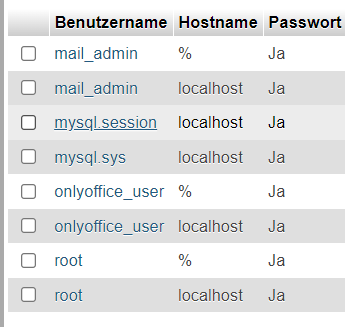
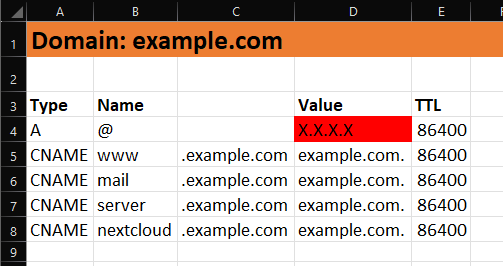
Hi @High-Tower, I know it's been a while, but I also encountered this problem and wanted to share my solution. To add some sub Domains you just need to create a CNAME in the DNS and Point to the A Record. The red cell is updated by the Docker "hetzner-ddns" with the public IP every 5 Minutes. Hi @Venari, As far as I have tested, only one A Record can be updated with this Docker. And this should be the main record -> Type A | Name @ But you can store www.example.com as CNAME and link to the A record. (See the picture above). Hi @RiDDiX, as I know with one Docker you can only Update A or AAAA Record. But you could just Configure one Docker for A (IPv4) and another Docker for AAAA (IPv6). That should be possible.
-
Is that one also working with the Cache drives? Those M.2. are all for the Cache.
-
Hello all, currently I have a Samsung SSD 970 EVO Plus 2 TB installed on a Gigabyte W480M VISION W. I would now like to replace this M.2. with 2x "SK hynix Gold P31 2TB PCIe NVMe Gen3 M.2 2280 internal SSD, up to 3500 MB/s, compact, form factor SSD - Internal Solid State Drive with 128-layer NAND Flash". What is the best way to do that? Is there anything to consider or can I simply exchange?
-
Nur zur Info. 12 Tage nun ohne Absturz. Habe einfach nur den USB Stick via Adapter an einen 2.0 USB Port direkt auf dem Mainboard angeschlossen. Scheint bisher zu funktionieren. Ich halte euch auf dem Laufenden! Danke!
-
Habe nun erstmal meinen 64GB USB Stick an den internen 2.0 USB Port angeschlossen. Mal sehen ob dies eine Auswirkung hat.
-
Habe mir das nun bestellt um an die Internen 2.0 USB Anschlüsse ran zu kommen. https://www.amazon.de/gp/product/B0B936Y2TR/ref=ox_sc_act_title_1?smid=A21CTMDLFXECIV&th=1
-
Ich habe mir mal die USB Version als 32 GB Stick bestellt. Das werde ich auch mal probieren.
-
Korrekt. Ich kann nichts mehr eingeben. Bild ist eingefroren. - Intel Xeon W-1290P, 10C/20T, 3.70-5.30GHz, tray - Gigabyte W480M Vision W (LGA 1200/Intel W480/Micro-ATX/Dual M.2/SATA 6Gbps/USB 3.2 Gen 2/Dual Intel LAN/Multi-GPU support/ECC memory support/Motherboard) - 4x32GB Kingston Server Premier ECC DDR4-2933 DIMM CL21 Single - 550 Watt Corsair RMx Series RM550x Modular 80+ Gold - 2TB Samsung 970 Evo Plus M.2 2280 PCIe 3.0 x4 3D-NAND TLC (MZ-V7S2T0BW) - 2x 12TB WD Red Plus WD120EFBX 256MB 3.5" (8.9cm) SATA 6Gb/s - Noctua NH-P1 passiver CPU-Kühler - Noctua NF-A20 PWM chromax.black.swap Lüfter - 200mm, schwarz - Noiseblocker NB-eLoop B14-3 140x 140x 29mm 1400 U/min 28.5 dB(A) schwarz/weiß - Thermaltake Core V21 Matx Mesh Stackable Case with 200 mm Fan, Black USB STICK -> SanDisk Ultra Fit USB 3.1 Flash-Laufwerk 64 GB (Für Laptops, Spielkonsolen und Auto-Audiosysteme, Plug-and-Stay, 130 MB/s Lesen, SecureAcess Software) Schwarz Kann es am Stick liegen, da dieser 64 GB hat anstatt max 32GB ? Memtest kann ich gerne noch mal durchführen. Netzteil wird es denke ich nicht sein, da der Server trotzdem immer an bleibt. CPU Benchmark kann ich bestimmt über unraid auch machen oder?
-
Ich wundere mich halt nur etwas, da ich die gesamten PowerSave Settings von beginn an verwendet habe und alles funktioniert hat. Nie Probleme gehabt. Und nun nach einigen Unraid Updates oder anderen Veränderungen ist der Server manchmal nicht mehr erreichbar. Angeschaltet ist dieser trotzdem noch!
-
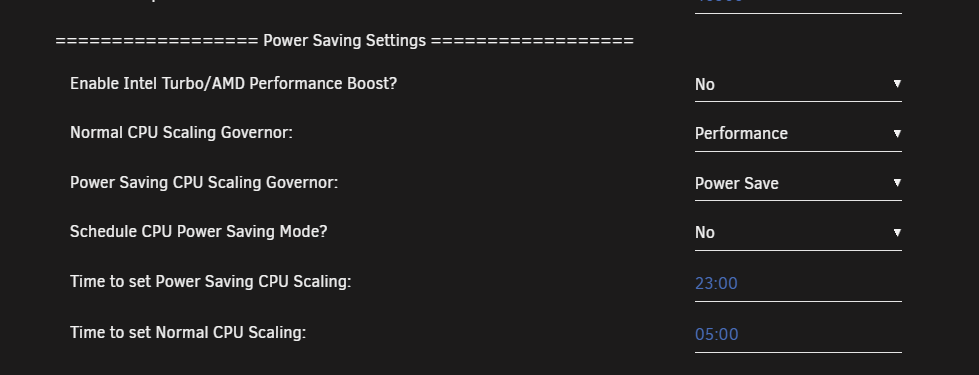
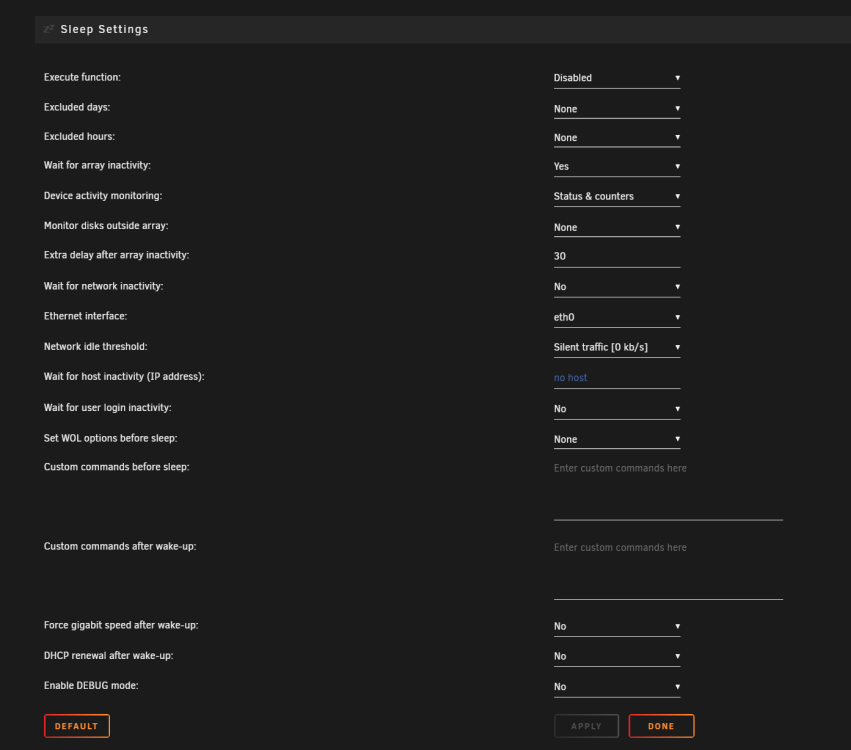
Ich kann gerne mal unter Settings -> Tips and Tweaks -> Normal CPU Scaling Governor: auf Performance stellen. Oder meint ihr ALLE Powersave Einstellungen? Ich habe auch das Dynamix S3 Sleep Plugin installiert. Nutze dieses aber nicht. Folgendes habe ich im powertop script hinterlegt: #!/bin/bash # ------------------------------------------------- # disable haveged as we trust /dev/random # https://forums.unraid.net/topic/79616-haveged-daemon/?tab=comments#comment-903452 # ------------------------------------------------- #/etc/rc.d/rc.haveged stop # ------------------------------------------------- # Set power-efficient CPU governor # ------------------------------------------------- /etc/rc.d/rc.cpufreq powersave # ------------------------------------------------- # Enable power-efficient ethernet # ------------------------------------------------- # enable IEEE 802.3az (Energy Efficient Ethernet): Could be incompatible to LACP bonds! for i in /sys/class/net/eth?; do dev=$(basename $i); [[ $(echo $(ethtool --show-eee $dev 2> /dev/null) | grep -c "Supported EEE link modes: 1") -eq 1 ]] && ethtool --set-eee $dev eee on; done # Disable wake on lan for i in /sys/class/net/eth?; do ethtool -s $(basename $i) wol d; done # ------------------------------------------------- # powertop tweaks # ------------------------------------------------- # Enable SATA link power management echo med_power_with_dipm | tee /sys/class/scsi_host/host*/link_power_management_policy # Runtime PM for I2C Adapter (i915 gmbus dpb) echo auto | tee /sys/bus/i2c/devices/i2c-*/device/power/control # Autosuspend for USB device echo auto | tee /sys/bus/usb/devices/*/power/control # Runtime PM for disk echo auto | tee /sys/block/sd*/device/power/control # Runtime PM for PCI devices echo auto | tee /sys/bus/pci/devices/????:??:??.?/power/control # Runtime PM for ATA devices echo auto | tee /sys/bus/pci/devices/????:??:??.?/ata*/power/control