UNRA1DUser
Members
-
Joined
-
Last visited
Everything posted by UNRA1DUser
-
Müsste so zwischen 8:00 Uhr bis 11 Uhr liegen.
-
Heute morgen ist der Server wieder abgestürzt. syslog (2)
-
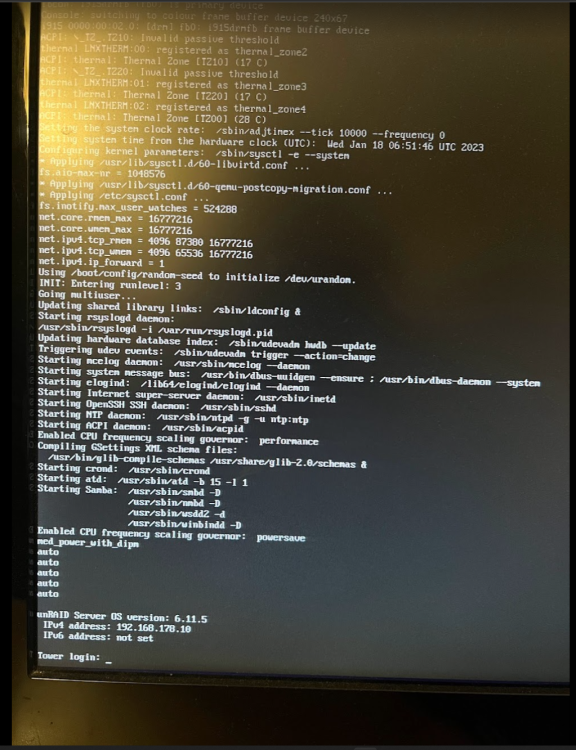
Hi, von gestern auf heute gab es wieder dieses Phänomen. Webinterface und sämtliche Server plötzlich nicht mehr erreichbar. Auf dem Bildschirm wird nichts angezeigt -> Siehe Bild. Syslog habe ich wieder angehangen. Netzwerkinterface Blinkt. Server ist warm und zieht Strom (laut meiner Steckdose + App) Reset Knopf musste ich drücken, damit ich den Server neustarten konnte. syslog_23.01.2023
-
Habe ich nun komplett rausgelöscht. Meine Docker werden täglich neugestartet, da vom Folder Appdata ein Backup durchgeführt wird.
-
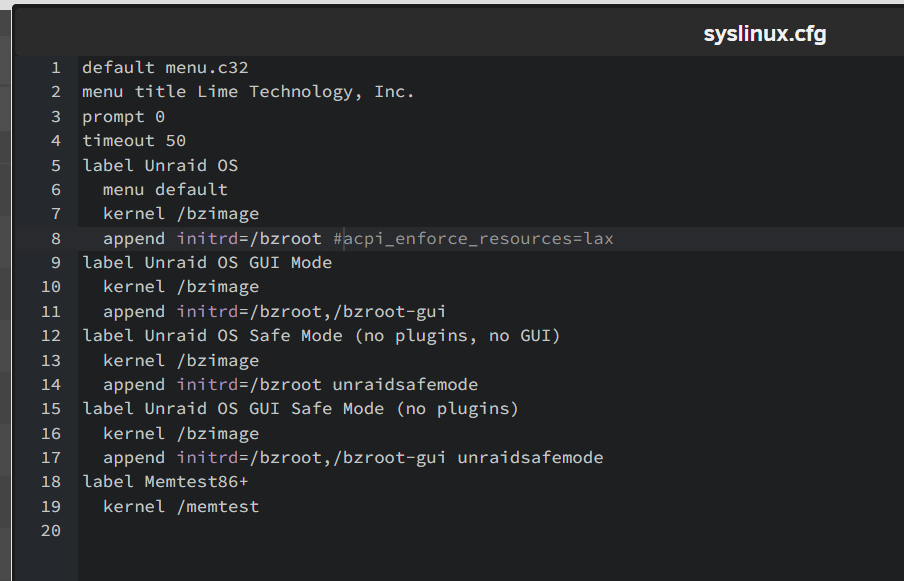
Go File ist editiert. Syslinux file habe ich gefunden. Muss ich das in der syslinux.cfg ändern oder in syslinux? Habe es nun so geändert in der syslinux.cfg. Sollte passen oder?
-
Go File ist editiert. Syslinux file habe ich gefunden. Muss ich das in der syslinux.cfg ändern oder in syslinux? Korrekt Hatte ich zu beginn mal gemacht. Kann ich aber gerne noch mal machen. Hab ich mal gemacht EDIT: Würde ich noch nicht machen bis das Problem gelöst ist. Habe ich zurück geändert. Kann ich auch gerne mal testen Ich werde auch ein neues Syslog file anlegen.
-
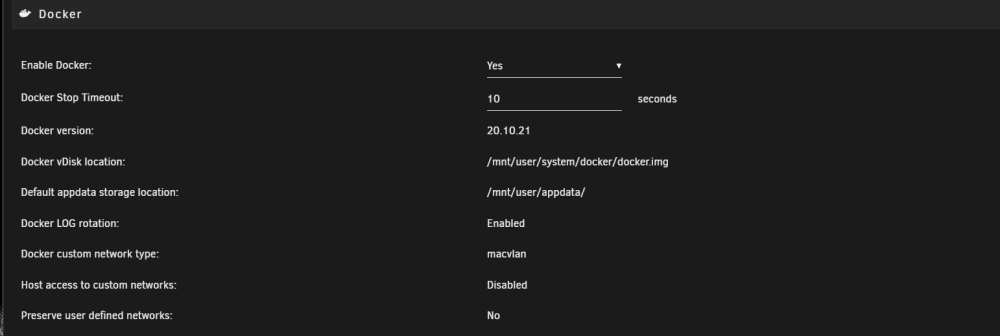
Ich habe jetzt mal wieder auf "macvlan" gestellt. "ipvlan" hat keinen unterschied gemacht.
-
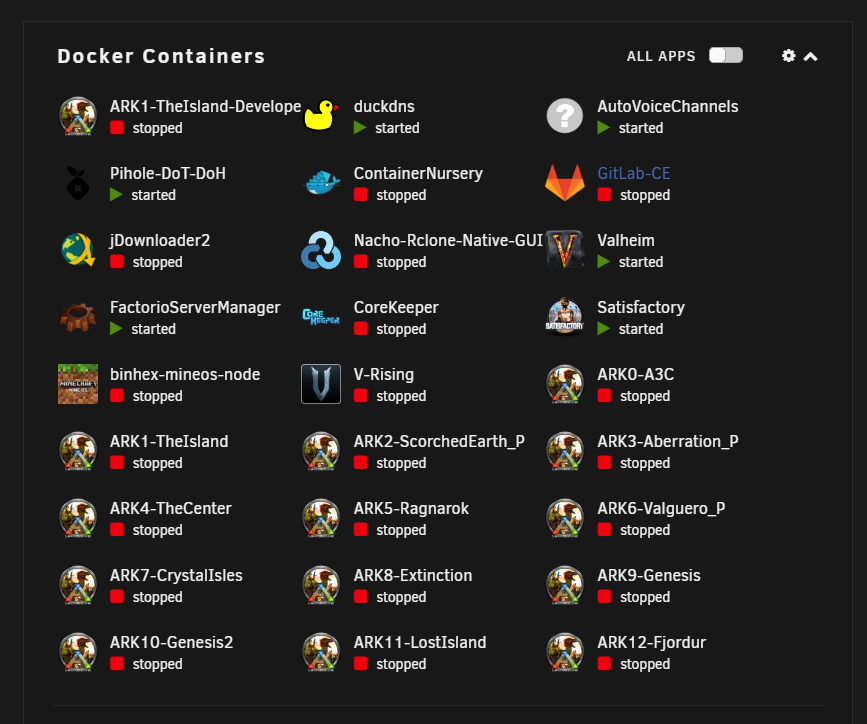
Anbei noch mal das Syslog. Dazu diesmal eine Diagnose und ein Screenshot meiner Docker Container. Alle die an sind, sind in Benutzung. Der Rest ist soweit immer aus. Erst gestern wieder (08.01.2023) war nichts mehr erreichbar. War Abends ab ca. 20 Uhr+ rum. syslog (1) tower-diagnostics-20230109-0949.zip
-
ich werde darauf mal achten. Aber bisher ist es egal was ich einstelle etwa einmal pro Woche ist das Interface nicht mehr erreichbar inklusive allen Services/Servern etc. dann muss ich den Server per reset Knopf Neustarten. Ist recht komisch, da der Lüfter weiter läuft und der Server an zu sein scheint. Jedoch kann ich auch nichts sehen wenn ich den Bildschirm dann anschließe.
-
Still getting crashes
-
Doch ich habe eine Fritz.Box. Soll ich dann doch lieber zurück stellen?
-
Das hat leider nicht funktioniert. Bei mir ist der Server sogar noch schneller nicht erreichbar gewesen. Wobei alles läuft und auch die Festplatten etc. Jedoch kann ich das Interface nicht mehr erreichen. Ich werde die ipvlan Einstellung erstmal drin lassen. Anbei noch das Syslog. Ich hoffe da stehen keine Informationen drin, die man nicht teilen sollte Webinterface war von gestern auf Heute nicht erreichbar. Also sollte man was finden zwischen 27 - 28.12.2022 syslog
-
Ich habe einen Pi-Hole Docker auf Br0 laufen. Der Rest läuft auf bridge. Ich versuche das mal mit dem Umstellen.
-
Thanks! Did it now. Let´s wait for a crash
-
Hallo zusammen, es ist etwas komisch. Sporadisch kann ich z.B. das Webinterface des Servers nicht mehr aufrufen, mein Discord Docker funktioniert nicht mehr (Channels im Discord werden nicht mehr erstellt) oder aber auch meine GameServer sind nicht mehr erreichbar. Früher war es nicht so. Und verändert, außer Updates, habe ich nichts. Der Server scheint aber an zu sein, da er Hitze produziert. Wenn ich einen Bildschirm anschließe, bekomme ich aber kein Bild. Auch wenn ich auf der Tastatur rum hämmer, passiert nichts. Aus kriege ich diesen Server nur, wenn ich den Reset Knopf betätige. Danach kann ich mich wieder einloggen und es wird ein Parity-Check erfolgreich durchgeführt. Ich weiß leider nicht woran es liegen könnte. Was für Informationen benötigt ihr? Welche Logs benötigt ihr? Wo finde ich diese? Was kann ich tun? Für Hilfe wäre ich sehr dankbar. Unraid Version 6.11.5
-
Hello, can maybe someone create this Auto-Voice-Channels Bot for Discord in a Docker Container? Or can someone tell me how I can do it ? https://github.com/gregzaal/Auto-Voice-Channels Thanks!
-
I think i need something to check if anyone is connected to the GameServer. If not it should stop or suspend. And if someone is trying to connect to the GameServer it should register it and start the GameServer again. This App is only to open the WebUIs from the Dockers.
-
Thanks. What would the script for this look like? Or rather, does anyone know what the app is called? I can't find an app that allows me to launch Docker containers from a website.
-
Thanks to all! I did it. Created all ARK Maps as Docker (12 Servers + the ARK Managed Server) with MODs on all Servers. Is there also a way to send some Dockers to sleep / or Stop them if they are not in use? And If someone wants to Connect to it start it or maybe have a Webpage with a start button to start the server to use it ?
-
I did it now! Thank you very much for you´r help and thanks to @Cyd for that post!
-
Where can I find the Docker Config? I tried to delete the default entries in the Docker template and created new ones. But I think i missed the setp to change the Docker Config.
-
Hi, I have a Problem and need some help. Goal: Create 10 Ark Survival Evolved Docker Server (Every Map in a Cluster) Description: If I create one Ark Survival Evolved Docker Container with the Default Ports I can normally connect to it and play the Game. But if I change the Ports to a different number, I can´t connect anymore. For exmaple I changed UDP 1: from 7777 to 7779 UDP 2: from 7778 to 7780 UDP Steam: 27015 to 27016 RCON TCP: 27020 to 27021 Every port is forwared but also in the local network its not working. The Server is normally up and running without any errors, but if I want to connect to it I get "Connection Timeout". If I am using the default ports its connecting immediately. Someone has an idea and can maybe help me ?
-
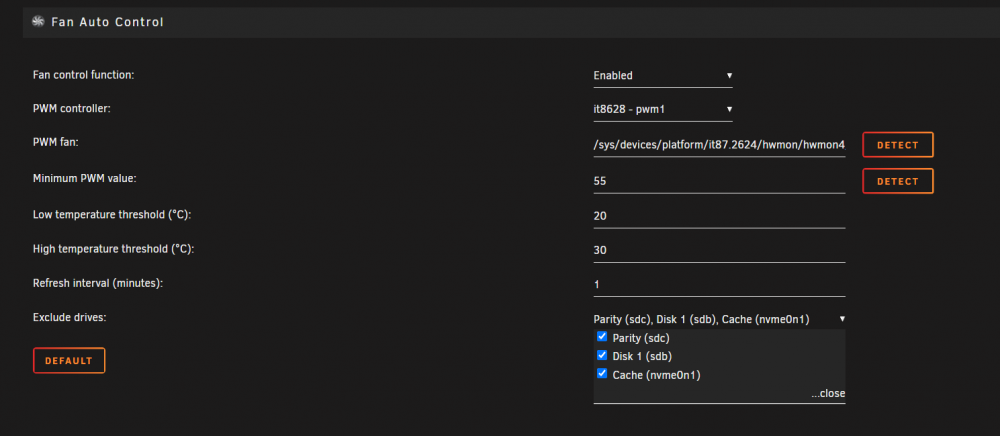
@mgutt Thanks! Do I also need "i915.alpha_support=1" ? What does this do ? Do I need this ? This was not present in my file. Is it possible to control the fan via CPU Temp? Somehow its always remains off for me when I exclude all hard drives
-
@MPC561 Ob Performance oder PowerSave macht echt kaum einen unterschied. Jedoch bringt das deaktivieren des Turbos bei mir ca. -30W, da ich GameServer laufen habe. Satisfactory zum Beispiel läuft immer auch wenn keine Spieler verbunden sind. Und auch wenn ich den Turbo deaktiviere kommt es nicht zu rucklern oder sonstiges in Game. Daher werde ich das wohl erstmal aus lassen. OnDemand muss ich noch mal in ruhe mir anschauen. Weiß noch nicht so ganz wie ich den P-State deaktivieren kann. Wo was rein geschrieben werden muss.
-
@MPC561 Danke dir für die Info. Ich werde das mal auf Performance stellen und beobachten. Ich hätte gedacht es zieht etwas mehr. Bezüglich dem Passiv Kühler kann ich auch noch einen Lüfter anbauen. Das würde dann aber wieder 1-2 W mehr ausmachen. Kann den Lüfter irgendwie nicht über AutoFan steuern. Habt ihr da eventuell noch eine Idee? Ich werde auch noch mal versuchen P-States zu deaktivieren und OnDemand verwenden. Eventuell bringt dies noch ein wenig mehr.