





folic86
Members
-
Joined
-
Last visited
Everything posted by folic86
-
Hi guys, Can anyone suggest what the heck is causing my CPU load to hit 75%? I've not had this issue before but my cache drive died and I replaced it, so could it be that? I can't even download diags... it gets to "lsof -Pni 2>/dev/null|todos >'/wopr-diagnostics-20240215-1627/system/lsof.txt'" and just hangs! It's fine if I reboot, but it's happened twice now.
-
Also having this issue since updating
-
Not entirely sure that I have spares, so that may take a while. I'll be back.
-
When you say fix... replace? Because the breakout cable DIsk 1 & 2 was connected to was swapped last week when I had the same issue.... so could it be the power cable, or should I swap the drive so it connects to a different card?
-
Disk 11 says 199 UDMA CRC error count 0x003e200200000 Old age Always Never 6
-
Power issues? I added 3 drives and now think it was a bad idea! Which attribute? I don't really have the budget to replace it right now.....
-
Yeah it's currently mounted but I know if I reboot it will decide not to, as I had it last week. There are definitely splitters, and may well be more than 4 per cable, I'm not 100% sure.
-
Can anyone see what is causing the drive to fail? I've tried everything I can think of, and did an xfs repair, and it was fine for 2 days. It's driving me mad, as nothing is faulty, but if I reboot, it'll come up as unmountable. Would you zero the log? wopr-diagnostics-20230630-1728.zip
-
-
Hi guys, So I am thinking about using Included disk(s): and Excluded disk(s): for my shares, which already exist spread across all my drives. Is it possible to move files that already exist so the shares only sit on the included disks? I thought unBALANCE may be best but is there a better way?
-
Thanks - 2 of these would work right?
-
Thanks! Can Ijust swap out cards and replace? I am thinking of changing my HBA and adding a 2nd if my board has the slots - it may not.
-
What can I replace it with? Suggestions very welcome I've done memtest a lot - you always suggest that, but it's never showing me any errors.... so what gives?
-
Hi guys. My Drive 11 failed last week and I ran a SMART extended test, which showed no errors. I did a rebuild and it seemed fine - rebuild completed. It's then thrown me the same issue - 2048 read errors - so I assume SMART is missing something? I've attached the DIAGS but is it maybe a dodgy SATA cable or something more serious? wopr-diagnostics-20230426-1724.zip
-
So I did this, and it repaired the errors. I then had a lost+found folder which is fine but I embarked on a data rebuild and it has come back in an error state and has stopped the rebuild. I am so puzzled. Can you advise? wopr-diagnostics-20230124-1647.zip
-
Ok. Wil try, thanks Jorge!
-
I still have an unmountable Disk 9 though!

-
Thanks for the assistance Jorge. It found 0 errors when I ran it when this issue began. Does this info below help at all? How would RAM effect the log file issue? Also @JorgeB now I reset the stats and it says 0, do I just reboot and kill the corrupt log file and start again? What is your suggestion?
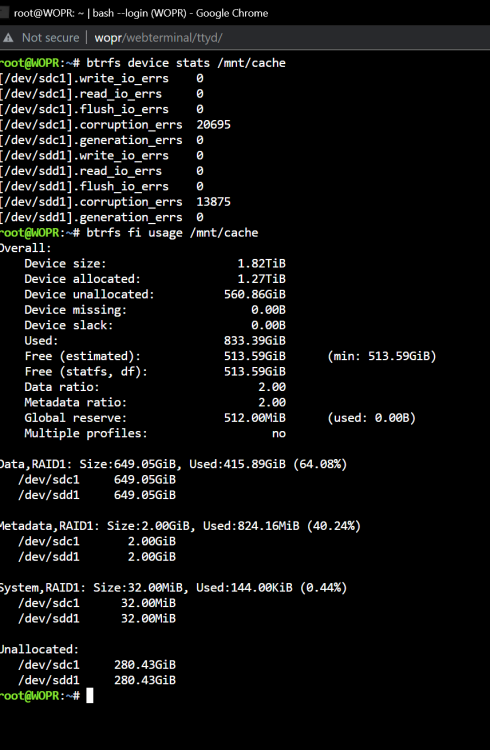
-
I've already done that. Didn't report any issues.
-
Diagnostics attachedwopr-diagnostics-20230120-1503.zip
-
Hey Jorge, Same issue unfortunately again - reported 5206 udma errors, disabled the drive and on reboot is unmountable due to filesystem error, so I guess I need to back it up - is there an easy way? I don't have a spare sata port, but do (I think) have an 18tb drive
-
@JorgeB so I did that and it gave me the same issue with the log as previously in the thread. I have run it as -L and it now mounts with no evidence on the drive of a lost+found. But this is the same place I was, before I had the same issue and had to restart all of this. So I'm still puzzled as to what is going on? If I try another restart in a few days, could I not just have the same issue?
-
How would I go about backing it up if it's unmountable?
-
So memtest passed with 0 errors. Any other suggestions @trurl @itimpi? Try the basic stuff like cables?
-
Great, thanks I am running that now. It took me a while as I forgot my cpu doesn't have inbuilt gfx and couldn't find my mini DP convertor for my P400 ahaha. Will post results when I get them.

