





bonox
Members
-
Joined
-
Last visited
-
Of course I'm using an reverse proxy. But I hadn't thought to forward v6 received packets to the v4 address of plex. I don't know why. Anyway, thanks for the hint 🙈
-
I'm having trouble to get the plex media server accessibale via ipv6. Running the command " docker inspect -f '{{range .NetworkSettings.Networks}}{{.GlobalIPv6Address}}{{end}}' Plex-Media-Server" throws out an ipv6 address. But the server is not responding to this ipv6 address. Other docker container are working properly with identical network settings. I'm using custom br0 by setting a static v4 address. Other container obtaining v6 adresses automatically. The prefix does not fit to the working container. Is there something missing in the network stack that plex is not processing router advertisements or dhcpv6 packets? Or do I have to do some manual settings?
-
"Fehler" behoben. Gleich vorweg: Layer 8 Problem! Und zwar ganz bescheuert. Reine Vergesslichkeit ist die Ursache. Ich habe mir quasi in meiner Beschreibung selbst den Hinweis gegeben -> Unraid Connect. Um Unraid Connect zu betreiben, muss der Server von außen erreichbar sein. Es wird hierfür wohl der GUI-Port verwendet. Diesen hatte ich geändert, da ich eine Port-Weiterleitung auf dem ursprünglichen Port bereits hatte. Als ich mich in Unraid-Connect eingeloggt hatte, sah ich auch gleich den Port und mir fiel es wie Schuppen von den Augen. Ein klein bisschen schäme ich mich Grüße Sascha
-
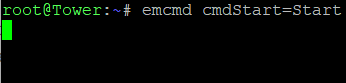
Hallo zusammen, gestern fiel mir auf, dass die GUI meines Unraid-Servers nicht mehr erreichbar ist. Seit wann genau, kann ich leider nicht benennen. Die letzte Aktion die ich durchgeführt habe, war vorgestern das Einrichten von Unraid Connect. Direkt danach war die GUI allerdings noch erreichbar. Die Shell, Container, VM und SMB Shares liefen und funktionierten alle noch. /etc/rc.d/rc.nginx restart und /etc/rc.d/rc.nginx reload halfen leider nicht. Heute morgen dann der Versuch des kompletten Neustarts per SSH durchgeführt: emcmd cmdStop=Stop und anschließend pwerdown -r Nach dem Neustart war die GUI leider immer noch nicht erreichbar. /etc/rc.d/rc.nginx restart und /etc/rc.d/rc.nginx reload halfen erneut nicht. emcmd cmdStart=Start bleibt "hängen". Eine zweite Shell kann geöffnet werden. Ich muss dazu sagen, ich hatte noch das Array und auch den Server nicht per Konsole neu starten müssen. Die Befehle habe ich durch googlen aufgetrieben und war eben der Hoffnung, die richtigen Befehle gefunden zu haben. Unraid Version: 7.1.2 Linux Version: 6.12.24-Unraid syslog.txtvor emcmd cmdStart=Start Das WebUI war nicht erreichbar. Über ein paar Tipps würde ich mich sehr freuen! Danke und Grüße Sascha
-
Hi all, I'm facing an issue and I'm not able to fix it. I had some trouble deleting files using the web ui. After changing the rights, it worked fine. Afterwards I noticed the new version. As a backup I did 'cp -r owncloud owncloud.old'. I know that dlandon describes in the update manual to rename the folder. However, when I restarted the docker container after the copy process, I'm facing the following error: 2024/08/25 19:31:13 [error] 534#534: *41 FastCGI sent in stderr: "PHP message: PHP Fatal error: Uncaught Doctrine\DBAL\DBALException: Failed to connect to the database: An exception occurred in driver: SQLSTATE[HY000] [2002] No such file or directory in /config/www/owncloud/lib/private/DB/Connection.php:62 Stack trace: #0 /config/www/owncloud/lib/composer/doctrine/dbal/lib/Doctrine/DBAL/Connection.php(475): OC\DB\Connection->connect() #1 /config/www/owncloud/lib/composer/doctrine/dbal/lib/Doctrine/DBAL/Connection.php(437): Doctrine\DBAL\Connection->getDatabasePlatformVersion() #2 /config/www/owncloud/lib/composer/doctrine/dbal/lib/Doctrine/DBAL/Connection.php(379): Doctrine\DBAL\Connection->detectDatabasePlatform() #3 /config/www/owncloud/lib/composer/doctrine/dbal/lib/Doctrine/DBAL/Connection.php(844): Doctrine\DBAL\Connection->getDatabasePlatform() #4 /config/www/owncloud/lib/private/DB/Connection.php(148): Doctrine\DBAL\Connection->setTransactionIsolation() #5 /config/www/owncloud/lib/composer/doctrine/dbal/lib/Doctrine/DBAL/DriverManager.php(262): OC\DB\Con" while reading response header from upstream, client: x.x.x.x, server: _, request: "GET /status.php HTTP/1.1", upstream: "fastcgi://unix:/var/run/php/php7.4-fpm.sock:", host: "my-domain.com" Asking google I found some hints in missing php modules. I changed the php version via 'Edit' in the unraid web ui regarding to the owncloud docker container. This led to pulling and (re)installing the php packets during the start of the docker container. Nevertheless, I'm still facing this issue. Used php version is 7.4 Any tips or ideas? UPDATE: Database log says: Honestly, I'm not good in database administration. More precisely: I hate databases How can I do this within the container? -> start mysqld with --tc-heuristic-recover switch to commit or rollback pending transactions UPDATE 2: I'm lost .... BR Sascha
-
Danke für die schnelle Antwort. Diese Antworten habe ich bereits erwartet. Meine unausgesprochenen Vermutungen wurden bestätigt. Paritycheck ist ohne Fehler durchgelaufen. D.h. somit die Parität passt zum aktuellen Stand ohne die Daten. Im Syslog habe ich nichts gefunden. Es sind ja nur Filme. Es ist nicht das technische Problem die Filme wieder auf die Platte zu bekommen. Es ist vielmehr die Zeit, die dafür benötigt wird. Ja, ich werde mir wohl Gedanken um ein Backup-System machen müssen. Die Disk mit den schlechten Werten, werde ich schnellstmöglich austauschen.
-
Guten Tag allerseits, vor einigen Tagen habe ich schmerzlich feststellen müssen, dass über 400 meiner Filme verschwunden sind. Die Filme liegen auf einem SMB Share und werden in aller Regel über Plex geschaut. Plex läuft als Docker auf Unraid. Den genauen Zeitpunkt wann die Filme nicht mehr vorhanden sind weiß ich leider nicht. Ich musste vor ca. ein bis zwei Wochen den Unraid-Server per Unterbrechung der Stronzufuhr neu starten. Die Unraid-GUI war nicht mehr aufrufbar und die Docker Container haben auch nicht mehr funktioniert. Nach dem Neustart konnte ich eigentlich keine Fehler feststellen. Die Container laufen alle wieder wie gewünscht und konfiguriert. Lediglich habe ich, wie bereits beschrieben, vor zwei Tagen die fehlenden Filme fesrgestellt. Andere Daten fehlen nicht, soweit ich das überblicken kann. Auffällig ist, dass auf Disk 1 nur 31 Filme vorhanden sind. Auf Disk 2 hingegen 228. Ebenfalls auffällig ist, dass bei Disk 1 der SMART-Wert "Reallocated sector count" orange hervorgehoben ist, da der Schwellwert 50 mit dem Wert 48 unterschritten wurde. Ein SMART-Short-Test wiederum wurde ohne Fehler abgeschlossen. Den erweiterteten werde ich jetzt noch anstoßen. Disk 1TOSHIBA_MD04ACA400_55TGKB5SFSAA - 4 TB (sdf) Disk 2ST4000DM004-2CV104_Z9702Z4N - 4 TB (sdd) Cache CT1000BX500SSD1_2323E6DFA2A9 - 1 TB (sdc) Flash DataTraveler_80 - 31 GB (sda)*61981670vfat31 GB Sdb ist eine USB-Platte, welche lediglich an eine Ubuntu-VM weitergeleitet wird. Gibt es Logs, in denen nachvollziehbar ist, was genau passiert ist? Gibt es die Möglichkeit die Daten über die Parity-Disk zurück zu bringen? Ist es sinnvoll eine 4 TB Platte durch eine neue zu ersetzen und auf die Wiederherstellung per Parität zu hoffen? Besten Dank vorab und Grüße Sascha
-
Hi dlandon, thanks for answering super fast. You are right. Mapping was wrong. I did the change and now I'm able again to upload files. But why did it work for years with apparently wrong settings? Anyways thanks for great and fast support.
-
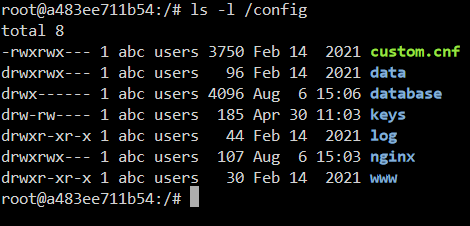
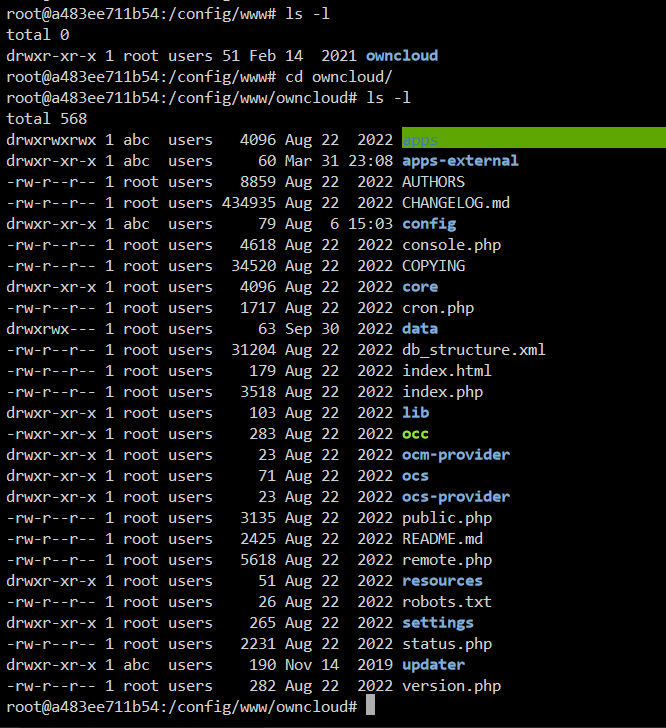
Hi all, after upgrading unraid to version 6.12.3 2023-07-14 I'm no longer able to upload, delete or change files. No matter if I try it by web ui or mobile apps. Last log entry is from 2023-08-02T18:36:13+00:00. That means logging stopped from that point. By the attampt to upload a file via Android app I can see a push message telling me it is not possible to upload due to insufficient rights. I checked with ls -l /config -> But most directories and files underneath have root:users. Only a few have abc:users Is that correct or has it abc:users as well? BR, Sascha
-
Did anyone solve this problem? Facing the same.
-
same question over here. I want to open this proxy page encrypted by using https. Is that possible?
-
Thanks for responding quickly. I restart the container very rarely. I'll keep it in mind to check the logs. Checking the logs actually should be the first thing to do Don't ask me why I did not do?! Might be that I thought the docker log is enough .....
-
Another question: How can I restart the oscam service on command line? I need to restart oscam periodically.
-
Owncloud is up and running. It just took very long. I guess more than 30 minutes. Any explanation for that?
-
Hi all, I tried to upload a file with a size of approximately 1.6G. It failed. Even when I set client_max_body_size to 0 in the config files under server and http. I reverted everything back to the values before. Now the docker stuck at '*** Running /etc/my_init.d/60_get_owncloud.sh...' during the boot process. The config files I found does not tell me anything related to the boot process. Has anyone had a similar situation and can give me a tip? In case this has alreaby been discussed, sorry, I did not read all the 16 pages due to lack of time. Many thanks in advance BR, Sascha


