





weirdcrap
Members
-
Joined
-
Last visited
Everything posted by weirdcrap
-
I noticed this broke when I updated to v7.3.0. Only issue appears to be that the generated backup name changed from flash-backup to boot-backup. Depending on how many days since you upgraded you may have a lot of copies of your flash backup in / so delete them or move them to their intended location so they aren't lost on reboot. EDIT: just decided to copy out my copy of the script and paste it here. This is with the latest fix for v7.3.0 #!/bin/bash ##### PRE RUN CHECK IF ARRAY IS STARTED ###### ls /mnt/disk[1-9]* 1>/dev/null 2>/dev/null if [ $? -ne 0 ] then echo "ERROR: Array must be started before using this script" logger "ERROR: Array must be started before using this script" exit fi #### SECTION 1 ####------------------------------------------------------------------------------------------------------ #dir = WHATEVER FOLDER PATH YOU WANT TO SAVE TO dir="YOUR_DIR_HERE" echo 'Executing native unraid backup script' /usr/local/emhttp/webGui/scripts/flash_backup #### SECTION 2 ####------------------------------------------------------------------------------------------------------ echo 'Remove symlink from emhttp' find /usr/local/emhttp/ -maxdepth 1 -name '*boot-backup-*.zip' -delete sleep 5 #### SECTION 3 ####------------------------------------------------------------------------------------------------------ if [ ! -d "$dir" ] ; then echo "making directory as it does not yet exist" # make the directory as it doesnt exist mkdir -vp "$dir" else echo "As $dir exists continuing." fi #### SECTION 4 ####------------------------------------------------------------------------------------------------------ echo 'Move Flash Zip Backup from Root to Backup Destination' mv /*-boot-backup-*.zip "$dir" sleep 5 #### SECTION 5 ####------------------------------------------------------------------------------------------------------ echo 'Deleting Old Backups' #ENTER NUMERIC VALUE OF DAYS AFTER "-MTIME +" find "$dir"* -mtime +YOUR_DAYS_HERE -exec rm -rfv {} \; echo 'All Done' #### SECTION 6 ####------------------------------------------------------------------------------------------------------ #UNCOMMENT THE NEXT LINE TO ENABLE GUI NOTIFICATION UPON COMPLETION /usr/local/emhttp/webGui/scripts/notify -e "Unraid Server Notice" -s "Flash Zip Backup" -d "A copy of tower unraid flash disk has been backed up" -i "normal" exit
-
I'm fairly certain the btrfs error is ignorable so I didn't end up doing anything about it. The drive has stayed online and I have no reasonable reference on a test window to wait for so I'll just mark this as solved and bump it if it ends up returning later. I did add the lines recommended in the thread I linked/what JorgeB recommended.
-
Ok I'll get the drive back up first and make a backup before i attempt any repairs. I double checked the bios and all PCI/PCIE ASPM options are disabled.
-
Ok and what about the BTRFS errors? Should I run a repair on the file system before I mess with the power saving features? I'm hesitant to run a repair without guidance as the help suggests. This is the first and ONLY time this has ever happened so I find it hard to believe that the power saving features just suddenly became problematic after years of trouble free operation. I'll try as you suggested, just strikes me as unlikely that without a firmware update or bios setting change that it would just suddenly become an issue on it's own. I'll also check the bios to make sure any PCIE/NVME power saving features are off. EDIT: or could the "We have a space info key for a block group that doesn't exist" be a benign error? https://www.spinics.net/lists/linux-btrfs/msg160026.html https://bbs.archlinux.org/viewtopic.php?id=310626
-
Noticed one of my VMs was unresponsive. It looks like my cache drive just dropped offline? Never had a cache drive just drop out suddenly like this. I have had zero issues with this drive since it was installed years ago so this is totally out of left field. Feb 7 14:53:43 VOID kernel: nvme nvme0: I/O tag 453 (31c5) opcode 0x0 (I/O Cmd) QID 11 timeout, aborting req_op:FLUSH(2) size:0 Feb 7 14:53:43 VOID kernel: nvme nvme0: Abort status: 0x0 Feb 7 14:53:45 VOID kernel: nvme nvme0: I/O tag 129 (b081) opcode 0x2 (I/O Cmd) QID 1 timeout, aborting req_op:READ(0) size:65536 Feb 7 14:53:45 VOID kernel: nvme nvme0: Abort status: 0x0 Feb 7 14:53:49 VOID kernel: nvme nvme0: I/O tag 792 (5318) opcode 0x2 (I/O Cmd) QID 5 timeout, aborting req_op:READ(0) size:8192 Feb 7 14:53:49 VOID kernel: nvme nvme0: I/O tag 793 (5319) opcode 0x2 (I/O Cmd) QID 5 timeout, aborting req_op:READ(0) size:12288 Feb 7 14:53:49 VOID kernel: nvme nvme0: Abort status: 0x0 ### [PREVIOUS LINE REPEATED 1 TIMES] ### Feb 7 14:53:53 VOID kernel: nvme nvme0: I/O tag 454 (e1c6) opcode 0x2 (I/O Cmd) QID 11 timeout, aborting req_op:READ(0) size:16384 Feb 7 14:53:53 VOID kernel: nvme nvme0: Abort status: 0x0 Feb 7 14:53:58 VOID kernel: nvme nvme0: I/O tag 130 (7082) opcode 0x9 (I/O Cmd) QID 1 timeout, aborting req_op:DISCARD(3) size:32505856 Feb 7 14:53:58 VOID kernel: nvme nvme0: Abort status: 0x0 Feb 7 14:54:13 VOID kernel: nvme nvme0: I/O tag 453 (31c5) opcode 0x0 (I/O Cmd) QID 11 timeout, reset controller Feb 7 14:55:26 VOID kernel: nvme nvme0: Device not ready; aborting reset, CSTS=0x1 Feb 7 14:55:26 VOID kernel: nvme0n1: I/O Cmd(0x2) @ LBA 153442520, 128 blocks, I/O Error (sct 0x3 / sc 0x71) Feb 7 14:55:26 VOID kernel: I/O error, dev nvme0n1, sector 153442520 op 0x0:(READ) flags 0x80700 phys_seg 8 prio class 2 Feb 7 14:55:26 VOID kernel: nvme0n1: I/O Cmd(0x2) @ LBA 225096848, 16 blocks, I/O Error (sct 0x3 / sc 0x71) Feb 7 14:55:26 VOID kernel: I/O error, dev nvme0n1, sector 225096848 op 0x0:(READ) flags 0x80700 phys_seg 2 prio class 2 Feb 7 14:55:26 VOID kernel: nvme0n1: I/O Cmd(0x2) @ LBA 246795088, 24 blocks, I/O Error (sct 0x3 / sc 0x71) Feb 7 14:55:26 VOID kernel: I/O error, dev nvme0n1, sector 246795088 op 0x0:(READ) flags 0x80700 phys_seg 3 prio class 2 Feb 7 14:55:26 VOID kernel: nvme0n1: I/O Cmd(0x2) @ LBA 597332760, 1024 blocks, I/O Error (sct 0x3 / sc 0x71) Feb 7 14:55:26 VOID kernel: I/O error, dev nvme0n1, sector 597332760 op 0x0:(READ) flags 0x84700 phys_seg 126 prio class 2 Feb 7 14:55:26 VOID kernel: nvme0n1: I/O Cmd(0x2) @ LBA 597496360, 1024 blocks, I/O Error (sct 0x3 / sc 0x71) Feb 7 14:55:26 VOID kernel: I/O error, dev nvme0n1, sector 597496360 op 0x0:(READ) flags 0x84700 phys_seg 127 prio class 2 Feb 7 14:55:26 VOID kernel: nvme0n1: I/O Cmd(0x2) @ LBA 597497384, 24 blocks, I/O Error (sct 0x3 / sc 0x71) Feb 7 14:55:26 VOID kernel: I/O error, dev nvme0n1, sector 597497384 op 0x0:(READ) flags 0x80700 phys_seg 3 prio class 2 Feb 7 14:55:26 VOID kernel: nvme0n1: I/O Cmd(0x2) @ LBA 597333784, 456 blocks, I/O Error (sct 0x3 / sc 0x71) Feb 7 14:55:26 VOID kernel: I/O error, dev nvme0n1, sector 597333784 op 0x0:(READ) flags 0x80700 phys_seg 57 prio class 2 Feb 7 14:55:36 VOID kernel: nvme nvme0: Device not ready; aborting reset, CSTS=0x1 Feb 7 14:55:38 VOID kernel: nvme 0000:02:00.0: not ready 1023ms after FLR; waiting Feb 7 14:55:39 VOID kernel: nvme 0000:02:00.0: not ready 2047ms after FLR; waiting Feb 7 14:55:41 VOID kernel: nvme 0000:02:00.0: not ready 4095ms after FLR; waiting Feb 7 14:55:46 VOID kernel: nvme 0000:02:00.0: not ready 8191ms after FLR; waiting Feb 7 14:55:54 VOID kernel: nvme 0000:02:00.0: not ready 16383ms after FLR; waiting Feb 7 14:56:11 VOID kernel: nvme 0000:02:00.0: not ready 32767ms after FLR; waiting Feb 7 14:56:47 VOID kernel: nvme 0000:02:00.0: not ready 65535ms after FLR; giving up Feb 7 14:56:47 VOID kernel: nvme nvme0: Disabling device after reset failure: -25 Feb 7 14:56:47 VOID kernel: I/O error, dev nvme0n1, sector 0 op 0x1:(WRITE) flags 0x800 phys_seg 0 prio class 2 Feb 7 14:56:47 VOID kernel: BTRFS error (device nvme0n1p1): bdev /dev/nvme0n1p1 errs: wr 0, rd 1, flush 0, corrupt 0, gen 0 Feb 7 14:56:47 VOID kernel: BTRFS error (device nvme0n1p1): bdev /dev/nvme0n1p1 errs: wr 0, rd 2, flush 0, corrupt 0, gen 0 Feb 7 14:56:47 VOID kernel: BTRFS error (device nvme0n1p1): bdev /dev/nvme0n1p1 errs: wr 0, rd 2, flush 1, corrupt 0, gen 0 Feb 7 14:56:47 VOID kernel: BTRFS error (device nvme0n1p1): bdev /dev/nvme0n1p1 errs: wr 1, rd 2, flush 1, corrupt 0, gen 0 Feb 7 14:56:47 VOID kernel: BTRFS warning (device nvme0n1p1): chunk 13631488 missing 1 devices, max tolerance is 0 for writable mount Feb 7 14:56:47 VOID kernel: BTRFS: error (device nvme0n1p1) in write_all_supers:4044: errno=-5 IO failure (errors while submitting device barriers.) Feb 7 14:56:47 VOID kernel: BTRFS error (device nvme0n1p1): bdev /dev/nvme0n1p1 errs: wr 2, rd 2, flush 1, corrupt 0, gen 0 Feb 7 14:56:47 VOID kernel: BTRFS error (device nvme0n1p1): bdev /dev/nvme0n1p1 errs: wr 2, rd 3, flush 1, corrupt 0, gen 0 Feb 7 14:56:47 VOID kernel: BTRFS error (device nvme0n1p1): bdev /dev/nvme0n1p1 errs: wr 2, rd 4, flush 1, corrupt 0, gen 0 Feb 7 14:56:47 VOID kernel: BTRFS error (device nvme0n1p1): bdev /dev/nvme0n1p1 errs: wr 2, rd 5, flush 1, corrupt 0, gen 0 Feb 7 14:56:47 VOID kernel: BTRFS error (device nvme0n1p1): bdev /dev/nvme0n1p1 errs: wr 2, rd 6, flush 1, corrupt 0, gen 0 Feb 7 14:56:47 VOID kernel: BTRFS error (device nvme0n1p1): bdev /dev/nvme0n1p1 errs: wr 2, rd 7, flush 1, corrupt 0, gen 0 Feb 7 14:56:47 VOID kernel: I/O error, dev loop2, sector 80732704 op 0x0:(READ) flags 0x80700 phys_seg 5 prio class 2 Can't view anything in the webui about it. Going to try and reboot to see if it comes back up. EDIT: well it seems to have come back up ok after a reboot? I've stopped all dockers and VMs for now. I'm going to do an FS check and a BTRFS scrub to look for errors. BTRFS scrub passed, the FS check did find errors: [1/8] checking log skipped (none written) [2/8] checking root items [3/8] checking extents [4/8] checking free space tree We have a space info key for a block group that doesn't exist [5/8] checking fs roots [6/8] checking only csums items (without verifying data) [7/8] checking root refs [8/8] checking quota groups skipped (not enabled on this FS) Opening filesystem to check... Checking filesystem on /dev/nvme0n1p1 UUID: 93f1bb6c-be8a-4014-a762-2755d1e2e690 found 914831544320 bytes used, error(s) found total csum bytes: 818051900 total tree bytes: 2522759168 total fs tree bytes: 1412333568 total extent tree bytes: 200622080 btree space waste bytes: 393034216 file data blocks allocated: 3480582864896 referenced 888944390144 Currently have the array in maintenance mode while I wait for next steps. void-diagnostics-20260208-0610.zip Edit: Could it be related to power saving features? https://wiki.archlinux.org/title/Solid_state_drive/NVMe#Troubleshooting https://forums.unraid.net/topic/135766-seems-one-of-my-nvme-drives-threw-up-on-itself-overnight-help-diagnostics-attached/#comment-1234771 Seems odd that this would just now suddenly become an issue after years of trouble free operation if this was a power saving issue...I've not updated the drive firmware or changed any bios settings recently...
-
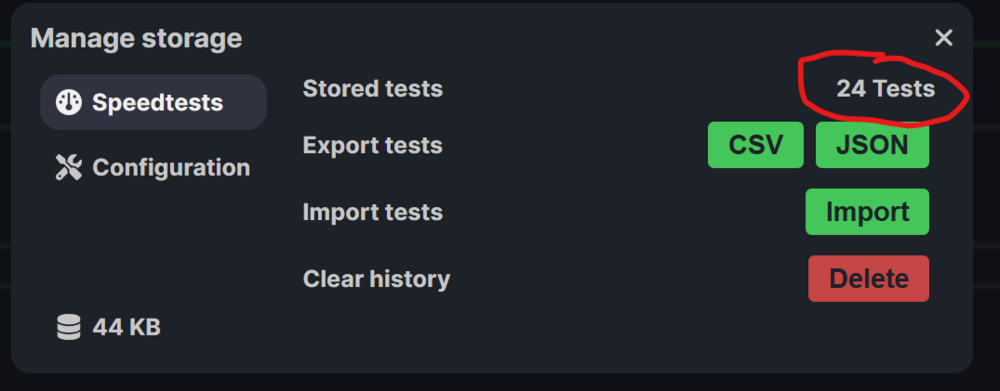
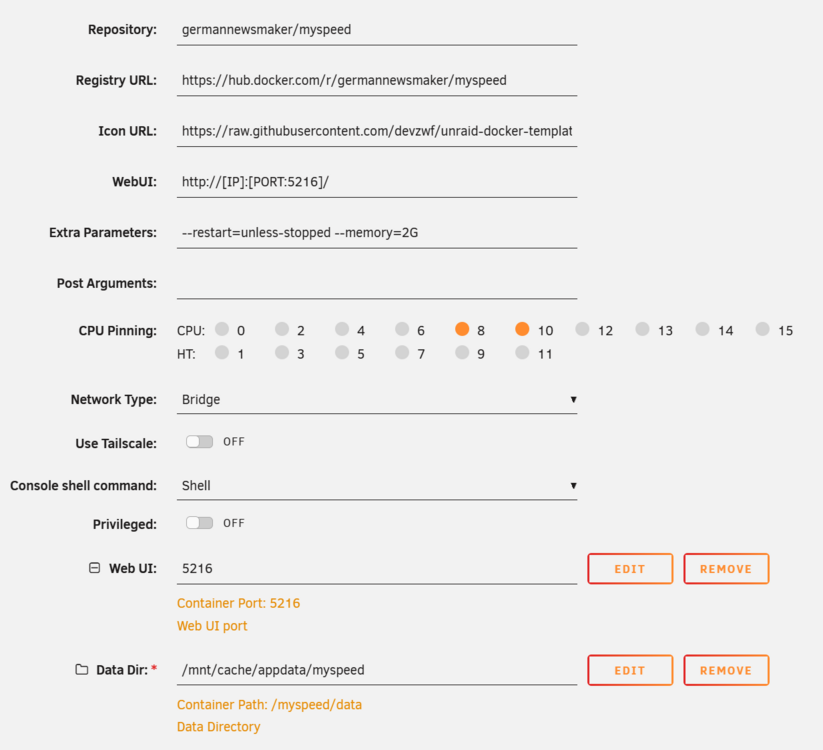
Noticing a weird issue with this. It only ever seems to keep the last 24ish hours worth of tests in the GUI? But if you go to export the tests it clearly shows more tests than the GUI? The export contains all the tests I would expect it to, significantly more than the GUI shows. If I try to run the recommendations (since I have 24 tests supposedly) it tells me I don't have enough tests? Nothing particularly weird or interesting about my docker setup: EDIT: Ah ok, I'm an idiot and didn't realize you needed to set the period to see more tests. The recommendations still don't appear to be working though, it just keeps giving me the error about not having enough tests? Am I just missing something else obvious?


-
Yeah so despite my RAM continuing to pass multiple memtest attempts all of my parity errors go away with different RAM installed and two back to back parity tests.. Now I've got to figure out how to convince corsair to replace these sticks despite their being "nothing wrong with them". EDIT: I was expecting some pushback from corsair on the RMA but they were surprisingly easy going about it even though I had no concrete proof the ram was defective, just circumstantial evidence that the problem goes away with different ram. Should have a new kit on the way in a few weeks while I limp by with a borrowed 16GB kit.
-
So with the new kit in I need to run two checks to be sure the error is resolved? I'm going to test the RAM in another machine to rule out contributing factors in my server.
-
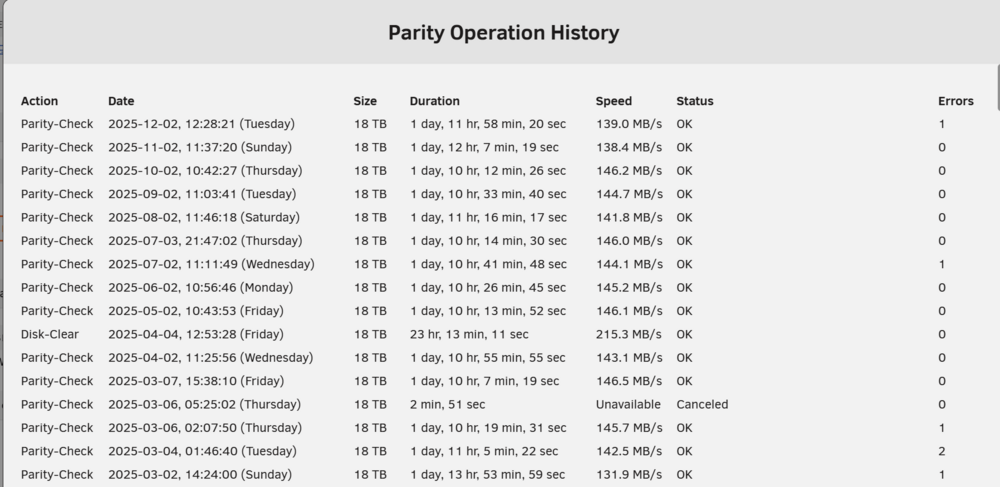
I've been having an off and on issue with my main UnRAID server where I will get a few (1-2) parity errors randomly. They are never the same sector and the issue can sometimes not occur for months at a time: As you can see i had some issues at the beginning of the year, which then disappeared for months, resurfaced for a single month, disappeared for five more months, and has now resurfaced again. Back in March when these errors first started appearing I tested the RAM, and it passed an overnight memtest. I understand memtest is never definitive unless it actually finds errors so it may still be the RAM. I plan on retesting these in a different machine and borrowing a new kit from someone to test in my server (since DRAM prices are insane right now). While I'm working the RAM angle, what other things should I be checking? No unclean shutdowns and the server is on a UPS of sufficient size. I don't see any reported sector issues on any disks. I have a single disk that has some historical UDMA CRC errors but I don't recall seeing any recently. Nothing that to my eyes would suggest I need to swap about sata/power cables for the disks or that one of the disks is failing. Power supply should be of sufficient size, IIRC its either 850 or 1000W. I'm using Dell H310 HBAs with SAS style split out SATA connectors. I don't use ZFS or the file integrity plugin so currently no way to know where the troublesome data is stored. node-diagnostics-20251203-0817.zip
-
I'm going to mark this as solved. My only thought is this had something to do with the specific kernel version(s) used in the 7.1.x releases as 7.2 the issue has completely gone away with no changes to the hardware.
-
Yeah I have XMP disabled. There were two, an MSI Fast Boot (off) and regular Fast Boot (on). Turning it off seems to have fixed it, I've rebooted it a few times and it comes back up. Strange that it just suddenly became a problem, I assume it's been on for years.
-
This has taken a turn for the weird. I ran the server with one stick for over a month, then the other. worked flawlessly. I put both sticks back in a few weeks ago and it was working fine, i was running on 7.2 RC2 and everything seemed great. I installed the 7.2 stable today and the server never came back up after reboot. Upon investigating it appears that the system passes post, but then gets stuck before the UnRAID OS loads (I never get to the picker screen for safe mode, gui, etc). If I move the flash drive to another port, it will boot normally exactly once. The next time you reboot the server it hangs at the same spot. If you enter then exit the bios without changing anything, it will boot normally without having to move the flash drive around but this is obviously not ideal for a headless server. I tried going back down to one stick, then the other same behavior. I've tried both sticks in every slot on the motherboard, same behavior. I even found some entirely different DDR4 RAM that I had in a drawer and forgot about. Same issue. The motherboard has diagnostic LEDs but whatever this issue is is not causing any of them to light up. I'm stumped. I might take another crack at getting windows on this thing somehow so I can try to run that processor diagnostic. Any additional insights from the community? I'm beyond frustrated with it at this point. I hate just throwing money at a problem with no real idea if it's going to fix it or not. But I still can't tell if this is a RAM thing (seems rather unlikely at this point), a CPU issue (you'd think I'd get some kind of error or log entry with the server running), or something with the motherboard. EDIT: forgot to mention I also tried a brand new flash drive freshly flashed with 7.2 just to make sure it wasn't something with my USB. Same behavior.
-
I will give this a try, thankfully I've got 64GB of RAM in there (I thought I only had 32) so I should still be able to keep all my services up. I had zero luck with Windows to Go. Rufus made the USBs fine but the first attempt just kept failing to load the user profile service. So thinking Something had gone wrong in the imaging I imaged it again only to have it fail even earlier and suddenly reboot before I could even get to the login screen. I may just have to bite the bullet and install an SSD in here temporarily so I can run this damn processor testing software.
-
Nice, I wish mine would crash more frequently than once a month. Makes it way harder to try and track down the problem. If I had to guess mine is also probably CPU related. Visually my mobo looks fine (no bulging/leaking caps or anything like that). I'm waiting for the Windows to Go USB to be created so I can try the processor test software from intel. I checked the server when I got home and its the same as always, no screen output, everythings frozen, no connectivity.
-
Mine is also about once a month. Doesn't seem to be any particular activity that causes the problem and IIRC it was doing this on the earlier 7.1.x releases as well. This is the first time I've been actively connected to it when it goes down. I usually get on Plex and only then notice the server is down. I think this is the third or fourth time now. I'll report back if I can find any physical issues (like bad caps on the mobo) or if the Intel Processor Diagnostic tool yields any results.
-
Are there known issues with thia CPU/MOBO combo? I've got a 12th gen in my other server with no issues but it's paired with a Z790. EDIT: I'm going to make a bootable windows USB and try to run Intel's processor diagnostic tool. Really want to figure out which piece of hardware the problem is so I'm not just buying random things in the hopes that they resolve whatever the issue is.
-
I've been having a vexing issue with one of my servers hard locking abruptly and becoming completely unresponsive. I was working on it remotely just now actually when it suddenly dropped off the face of the earth. I'll have to confirm when I get home but each time this has happened previously the system is completely unresponsive to any local inputs (keyboard/mouse) and all remote connection attempts (SSH, WebUI, etc) all fail despite it still being powered on. I've done multiple rounds of memtest (pretty much each time it does this I check the RAM with an overnight test) and it always passes. I turned on remote logging to another device hoping to catch a hint of what's going on but it seems to cut out so abruptly that nothing ever gets logged to indicate what the issue is. My last entry was: 2025-08-07T12:24:51+01:00 VOID webgui: Kometa: Could not download icon https://raw.githubusercontent.com/Kometa-Team/Kometa/nightly/docs/_static/logomark-color.png Which was me switching my Kometa container to Nightly and roughly five minutes before the system went down. The system has a monitor hooked up but if it goes to sleep I can't wake the screen after the hard lock to try and see if anything was output to the display. I'll have to see if i can turn off any power saving features to keep it on all the time. Any hints on likely culprits? I'm thinking its got to be either CPU or MOBO? Quite frustrating given they're barely two years old (specs for VOID are in my signature). You can see a month old diagnostic here from my last thread about this server, nothing has changed since it was taken. void-diagnostics-20250710-0925.zip
-
I'm on 7.1.4 but I don't think this issue is new to this version, hoopster noticed it a little over a year ago. I have a general support thread about this but wasn't sure how much the dev's looked at those vs the bug reports here. Myself and others have been manually editing our /config/syslog.cfg & syslog.conf files to log to an unassigned device/pool/whatever instead of the default share only behavior in the webui. This was acknowledged as possible in a couple threads (here for example) by bonienl and the webui even has a <custom> option shown so clearly this was at least a semi-officially supported feature even if it was not explicitly recommended. This was working fine for me until I inadvertently changed a syslog related config option recently and now I am unable to get it to work again despite restoring the exact original working config files from a backup. I outlined my issues in this thread and my diagnostics is there if you want to see it. To summarize, the <custom> option is no longer selectable/shows up when a custom path is set. Updates to the logging path in syslog.cfg (server_folder=) and the remote template in syslog.conf seem to be entirely ignored now despite rolling the service and restarting the server. It chooses to instead log to the last share selected in the GUI (if you had previously selected one) or if not seems to log to the first share alphabetically available. Could we get some clarification on if this was a purposeful change by the development team? Is modifying the logging path in syslog files in /config/ now officially "Not Supported"? Or was it broken by mistake?
-
Well that sucks. Since this at one point worked and since the <custom> option is still present I'm going to open a bug report on this. Maybe limetech will fix it. In the meantime I have some Pi 2Bs that I can just plug the USB drive into and setup logging remotely that way. It's irritating I have to setup an entirely separate device when this was literally working for me up until last week when I changed a setting not realizing it was going to break my perfectly functional config permanently.
-
v7.1.4 I'm using the logging trickery from the docs to log locally however I'm wanting to log to an Unassigned Device, not a share on the array. Since I can't select UD Devices from the GUI I've been trying to hardcode the directory into rsyslog.cfg, rsyslog.conf, & rsyslog.local (when present) . This used to be possible but as hoopster mentioned it doesn't seem to work anymore? @Hoopster did you ever fix your issue with this? I've edited the files (in /boot/config/ & /etc/ just in case) and tried restarting the service and the entire server but it stubbornly sticks to whatever directory was last chosen through the web ui. It's not changing the modified files back (unless I select a new directory through the web ui) it's almost like it's not reading those files or it's getting it's config from somewhere else. Is there somewhere else UnRAID stores its rsyslog config besides the files in the /boot/config/ folder and the /etc/ folder for the live in RAM system? Or is my config just wrong somehow? node-diagnostics-20250715-0718.zip
-
@JorgeB I know I marked this as solved and it is solved for this server but I have a related question for my other server. I'm using the documented trick to log to the local log server using the remote option in the settings. However I'm wanting to use a mounted Unassigned Device for the destination which I can't pick from the GUI. I'm trying to edit the path I want in and have it changed in both rsyslog.cfg and rsyslog.conf but the changes aren't taking it still logs to whatever directory was last set using the GUI even after restarting the service and rebooting the server. So my question is, what other files does the webui touch when updating the syslog settings that I'm missing? I've tried editing them in both /boot/ and /etc/ but it just won't take now. I used to have it working then it broke and I didn't notice. If it's not as simple as I missed a file somewhere I'll open a new thread with my problem and diagnostics.
-
Ok, I don't really understand what was different between my file and the unraid defaults but I seem to have fixed it. I created a new unraid flash and booted it on a spare pc I had. I just toggled on the local syslog server so unraid would generate an rsyslog.conf and rsyslog.cfg for me. I made backup copies of my existing files and emptied them out replacing them entirely with the default files from the new flash. Saved them and rolled the rsyslog service. Now when I setup remote logging it is actually logging to the Pi as instructed.
-
Yes that is how I had it setup previously, logging to a flash drive I have mounted via UD. I was hoping I might be able to catch some additional entries with the remote system as the logs to the flash drive are normal and then just cease when the system locks up. No traces or any errors EDIT: I think I found my issue. I didn't look far enough down in rsyslog.conf. I apparently made a hardcoded edit for my remote local logging trickery whenever I set it up and forgot about it: # remote host is: name/ip:port, e.g. 192.168.0.1:514, port optional *.* @192.168.1.254:514 $DefaultRuleset local $DefaultRuleset RSYSLOG_DefaultRuleset $DefaultRuleset RSYSLOG_DefaultRuleset $RuleSet remote $FileOwner nobody $FileGroup users $FileCreateMode 0666 $IncludeConfig /etc/rsyslog.d/*.conf # remote #*.* ?remote $InputUDPServerBindRuleset remote $UDPServerRun 514 EDIT2: Ok so this must be part of it but not the whole issue as changing that to my Pi's IP still doesn't get the system logs flowing to the pi. Is there somewhere I can grab an unmodified version of rsyslog.conf and rsyslog.cfg to try to figure out what all I must have changed? EDIT3: Yeah I don't know what to make of this. There are only 3 rsyslog files in /boot/config/ and even after commenting out everything I can find that I believe I added over the standard config its still just happily logging to the flash drive ignoring changes I make to try to redirect it out. I've attached my rsyslog configuration files for review (there is also an older version in my diagnostics above). Am I going to need to make a new flash to get an unchanged copy of the rsyslog files? rsyslog.cfg rsyslog.conf rsyslog.local
-
Bump, any ideas? Seems rather odd that unraid is just sending nothing despite it being configured to log to a remote system.
-
I'm trying to track down a weird issue where VOID hard locks and I'm unable to capture any logs via normal means. I wanted to setup an old Pi I had lying around to act as a syslog server in the hopes of catching some clues as to what is going on. Problem is from what I can tell UnRAID just isn't sending anything to the pi? UnRAID's config is simple and seems to be setup correctly: That is the pi's static IP address. eth0: flags=4163<UP,BROADCAST,RUNNING,MULTICAST> mtu 1500 inet 192.168.1.31 netmask 255.255.255.0 broadcast 192.168.1.255 inet6 2601:248:8300:fd7:e49e:8625:9e9c:42b3 prefixlen 64 scopeid 0x0<global> inet6 2601:248:8300:fd7::1008 prefixlen 128 scopeid 0x0<global> inet6 fe80::1eee:a574:e626:3bd9 prefixlen 64 scopeid 0x20<link> ether b8:27:eb:1a:c8:e7 txqueuelen 1000 (Ethernet) RX packets 154081 bytes 18953278 (18.0 MiB) RX errors 0 dropped 86109 overruns 0 frame 0 TX packets 7841 bytes 1401897 (1.3 MiB) TX errors 0 dropped 0 overruns 0 carrier 0 collisions 0 I've verified the Pi is listening on UDP 514: module(load="imudp") input(type="imudp" port="514") module(load="imtcp") input(type="imtcp" port="514") root@logpi:/home/chris# netstat -an | grep 514 tcp 0 0 0.0.0.0:514 0.0.0.0:* LISTEN tcp6 0 0 :::514 :::* LISTEN udp 0 0 0.0.0.0:514 0.0.0.0:* udp 0 0 0.0.0.0:514 0.0.0.0:* udp6 0 0 :::514 :::* udp6 0 0 :::514 :::* There is no firewall installed on the Pi. AFAIK raspbian lite doesn't come with a firewall pre-installed. Running TCPDump shows nothing captured on UDP 514 despite me spamming UnRAID's logger with random little messages. tcpdump -n udp port 514 tcpdump: verbose output suppressed, use -v[v]... for full protocol decode listening on eth0, link-type EN10MB (Ethernet), snapshot length 262144 bytes Rsyslog on the pi is stock config so anything it receives should be hitting the syslog and it's not so I have to assume it isn't getting anything from VOID. Not really sure what else to check? I manually restart the service each time I change the config on either end. void-diagnostics-20250710-0925.zip EDIT: Installed tcpdump on unraid using un-get and I can confirm I see zero traffic on eth0 on UDP port 514. root@VOID:~# tcpdump -n udp port 514 tcpdump: verbose output suppressed, use -v[v]... for full protocol decode listening on eth0, link-type EN10MB (Ethernet), snapshot length 262144 bytes EDIT2: changed my tcpdump parameters to just monitor any traffic going to the Pi's IP. sent a ping to make sure I was actually able to capture traffic: root@VOID:~# tcpdump -n dst host 192.168.1.31 tcpdump: verbose output suppressed, use -v[v]... for full protocol decode listening on eth0, link-type EN10MB (Ethernet), snapshot length 262144 bytes 10:57:33.808992 IP 192.168.1.254 > 192.168.1.31: ICMP echo request, id 13570, seq 1, length 64 10:57:33.809500 ARP, Reply 192.168.1.254 is-at 04:7c:16:6e:e8:e3, length 28 10:57:34.836995 IP 192.168.1.254 > 192.168.1.31: ICMP echo request, id 13570, seq 2, length 64 10:57:35.861095 IP 192.168.1.254 > 192.168.1.31: ICMP echo request, id 13570, seq 3, length 64 10:57:36.885243 IP 192.168.1.254 > 192.168.1.31: ICMP echo request, id 13570, seq 4, length 64 10:57:37.909225 IP 192.168.1.254 > 192.168.1.31: ICMP echo request, id 13570, seq 5, length 64 10:57:38.933214 IP 192.168.1.254 > 192.168.1.31: ICMP echo request, id 13570, seq 6, length 64 10:57:39.317032 ARP, Request who-has 192.168.1.31 tell 192.168.1.254, length 28 10:57:39.957252 IP 192.168.1.254 > 192.168.1.31: ICMP echo request, id 13570, seq 7, length 64 10:57:40.981046 IP 192.168.1.254 > 192.168.1.31: ICMP echo request, id 13570, seq 8, length 64





