





N385
Members
-
Joined
-
Last visited
-
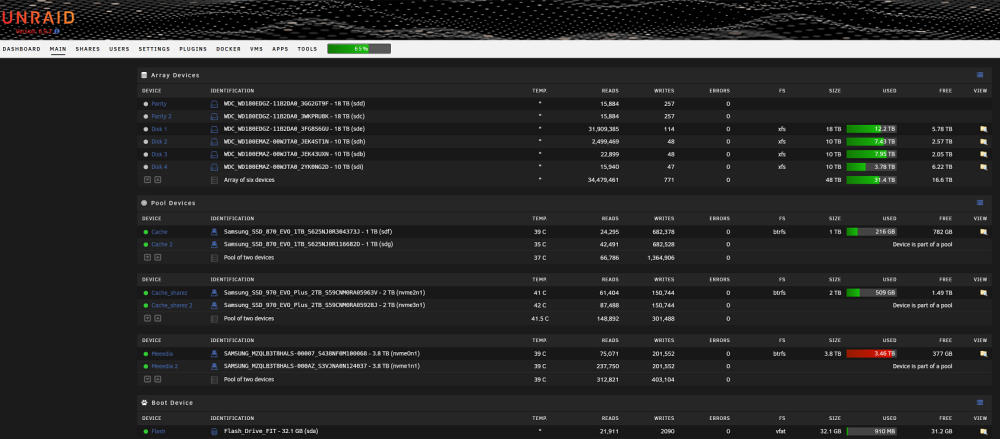
The reason I asked is because something else is going on and I don't know what. I decided to remove Parity one and Disk one and put in two replacements. I moved both of the old disks into another Unraid system, they both showed up as unassigned, and they are both preclearing. Neither of those disks are actually bad and someday they'll probably wind their way back into the array to replace another disk or two that aren't actually bad. *I'm thinking of replacing my HBA...
-
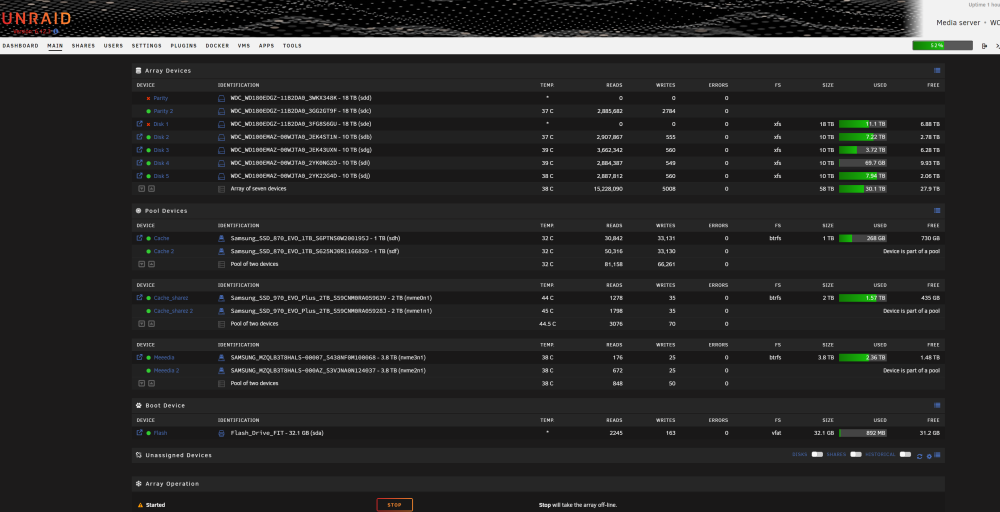
Unraid Version 6.12.3 My Daily driver Windows 10 is an Unraid VM. I stepped away from the computer and when I came back I noticed windows was at the login screen. Not thinking much of it I logged back in and noticed Plex wasn't working so I stopped the plex docker and it wouldn't restart. This is rare but it's happened about a year ago and was fixed by a reboot of Unraid. I reboot Unraid and when once it started I noticed a parity disk and a raid disk were both in error and disabled. Thinking it was just a hickup, I reboot the server again and they both came back in error again so I stopped the array, clicked 'no device' for my first data disk and it showed up in unassigned devices so I mounted it and found all the files and the disk working otherwise as normal. After re-adding it and restarting the array, both still came back in error. A similar situation has happened before a couple years ago (not the same disks) and was remedied by using 'New Config' and rebuilding the parity. Should I do that again or is there an easier fix? My last parity check was two weeks ago. All my important array disks are backed up so I'm not too concerned with losing data. Sorry I didn't grab a diagnostic before a first reboot, but here is my current one along with a snap of my system and the Smart report on both drives. (Data disk 1)- smart-20230719-0148.zip -diagnostics-20230719-0110.zip (Parity disk 1)-smart-20230719-0151.zip
-
My second day of forum surfing, and I found this: https://learn.microsoft.com/en-us/windows/deployment/mbr-to-gpt That fixed my problem, all booted and ready to go. Don't know why my windows install media that I DLd the other day didn't format that way in the first place....
-
Before I started this process I cloned my VMs NVME ssd to a SATA ssd. If I change the VM settings to the bound SATA ports, I can actually boot into that, so I know my VM settings work, I just don't know why they aren't working for NVME??? Any ideas anyone? PLEASE HELP, I've got a lot of work piling up. PS I thought maybe something went wrong when I loaded windows on the NVME, so I re-re-loaded windows on it and it still won't boot
-
I had a Windows 10 VM running on a 1TB PNY NVME that I've used for about 3 years and it started getting really buggy, so I booted into it and loaded a fresh version of windows 10. After booting back into Unraid, the VM wouldn't start, so I unbound everything from it other than the NVME drive and it still won't work, so I created a new VM and it won't run either. The new VM records are here with a picture from the VNC vm.txt

-
88 days that I know of is my record. It could have gone longer but I rarely pay attention before shutting it down. Hardware updates, software updates, the rare Plex error, dust cleanout and the occasional UPS busting power outage all take their toll.
-
I ran SSD trim manually and it definitely was the cause. I wonder if the plugin went bad or what but It's disabled and hopefully all will run well.
-
CA Backup runs monthly on the 14th @ 3AM Mover Tuning is there so only files that are older than 60 days will get moved to the array. It looks like I overlooked SSD trim. SSD Trim was set to run daily at 12:00 (I have just disabled it to see if that fixes the problem).
-
I started a movie this morning at around 11 AM and it quit at 12:02 PM as if on a schedule. I have not reboot yet today so nothing much will work until I do. I did that screen grab at 12:50 PM today. I have 4 user scripts that run once a day. I just downloaded all the logs and viewed them and they show each ran successfully at 4:40 AM one after the other this morning. Other than that Mover runs once a week on Sundays at 2:00 AM and parity check runs the first Sunday of every other month at 3:00 AM. I don't recall having anything scheduled for 12:00 PM User-Script.Logs.zip
-
This has been going on for over a month. In that time I have switched what cable connects what drive and I have even replaced drives in the pool. I have had the machine open at least 5 times. The SATA connectors on the motherboard go to a virtual machine that does backups, video encoding and a lot more so they are not available. I have purposely started watching a movie close to noon many many times and it always stops at ~12:02 (when the browsers video buffer runs out). Not at 11:58 or 12:04, but always 12:02 PM If this were a mechanical issue it wouldn't happen on an exacting schedule. We run no AC or Heat at this time of year so it's not happening due to temperature either. After 12:02 PM Plex will only show this error, the Unraid docker button will hang, fix common problems will hang and the 'reboot' button will not work either. After a hard reboot the machine will work for until 12:00 PM the next day.
 I have a PCIe card installed that has 4 mini SAS connectors with a mini SAS to 4 SATA cable on Each. I've swapped what connectors and even replaced the SSDs to no avail.
 workhorse-diagnostics-20220916-1215.zipI use Unraid mainly for Plex and file storage. At noon my system cache disks seem to go into read only mode (from what I've been able to gather). To get the server working I have to reset it. Half the time the server will not reset from 'reboot' button, so has to be hard reset. Fix common problems will work to 22% and hang. I have a copy of the log. workhorse-syslog-20220915-1914.zip
 The windows 10 PC I'm using now runs on an M.2 nvme drive that I'm going to put in the server and pair with an AMD graphics card so I won't have to have two PCs on all the time. I have a second M.2 nvme that will again be paired with the second nvidia for nvenc and can do other tasks relatively undisturbed. If I have to do any work that requires the VMs be shutoff, I'll have to be able to do it with the first video card that will be paired to Plex for transcoding etc. BTW I deleted the driver and reinstalled it and now, finally it's working.


