






Icekronik
Members
-
Joined
-
Last visited
Everything posted by Icekronik
-
@StevenHB not really. I've been pondering to upgrade for a while, but since then we got RAM shortage and prices are out of whack. Even if I were to discard RAM issues, I couldn't really settle for a small board as I am really looking for a full ATX board and can't find any? I am still aiming for 4545p processor from AMD (due to 65W TDP), but can't find a suitable mobo with multiple PCI-E slots that isn't mITX.
-
Greetings, Seeking guidance on the upgrade path. My current setup: CPU: Intel i5-9600K Motherboard: ROG STRIX Z390-I GAMING GPU: Arc A380 (used for video transcoding) RAM: 32GB DDR4 Storage: 2x M.2 NVME 512GB Samsung Drives Storage: 4x HDD 4TB from Seagate (Ironwolf) I use my UNRAID for variety of tasks, streaming videos, nextcloud, macOS backup. My plan is to expand this further by hosting my own Gitlab instance with runners to build my applications all on my machine. Presently I ran out of storage (all drives at max capacity) and in need of expansion. Trouble is that I already used all 4 of my SATA ports, mobo only has 1 PCI-E slot which is occupied by the GPU, and I am in need of more cores for Gitlab runners and a few VMs I want to run. So I started doing research and wanted to build something to last me next 10 years or so since I got serious about self hosting. CPU: AMD Epyc 4545p (efficient 65W TDP compared to 95W TDP of my current CPU and comes with 16 cores) Motherboard: Supermicro H13SAE-MF GPU: Stays the same RAM: 32GB DDR5 ECC UDIMM (may go higher but perfect time to upgrade with RAM prices going STONKS) This is roughly what I am aiming for, but I do have questions I am hoping to get answers and also what are your overall thoughts on the setup? I've seen conflicting information that there is no reason to limit myself to 65W TDP processor as many higher tier variants may be more efficient at low load like 4585px, is that right or I am misunderstanding smth here? I primarily looked for motherboard with multiple PCI-E slots so I can have GPU and HBA card for more HDD expansion, however all seem to be Micro-ITX instead of full size, why is that? Perhaps there are better options than the one above? Speaking of HBA this is an unknown area for me. I know that HBA card allows me to split SAS ports into 4 SATA ports, but any general recommendations on the setup/hardware, as well as general knowledge about HBA/SATA expansion, is greatly appreciated it as I never had to expand beyond built in SATA ports. I noticed that Supermicro H13SAE-MF has "-O" and "-B" suffix by some retailers. What's that about? P.S. parts were also picked based on general availability in Europe so please keep that in mind when suggesting alternatives :)
-
Experiencing same issue. Not a huge deal, but also should be pretty unnecessary for it to do that while not in use.
-
After upgrading to 7.2.0 on 31st of October, I had a parity check scheduled to run on 1st of November. Come 2nd of November and I see that parity check has not ran even though it was scheduled. I checked the logs and noticed weird check happening ~ every 2 hours. Nov 2 08:22:53 TOWER emhttpd: shcmd (370607): /usr/local/sbin/smartctl_type parity2 -c | grep -q 'in progress' Nov 2 08:22:53 TOWER emhttpd: shcmd (370607): exit status: 1 Nov 2 08:22:53 TOWER emhttpd: spinning down /dev/sdb Nov 2 08:22:53 TOWER emhttpd: shcmd (370608): /usr/local/sbin/smartctl_type parity -c | grep -q 'in progress' Nov 2 08:22:53 TOWER emhttpd: shcmd (370608): exit status: 1I ran the commands manually, but no output is actually given. When just running smartctl_type parity -c there is no place for "parity" check to be there, as it's returning smart data to me. I am not sure if this is related to my system not executing parity check, but I did not get such log lines on 7.1.4 update and parity correctly ran on schedule prior. diagnostics-20251102-1149.zip
-
I've just now ended up reverting back to v6 so I can't check if that's the case anymore. I've had too many issues with v7 atm, lagging interface, constant spamming about DHCP A kernel panic (never had one for 2 years of running Unraid v6) and my docker containers just disappearing on the network with only fix is to restart the server. In the past week I've restarted my server almost daily, something that I didn't need to do with previous version so I just decided I don't have time to spend debugging things each day and rather revert back to last known working version at this time. Maybe I will wait for point release 7.0.1 or minor patch 7.1 before trying again.
-
Same here. Not only that I get blank pages when trying to access logs/terminal via WebGUI often (not always), having to SSH each time instead to do something quick.
-
aaaand it's back. Nothing for almost 2 days and then today at Jan 28 11:35:23 Blackfox dhcpcd[2872926]: br0: requesting DHCPv6 information I am lost as hell... no issues on Unraid 6 and now with 7 absolute log pollution...
-
In this instance I truly mean "Bridge Mode" and not "DMZ". I am presently located in Finland and ISP here provides a single unit that is Modem + Router combo. I did not want the router portion just the modem, as I have this spider looking router to actually do WiFi, so all documentation (ISP's and Asus's) pointed me needing to switch ISP modem/router to Bridge Mode to let ASUS router do DHCP and Wifi I don't think there is anything wrong with the setup cause again, sorry to sound like broken record :D, it worked absolutely fine for 2 years with no flooding in the logs about DHCP. I've been monitoring logs after re-doing my IPv6 setup and so far nothing. I will keep monitoring for a week at least to see if anything creeps up.
-
Oh by borked connection I did not mean to suggest that my ISP is/was at fault here. I just did not noticed that my ipv6 stopped working (not sure if it's after 7.0.0 upgrade or even before that) so I had fixed it to the best of my ability. This had more to do with Adguard Home DNS resolution and ipv6 which I know, supposedly, fixed. At least I am able to resolve and connect to ipv6 addresses. I am just perplexed why the issue with br0: requesting DHCPv6 information popped up after upgrade to 7.0.0 when it wasn't a thing before for 2 years. Hence I would not point fingers to ISP or even misconfiguration as I would have seen these in logs a long time a go (I have a bad/good habit of checking server logs almost daily for the past 2 years).

-
Hi, Thank you for the deep dive but I am afraid half of it went over my head, My apologies I am a total lamb when it comes to networking. I got that it could be router misconfiguration but why did it start happening with Unraid 7 now? I've been running v6 for 2 years with no issues regarding DHCPV6 or at least I thought I did anyway. Did additional logging get enabled to reveal the issue? I am using ASUS spider monstrosity of a router https://rog.asus.com/fi/networking/rog-rapture-gt-ax11000-model/ an didn't find anything related to DHCPv6 specifically. P.S. I did notice that my ipv6 was borked (test would show timeout on getting ipv6 connections), dunno for how long and I honestly don't have much idea how I fixed it. I am running my router in bridge mode with my asus router configured to use Adguard Home container DNS settings for both ipv4 and ipv6 but the latter is not locked into specific address unlike ipv4 which I have a rule to assign same ip address each time. After reading more about ipv6 I think I may have misunderstood how the whole ordeal worked and now I am passing ipv6 tests in https://test-ipv6.com/ I dunno if this has any correlation to the issue I have at hand though so I appreciate any additional insights.
-
Trying to debug an annoyance where my logs are spammed with Jan 27 05:34:07 dhcpcd[1403]: br0: requesting DHCPv6 information Jan 27 05:44:08 dhcpcd[1403]: br0: requesting DHCPv6 information Jan 27 05:54:09 dhcpcd[1403]: br0: requesting DHCPv6 information Jan 27 06:04:10 dhcpcd[1403]: br0: requesting DHCPv6 information Jan 27 06:14:11 dhcpcd[1403]: br0: requesting DHCPv6 information Jan 27 06:24:12 dhcpcd[1403]: br0: requesting DHCPv6 information Jan 27 06:34:13 dhcpcd[1403]: br0: requesting DHCPv6 information Jan 27 06:44:14 dhcpcd[1403]: br0: requesting DHCPv6 information This hasn't happened prior to 7.0.0 update and what's more interesting I think it has negative effect on my webgui, it seems to load much much slower compared to previous version though I don't know if 2 things are related. Rebooting the server temporarily fixes the spam (and loading speed more or less of tower.local) but eventually the issue comes back. Any clue as to why did it start happening with version 7 of Unraid and how to fix it? diagnostics-20250127-0705.zip
-
I am using Seagate 4TB NAS Storage https://www.disctech.com/Seagate-ST4000NE001-4TB-SATA-Hard-Drive from my understanding these should have been pretty reliable. Do you have some recommendation going forward or is this just all luck these days? I didn't replace cables so much as re-did the connections shuffling them around. I could of course change all of them but as states the errors happen on all ATA interfaces at random which leads me to believe this can't be all cables being bad I hope... I don't see any bad side effects, just hoping this has no major implications in future. Server been running for 2 years now. Just out of curiosity, what does this error even mean? SError: { PHYRdyChg CommWake DevExch }
-
I am using SATA power cable that came with my PSU (mine is Corsair, picture is just an example). Is that considered a power splitter?
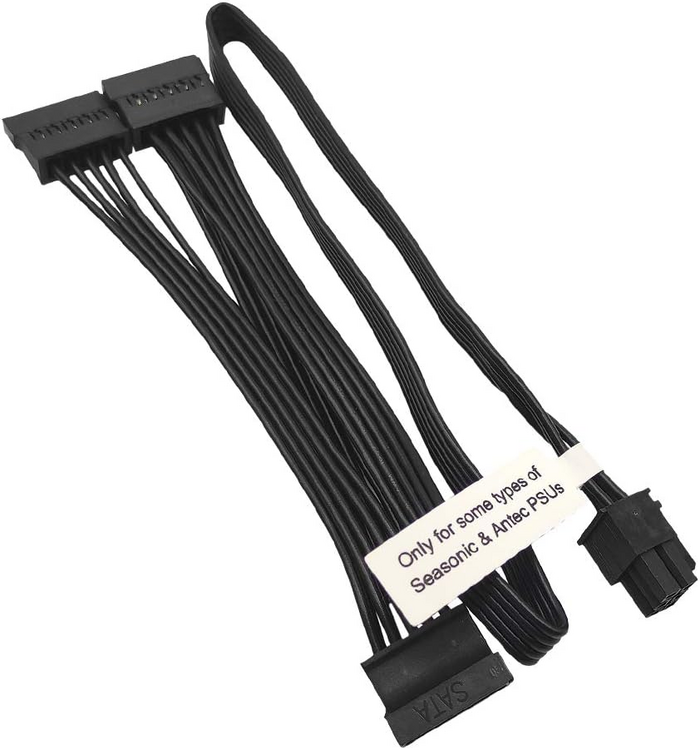
-
Hi, I've scrubbed Unraid forums to the best of my ability but been having an issue I am sure many have faced but could not find exact match or failed to fix it by using suggested fixes in those forum posts. I am talking about this heap of mess Jan 17 02:47:47 Blackfox kernel: ata4.00: exception Emask 0x10 SAct 0x300000 SErr 0x4050000 action 0xe frozen Jan 17 02:47:47 Blackfox kernel: ata4.00: irq_stat 0x00000040, connection status changed Jan 17 02:47:47 Blackfox kernel: ata4: SError: { PHYRdyChg CommWake DevExch } Jan 17 02:47:47 Blackfox kernel: ata4.00: failed command: READ FPDMA QUEUED Jan 17 02:47:47 Blackfox kernel: ata4.00: cmd 60/00:a0:90:8b:92/01:00:4a:00:00/40 tag 20 ncq dma 131072 in Jan 17 02:47:47 Blackfox kernel: res 40/00:70:c0:0f:09/00:00:8f:00:00/40 Emask 0x10 (ATA bus error) Jan 17 02:47:47 Blackfox kernel: ata4.00: status: { DRDY } Jan 17 02:47:47 Blackfox kernel: ata4.00: failed command: READ FPDMA QUEUED Jan 17 02:47:47 Blackfox kernel: ata4.00: cmd 60/00:a8:90:8c:92/01:00:4a:00:00/40 tag 21 ncq dma 131072 in Jan 17 02:47:47 Blackfox kernel: res 40/00:70:c0:0f:09/00:00:8f:00:00/40 Emask 0x10 (ATA bus error) Jan 17 02:47:47 Blackfox kernel: ata4.00: status: { DRDY } Jan 17 02:47:47 Blackfox kernel: ata4: hard resetting link Jan 17 02:47:48 Blackfox kernel: ata4: SATA link up 6.0 Gbps (SStatus 133 SControl 300) Jan 17 02:47:48 Blackfox kernel: ata4.00: configured for UDMA/133 Jan 17 02:47:48 Blackfox kernel: ata4: EH complete I've been randomly getting these link resets in my logs for **random** drives as well. There is no consistency to it. Some days there are no errors at all, sometimes one during the day and rarely 2-3+ in succession. I don't notice any effects, no data loss of any kind, parity checks always passed and whatever file I check all seem to be A-OK. Looking at other posts out there, many have suggested checking SATA cables. I re-checked and re-seated all the cables (in the process even once accidentally yanked the cable while system was on so even got to test rebuild from parity :P) and nothing, plus since it happens to random SATA links each time (between 1-4) I don't believe I am so unlucky that all my 4 SATA cables are bad. The only thing I get to latch on here is the fact that `SError` is a bit different than what many other forum posts have and I know they are related to some SATA error codes but this is outside of my domain expertise to fully understand. Anyone has any idea what else I could do/try? This has been going on pretty much since day one I've used UNRAID but again have not noticed any bad side effects but that isn't to say there is no harm in it obviously. diagnostics-20250117-2203.zip


