




.jpg.d8271e5792409634b918877a0a72b025.jpg)
1471
Members
-
Joined
Everything posted by 1471
-
-
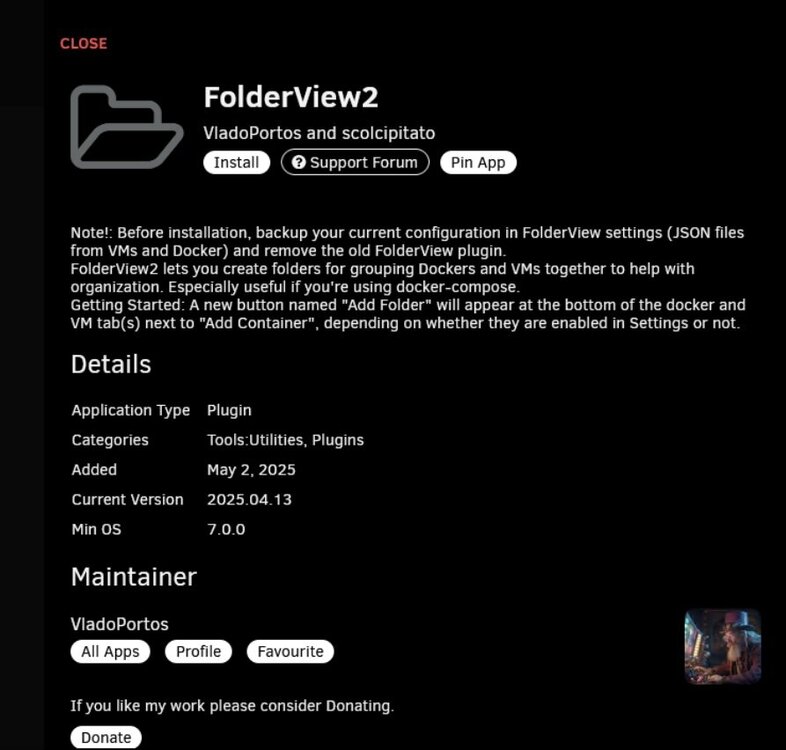
Just wondering, has anyone tried running 2025.04.13 (latest folderview2 in the app store) on Unraid 7.2? Or is it a case manually installing the 04.08.2025 for now? If so, any idea on a rough timeline for a app store release?
-
Anyone else having issues since the update 3 days ago? Using the forked version: https://github.com/freender/docker-intel-gpu-telegraf?tab=readme-ov-file 2025-09-13T06:42:39Z I! Loading config: /etc/telegraf/telegraf.conf 2025-09-13T06:42:39Z E! [telegraf] Error running agent: no outputs found, probably invalid config file provided 2025-09-13T06:43:07Z I! Loading config: /etc/telegraf/telegraf.conf 2025-09-13T06:43:07Z E! [telegraf] Error running agent: no outputs found, probably invalid config file provided
-
Just a heads up, if you're running the latest version of Telegraf (1.34.5-alpine), it seems to cause issues with the 'Ultimate Dashboard'. Until someone clever that me can work out what changes caused the issue, pinning to an older version works: Change from: telegraf:alpine To version: telegraf:1.34.4-alpine
-
Good spot, it is indeed, woooo! Will switch over later today. Thank you for your efforts keeping this plugin alive @VladoPortos
-
Well, this thread made the ‘Unraid newsletter’. Hopefully a bit of attention will help getting it into the App Store!
-
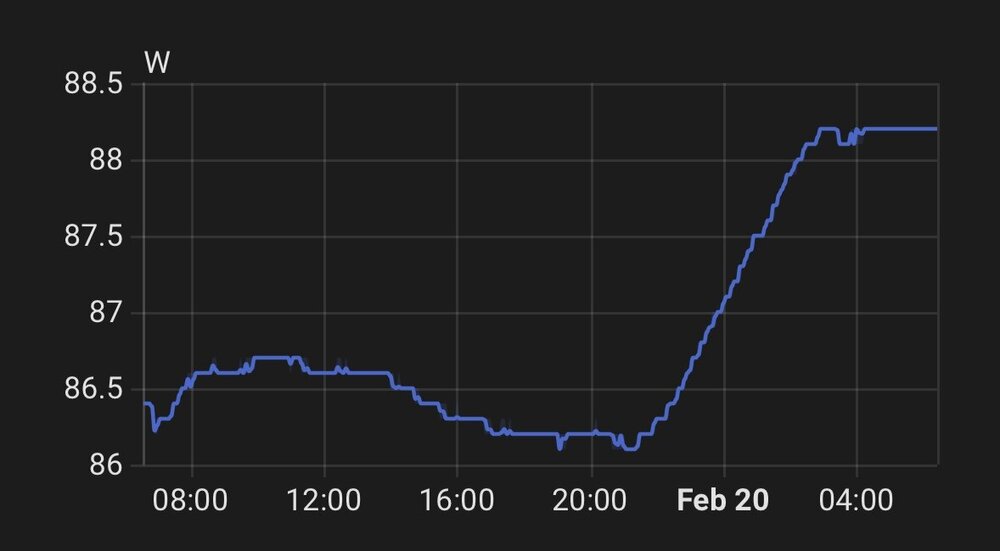
I've got an issue when the Unraid webpage is left open, over time the servers power usage slowly increases. Below is a screen show from a Tasmota smart plug in Home Assistant. You can see when having the webpage closed the power usage idles around 87W, then with the webpage open it starts steadily increasing. I've seen this rise to 110W before I noticed and closed the webpage. When the power usage increases, navigating to different tabs on the webpage also seems sluggish, taking a while to open a different tab etc. Seems others have the same issue, see post on the Unraid subreddit HERE. Issue wasn’t present on 6.12.14 and I’ve not made any significant changes to the system other than upgrading to 7.0.0. Only change has been updating a Server 2022 VM to Server 2025. I've also tried setting the fastusr flag, as per the 7.0.0 relaese notes, no change. I don't think this is the issue as wasnt seeing high flash writes and have plenty of RAM available (normal usage of 35GB out of 64GB total). Diagnostics attached. unraid-server-diagnostics-20250220-0636.zip
-
Thanks for that, works for me. I had previously been using an old version as a workaround, but your method is a much better solution. Repository telegraf:1.20.2-alpine Post arguments /bin/sh -c 'apk update && apk upgrade && apk add ipmitool && apk add smartmontools && telegraf'
-
Cool, i'll test when I update to 7.0 over the weekend and update this post with how it goes. Edit: yup, works fine using the latest slackware package.
-
Thanks @mgutt, Looks like the latest Slackware package is: powertop-2.15-i586-2 Which looks like the same version as you're using on your Github repo: powertop-2.15-x86_64-1.txz and the current version installed via Nerd Tools: powertop-2.15-x86_64-1_nerdtools.txz Looking at the Nerd Tools thread, looks like it might be dying for good this time.
-
Can I just check, is THIS still the recommended way to install powertop? mkdir /boot/extra cd /boot/extra wget https://github.com/mgutt/unraid-packages/raw/main/6.11.0/powertop-2.15-x86_64-1.txz I’ve previously installed Powertop using Nerd Tools but see it’s deprecated in Unraid 7.0.0.
-
Running a different set up to you, but I have the same issue with VM's. Can hit C8, but can't get any C State soon as I start a VM (Server 2022 + Home Assistant). Bit of info here:
-
I don't suppose anyone can run a little test for me? Are you able to hit any C States with just a Windows VM running (indeally Win Server and an intel CPU)? Wondering if the reason I can't get to any C state with a Win VM running is local to me or not.
-
Right then, I had a bit of time to do some testing earlier in the week, it seems like: Win Server 2022 VM's stops getting to C2 PCI Sata card stops C6 NVME / SSD's stops C8 Frst thing to look at is the VM issue, then look at the sata card as supports ASPM and shouldn't be causing problems. I'd be happy if I could get to C6 for now. Any help would be appreciated. Previous post earlier in this thread with server spec and configuration HERE for info and my testing notes below: _____________________________________________ Leaving powertop running for 2 mins before recording C state. Looking at Pkg(HW) only, CPU C states are fine. SERVER TESTING array on - No C state array off - C2 77% array on (VM off, docker on) - C2 21.5% array on (VM on, docker off) - No C state array on (VM Win on only, docker off) - No C state array on (VM HA on only, docker off) - C2 43.3% array on (VM off, docker off) - C2 54% NOTES: - Seems like the Win Server 2022 VM’s stopping the server from getting to C2 - With the Win VM off and getting to C2, power usage drops from an average of 95W to 75W (a 20W saving) THINGS REMOVED (array off) SATA Card - SSD removed - C2 40.6% + C6 47.9% SATA Card - SSD - NVME removed - C2 37.4% + C3 11.6 + C6 1.7% + C8 39.4% SATA Card - NVME removed - C2 27.2.6% + C6 57.5% SSD - NVME removed - C2 91.9% NOTES: - Seems like the SATA Card is stopping the server from getting to C6 and the SSD's or NVME's are stopping C8. - This should be fine as running the latest firmware available which supports ASPM TO TRY: - Create fresh Win11 VM and see if can get C2 with just that running - DONE - NO DIFFERENCE - Remove mapped drive in Win VM and turn off indexing? - DONE, NO DIFFERENCE - Update BIOS version to latest version - DONE, NO DIFFERENCE - Check firmware of card and maybe lower to recommended? - Set 'PCI native control' in BIOS to disabled (let the BIOS control ASPM)?
-
Thanks, yea probably the best option at this point. A job for next week.
-
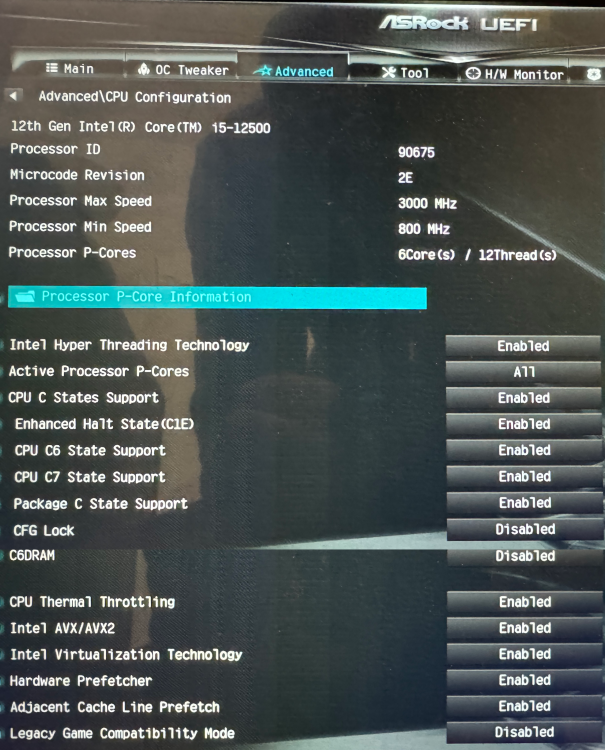
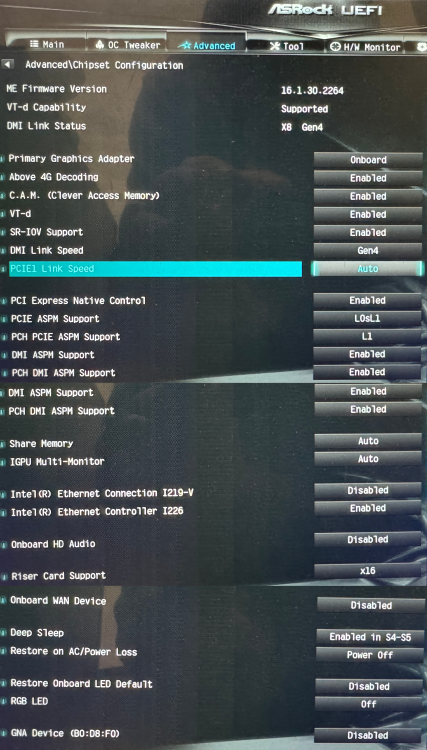
Thanks, the AsRock Z790 ITX motheboard i'm using has two onboard network cards, an Intel I226V (2.5G) and I219V. I have the I219V disabled, tried swapping round and no change. With a bit more testing I found that with the Win Server 2022 VM disabled I was getting ~20% C2, not brilliant but at least Pkg(HW) is working. Any idea what could cause that? Containers are fine, tried spinning one up at a time with the VM disabled and didnt effect things. I've been through the BIOS quite a few times not and can't see any obvious settings that are wrong, so suspect its something else.
-
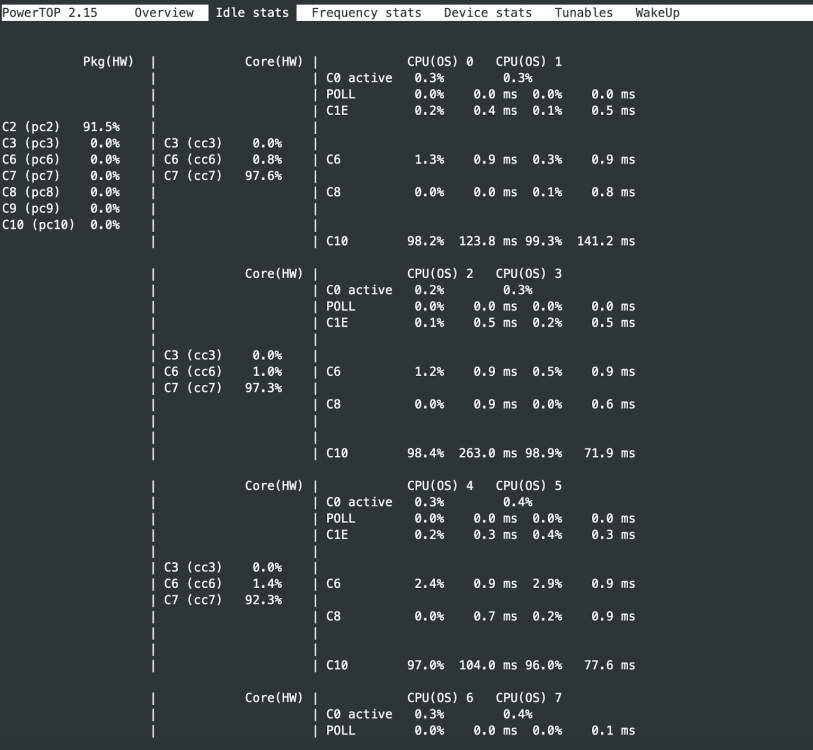
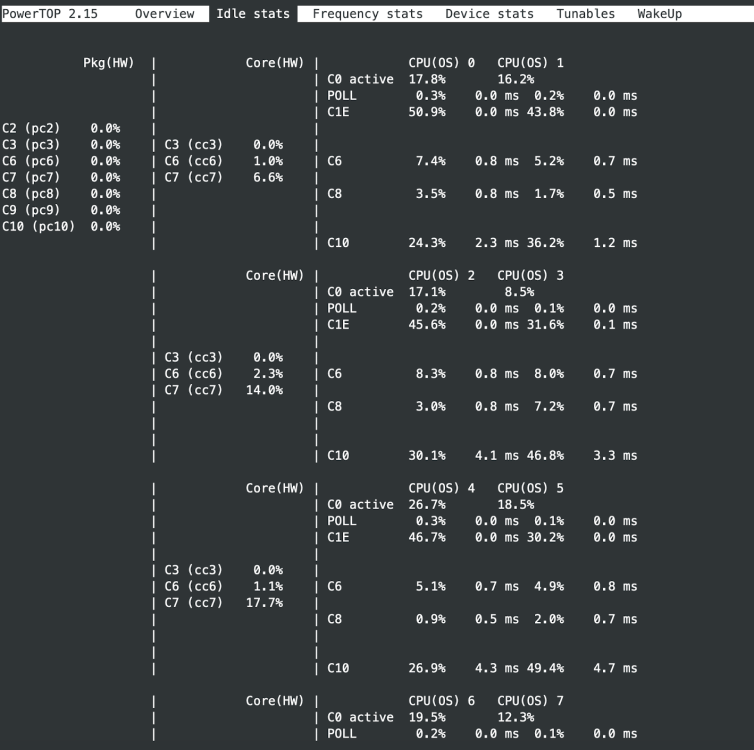
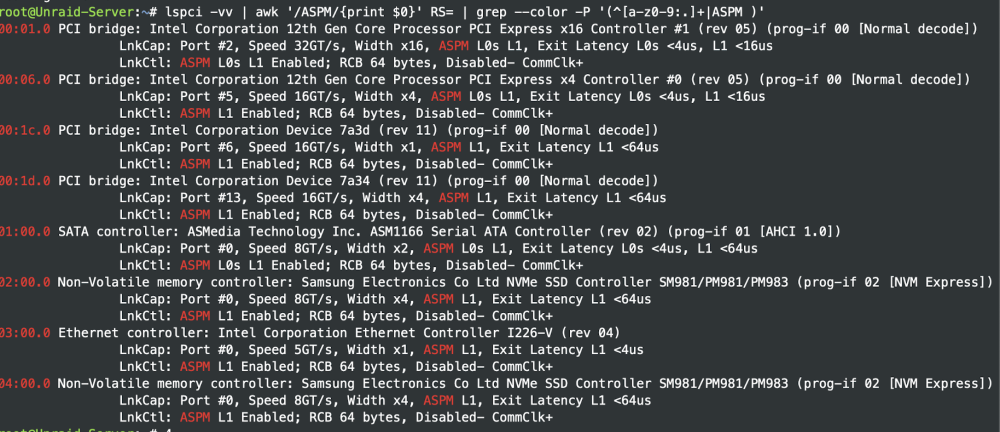
Help! This has been a really useful thread and a bit of a rabbit hole! I've been working my way through applying changes to try and save some power, but have an issue with getting in any C state with my array running. Relevant bits of my setup: ASRock Z790 ITX motherboard Intel 12500 CPU 6 port MZHOU ASM1166 card 6x 20TB WD 'white lable' disks (1x as parity) 2x Samsung 780 SSD (ZFS mirros, cache) 2x 970 Evo Plus NVME (ZFS mirros, cache) Lots of containers 2 VM's (Win Server 2022 and Home Assistant) With the above set up but with a LSI 9207-8i I was getting an average power draw of 113W, which seemed high. Running powertop this reduced to 111W but I was unable to get to any C state. This was due to the HBA and a bluetooth dongle I was using. So I did the following: I swapped the HBA for the recommended MZHOU 6 port ASM1166 card and updated the firmware to the latest available, HERE for info. I havent had any issues running 'powertop --auto-tune &>/dev/null' with this firmware (that I know of!) Following the guide HERE, using SCEWIN_64, I enabled 'Low Power S0 Idle Capability' and deactivated 'Native Aspm' I also removed the bluetooth dongle (moved to ESP32 bluetooth proxys) Installed the 'tips and tweaks' plugin and set the CPU governor to power save and made some BIOS changes, relevant ones below: SR-IOV support - enabled PCI express native control - enabled (tried disabled first, no difference in power usage) PCI ASPM support - L0sL1 PCH PCIE ASPM support - L1 DMI ASPM support - enabled PCH DMI ASPM support - enabled Deep sleep - Enabled in S4-S5 GNA device - disabled Onboard audio - disabled Onboard WAN device - disabled RGB LED - disabled Left running for a few days and the average power was 95W, so a reduction of 16W, which is about right with the HBA removed, but still quite high. Running powertop it seems like i'm not getting any Pkg(HW) C states which is odd. With the array spun down its mostly running in C2: But as soon as I spin up the array, it doesnt get to any C state: Checking the ASPM status of all devices shows this. Seems fine, although all the red can't be a good sign.. Things i've tried and info Shutting down VM's - no difference All disks are encrypted, but don't think that makes a difference powertops showing all tunable options and 'good' Feels like there's a BIOS setting i've missed (dont thing I have though) or some hardware stopping things? I have a UPS connected via USB From this thread I can see others have reached C8 or C10 with Asrock Z790 motherboards so it seems possible. I've exhausted my limited expertise, so any help would be much appreciated!
-
Its not something I have the skills to contribute to, but thanks for looking, Varken has been really useful over the years. Sounds like updating Varken at some point would probably be the easiest option for the Ultimate UNRAID Dashboard? If not prometheus-plex-exporter might be another route, would also need some adapting though. Blog post about it HERE, github repository HERE for info.
-
Looks brilliant, will check it out properly when I have some time, thanks for creating and sharing! Just a heads up, Unraid-API was replaced with Unraid-API-RE. I've been using in my dashboards for a while without problems and it seems to be developed still. (make sure you're using the repository for 6.12.xx - bokker/unraidapi-re:6.12) Unraid-API-RE Github link Unraid-API-RE Support page Hope that helps someone.
-
Yea. The 2x SSD's are mirrored for redundancy and used as cache for the array. New files are written to the cache and moved over to the array on a schedule, more info on how that works HERE. I wouldn't normally bother with redundancy for a cache drive, but in my use case I also use for Docker Container storage so something I needed. My NVME's for appdata and the other for VM's don't need redundancy as these are backed up weekly to the array. Running a 1G network, more than enough for me. Good luck with your build!
-
No problem. Every use case will be different, yours sounds like a solid plan though. I use one of the NVME's for appdata storage and the other for VM's. The two SSD's are mirrored and used as a cache drive for the array. I also use for some docker container storage, which is why its mirrored. All are just XFS for now as currently running 6.11.5, but will move over to ZFS when updating to 6.12.8. Been holding off updating as I want to continue using macvlan, which has problematic in 6.12.XX releases. There's a workaround for the in 6.12.4, but I've not been brave enough to try yet as not had much spare time for any troubleshooting. Backup plan sound good too. I'm using Backblaze B2 with Duplicacy which works well enough.
-
Wooooo, looks like this post made it onto the Unraid Monthly Digest
-
Well done, looks good! The Node 304 fits perfectly in some Ikea Kalax for me, nice and out of the way too.
-
Had a bit of spare time to troubleshoot the rather high 110w average power usage today. Using powertop I can see the ZEXMTE USB Bluetooth adapter i'm passing through to my Home Assistant VM is stopping Pkg (HW) from getting to any C state. When removing this, I was able to get to C3, so will have to think about other options. Maybe look to using the onboard Bluetooth, would mean re-enabling the WiFi adapter as its shared with that. Running the nice and stable 6.11.5, should probably update to 6.12.8 too as suppose to bring better driver support, might help. Also realised that when I updated the BIOS recently, all the BIOS setting I'm made had reset, such as disabling devices not used, customising the PL1 and PL2 settings etc. With the setting applied again, plus a few more ASPM related ones, average power draw has dropped to 105w. Expect this to drop more as that's an average of the last few hours, will be less over night. Expect more power saving in the future and going to buy a 6 port ASM1166 based card to replace the HBA that's stopping the low C states.
-
Thanks JorgeB, yea makes sense, appreciate the reply.
.thumb.jpg.d41b3d13eafb9b2529a93d338507d030.jpg)





