





SimpleDino
Members
-
Joined
-
Last visited
Everything posted by SimpleDino
-
Don't know why it doesn't work for you. could post your input commands and the following texts?
-
For anyone that wants to test the speed of the container they can run speedtest-cli: Open NordVPN console and run these commands: sudo apt update sudo apt install speedtest-cli speedtest-cli If you reboot or restart the container then you must run the commands again.
-
It does not work which is very odd. Because all the VMs work perfectly with VNC. Probably something wrong with the mappings. Anyhow I will continue troubleshooting this odd behaviour hopefully I'll get figured out or just reinstall VM's. unRAID is very fragile when it comes to changes in vm (I've probably mentioned this earlier).
-
Yes, true. I do have the Vendor plugin installed. It worked during one reboot. But now I only get to Shell Script (I do type exit and continue) and no further. Something is wrong, maybe the order of BUS:s for the vdisk or something? ErrorWarningSystemArrayLogin -device pcie-root-port,port=0x8,chassis=6,id=pci.6,bus=pcie.0,multifunction=on,addr=0x1 \ -device pcie-root-port,port=0x9,chassis=7,id=pci.7,bus=pcie.0,addr=0x1.0x1 \ -device pcie-root-port,port=0xa,chassis=8,id=pci.8,bus=pcie.0,addr=0x1.0x2 \ -device pcie-root-port,port=0xe,chassis=9,id=pci.9,bus=pcie.0,addr=0x1.0x6 \ -device pcie-pci-bridge,id=pci.10,bus=pci.1,addr=0x0 \ -device ich9-usb-ehci1,id=usb,bus=pcie.0,addr=0x7.0x7 \ -device ich9-usb-uhci1,masterbus=usb.0,firstport=0,bus=pcie.0,multifunction=on,addr=0x7 \ -device ich9-usb-uhci2,masterbus=usb.0,firstport=2,bus=pcie.0,addr=0x7.0x1 \ -device ich9-usb-uhci3,masterbus=usb.0,firstport=4,bus=pcie.0,addr=0x7.0x2 \ -device virtio-serial-pci,id=virtio-serial0,bus=pci.2,addr=0x0 \ -blockdev '{"driver":"file","filename":"/mnt/user/domains/Windows 11/vdisk1.img","node-name":"libvirt-3-storage","cache":{"direct":false,"no-flush":false},"auto-read-only":true,"discard":"unmap"}' \ -blockdev '{"node-name":"libvirt-3-format","read-only":false,"cache":{"direct":false,"no-flush":false},"driver":"qcow2","file":"libvirt-3-storage","backing":null}' \ -device virtio-blk-pci,bus=pci.4,addr=0x0,drive=libvirt-3-format,id=virtio-disk2,bootindex=1,write-cache=on \ -blockdev '{"driver":"file","filename":"/mnt/user/isos/Windows/Win11_Swedish_x64.iso","node-name":"libvirt-2-storage","auto-read-only":true,"discard":"unmap"}' \ -blockdev '{"node-name":"libvirt-2-format","read-only":true,"driver":"raw","file":"libvirt-2-storage"}' \ -device ide-cd,bus=ide.0,drive=libvirt-2-format,id=sata0-0-0,bootindex=2 \ -blockdev '{"driver":"file","filename":"/mnt/user/isos/Virtio/virtio-win-0.1.208-1.iso","node-name":"libvirt-1-storage","auto-read-only":true,"discard":"unmap"}' \ -blockdev '{"node-name":"libvirt-1-format","read-only":true,"driver":"raw","file":"libvirt-1-storage"}' \ -device ide-cd,bus=ide.1,drive=libvirt-1-format,id=sata0-0-1 \ -netdev tap,fd=37,id=hostnet0 \ -device virtio-net,netdev=hostnet0,id=net0,mac=52:54:00:0f:e5:9e,bus=pci.5,addr=0x0 \ -chardev pty,id=charserial0 \ -device isa-serial,chardev=charserial0,id=serial0 \ -chardev socket,id=charchannel0,fd=38,server=on,wait=off \ -device virtserialport,bus=virtio-serial0.0,nr=1,chardev=charchannel0,id=channel0,name=org.qemu.guest_agent.0 \ -tpmdev emulator,id=tpm-tpm0,chardev=chrtpm \ -chardev 'socket,id=chrtpm,path=/run/libvirt/qemu/swtpm/2-Windows 11-swtpm.sock' \ -device tpm-tis,tpmdev=tpm-tpm0,id=tpm0 \ -device usb-tablet,id=input0,bus=usb.0,port=1 \ -audiodev id=audio1,driver=none \ -device 'vfio-pci,host=0000:0f:00.0,id=hostdev0,bus=pci.3,multifunction=on,addr=0x0,romfile=/mnt/user/isos/vbios/rx 480v3.rom' \ -device vfio-pci,host=0000:0f:00.1,id=hostdev1,bus=pci.3,addr=0x0.0x1 \ -device usb-host,hostdevice=/dev/bus/usb/003/008,id=hostdev2,bus=usb.0,port=2 \ -device usb-host,hostdevice=/dev/bus/usb/005/003,id=hostdev3,bus=usb.0,port=3 \ -device usb-host,hostdevice=/dev/bus/usb/003/007,id=hostdev4,bus=usb.0,port=4 \ -sandbox on,obsolete=deny,elevateprivileges=deny,spawn=deny,resourcecontrol=deny \ -msg timestamp=on char device redirected to /dev/pts/0 (label charserial0) 2022-01-25T09:09:22.231649Z qemu-system-x86_64: vfio: Cannot reset device 0000:0f:00.1, no available reset mechanism. 2022-01-25T09:09:22.235623Z qemu-system-x86_64: vfio: Cannot reset device 0000:0f:00.1, no available reset mechanism. It's RX 480 GB.
-
No, first it's not possible and I try to be thorough! It's this message that comes up on all VM's with GPU & sound part passed through: 2022-01-25T07:24:07.859000Z qemu-system-x86_64: vfio: Cannot reset device 0000:0f:00.1, no available reset mechanism. 2022-01-25T07:24:07.863951Z qemu-system-x86_64: vfio: Cannot reset device 0000:0f:00.1, no available reset mechanism. But I've notice with the amd vendor plugin, when win11 sometimes crashes or does not get past uefi shell script POST install then I can still run the gpu in Fedora VM. So no need for @Squids fantastic script (this time) 🙂. Edit: Fedora also crashes periodically and we are back to shell script!
-
Okay, I've now managed to get VM's working with GPU passthrough on Fedora and windows 11. I will try MacOS soon also and see what results I get there. Instead of passing through the whole USB controller for Mouse & Keyboard (un-binded) I'm instead passing through them as stand online usb devices. Made a difference. The VM's are working now as they should no problems, no freezing (yet) but the logs show this message (vfio: Cannot reset device, no available reset) Is this normal?
-
I have tried isolating as well and it still doesn't work. When isolated I couldn't even extract diagnostics or do anything else and I hate doing unclean shutdown . Can I stop array then try troubleshooting VM's with different settings in case it freezes again? How will unclean affect (hard reset) the server then? One thing that might stand out is that I had/have to fill out the vbios section manually, could it be that the vbios is simply not applied when manually input?
-
Hi, I've created a few VM's under 6.10.0 RC2 and they work fine with VNC, no problems at all but as soon I passthrough GPU the whole system crashes, and all VM-related sections freeze the unRAID server (WebUI and GUI). The only way to restart the system is by a hard reset (unclean). Attached you can find diagnostics, for the first time I was able to pull the diag because previously when it has crashed I have not been able to extract it. Even though the server is frozen, all dockers work as usual. SSH/telnet does not work either during this (from previous freezes but they are disabled because of security reasons). My Specs: CPU - Ryzen 3900X Motherboard - X570 Taichi GPU - RX 480 4GB RAM - DDR4 64 GB (memtest shows no errors) tower-diagnostics-20220122-1549.zip
-
I honestly gave up, to much hassle. But the I have a working VM now with GPU passthrough and USB ASUS BT400 Bluetooth dongle instead of the onboard wifi BT controller. Steps I took: Deleted the VM Unbind all the VFIO's which I binded early correctly . Disabled PCIe ACS override Created a new VM (used the vdisk i backed up and efi(added new kexts for BT) to boot the new vm so no data loss). Passed through the entire usb controller where the BT controller is just as before. Passed through GPU and Sound. Edit XML for respective devices passthrough and now Everything just works. Thanks for all the help, but it feels like everything gets broken as soon anymore changes are made with vm even with XML being the same as before when trying to reset changes. Br,
-
@ghost82 Sorry for the delay: I tried with 6.10.0 RC2 but that was hopeless because everything crashes, also UnRAID server immediately when I try to access anything that has to with VMS. I have done as you suggested and here are the info plus diagnostics. tower-diagnostics-20220103-0853.zipbigsur XML.xmlBigSur VM Logs.txt
-
Hi all, I've updated the unRAID OS to 6.10.0 RC2 and now when I start the only VM (VNC) and the whole WebUI and GUI freezes. All dockers are accessible and working fine such as Plex, arr's, etc. Whenever I try to interact with anything concerning VM's or the VM's settings and everything freezes. SSH/CLI/PUTTY doesn't work either and I can not extract diag. file/syslogs or any form of information regarding this. The only way I can gain WebUI/GUI access is through a hard reset/shutdown and then the parity check kicks in. If the server is reset through a hard reset and I extract the diag. file will it show the cause of the freeze/crash? This only happens in 6.10.0 RC2 and not stable version. I can always go back to stable version but want the new version because of the AMD reset bug. Is there anyone out there having the same issue or know anything about this? Best regards,
-
Hi, did you ever get this solved? I’m having kind of the same issue. updated to 6.10.0 RC2 and when trying to start a VM the whole webUI server freezes and I can not do anything. But all dockers work as they are. Only a hard reset helps and that kick starts parity check!
-
I re-did everything but it did not help. Thinking of doing backup of the vm and then start fresh with a new install all over again.
-
Yet again, thanks for the input. I will give this a try now and see how it goes.
-
@ghost82 Of course, here it is.tower-diagnostics-20211223-1017.zip
-
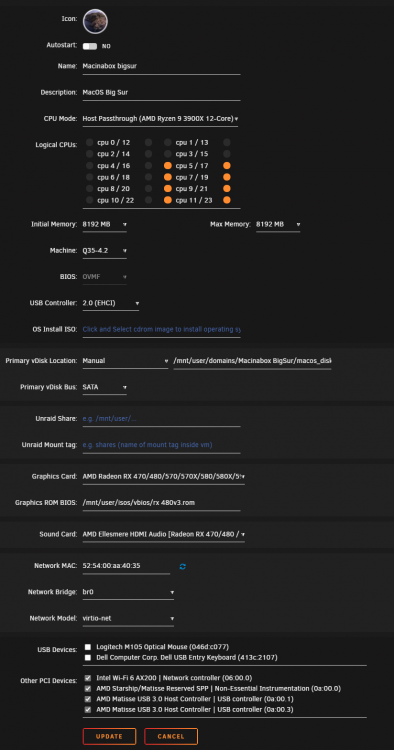
@ghost82 Sorry to bother you with even more troubleshooting. I have some issues with the VM not outputting any display picture again. What has has changed since last I got the display output working with your help, are basically these: I split up the IOMMU grouping in stages per SP1 instruction video until I got the BT devices separate and then VFIO bind. After that I disabled PCIe ACS override again. Added the onboard Wi-Fi & BT to the VM (Intel AX200), run the script and afterward made the necessary changes in the XML again. (works perfectly in VNC mode) Now even if I remove the Wi-Fi & BT devices I do not get the display output back (of course script run and the xml change as before). But works when in VNC mode. I have added the XML, Template and vm logs. XML-Monterey+GPU+WiFi.xml Logs--Monterey+GPU+WiFi.txt
-
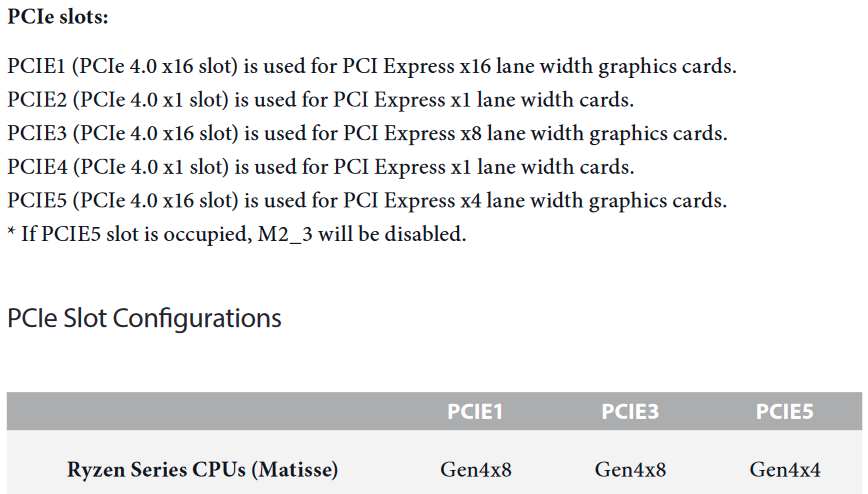
Try this, type "exit", which takes you to the BIOS and select the EFI DVD Rom drive and the installation should start I think.Thanks for the answer. I need both the GPUs working and probably all the slots on nvme devices as well so more lanes are needed. I might try to get my hands on a or trade for a threadripper system instead. let's see if I understand correctly: If PCIE 5 gets populated with the m.2 then PCIE 1 & 3 get down to x8 lanes, correct? And only two m.2 devices shows up in unRAID from the adapter? No, only two GPUS in PCIE 1 & 3 the rest are unoccupied. I think the more recent consumer intel gen might have more. Ohh nice, that was fast. Thanks for testing it out. Did you try place it in PCIE slot 5? Did you try it with only one GPU or more?Hi, This my current unRAID setup: CPU: Ryzen 3900x MB: AsRock X570 Taichi PCIe slot 1: Nvidia P2000 for Plex PCIe slot 3: AMD rx 580 4GB for VMS (MacOS, Win11, PopOS) I want to add a PCIe m.2 adapter with four m.2 slots (MSI M.2 XPANDER-Z Gen4) into my current build with already two gpus in it. Some questions below: Is it possible to put it in PCIe slot 5? Does anyone know if the MB supports Bifurcation? Will the x16 PCIE Lanes Configuration change automatically to [x4x4x4]? how will this affect performance on the two already installed GPUs? Must this be in RAID or JBOD? There is not lot of info on the M.2 adapter. Don't really know how to ask the correct questions here. AsRock X570 Taichi. Best regards,
 Thanks for the help, it worked perfectly. I have Monterey installed now. Btw do you have any experience with the new 6.10.0-rc2 crashing VM totally? and by that I mean I can't even access VMs tab. When I try too the whole unRAID server crashes and an unclean shutdown is the only solution. I dowgraded back to stable version because of this issue.Thanks for the quick reply. I totally understand, i had an accident with my Server and had to begin anew and had trouble re-installing the VMs so decided to start fresh but just like everyone else I got errors with the old opencore in macinabox. I will try your solution here, I've just installed macinabox with BigSur-install.dmg and BigSur-opencore.img can I then just replace the opencore.img already here before doing first install? I guess the second paragraph is for when the VM is already installed?Is this with newer OpenCore 0.75.0 version?@ghost82 You've been really helpful with MacOS KVM related issues and other stuff, could you go one step further and make a video or some other form of guide for how to download & install MacOS with new OpenCore update etc... Br,Aha thanks, will make sure to try that when I'm near the Unraid PC again, can not do it remotely because of the amd reset bug unfortunately:(. Or do you think it's better to make a delay in " Misc > Boot > Timeout?



