





MoldavianRO
Members
-
Joined
-
Hey guys, I am the only one having this issue? Not sure when it came up, but I see app docker having this in log. Also, navigating to the wepbage I see: {"status":500,"unhandled":true,"message":"HTTPError"} I haven't changed anything manually, my fault is that I am using latest tag... that will change soon. Error: Invalid environment variables at file:///app/.output/server/_libs/_P5hiJZd0.mjs:19152:9 ... 7 lines matching cause stack trace ... at async Object.fetch (file:///app/.output/server/_libs/_BrI1wvhl.mjs:12525:10) { cause: Error: Invalid environment variables at file:///app/.output/server/_libs/_P5hiJZd0.mjs:19152:9 at createEnv (file:///app/.output/server/_libs/_P5hiJZd0.mjs:19157:28) at file:///app/.output/server/_libs/_P5hiJZd0.mjs:96717:13 at ModuleJob.run (node:internal/modules/esm/module_job:413:25) at process.processTicksAndRejections (node:internal/process/task_queues:103:5) at async onImport.tracePromise.__proto__ (node:internal/modules/esm/loader:660:26) at async loadEntries (file:///app/.output/server/_libs/_BrI1wvhl.mjs:12232:22) at async startRequestResolver (file:///app/.output/server/_libs/_BrI1wvhl.mjs:12357:20) at async Object.fetch (file:///app/.output/server/_libs/_BrI1wvhl.mjs:12525:10), status: 500, statusText: undefined, headers: undefined, data: undefined, body: undefined, unhandled: true } SOLVED: was using latest tag and docker auto-updated to v5.0.X , last known good version was v4.5.5 , so rolled back to that one and fixed my issues.
-
Leaving this here Hats off to you sir, and big THANKS for all your work! I am one among many that followed your clips and now have no more free time but a lot of fun and a rock solid unRAID server. @SpaceInvaderOne
-
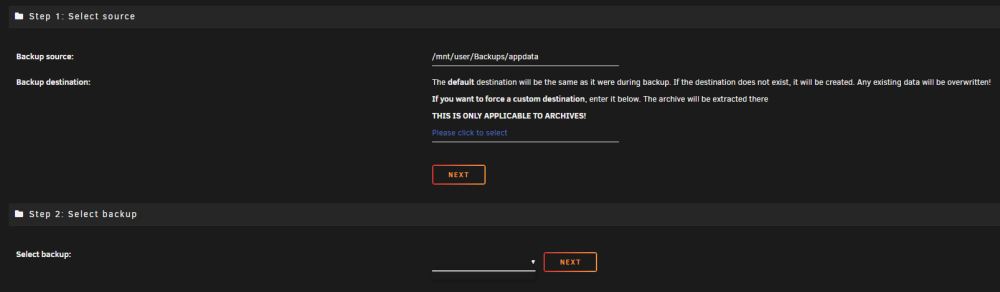
Need some assistance please, Getting this error: [⚠️][Main] An error occurred during backup! RETENTION WILL NOT BE CHECKED! Please review the log. If you need further assistance, ask in the support forum. Saw on a previous post that mappings were to blame. Checked for mappings, but can't tell which one is the culprit here. I attached the debug log. Also, If I try to restore via the plug-in , I do not see any back-up If I'm not mistaken, even though I got that warning, back-ups are successfully done and I could restore manually, correct? Nothing is corrupt inside each archive. Checked few of them and appear to be fine. Ran one back-up without verifying back-up option, set to no. It succeeded, now also visible in "Select Backup" from restore. Some containers have unique mappings, like plex and others. So not sure how to proceed here. So should I just keep "verify no' to ignore the possible mapping issues or is there something I'm doing wrong? TIA backup.debug.log
-
Yes please, just doing a reinstall when a snapshot could have easily saved me...
-
I think unRAID doesn't like something about the BIOS settings, as to when I try with booting directly from Windows, all works as desired - WoL, power state after power loss, all. With unRAID, not.
-
Forgot to put this under "things I tried" (now updated). I do have such option, and is set to stay off when power is lost.
-
Issue: Won't fully power down with enabled WoL on MB Enabled WoL with PCIe from BIOS ( MB: ASUS ROG STRIX Z370-E GAMING ) , and every time I power off unRAID, it will actually reboot. I would need this to function as I plan to hook an UPS up to the server, if it will reboot, no point of UPS.... Things tried: Disabling WoL, stays off. Disconnecting LAN cable and after initiating power off, same result, system reboots Changing UEFI to Legacy, same result, system reboots I have Windows VMs with pass-through SSD, booted directly from them (tried both), guess what, powering off actually works, system stays off, also WoL works. "Restore AC Power Loss" is set to "Power off" , this works as expected. In case of power outage, server will not come back online unless powered on either via button or WoL. So far I have been lucky and no data corruption.... Are there any solutions to this or to go with an actual server and not my "old" gaming rig?
-
I installed the container, set-it up, forwarded port from router, etc, all works fine from what I can tell. If I navigate to the page i created, says "it works!" . In firefox about:config I changed identity.sync.tokenserver.uri value to http://mysubdomain.mydomain.com/token/1.0/sync/1.5 . From here, I'm lost ... when I try to sign up from firefox menu I land on mozilla account page. I created an account, to see what happens. Seems that it's not working, no idea how to use the docker sync I run. Any help please?

