FlyingTexan
Members
-
Joined
-
Last visited
Everything posted by FlyingTexan
-
Which it's done but if it is a plugin how do I determine what to do next? I can't see them to uninstall.
-
It did boot into safemode gui without plugins. How would I go about seeing which plugin could be causing problems?
-
How do I rule out plugins? Are you saying just to see if it will boot at all? I do have tailscale is this a recent development with it? I've had it for a year or so and not faced this issue.
-
I replaced a drive and go to bring the array online after putting the new one in the old drives slot. When I go to bring the array online I lose all access to the array. It happened on 6.12.4 so I downgraded to 6.11.5 because I'd never had it happen before and it's happening here as well. Thoughts? I can still access the server through my piKVM and it allows me to log into unraid there using my credentials but it's not a GUI so I don't know my way around.
-
I have an 8TB drive that's acting up. It's failing. I have more than enough free space where I don't need it replaced with another drive. Everything I'm seeing mentions to first move your data off the drive, well mine's failed. Then the guides talk about replacing the drive, which I don't feel like buying one just right now. What steps do I take to simply remove the drive from the array and have that data that's saved in parity spread across the remaining drives?
-
I have a 13700 (non-k) and MSI pro B760 motherboard. How difficult would it be to add a PCIe 4 slot nvme board? This isn't in my wheelhouse and I read some setups it wouldn't be very compatible with.
-
If anyone is looking for an ARC card I'll cut you a deal. I have mine sitting in a drawer, got an RTX 4060 instead, Never once used probably still has the plastic on it. Bought it off newegg can give you a copy of the receipt for any warranty. I think I've had it since october.
-
try changing macvlan to ipvlan and do the above posted cloudflare zerotrust tunnel.
-
Change the network type from macvlan to ipvlan? It was causing kernal panics.
-
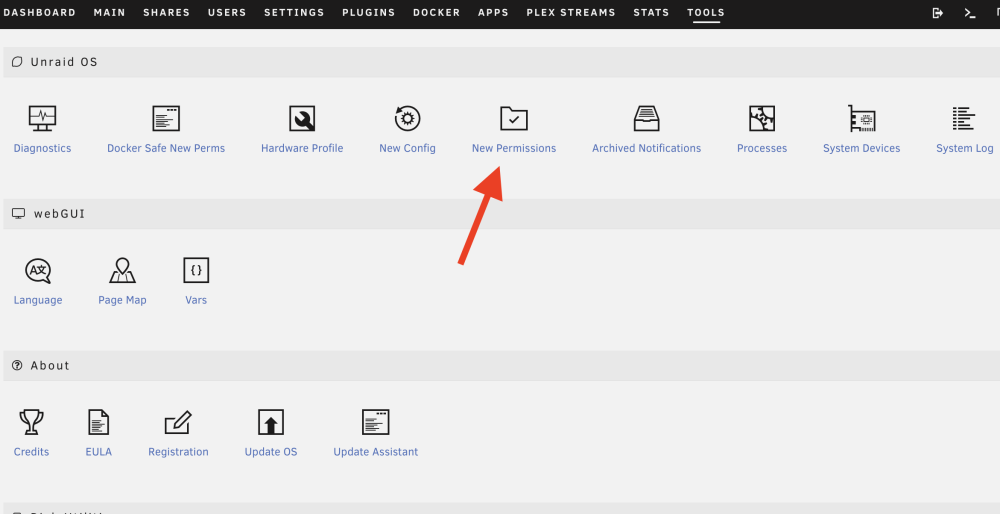
Everything is always "Post diagnostics" lol. 1) Create a user that isn't root 2) Go here and change permissions
-
Way shooting from the hip here but them being shucked doesn't have anything to do with it. Instead of having the array start with parity as valid download the pre-clear app and run that. It's worth the time. Then have it delete and format the drives. There's also where you can go and select the drive and change it's format to btrfs and save that. Then go back in and change it to xfs again and it will format everything off the drive and will be usable.
-
can you tell me how you installed powertop in nerdtools? I'm not seeing it. I don't want to simply start flipping switches in there.
-
And to what I posted? In your first post you say BAD when things are zeroes. I posted my screenshot showing I have all Zeroes. What can I do?
-
“Did you install the card just recently? For what are you using the card? Only for transcoding? For example a Nvidia T400, T600, T1000 is a way better choice for transcoding because these cards draw only a few watts in idle and the T400 has a max (and locked) TDP from 35W. If you are using it for transcoding only you can also use the iGPU which is more than capable of transcoding a few 4K streams, consumes nearly 0W in idle and a maximum while transcoding from about 15W.” What does a single questions of yours have to do with what I asked? Nothing. I asked about the driver and GPU idle wattage. Using quicksync has what to do with that? Nothing. What am I using the card for? Who cares, what does that have to do with idle card draw? Nothing. When did I install it? Who cares, what does that have to do with idle card draw? Nothing. you wanted diagnostics, ok you got them. I posted screenshots of everything as well. Your response was to say not to believe them. I told you they were accurate and your response was to question me again. So I thank you for ceasing your help.
-
Obviously this is on deaf ears. Ask about idle of a card and the response is always “why do you have a card”. The following response is basically teaching me computers run on electricity. Yes, I’m double triple sure because as I’ve already stated I measured it. Don’t want to believe that, fine. But the screen shots are accurate.
-
diagnostics were posted above
-
Oddly it worked this time. tower-diagnostics-20230813-0940.zip
-
Wouldn't that only work until the GPU is used? It would need to be re-ran after the fact?
-
Telling me to simply not trust the numbers I'm seeing isn't a solution. My UPS numbers support the GPU using more wattage. I can't provide system diagnostics I am not home. When I try to do it remotely it stalls and never completes.
-
My system idle seems to support the measurement. With the dockers off and array down I still draw around 120w. I don't understand your next statement about the user script. If nvidia-persistenced is in the script what does it matter? It doesn't hurt to run the command again does it? I'm confused on what it is that should be done differenlty.
-
It doesn't show that as open source for me. It shows that as the latest. I checked under plugins and it says the plugin is up-to-date as of 07-02-2023. Why would it show differently then what you are seeing?

-
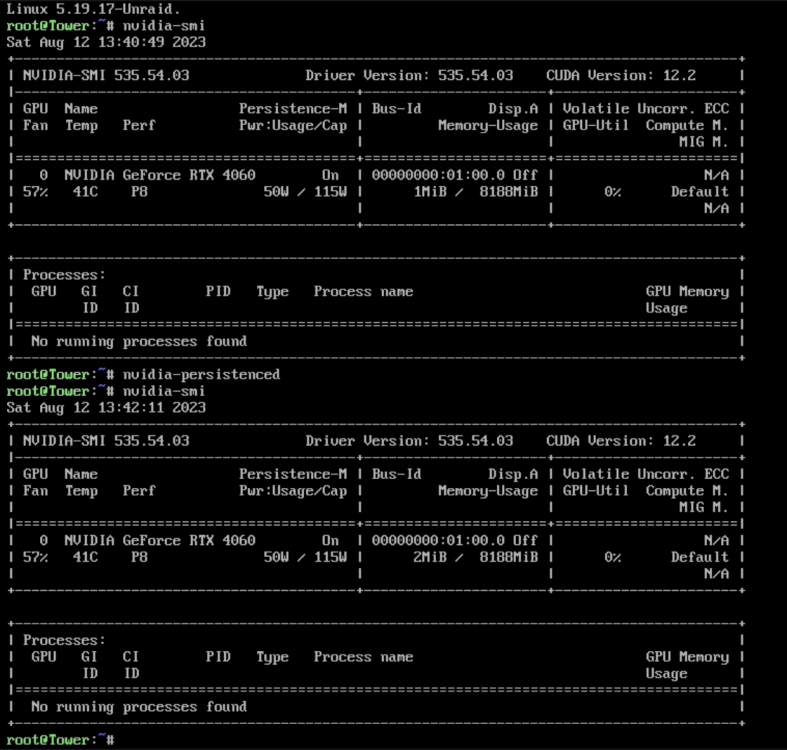
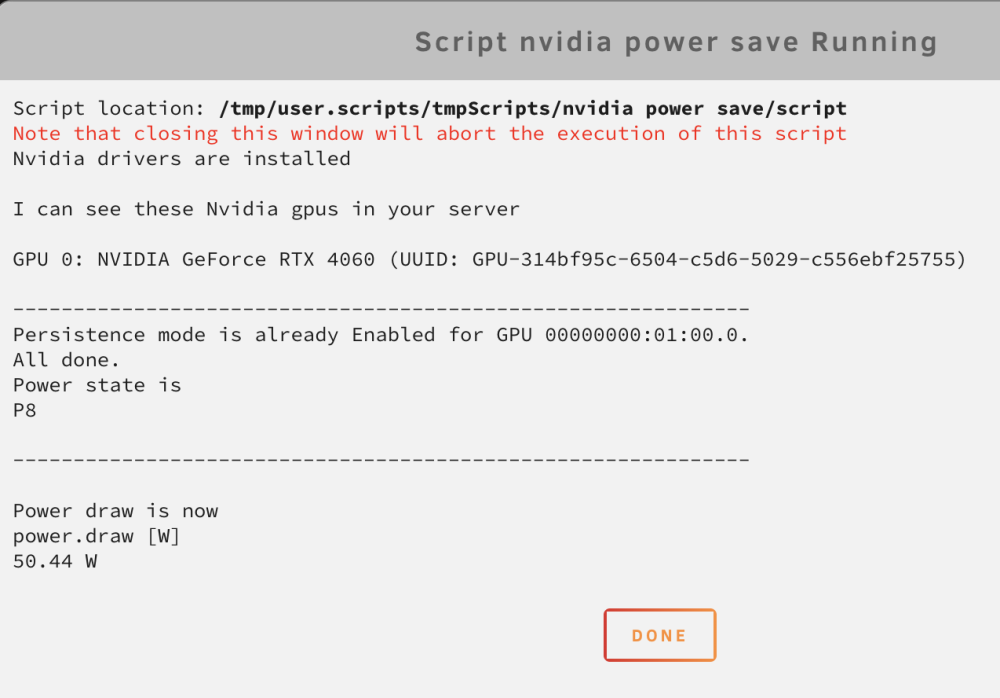
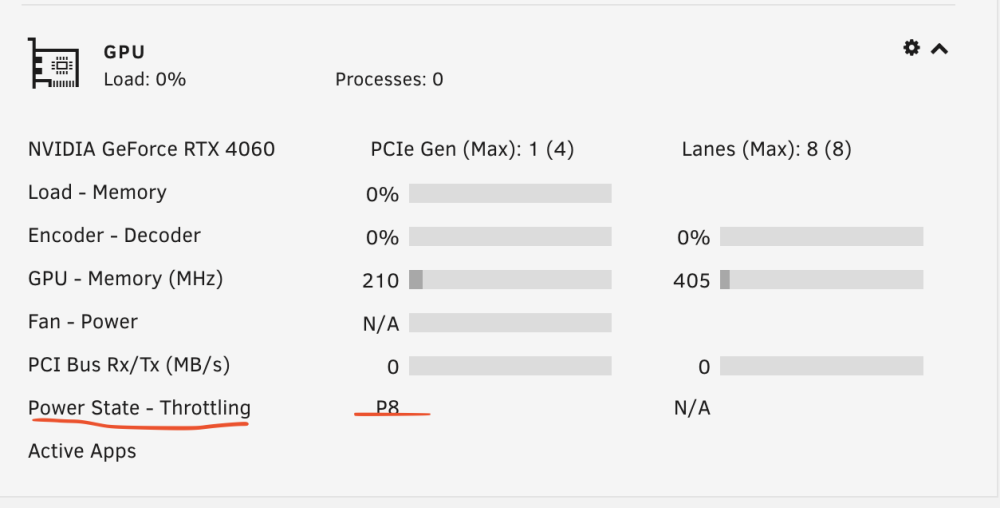
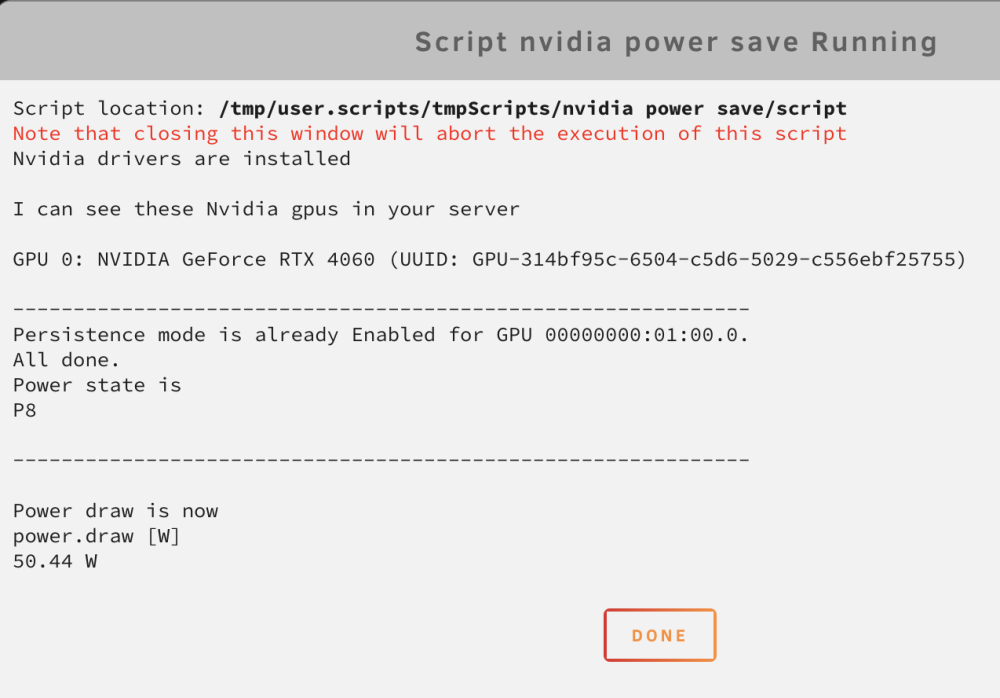
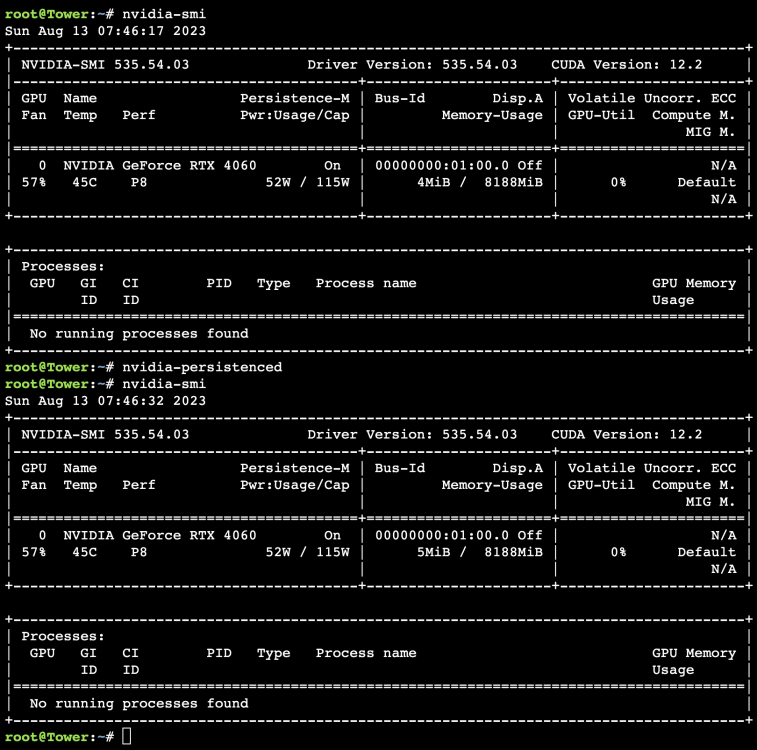
This is for an RTX 4060. I am having an issue where my GPU is stating I have persistenced enabled but it appears to not be working. I followed spaceinvaderone's video and as you can see the script is working. The GPU works when transcoding in plex. However before and after running persistenced the GPU shows a wattage of 50w/115w. It does not appear to be doing anything for the GPU even thought the GPU shows a state of P8. It should be much lower on the wattage. I'm currently using the latest driver. Does this sound like a bad driver issue? Is there a driver we know that works better or could it be because of how new the rtx 4060 is?
-
Unraid.net front page. Find the word NAS.... I'll wait.

-
-
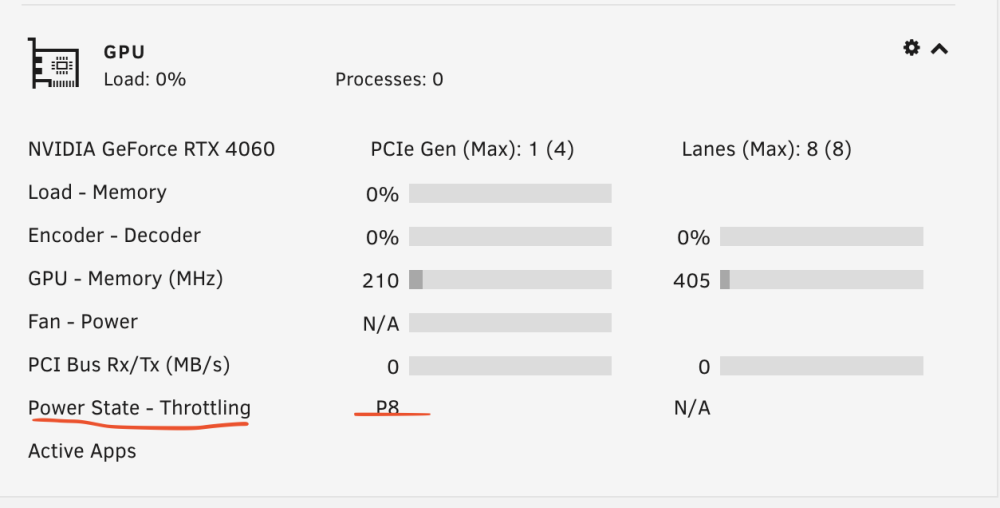
I'm trying to get the efficiencies of my system where they could be. I have a RTX 4060 in my system. I followed spaceinvader's guide and did the two user scripts. One which runs hourly and the one at startup. My system idle power is still high and when I manually run the script I'm seeing the card is saying it's using over 50w. Sometimes it's 55w. Then I was given a link to a post about nvidia-persistenced and I ran the commands there at CLI to see what it'd say. As you can see the card is showing 50/115 both before and after persistenced is manually ran. Under the dashboad and the script it shows powerstate of P8. So would this basically be a bad driver or driver related issue? When I installed the nvidia plugin I just ran it and let it install the latest driver. Should I try other's or could this be related to how new the card is?