





jluerken
Members
-
Joined
-
Last visited
Everything posted by jluerken
-
Hallo jj1987, danke für Deine Antwort. Ich habe keine NVME verbaut. Der Dell T.40 den ich nutze hat zwar einen Port, dieser ist aber wohl nicht wirklich nutzbar und bei mir nicht belegt.
-
Guten Morgen, nach dem Update auf 6.12 ist /var/log zu 100% voll. Reboot hilft nicht. Es wäre nett wenn ich da Hilfe bekommen könnte. unraid-diagnostics-20230616-0759.zip
-
Gleiches Problem hier. Gerade ein Update auf 6.12 gemacht und auch ich bekomme die Fehlermeldung was den Logspeicher angeht. Der Log wird vollgespamt mit: Jun 16 07:24:18 Unraid kernel: ahci 0000:02:00.0: [12] Timeout Jun 16 07:24:18 Unraid kernel: pcieport 0000:00:1b.0: AER: Corrected error received: 0000:02:00.0 Jun 16 07:24:18 Unraid kernel: ahci 0000:02:00.0: PCIe Bus Error: severity=Corrected, type=Data Link Layer, (Transmitter ID) Jun 16 07:24:18 Unraid kernel: ahci 0000:02:00.0: device [1b4b:9215] error status/mask=00001000/00002000
-
Hey, I have used rClone WebUI Container to access pCloud via Webdav. This is working and I can see the online files. Now I want to map this into a local unraid folder to obtain a sync between the local share and my pCloud drive. When I go under "Mounts" and try to create a new mount I am always getting an error 500. Any help appreciated.
-
Ok das hat einwandfrei funktioniert. Danke für den Topp MAM59
-
Ich sichere mal die .img Dateien weg und lege das mal neu an. Mal sehen was das System dann macht.
-
Ich hab keine Ahnung mehr was ich damals da eingetragen habe. Da läuft ein Proxmox Backup Server als VM für kleine Testsysteme. Die Lektion ist übrigens gelernt, nun hab ich appdata_backup so eingestellt das diese Einstellung mit im Backup sind. Hatte ich vorher nicht und nun hab ich den Salat das ich das irgendwie wieder manuell hinbiegen muss 🙂
-
Hi, mein Cache ist vollgelaufen und aus irgendeinem Grund hat dies die libvirt zerschossen. Ich habe eine neue angelegt und nun ist meine VM nicht mehr da (hab tatsächlich nur eine gehabt aktuell). Das Verzeichnis /usr/disk3/domains/... enthält die VM und die .img Files jedoch noch. Kann ich der VM Konfiguration irgendwie sagen wo die VM zu finden ist, das der Eintrag in der libvirt wieder angelegt und die VM wieder sichtbar ist? Danke
-
@BuTscH: Korrekt. Sobald ich diese Einstellung einfüge geht es bei mir auch nicht mehr. @mgutt: Kannst du das bei Dir auch nachvollziehen?
-
hide unreadable = Yes wieder hinzugefügt und es geht immer noch. Daran scheint es also nicht gelegen zu haben
-
Die Ordner gehören "nobody:users" Es ist wichtig das die Leute nur angezeigt bekommen zu was sie auch Zugang haben.
-
Ohne die Inhalte der SMB Extra werden alle Shares normal wieder angezeigt. Fragt sich nur noch welcher Eintrag da das Problem darstellt? "hide unreadable = Yes" brauche ich damit Leute die keine Leserechte auf eine Share haben diese erst gar nicht sehen können. Den Rest teste ich einfach mal Schritt für Schritt. Frage mich halt nur was sich im Update getan hat, denn vorher ging es ja mit diesen Einträgen so wie gewollt.
-
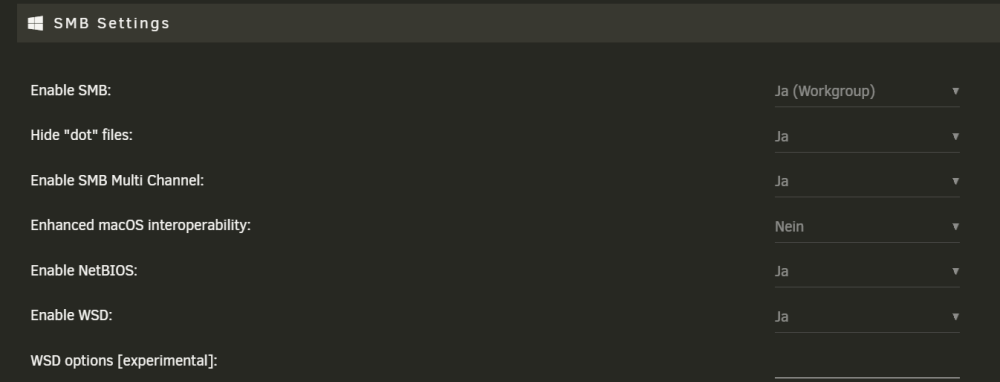
SMB Extras: # log stuff only to syslog log level = 0 syslog = 0 syslog only = Yes # we don't do printers show add printer wizard = No disable spoolss = Yes load printers = No printing = bsd printcap name = /dev/null #client min protocol = SMB2 #client max protocol = SMB3 # HP Printerscan Option #client min protocol = NT1 #ntlm auth = yes # Optimization #socket options=SO_RCVBUF=131072 SO_SNDBUF=131072 TCP_NODELAY #min receivefile size = 16384 #aio read size = 1 #aio write size = 1 wide links = yes # sendfile is automatically NO if aio read and write is 1 #use sendfile = Yes #unix extensions = no #server multi channel support = yes hide files = /desktop.ini/$RECYCLE.BIN # ease upgrades from Samba 3.6 acl allow execute always = Yes # permit NTLMv1 authentication #ntlm auth = Yes #[ecoDMS] #path = /volume1/ecoDMS/ #public = yes #writable = yes #comment = ecoDMS Docker share #printable = no #read only = no #guest ok = no #force user = jluerken #force group = users hide unreadable = Yes access based share enum = Yes
-
Ich habe eine neue Share mit Namen "test" angelegt. Egal ob ich bei der Option sichtbar "Nein, Ja oder Ja (versteckt) anwähle", die Freigabe ist nicht sichtbar
-
In der GUI sind alle Shares vorhanden. Kennt man die Shares kann man auch problemlos zugreifen, nur angezeigt werden die an den Clients nicht mehr. Win10/Win11 und iOS auf iphone können keine Shares mehr sehen. Im Safe Mode habe ich noch nicht gebootet
-
Nein, meine Shares werden angezeigt
-
Guten Morgen, seit dem letzten Update von Unraid auf 6.11.1 werden meine Samba Shares nicht mehr angezeigt. Server und Samba Restart haben nichts bewirkt. Die Einstellungen wurden von mir nicht verändert. Gruß jluerken
-
Ich habe seit dem letzten Update das gleiche Problem. Von meinen Apple Geräten kann ich z.B. wie VLC keine Medien mehr auf meinen Samba Shares sehen. Über Windows funktioniert es normal.
-
Was kann ich hier machen um den Stick tatsächlich mal testen zu lassen vom System?
-
fsck.vfat /dev/sda fsck.fat 4.2 (2021-01-31) Logical sector size (1766 bytes) is not a multiple of the physical sector size. Das ergibt mein Versuch den Stick mal zu reparieren
-
Interessant -rw------- 1 root root 12 Sep 1 19:45 /boot/System\ Volume\ Information/WPSettings.dat -rw------- 1 root root 76 Sep 1 19:45 /boot/System\ Volume\ Information/IndexerVolumeGuid -rw------- 1 root root 0 Sep 1 17:57 /boot/config/forcesync -rw------- 1 root root 110 Sep 2 23:36 /boot/config/plugins/dynamix/monitor.ini -rw------- 1 root root 73 Sep 1 17:57 /boot/config/plugins/dynamix/mover.cron -rw------- 1 root root 0 Sep 1 18:55 /boot/config/plugins/dynamix/notifications/archive/FSCK0000.002 -rw------- 1 root root 0 Sep 1 18:55 /boot/config/plugins/dynamix/notifications/archive/FSCK0000.003 -rw------- 1 root root 0 Jun 18 2023 /boot/config/plugins/dynamix/notifications/archive/FSCK0000.006 -r-------- 1 root root 0 Sep 1 18:55 /boot/config/plugins/dynamix/notifications/archive/fsck0000.007 -r-------- 1 root root 0 Jul 13 2098 /boot/config/plugins/dynamix/notifications/archive/FSCK0000.014 -r-------- 1 root root 0 Jul 13 2098 /boot/config/plugins/dynamix/notifications/archive/FSCK0000.015 -r-------- 1 root root 0 Jul 13 2098 /boot/config/plugins/dynamix/notifications/archive/FSCK0000.016 -r-------- 1 root root 0 Jul 13 2098 /boot/config/plugins/dynamix/notifications/archive/FSCK0000.017 -r-------- 1 root root 0 Jul 13 2098 /boot/config/plugins/dynamix/notifications/archive/FSCK0000.018 -r-------- 1 root root 0 Jul 13 2098 /boot/config/plugins/dynamix/notifications/archive/FSCK0000.019 -rw------- 1 root root 0 Apr 17 2063 /boot/config/plugins/dynamix/notifications/archive/FSCK0000.020 -rw------- 1 root root 0 Sep 1 18:55 /boot/config/plugins/dynamix/notifications/archive/FSCK0000.026 -rw------- 1 root root 0 Sep 1 18:55 /boot/config/plugins/dynamix/notifications/archive/FSCK0000.027 -rw------- 1 root root 0 Jun 18 2023 /boot/config/plugins/dynamix/notifications/archive/FSCK0000.031 -r-------- 1 root root 0 Sep 1 18:55 /boot/config/plugins/dynamix/notifications/archive/fsck0000.032 -rw------- 1 root root 0 Apr 17 2063 /boot/config/plugins/dynamix/notifications/archive/FSCK0000.039 -rw------- 1 root root 0 Sep 1 18:55 /boot/config/plugins/dynamix/notifications/archive/FSCK0000.045 -rw------- 1 root root 0 Sep 1 18:55 /boot/config/plugins/dynamix/notifications/archive/FSCK0000.046 -rw------- 1 root root 0 Jun 18 2023 /boot/config/plugins/dynamix/notifications/archive/FSCK0000.049 -r-------- 1 root root 0 Sep 1 18:55 /boot/config/plugins/dynamix/notifications/archive/fsck0000.050 -rw------- 1 root root 0 Apr 17 2063 /boot/config/plugins/dynamix/notifications/archive/FSCK0000.057 -rw------- 1 root root 0 Sep 1 18:55 /boot/config/plugins/dynamix/notifications/archive/FSCK0000.063 -rw------- 1 root root 0 Sep 1 18:55 /boot/config/plugins/dynamix/notifications/archive/FSCK0000.064 -rw------- 1 root root 0 Jun 18 2023 /boot/config/plugins/dynamix/notifications/archive/FSCK0000.067 -r-------- 1 root root 0 Sep 1 18:55 /boot/config/plugins/dynamix/notifications/archive/fsck0000.068 -rw------- 1 root root 0 Apr 17 2063 /boot/config/plugins/dynamix/notifications/archive/FSCK0000.075 -rw------- 1 root root 0 Sep 1 18:55 /boot/config/plugins/dynamix/notifications/archive/FSCK0000.081 -rw------- 1 root root 0 Sep 1 18:55 /boot/config/plugins/dynamix/notifications/archive/FSCK0000.082 -rw------- 1 root root 0 Jun 18 2023 /boot/config/plugins/dynamix/notifications/archive/FSCK0000.085 -r-------- 1 root root 0 Sep 1 18:55 /boot/config/plugins/dynamix/notifications/archive/fsck0000.086 -rw------- 1 root root 0 Apr 17 2063 /boot/config/plugins/dynamix/notifications/archive/FSCK0000.093 -rw------- 1 root root 0 Sep 1 18:55 /boot/config/plugins/dynamix/notifications/archive/FSCK0000.099 -rw------- 1 root root 0 Sep 1 18:55 /boot/config/plugins/dynamix/notifications/archive/FSCK0000.100 -rw------- 1 root root 0 Jun 18 2023 /boot/config/plugins/dynamix/notifications/archive/FSCK0000.103 -r-------- 1 root root 0 Sep 1 18:55 /boot/config/plugins/dynamix/notifications/archive/fsck0000.104 -rw------- 1 root root 0 Apr 17 2063 /boot/config/plugins/dynamix/notifications/archive/FSCK0000.111 -rw------- 1 root root 0 Sep 1 18:55 /boot/config/plugins/dynamix/notifications/archive/FSCK0000.117 -rw------- 1 root root 0 Sep 1 18:55 /boot/config/plugins/dynamix/notifications/archive/FSCK0000.118 -rw------- 1 root root 0 Jun 18 2023 /boot/config/plugins/dynamix/notifications/archive/FSCK0000.121 -r-------- 1 root root 0 Sep 1 18:55 /boot/config/plugins/dynamix/notifications/archive/fsck0000.122 -rw------- 1 root root 0 Apr 17 2063 /boot/config/plugins/dynamix/notifications/archive/FSCK0000.129 -rw------- 1 root root 0 Jul 21 2090 /boot/config/plugins/dynamix/notifications/archive/fsck0000.133 -r-------- 1 root root 0 Sep 1 18:55 /boot/config/plugins/dynamix/notifications/archive/FSCK0000.142 -rw------- 1 root root 0 Sep 1 18:55 /boot/config/plugins/dynamix/notifications/archive/fsck0000.145 -r-------- 1 root root 0 Sep 1 18:55 /boot/config/plugins/dynamix/notifications/archive/FSCK0000.147 -rw------- 1 root root 0 Feb 3 2042 /boot/config/plugins/dynamix/notifications/archive/FSCK0000.149 -r-------- 1 root root 0 Oct 6 2065 /boot/config/plugins/dynamix/notifications/archive/FSCK0000.151 -r-------- 1 root root 0 Sep 1 18:54 /boot/config/plugins/dynamix/notifications/unread/fsck0000.000 -r-------- 1 root root 0 Jul 13 2098 /boot/config/plugins/dynamix/notifications/unread/FSCK0000.007 -r-------- 1 root root 0 Jul 13 2098 /boot/config/plugins/dynamix/notifications/unread/FSCK0000.008 -r-------- 1 root root 0 Jul 13 2098 /boot/config/plugins/dynamix/notifications/unread/FSCK0000.009 -r-------- 1 root root 0 Jul 13 2098 /boot/config/plugins/dynamix/notifications/unread/FSCK0000.010 -r-------- 1 root root 0 Jul 13 2098 /boot/config/plugins/dynamix/notifications/unread/FSCK0000.011 -r-------- 1 root root 0 Jul 13 2098 /boot/config/plugins/dynamix/notifications/unread/FSCK0000.012 -rw------- 1 root root 0 Apr 17 2063 /boot/config/plugins/dynamix/notifications/unread/FSCK0000.013 -rw------- 1 root root 0 Sep 1 18:55 /boot/config/plugins/dynamix/notifications/unread/FSCK0000.019 -rw------- 1 root root 0 Sep 1 18:55 /boot/config/plugins/dynamix/notifications/unread/FSCK0000.020 -rw------- 1 root root 0 Jun 18 2023 /boot/config/plugins/dynamix/notifications/unread/FSCK0000.023 -r-------- 1 root root 0 Sep 1 18:55 /boot/config/plugins/dynamix/notifications/unread/fsck0000.024 -rw------- 1 root root 0 Apr 17 2063 /boot/config/plugins/dynamix/notifications/unread/FSCK0000.031 -rw------- 1 root root 0 Sep 1 18:55 /boot/config/plugins/dynamix/notifications/unread/FSCK0000.037 -rw------- 1 root root 0 Sep 1 18:55 /boot/config/plugins/dynamix/notifications/unread/FSCK0000.038 -rw------- 1 root root 0 Jun 18 2023 /boot/config/plugins/dynamix/notifications/unread/FSCK0000.041 -r-------- 1 root root 0 Sep 1 18:55 /boot/config/plugins/dynamix/notifications/unread/fsck0000.042 -rw------- 1 root root 0 Apr 17 2063 /boot/config/plugins/dynamix/notifications/unread/FSCK0000.049 -rw------- 1 root root 0 Sep 1 18:55 /boot/config/plugins/dynamix/notifications/unread/FSCK0000.055 -rw------- 1 root root 0 Sep 1 18:55 /boot/config/plugins/dynamix/notifications/unread/FSCK0000.056 -rw------- 1 root root 0 Jun 18 2023 /boot/config/plugins/dynamix/notifications/unread/FSCK0000.059 -r-------- 1 root root 0 Sep 1 18:55 /boot/config/plugins/dynamix/notifications/unread/fsck0000.060 -rw------- 1 root root 0 Apr 17 2063 /boot/config/plugins/dynamix/notifications/unread/FSCK0000.067 -rw------- 1 root root 0 Sep 1 18:55 /boot/config/plugins/dynamix/notifications/unread/FSCK0000.073 -rw------- 1 root root 0 Sep 1 18:55 /boot/config/plugins/dynamix/notifications/unread/FSCK0000.074 -rw------- 1 root root 0 Jun 18 2023 /boot/config/plugins/dynamix/notifications/unread/FSCK0000.077 -r-------- 1 root root 0 Sep 1 18:55 /boot/config/plugins/dynamix/notifications/unread/fsck0000.078 -rw------- 1 root root 0 Apr 17 2063 /boot/config/plugins/dynamix/notifications/unread/FSCK0000.085 -rw------- 1 root root 0 Sep 1 18:55 /boot/config/plugins/dynamix/notifications/unread/FSCK0000.091 -rw------- 1 root root 0 Sep 1 18:55 /boot/config/plugins/dynamix/notifications/unread/FSCK0000.092 -rw------- 1 root root 0 Jun 18 2023 /boot/config/plugins/dynamix/notifications/unread/FSCK0000.095 -r-------- 1 root root 0 Sep 1 18:55 /boot/config/plugins/dynamix/notifications/unread/fsck0000.096 -rw------- 1 root root 0 Apr 17 2063 /boot/config/plugins/dynamix/notifications/unread/FSCK0000.103 -rw------- 1 root root 0 Sep 1 18:55 /boot/config/plugins/dynamix/notifications/unread/FSCK0000.109 -rw------- 1 root root 0 Sep 1 18:55 /boot/config/plugins/dynamix/notifications/unread/FSCK0000.110 -rw------- 1 root root 0 Jun 18 2023 /boot/config/plugins/dynamix/notifications/unread/FSCK0000.113 -r-------- 1 root root 0 Sep 1 18:55 /boot/config/plugins/dynamix/notifications/unread/fsck0000.114 -rw------- 1 root root 0 Apr 17 2063 /boot/config/plugins/dynamix/notifications/unread/FSCK0000.121 -rw------- 1 root root 9 Sep 2 00:08 /boot/config/plugins/dynamix.my.servers/.gitignore -rw------- 1 root root 36348 Sep 2 18:16 /boot/config/plugins/dynamix.my.servers/dynamix.unraid.net.txz -rw------- 1 root root 17 Sep 5 00:00 /boot/config/plugins/dynamix.my.servers/env -rw------- 1 root root 849 Sep 5 00:00 /boot/config/plugins/dynamix.my.servers/myservers.cfg -rw------- 1 root root 577067 Sep 5 00:00 /boot/config/plugins/dynamix.my.servers/webComps/unraid.min.js -rw------- 1 root root 24495 Sep 5 00:00 /boot/config/plugins/dynamix.unraid.net.plg -rw------- 1 root root 99554 Sep 6 00:00 /boot/config/plugins/unassigned.devices/unassigned.devices-2022.09.02.tgz -rw------- 1 root root 77908 Sep 6 00:00 /boot/config/plugins/unassigned.devices.plg -rw------- 1 root root 9 Sep 6 00:00 /boot/config/plugins/unassigned.devices.preclear/.gitignore -rw------- 1 root root 76931 Sep 6 00:00 /boot/config/plugins/unassigned.devices.preclear/unassigned.devices.preclear-2022.09.02.tgz -rw------- 1 root root 8375 Sep 6 00:00 /boot/config/plugins/unassigned.devices.preclear.plg -rw------- 1 root root 8801 Sep 1 17:57 /boot/config/disk.cfg -rw------- 1 root root 274 Sep 6 11:49 /boot/config/domain.cfg -rw------- 1 root root 1286 Sep 6 11:37 /boot/config/parity-checks.log -rw------- 1 root root 758 Sep 1 17:57 /boot/config/pools/cache.cfg -rw------- 1 root root 4096 Sep 2 23:21 /boot/config/super.dat -r-------- 1 root root 69632 Sep 1 19:46 /boot/ldlinux.sys -r-------- 1 root root 122308 Sep 1 19:46 /boot/ldlinux.c32 Ich nehme an die FSCK.... Einträge weisen auf ein Problem hin oder spinnt da vllt. ein Plugin?
-
Aktuell sieht der Stick so bei mir aus: Ich habe hier auch mehrere "Ersatz"-Sticks liegen für den Fall der Fälle. Die Sticks sind aber technisch in Ordnung nur gibt es nach dem Runterfahren öfter ein Problem beim Start das ich bisher immer irgendwie lösen konnte. Es wäre halt toll, wenn das System den Boot-Stick beim kontrollierten Runterfahren testen würde und stoppt wenn es da ein Problem gibt. Ist das System nämlich dann einmal unten und der Start macht ein Problem, kommt man so einfach nicht an einige Dinge ran. Wäre ein wöchtenlicher/monatlicher fsck Cron eine Lösung?

-
Sticks hab ich hier eine Menge rumliegen, ich würde aber gern zwei Dinge bei Unraid sehen: 1. Eine Alternative zum Stick wie z.B. SSD, USB-->M.2 Lösung etc. 2. Der Stick sollte regelmäßig automatisch nach Fehlern untersucht werden, im speziellen beim Runterfahren des Systems Da ist mir echt ein paar Mal schon warm geworden 🙂
-
Ich konnte das Problem lösen indem ich den USB Stick manuell neu installierte. Die automatische Installation hat nicht funktioniert. Nachdem ich den CONFIG Ordner rüber kopiert habe, ist nun alles wieder wie es sein soll. Leider habe ich es schon öfter gehabt, dass bei einem geregelten Runterfahren des Servers beim nächsten Neustart Probleme mit dem USB Stick auftragen. Natürlich habe ich diesen schon einmal ausgetauscht. Gibt es nicht eine andere Möglichkeit, von einem etwas "verlässlicheren" Medium zu booten?
-
Hi, ich habe heute den Server runtergefahren über die Oberfläche weil etwas an der Stromversorgung geändert wurde im Haus. Beim Neustarten des Servers kam es zu einer Fehlermeldung: Kernel panic - not syncing VFS: Unable to mount root fs on unknown-block(0,0) Ich habe daraufhin den USB Stick gesichert und mit dem USB Creator komplett neu eingerichtet. Das Verzeichnis "config" habe ich anschließend wieder rüber kopiert. Die Fehlermeldung bleibt jedoch, egal ob ich normal oder ohne Plugins starte. Kann mir da bitte jemand helfen?

