





shawnngtq
Members
-
Joined
-
Last visited
Everything posted by shawnngtq
-
I verified this works. Thanks @sreknob! That said, I worry the day using directIO will blow up unexpectedly, or worse, data corruption. Hopefully we will have actual fix that uses shfs 🤞
-
👍, detailed guide. That said. I really want to see unraid adding official kubernetes support like what they did for docker. So that k8s is independent on VM.
-
👍🤩. I would like to see this feature too. Prefer use kubernetes over docker compose.
-
No, need @cheesemarathon's help on this. Believe this is some filesystem type issue?
-
Using unraid 6.10.3, with latest minio, facing this error API: SYSTEM() Time: 09:50:54 UTC 09/02/2022 DeploymentID: 37851195-54a1-4973-924d-f412403d98ea Error: write /data/.minio.sys/tmp/e6ec6910-320c-4b7a-9e3b-207675712ad7/xl.meta: invalid argument (*fs.PathError) 6: internal/logger/logger.go:259:logger.LogIf() 5: cmd/storage-errors.go:171:cmd.osErrToFileErr() 4: cmd/xl-storage.go:2380:cmd.(*xlStorage).RenameData() 3: cmd/xl-storage-disk-id-check.go:373:cmd.(*xlStorageDiskIDCheck).RenameData() 2: cmd/erasure-object.go:721:cmd.renameData.func1() 1: internal/sync/errgroup/errgroup.go:123:errgroup.(*Group).Go.func1() Waiting for all MinIO sub-systems to be initialized.. possible cause (Unable to initialize config system: migrateConfigToMinioSys: Storage resources are insufficient for the write operation .minio.sys/config/config.json) Exiting on signal: TERMINATED ERROR Server startup canceled upon user request: Initializing sub-systems stopped gracefully context canceled
-
I noticed that the reason VM page hang is because my plex docker setting includes the gpu even though GPU is not in used that time. The moment I shut plex down, my VM page works => this is the root cause As for the force stop VM via terminal, I still don't have a solution that doesn't include system reboot / shutdown. Maybe as of 6.9.2, it's not possible. But I do hope this can be a future feature. Afterall slackware OS is still Linux-based, terminal should be able to do everything, considering that the default terminal user is already root user.
-
Hi, sometimes when I do gpu passthrough and start the VM, it will cause the VM tab page to hang. 1. I am unable to force stop VM since page is empty 2. If I go to the terminal and execute any `virsh` command, the command will hang as well Is there any way we can force kill the VM? Maybe `kill -9 <VM process>`? It's kinda troublesome to restart the PC everytime because of this ... Thanks
-
@Zotarios, did you found a solution? I am also using nginx proxy manager. When I git clone using ssh, it works locally, but not for remote server. I think it has something to do with NPM port
-
Is there a working solution?
-
@ghost82 You mean inside the Linux VM? I managed to install the nvidia driver. Never tried for Windows because the display will become so small it's hard to do anything. I will try installing the nvidia drive in Windows 10 then.
-
1 thing to add, I tried adding 3060Ti to my Linux VM and I think it passthrough with settings I had when I posted. Because I am able to run `glmark2` benchmark, even though it's a bad score of 419.
-
@ghost82 Reboot in safe mode, so plugin tab shows `No plugins installed` Windows 10 still give code 43.

-
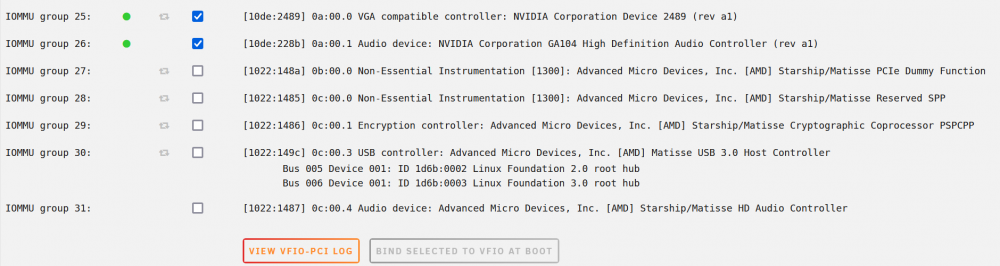
@ghost82, no luck, I bind group 25, 26 to vfio, restart unraid. start windows 10 vm. Still code 43 with that small display as shown in previous image. BTW, I don't mentioned earier. My VM manager settings has PCIe ACS override: Multi-function `Warning: Your system has booted with the PCIe ACS Override setting enabled. The below list doesn't not reflect the way IOMMU would naturally group devices.` If my PCIe ACS override is disabled, I think the 3060Ti is in the same group instead of the group 25,26 you are seeing. VFIO-PCI Log Loading config from /boot/config/vfio-pci.cfg BIND=0000:0a:00.0|10de:2489 0000:0a:00.1|10de:228b --- Processing 0000:0a:00.0 10de:2489 Vendor:Device 10de:2489 found at 0000:0a:00.0 IOMMU group members (sans bridges): /sys/bus/pci/devices/0000:0a:00.0/iommu_group/devices/0000:0a:00.0 Binding... Successfully bound the device 10de:2489 at 0000:0a:00.0 to vfio-pci --- Processing 0000:0a:00.1 10de:228b Vendor:Device 10de:228b found at 0000:0a:00.1 IOMMU group members (sans bridges): /sys/bus/pci/devices/0000:0a:00.1/iommu_group/devices/0000:0a:00.1 Binding... Successfully bound the device 10de:228b at 0000:0a:00.1 to vfio-pci --- vfio-pci binding complete Devices listed in /sys/bus/pci/drivers/vfio-pci: lrwxrwxrwx 1 root root 0 Jan 18 03:05 0000:0a:00.0 -> ../../../../devices/pci0000:00/0000:00:03.1/0000:0a:00.0 lrwxrwxrwx 1 root root 0 Jan 18 03:05 0000:0a:00.1 -> ../../../../devices/pci0000:00/0000:00:03.1/0000:0a:00.1 ls -l /dev/vfio/ total 0 crw------- 1 root root 249, 0 Jan 18 03:05 25 crw------- 1 root root 249, 1 Jan 18 03:05 26 crw-rw-rw- 1 root root 10, 196 Jan 18 03:05 vfio Let me know if I should change PCIe ACS override back to disabled.
-
@ghost82, just added diagnostics.
-
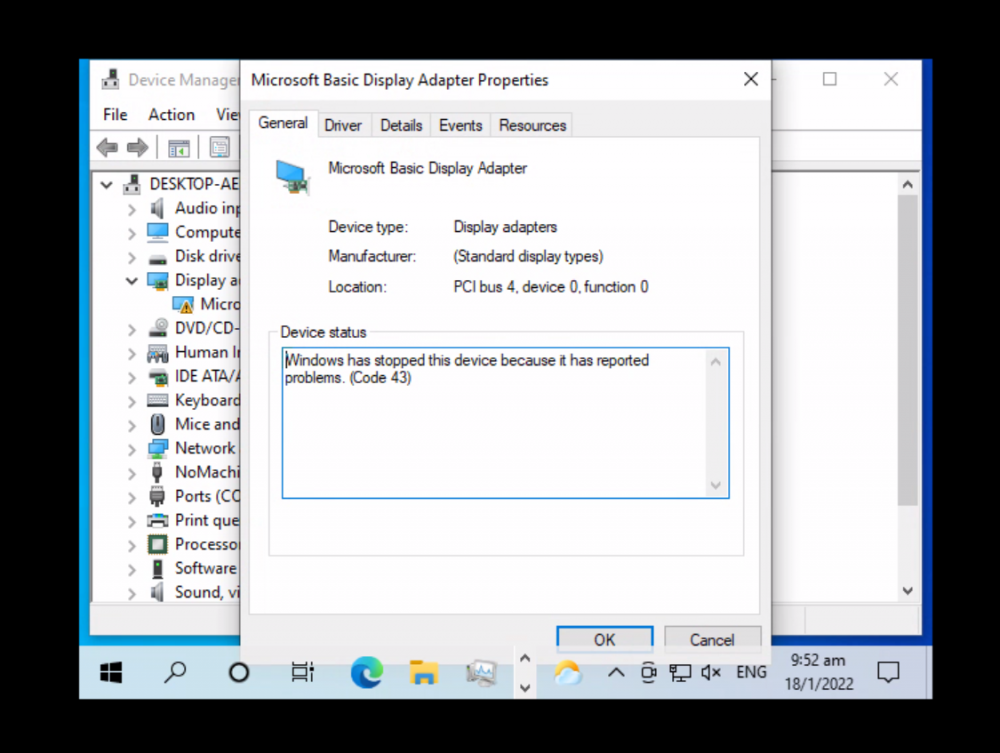
Specs: https://pcpartpicker.com/list/fXpJCz I followed guides & videos, still unable to pass-through my NVIDIA 3060Ti to my Windows 10 VM. I am using amd 5900x, so no onboard GPU. Original XML <?xml version='1.0' encoding='UTF-8'?> <domain type='kvm' id='1'> <name>Windows10</name> <uuid>414e4870-ed19-f2e2-ad1e-39f16f931847</uuid> <metadata> <vmtemplate xmlns="unraid" name="Windows 10" icon="windows.png" os="windows10"/> </metadata> <memory unit='KiB'>8388608</memory> <currentMemory unit='KiB'>8388608</currentMemory> <memoryBacking> <nosharepages/> </memoryBacking> <vcpu placement='static'>8</vcpu> <cputune> <vcpupin vcpu='0' cpuset='5'/> <vcpupin vcpu='1' cpuset='17'/> <vcpupin vcpu='2' cpuset='7'/> <vcpupin vcpu='3' cpuset='19'/> <vcpupin vcpu='4' cpuset='9'/> <vcpupin vcpu='5' cpuset='21'/> <vcpupin vcpu='6' cpuset='11'/> <vcpupin vcpu='7' cpuset='23'/> </cputune> <resource> <partition>/machine</partition> </resource> <os> <type arch='x86_64' machine='pc-q35-5.1'>hvm</type> <loader readonly='yes' type='pflash'>/usr/share/qemu/ovmf-x64/OVMF_CODE-pure-efi.fd</loader> <nvram>/etc/libvirt/qemu/nvram/414e4870-ed19-f2e2-ad1e-39f16f931847_VARS-pure-efi.fd</nvram> </os> <features> <acpi/> <apic/> <hyperv> <relaxed state='on'/> <vapic state='on'/> <spinlocks state='on' retries='8191'/> <vendor_id state='on' value='none'/> </hyperv> </features> <cpu mode='host-passthrough' check='none' migratable='on'> <topology sockets='1' dies='1' cores='4' threads='2'/> <cache mode='passthrough'/> <feature policy='require' name='topoext'/> </cpu> <clock offset='localtime'> <timer name='hypervclock' present='yes'/> <timer name='hpet' present='no'/> </clock> <on_poweroff>destroy</on_poweroff> <on_reboot>restart</on_reboot> <on_crash>restart</on_crash> <devices> <emulator>/usr/local/sbin/qemu</emulator> <disk type='file' device='disk'> <driver name='qemu' type='raw' cache='writeback'/> <source file='/mnt/user/domains/Windows10/vdisk1.img' index='3'/> <backingStore/> <target dev='hdc' bus='virtio'/> <boot order='1'/> <alias name='virtio-disk2'/> <address type='pci' domain='0x0000' bus='0x03' slot='0x00' function='0x0'/> </disk> <disk type='file' device='cdrom'> <driver name='qemu' type='raw'/> <source file='/mnt/user/isos/Windows10.iso' index='2'/> <backingStore/> <target dev='hda' bus='sata'/> <readonly/> <boot order='2'/> <alias name='sata0-0-0'/> <address type='drive' controller='0' bus='0' target='0' unit='0'/> </disk> <disk type='file' device='cdrom'> <driver name='qemu' type='raw'/> <source file='/mnt/user/isos/virtio-win-0.1.190-1.iso' index='1'/> <backingStore/> <target dev='hdb' bus='sata'/> <readonly/> <alias name='sata0-0-1'/> <address type='drive' controller='0' bus='0' target='0' unit='1'/> </disk> <controller type='pci' index='0' model='pcie-root'> <alias name='pcie.0'/> </controller> <controller type='pci' index='1' model='pcie-root-port'> <model name='pcie-root-port'/> <target chassis='1' port='0x10'/> <alias name='pci.1'/> <address type='pci' domain='0x0000' bus='0x00' slot='0x02' function='0x0' multifunction='on'/> </controller> <controller type='pci' index='2' model='pcie-root-port'> <model name='pcie-root-port'/> <target chassis='2' port='0x11'/> <alias name='pci.2'/> <address type='pci' domain='0x0000' bus='0x00' slot='0x02' function='0x1'/> </controller> <controller type='pci' index='3' model='pcie-root-port'> <model name='pcie-root-port'/> <target chassis='3' port='0x12'/> <alias name='pci.3'/> <address type='pci' domain='0x0000' bus='0x00' slot='0x02' function='0x2'/> </controller> <controller type='pci' index='4' model='pcie-root-port'> <model name='pcie-root-port'/> <target chassis='4' port='0x13'/> <alias name='pci.4'/> <address type='pci' domain='0x0000' bus='0x00' slot='0x02' function='0x3'/> </controller> <controller type='pci' index='5' model='pcie-root-port'> <model name='pcie-root-port'/> <target chassis='5' port='0x14'/> <alias name='pci.5'/> <address type='pci' domain='0x0000' bus='0x00' slot='0x02' function='0x4'/> </controller> <controller type='virtio-serial' index='0'> <alias name='virtio-serial0'/> <address type='pci' domain='0x0000' bus='0x02' slot='0x00' function='0x0'/> </controller> <controller type='sata' index='0'> <alias name='ide'/> <address type='pci' domain='0x0000' bus='0x00' slot='0x1f' function='0x2'/> </controller> <controller type='usb' index='0' model='ich9-ehci1'> <alias name='usb'/> <address type='pci' domain='0x0000' bus='0x00' slot='0x07' function='0x7'/> </controller> <controller type='usb' index='0' model='ich9-uhci1'> <alias name='usb'/> <master startport='0'/> <address type='pci' domain='0x0000' bus='0x00' slot='0x07' function='0x0' multifunction='on'/> </controller> <controller type='usb' index='0' model='ich9-uhci2'> <alias name='usb'/> <master startport='2'/> <address type='pci' domain='0x0000' bus='0x00' slot='0x07' function='0x1'/> </controller> <controller type='usb' index='0' model='ich9-uhci3'> <alias name='usb'/> <master startport='4'/> <address type='pci' domain='0x0000' bus='0x00' slot='0x07' function='0x2'/> </controller> <interface type='bridge'> <mac address='52:54:00:5a:1a:c9'/> <source bridge='br0'/> <target dev='vnet0'/> <model type='virtio-net'/> <alias name='net0'/> <address type='pci' domain='0x0000' bus='0x01' slot='0x00' function='0x0'/> </interface> <serial type='pty'> <source path='/dev/pts/0'/> <target type='isa-serial' port='0'> <model name='isa-serial'/> </target> <alias name='serial0'/> </serial> <console type='pty' tty='/dev/pts/0'> <source path='/dev/pts/0'/> <target type='serial' port='0'/> <alias name='serial0'/> </console> <channel type='unix'> <source mode='bind' path='/var/lib/libvirt/qemu/channel/target/domain-1-Windows10/org.qemu.guest_agent.0'/> <target type='virtio' name='org.qemu.guest_agent.0' state='disconnected'/> <alias name='channel0'/> <address type='virtio-serial' controller='0' bus='0' port='1'/> </channel> <input type='tablet' bus='usb'> <alias name='input0'/> <address type='usb' bus='0' port='1'/> </input> <input type='mouse' bus='ps2'> <alias name='input1'/> </input> <input type='keyboard' bus='ps2'> <alias name='input2'/> </input> <hostdev mode='subsystem' type='pci' managed='yes'> <driver name='vfio'/> <source> <address domain='0x0000' bus='0x0a' slot='0x00' function='0x0'/> </source> <alias name='hostdev0'/> <address type='pci' domain='0x0000' bus='0x04' slot='0x00' function='0x0'/> </hostdev> <hostdev mode='subsystem' type='pci' managed='yes'> <driver name='vfio'/> <source> <address domain='0x0000' bus='0x0a' slot='0x00' function='0x1'/> </source> <alias name='hostdev1'/> <address type='pci' domain='0x0000' bus='0x05' slot='0x00' function='0x0'/> </hostdev> <memballoon model='none'/> </devices> <seclabel type='dynamic' model='dac' relabel='yes'> <label>+0:+100</label> <imagelabel>+0:+100</imagelabel> </seclabel> </domain> I create and start this VM without the GPU 1st. After I setup and install all windows 10 updates. I stop the VM. Updated the GPU section to <hostdev mode='subsystem' type='pci' managed='yes'> <driver name='vfio'/> <source> <address domain='0x0000' bus='0x0a' slot='0x00' function='0x0'/> </source> <alias name='hostdev0'/> <address type='pci' domain='0x0000' bus='0x04' slot='0x00' function='0x0' multifunction='on'/> </hostdev> <hostdev mode='subsystem' type='pci' managed='yes'> <driver name='vfio'/> <source> <address domain='0x0000' bus='0x0a' slot='0x00' function='0x1'/> </source> <alias name='hostdev1'/> <address type='pci' domain='0x0000' bus='0x04' slot='0x00' function='0x1'/> </hostdev> Start VM, check the display, which shows Code 43. All this is done using Q35-5.1. I also tried i440fx-5.1 and it don't work too. Server boot mode is legacy
-
@wchusky, any solution? I face the same thing, I am using AMD 5900x with 3060Ti
-
Anyway, I reboot the server, problem disappear
-
@dlandon, I go to the terminal and execute arp, it can start but never finish, so I do ctrl + c
-
arp don't work for me too, any solution?
-
@GrehgyHils, yes, same thing, I find Unraid VM a pain in the ass, though the docker is awesome ...
-
@GrehgyHils, did you find a solution?
-
I ended downloading this instead of using my router's built-in VPN, since my PC is definitely stronger than my router.
-
Question My router has built-in vpn. If I am outside home network, I can connect to my router vpn, then access my unraid. In this case, is there any pro/con installing wireguard, do I still need it?
-
Hi, This is the 1st time I am creating a VM on my Unraid (which I just built recently). I tried to create a Ubuntu VM using Linux Mint 20.2 image. Now the VM page is showing nothing. So I tried to go to settings > VM Manager, which also shows nothing. Not sure what is going on here. So, I go to command line, to list VM domains and shut it down # to list domains # but this command still running after 5 mins ... virsh list # since I can't get the domains from above command # i tried to kill the domain with the name I see in /domains share # once again, this command runs for 5 mins still return nothing virsh shutdown "Linux Mint" All my dockers are running fine. CPU usage < 8%, RAM usage < 10% and GPU usage 0%. So this shouldn't be a resource problem. This VM creation hangs, not sure how I should stop it and make it work? I can reboot the server ...
-
Ya, regarding method 1 vs 2. I tried synology TD over network, I think it's about 50-100MB/s. Using method 2, it should be ~200MB/s. In theory method 2 is faster even with 2 copies, if we assume there is only few seconds gaps to change USB connection. But this is inconvenient. So ... wondering if there is any other method.





