





mgadbois
Members
-
Joined
-
Last visited
Everything posted by mgadbois
-
Got it resolved by adding in custom variables in the docker config
-
I am trying to add a new YUBIKEY 5NFC to my Bitwarden. I am told I need to globalSettings__yubico__clientId and globalSettings__yubico__key in the global.override.env file located at ~/bwdata/env/. Not sure how to get to that. Noob.... Looked at this posting... Any help is greatly appreciated.
-
I'll try that when I get home in a few days. Thanks for the feedback.
-
I don't have any custom IP addresses on any dockers. I changed te one I had and rebooted afterwards so not sure what the darn thing is looking at?
-
I changed the IP of my PleSyslogCatchAll-2022-01-30.txtx server to "Host" to help stop the maclvlan issue. Server became unresponsive today. Attached are syslog server log fileastro-server-diagnostics-20220130-1805.zip Diagnostic logs attached after reboot. Thoughts??
-
It seems, at least I thought, that NGINX would be easier to set up. I get intermittent results when training https. on and off cert errors
-
I have recently added a second domain name to my Cloudflare account. I would like to have the Cloudflare-DDNS docker in unRAID update my local WAN IP for both domains. Is this possible and if so any config changes I have to make in the docker?
-
My unRAID server is on a 10.5.254.80/24 and my plex server is 10.5.254.83/24. Everything else is on a customer "proxynet" network on the unRAID server. Not sure if thius is an issue or not.
-
Thanks. I have my plex server on a custom IP. I'll give that a look. Thanks
-
Additional Note. UPS is not connected which it shy those errors are there now.
-
Looks like it stopped responding to me this evening. I attached some logs. Hope this helps. SyslogCatchAll-2022-01-24.txt
-
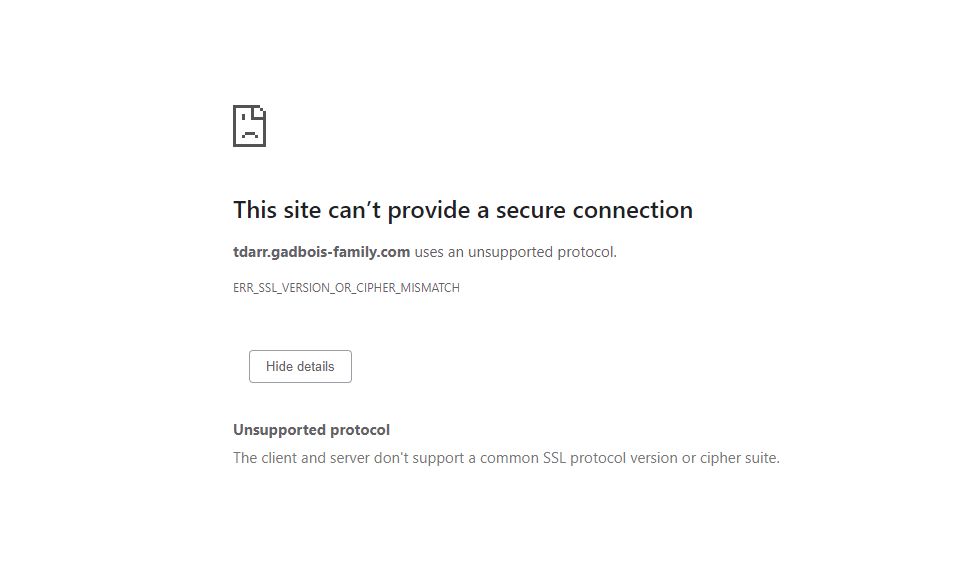
This is what I get when I try and http://tdarr.mydomain.com
-
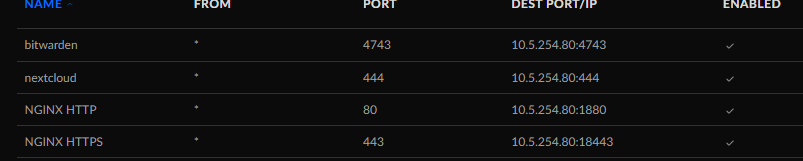
I have a fresh installation of NGINX docker on unRAID 6.9.2 I am trying to use it for nextcloud, vaultwarden, etc... I have my ubiquity UDM PRO SE set up to point port 80 to 1880 and 443 to point to 18443 of the unRAID server IP. I can get to say tdarr and vaultwarden internally using the local IP. I have cname setup in cloudflare to point to hostname of tdarr.mydomain.com (tried both proxy and dns only). I have a Lets encypt ssl cert for both mydoain.com and *.mydomain.com. Also have one for mydomain.com from CLoudflare. Nothing I do seems to allow me to see teh spalsh page of tdarr or anything else I try this with. Need help getting started to get the first docker up. Thoughts??
-
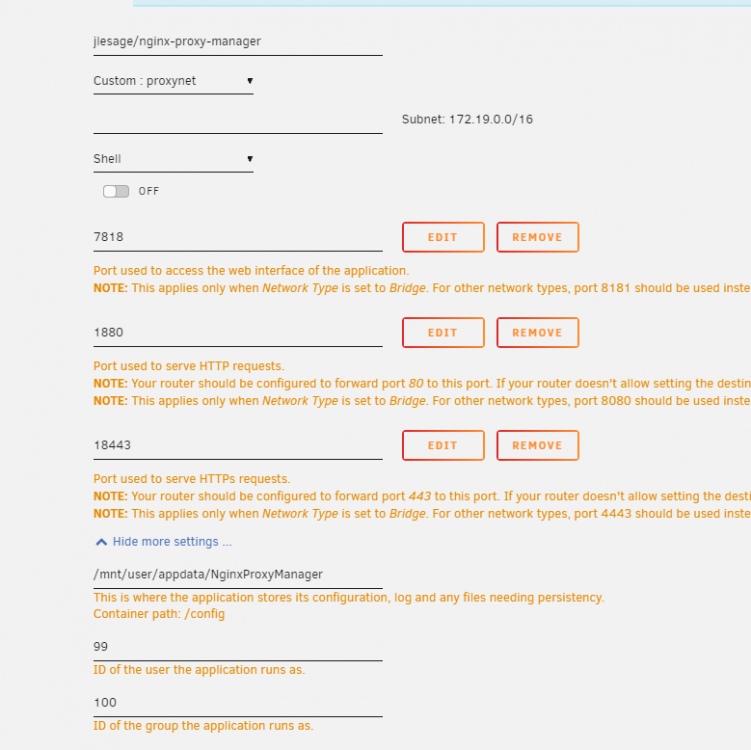
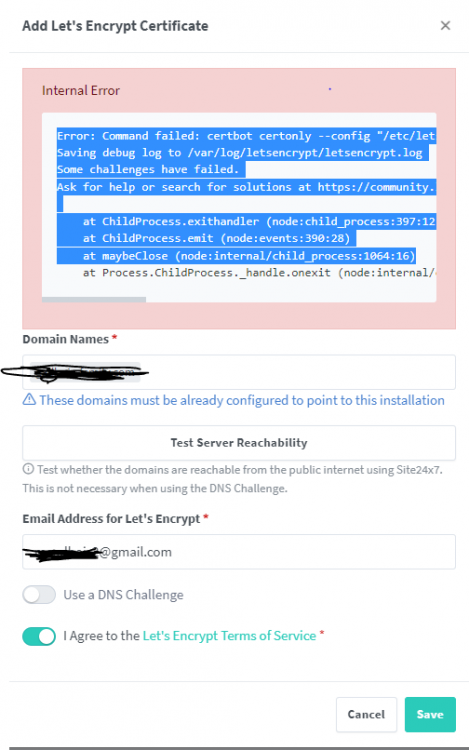
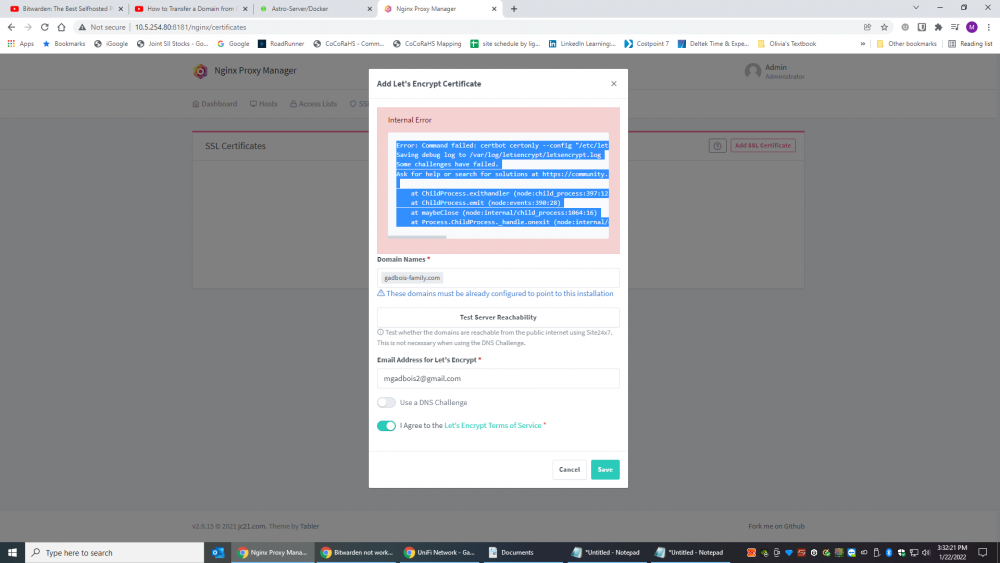
New setup - new \unRAID user... Running unRAID 6.9.2 Trying to install Nginx docker in unRAID. Installed without issue using default settings. Network is a Ubiquiti UDM Pro SE on current version with these port forwarding rules. When I try and add a SSL cert in Nginx I get this error.. Error: Command failed: certbot certonly --config "/etc/letsencrypt.ini" --cert-name "npm-16" --agree-tos --authenticator webroot --email "[email protected]" --preferred-challenges "dns,http" --domains "XXXXXX.com" Saving debug log to /var/log/letsencrypt/letsencrypt.log Some challenges have failed. Ask for help or search for solutions at https://community.letsencrypt.org. See the logfile /var/log/letsencrypt/letsencrypt.log or re-run Certbot with -v for more details. at ChildProcess.exithandler (node:child_process:397:12) at ChildProcess.emit (node:events:390:28) at maybeClose (node:internal/child_process:1064:16) Not sure what is going on here. It is stopping me from finishing the setup on vaultwarden (as I need a cert for that docker) and nextcloud. I am using Cloudflare as my DNS and my domain is registered with them. I also have CNAMES for bitwarden and nextcloud that do resolved to my home IP. Thoughts???
-
New install of NGINX Proxy Manager,. I am getting this error when I try and create a SSL cert. Ports on UDM PRO set to forward port 80 to 1880 of the server along with port 443 to 18443 Error: Command failed: certbot certonly --config "/etc/letsencrypt.ini" --cert-name "npm-10" --agree-tos --authenticator webroot --email "[email protected]" --preferred-challenges "dns,http" --domains "XXXXX.com" Saving debug log to /var/log/letsencrypt/letsencrypt.log Some challenges have failed. Ask for help or search for solutions at https://community.letsencrypt.org. See the logfile /var/log/letsencrypt/letsencrypt.log or re-run Certbot with -v for more details. at ChildProcess.exithandler (node:child_process:397:12) at ChildProcess.emit (node:events:390:28) at maybeClose (node:internal/child_process:1064:16) at Process.ChildProcess._handle.onexit (node:internal/child_process:301:5)
 Will do. Thanks for the advice.Twice in the past week I have had my server become unresponsive and require a hard restart. The last time was on 1/15 and just before 10pm local time. I had just finished watching a movie on Plex and went to look at server GUI and it was unresponsive. Plex was no longer responsive either and server did not respond to pings. Unfortunately I don't have a monitor and keyboard handy to hook up to the server. Thoughts? Thanks in advance.. astro-server-diagnostics-20220116-0800.zipI am new to UnRaid and looking for a way to speed up my downloads. I am setting up new Plex server on UnRaid and need to transfer 20TB of data from my QNAP to UnRaid. I have a Plex Media Share setup in UnRaid that has several subfolders. I have a 10GB NIC in both servers running through a 10GB switch. Looking for a way to have the files ryncd from QNAP to UnRaid through my 1TB cache SSD or another 1TB SSD that I use for Plex Metadata. Not sure how to set it up so that when I use this rsync command ( rsync -avh "/mnt/remotes/10.5.254.86_4K Movies/" "/mnt/user/Plex Media/4K") that the files transfer to the SSD and then when the SSD gets closer to getting full that it moves the files to the spinning disks in the array. Any help is appreciated. Thanks.I was able to Flash this Version 20 from version 14 and that fixed the issue. ThanksNewbie here.... The controller I got from the Server Store was Flashed to IT Mode. is that what you are refereeing to or is this different?I have (had) 2 parity drives and 6 data drives. All 14 TB drives. Parity Disk 1 had a lot of errors and it got disabled. I did a parity check with the 1 remaining drive and all came out well. Tried to add the parity drive 1 (bad one) back into array and it said it would take 54 days to sync. All drives are about a month old. This is a 24 bay supermicor server. I moved the bad parity drive to a different drive bay just in case. No effect. Thoughts astro-server-diagnostics-20211230-1244.zipLooks like the Above 4G decoding in bios fixed it. Thanks for the quick response.I have a brand new 3060 that I just put into my new unraid server. Had an older 6GB 1060 that was in there and it worked okay, but wanted more power. Unraid doesn't detect the 3060. Any thoughts? Nvidia drivers updated and v495.46 is loaded. Nvidia driver plugin shows this error. "NVIDIA-SMI has failed because it couldn't communicate with the NVIDIA driver. Make sure that the latest NVIDIA driver is installed and running." This is a supermicro server mobo. 3060 was in a Windows 10 pc for a week or 2 so I know it works.I have a new Plex install on a new Unraid server. My current issue is that after about 5 minutes of 3 transcodes the Roku devices stop playing a give the error that the server is not powerful enough. Unraid 6.9.2 Plex Pass 1.25.2.5319 Nvidia 1060 Dual Intel® Xeon® CPU E5-2690 0 @ 2.90GHz 128GB RAM with 50 GB set aside for RAM transcoding to /tmp in Plex Hardware transcoding enabled in Plex NVIDIA_DRIVER_CAPABILITIES filled in correctly NVIDIA_VISIBLE_DEVICES listed as all --runtime=nvidia listed in extra parameters Any thoughts as to why this would happen?


