





Anubclaw
Members
-
Joined
-
Last visited
Everything posted by Anubclaw
-
Added new diagnostics dellnas-diagnostics-20211212-1316.zip
-
I have opened the dellnas Server , checked cables and did a mem check , did update the bios to the latest version. Now the parity check has 0 errors again - seems ok for now. Gesendet von iPhone mit Tapatalk
-
Dear Support, I had today 446 parity errors on one of my Servers. Can you have a look at the diagnostics if you can see what type of issues came up ? Drives seem ok and the parity too but I just wanted to check where the issue is and how can I fix it if possible. Since this is the 1st time errors were seen I am a bit nervous. I had to replace one of the drives a few weeks ago. Thank you for your help. Best regards, Harald Weiss dellnas-diagnostics-20211128-1555.zip
-
adding diagnostics z1nas-diagnostics-20211102-1037.zip
-
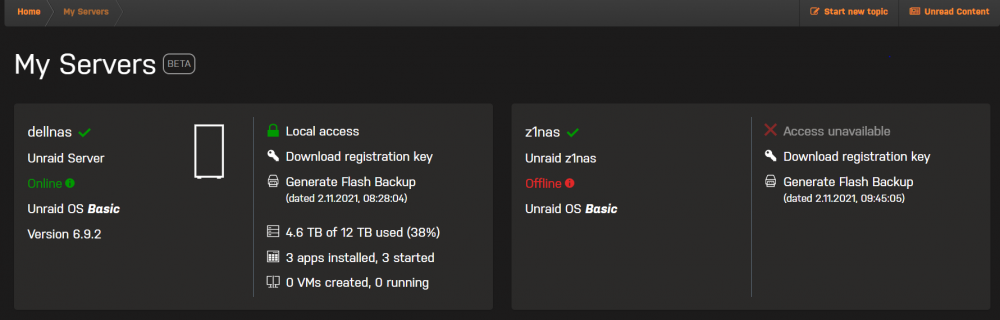
Dear Support, I have the issue that since the update to RC2 it seems the server does not connect correctly to the myservers service. Tried deleting and reinstalling the plugin which did just delete the backups from local and remote but did not help with the dashboard showing "offline".
-
Nods I agree there too I am only a nosey Network and Security Guy living on the "bleeding edge" of technology which has fun testing things out and testing the limits as well I was waiting for an ISO of the Win11 preview to get an early impression what changed. I joined the "Microsoft Insider" and i recieve detailed messages from Microsoft about each patch day. I am part of the Apple Developer Program just so I can access the new stuff early and give feedback when possible. Actually its similar with unraid running one Server on unraid 9.2 and the other with Unraid 10rc1 . Some of this gives me an advantage in my job but I am not getting paid for testing anything yet besides whatever Customer wishes come up on the consulting job
-
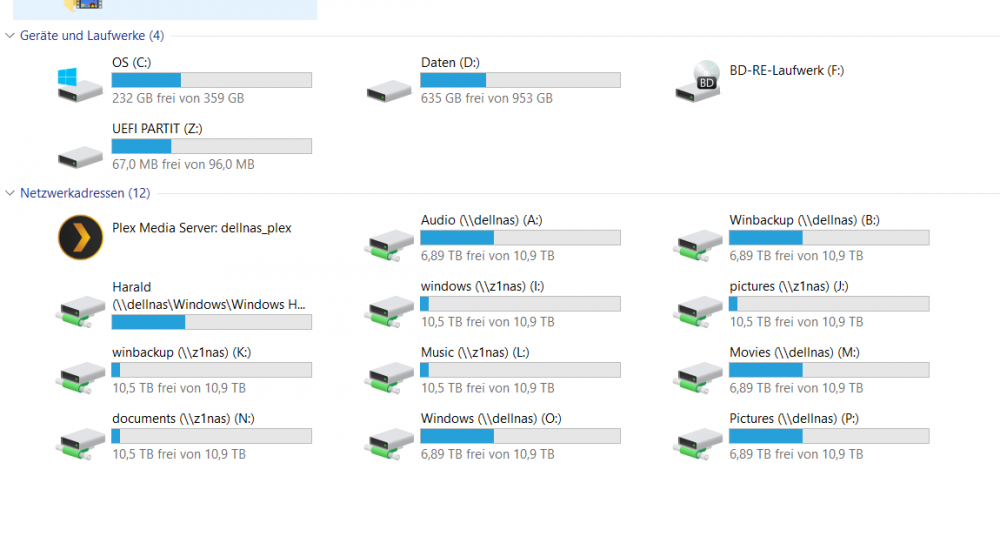
just to show what I have setup : In Windows I do have a script that is planned to run at logon that maps all the drives in the right places: mapping.cmd: net use * /delete /yes net use o: \\dellnas\Windows /savecred net use A: \\dellnas\Audio /savecred net use B: \\dellnas\Winbackup /savecred net use P: \\dellnas\Pictures /savecred net use M: \\dellnas\Movies /savecred net use h: "\\dellnas\Windows\Windows Home\Harald" /savecred rem z1nas shares net use i: "\\z1nas\windows" /savecred net use j: "\\z1nas\pictures" /savecred net use k: "\\z1nas\winbackup" /savecred net use l: "\\z1nas\Music" /savecred net use n: "\\z1nas\documents" /savecred There is maybe an more elegant way with powershell but thats easy enough as a scheduled task. yes I do have 2 Unraid Servers running Each one with 4x 4TB drives in a Dell T30 Server Tower. They have been really reliable no questions asked. On my Macs I also have a similar setup just mapped as "logon objects" for the users which works for the most part and also for Timemachine.
-
The reason why I map drive letters to unc paths is that not all Windows Software handles UNC paths really well. I know in 2021 they should be able to handle this but there is a lot of instances where the UNC path does not work - in addition some software is even crippled to not allow the unc path directly. And if you ever try to work with VHDX there is even the case of the DNS names do not work reliable but the IP Adress used in combination of a VHDX always works. Address is the same but result is not and DNS resolves ok. As I use multiple Computers and OS i use a mapping script for Windows so I can expect the same "Drive Layout" on each Windows Machine. The Mapping script resides on my Onedrive and is always on the drive from the settings. I prefer UNC Path (Windows) or Volumes (Mac OS) where possible it just throws up sometimes if the Drivecount changes for some reason.
-
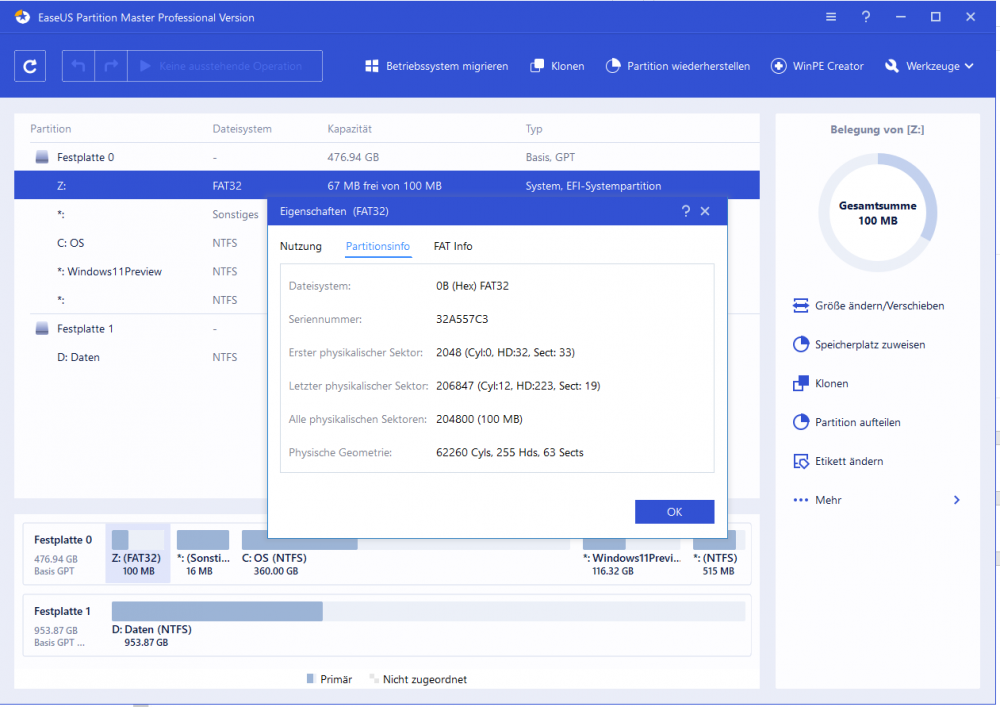
Thank you for the link to the interesting Article and I agree with you - for my background - I am a cybersecurity consultant so I know what you are talking about I think. I also found the reason for the "inaccessable Z: Share" is actually a small gift from the Windows 11 preview install as I found out. See what this is: (An UEFI System Partition with 100 MB what the heck ? And to make things worse its Mounted as a drive but not accessable so it actually blocks my mapping script from using the Z: as a drive letter - so it never mounts the share in the 1st place - well the Win 11 Preview looks good but yes it has its quirks. Another thing not to try is activate Hyper V in Windows 11 - it instantly made my laptop non bootable after reboot and I had to reinstall the win 11 preview again without the Hyper V activation. But then Windows 10 and 11 did boot again. So happy that this time its not an issue of Unraid in that respect So from the Unraid side this problem should be resolved.
-
Added information which might help- I actually installed the windows 11 preview 2200 on my Laptop in Dual Boot , I access all shares with all OS es Windows 10 , Windows 11 , Mac OS and even Mac OS Monterey where the windows 11 one was the one thing I added today
-
Dear Support, I have a huge "Windows" share on my Unraid Server which was accessable until today . It shows Fat32 and if i try to access it from Windows10 it says I have no rights to access the share ... I wonder what happened. I have attached the diagnostics ZIP file. Stopping and starting the Array or rebooting the server did not help. dellnas-diagnostics-20210828-1226.zip
-
Dear Support, just received a message that my USB Device is corrupted and i should post the diagnostics for help here. It came as a surprise to me but this is what happened just now: Is there anything more I can do right now ? laptopunraid-diagnostics-20210826-1320.zip
-
Dear Support, I know its unusual to try unraid on a Laptop with dual GPU but I try at least - I wanted to try what is possible and someone makes Videos showing their native windows 10 run in a VM on unraid so I try to give it a shot. . on the latest Beta I am unable to start VMs - I get errors like this one on Version: 6.10.0-rc1 : ErrorWarningSystemArrayLogin -mon chardev=charmonitor,id=monitor,mode=control \ -rtc base=localtime,driftfix=slew \ -global kvm-pit.lost_tick_policy=delay \ -no-hpet \ -no-shutdown \ -boot strict=on \ -device ich9-usb-ehci1,id=usb,bus=pci.0,addr=0x7.0x7 \ -device ich9-usb-uhci1,masterbus=usb.0,firstport=0,bus=pci.0,multifunction=on,addr=0x7 \ -device ich9-usb-uhci2,masterbus=usb.0,firstport=2,bus=pci.0,addr=0x7.0x1 \ -device ich9-usb-uhci3,masterbus=usb.0,firstport=4,bus=pci.0,addr=0x7.0x2 \ -device virtio-serial-pci,id=virtio-serial0,bus=pci.0,addr=0x3 \ -blockdev '{"driver":"file","filename":"/mnt/user/domains/Windows 10/vdisk1.img","node-name":"libvirt-3-storage","cache":{"direct":false,"no-flush":false},"auto-read-only":true,"discard":"unmap"}' \ -blockdev '{"node-name":"libvirt-3-format","read-only":false,"cache":{"direct":false,"no-flush":false},"driver":"raw","file":"libvirt-3-storage"}' \ -device virtio-blk-pci,bus=pci.0,addr=0x4,drive=libvirt-3-format,id=virtio-disk2,bootindex=1,write-cache=on \ -blockdev '{"driver":"file","filename":"/mnt/user/isos/Win10_21H1_German_x64-1.iso","node-name":"libvirt-2-storage","auto-read-only":true,"discard":"unmap"}' \ -blockdev '{"node-name":"libvirt-2-format","read-only":true,"driver":"raw","file":"libvirt-2-storage"}' \ -device ide-cd,bus=ide.0,unit=0,drive=libvirt-2-format,id=ide0-0-0,bootindex=2 \ -blockdev '{"driver":"file","filename":"/mnt/user/isos/virtio-win-0.1.190-1.iso","node-name":"libvirt-1-storage","auto-read-only":true,"discard":"unmap"}' \ -blockdev '{"node-name":"libvirt-1-format","read-only":true,"driver":"raw","file":"libvirt-1-storage"}' \ -device ide-cd,bus=ide.0,unit=1,drive=libvirt-1-format,id=ide0-0-1 \ -netdev tap,fd=34,id=hostnet0 \ -device virtio-net,netdev=hostnet0,id=net0,mac=52:54:00:ea:be:99,bus=pci.0,addr=0x2 \ -chardev pty,id=charserial0 \ -device isa-serial,chardev=charserial0,id=serial0 \ -chardev socket,id=charchannel0,fd=35,server=on,wait=off \ -device virtserialport,bus=virtio-serial0.0,nr=1,chardev=charchannel0,id=channel0,name=org.qemu.guest_agent.0 \ -audiodev id=audio1,driver=none \ -device vfio-pci,host=0000:01:00.0,id=hostdev0,bus=pci.0,addr=0x5 \ -device vfio-pci,host=0000:01:00.1,id=hostdev1,bus=pci.0,addr=0x6 \ -device usb-host,hostdevice=/dev/bus/usb/004/005,id=hostdev2,bus=usb.0,port=1 \ -device usb-host,hostdevice=/dev/bus/usb/003/003,id=hostdev3,bus=usb.0,port=2 \ -device usb-host,hostdevice=/dev/bus/usb/005/002,id=hostdev4,bus=usb.0,port=3 \ -device usb-host,hostdevice=/dev/bus/usb/003/005,id=hostdev5,bus=usb.0,port=4 \ -device usb-host,hostdevice=/dev/bus/usb/004/003,id=hostdev6,bus=usb.0,port=5 \ -sandbox on,obsolete=deny,elevateprivileges=deny,spawn=deny,resourcecontrol=deny \ -msg timestamp=on char device redirected to /dev/pts/0 (label charserial0) 2021-08-26T08:21:52.458926Z qemu-system-x86_64: -device vfio-pci,host=0000:01:00.0,id=hostdev0,bus=pci.0,addr=0x5: vfio 0000:01:00.0: group 9 is not viable Please ensure all devices within the iommu_group are bound to their vfio bus driver. 2021-08-26 08:21:52.486+0000: shutting down, reason=failed laptopunraid-diagnostics-20210826-1028.zip
-
Well I fixed the issue in the meantime by a password reset. The thing I noticed was that login was not possible anymore - that unraid.net account connection was there before the upgrade. It was easy to fix but made my heart almost stop seeing the issue first - since the password reset took out all accounts created there is not much additional diagnosis I could do I think Gesendet von iPhone mit Tapatalk
-
After upgrading from 6.9.2 to 6.10 RC1 i was unable to logon with my normal GUI credentials - a password reset did do the trick but this was a bit unpleasent surprise after reboot
-
Dear Support, I just wanted to give feedback on the 6.10rc1 build upgrade from 6.9.2: After the upgrade the login with my previous Login did no longer work - I had to do the password reset procedure but then all worked as expected. Just a 1st impression on the build-
-
Thank you , this solved the issue [emoji4] Gesendet von iPhone mit Tapatalk
-
I have tried removing the Plugin and installing it again - Result seems to be the same
-
I tried restarting the API as it is said there: root@z1nas:~# unraid-api restart Found no running processes. Starting unraid-api v2.23.2 Connecting to the "production" environment. /usr/local/bin/unraid-api/build/libvirt.node: file too short ----- This does not look to good from my side
-
Dear Support, I managed to set up all the shares like I wanted but I have an issue when trying to run a Steam Game when trying to run it off the Mac share (separate folder). The error message I got was "You have not the necessary rights to run this Program off of this location. Please contact your Administrator" - well I am the administrator And i checked the security settings and allowed full folder access but the message still pops up. If you need anything aditional to help please let me know. Thank you in advance, Best regard, Harald Weiss
-
Dear Support, I have added a secondary UnRaid Server to my Account - now one Shows Online and the latest one as offline. Is there a Port that Needs to be forwarded for the secondary unraid Server ? Thank you in advance,
-
I have done some extended Tests on my M1 Mac with Big Sur 11.5.1 - I had the issue that whatever settings I changed the shares would not show up. Solution for me was "Follow the official Unraid Time Machine Setup settings in SMB / Interoperability settings" then turn export to "No" and say that it should not export this share. After the save I reenabled the share with YES/Timemaschine setting. Then I disconnected all the shares that came from Unraid in finder. And just connected the Time Machine share. Then I opened the Timemachine settings and selected "Select Volume" and the Unraid share did show up as if it was never an issue Hope I can help some people with the description how I solved the issue with the Timemachine Share not showing up.



