





MaxwellHouse
Members
-
Joined
-
Last visited
Everything posted by MaxwellHouse
-
Hi all, I now have a bug to upgrade my system one piece at a time. I'm going to start with the parity drive. Currently I have a 4TB HD and want to update to a 12 TB drive. Is there a recommended process to do this? My thought at the moment is to simply replace the drive, reassign as parity and then run the parity check. Please let me know if I'm on the right track! Thanks, Brian
-
Sorry to hijack the thread but I was hoping to ask about disabling Google Photo Albums backup? I've found that the albums backup creates a soft link to the photo files on my nvme cache drive and mover doesn't move these links to the array device. I've tried to include the "--skip-albums" argument in both the Extra Parameters and Post Arguments in the advanced container setup but it appears as though that command is depreciated. Thanks!
-
Ok, so you've talked me into it... I just bought a 980 Pro 1TB NVMe. So, what's the best way to replace my 500 Gb NVMe drive? Should I do an rsync to another mount, switch out the drive, let Unraid do it's formatting thing, and then rsync back? I use this guy for all of my Docker containers. EDIT: Never mind, I found this wiki. Thanks! Brian
-
What size is your 980? I have a 500 GB drive and noticed that it reports 84C for exactly 30 minutes!
-
Yeah, I went back to rc2 and I'm getting the same problem. But, we've determined it's a sensor read error on Samsung 980 NVMe drives. So, for now, I'm ignoring the warning!
-
Hi all. For fun I took the cover off my server and then installed rc2. As soon as I got a notice that the NVMe went to 84C I went to go touch it. I can tell you that it was NOT at 84 (otherwise I'd be in pain!) This seems to point to a sensor read error in rc2.
-
I have reverted and the problem has gone away. If there are any other ideas to try to troubleshoot this I'm very happy to help. -Brian
-
No worries! Thank you very much for your suggestions to try to troubleshoot this issue! I upgraded to rc2 and re-ran the random file write. Very interesting results on Sensor 2... see here: There is definitely more of a delta. Incidentally I increased the write command to 2048 counts and the Sensor2 temp peaked at 53.9C. Hmm.... EDIT: After reverting back to rc1 I noticed a delta of 5C increase when writing 2048 counts. root@maxwell:~# sensors | grep nvme-pci-0400 -A 5 nvme-pci-0400 Adapter: PCI adapter Composite: +30.9°C (low = -273.1°C, high = +81.8°C) (crit = +84.8°C) Sensor 1: +30.9°C (low = -273.1°C, high = +65261.8°C) Sensor 2: +41.9°C (low = -273.1°C, high = +65261.8°C) root@maxwell:~# sensors | grep nvme-pci-0400 -A 5 nvme-pci-0400 Adapter: PCI adapter Composite: +31.9°C (low = -273.1°C, high = +81.8°C) (crit = +84.8°C) Sensor 1: +31.9°C (low = -273.1°C, high = +65261.8°C) Sensor 2: +47.9°C (low = -273.1°C, high = +65261.8°C) root@maxwell:~# sensors | grep nvme-pci-0400 -A 5 nvme-pci-0400 Adapter: PCI adapter Composite: +31.9°C (low = -273.1°C, high = +81.8°C) (crit = +84.8°C) Sensor 1: +31.9°C (low = -273.1°C, high = +65261.8°C) Sensor 2: +47.9°C (low = -273.1°C, high = +65261.8°C) root@maxwell:~# sensors | grep nvme-pci-0400 -A 5 nvme-pci-0400 Adapter: PCI adapter Composite: +31.9°C (low = -273.1°C, high = +81.8°C) (crit = +84.8°C) Sensor 1: +31.9°C (low = -273.1°C, high = +65261.8°C) Sensor 2: +45.9°C (low = -273.1°C, high = +65261.8°C) root@maxwell:~# sensors | grep nvme-pci-0400 -A 5 nvme-pci-0400 Adapter: PCI adapter Composite: +31.9°C (low = -273.1°C, high = +81.8°C) (crit = +84.8°C) Sensor 1: +31.9°C (low = -273.1°C, high = +65261.8°C) Sensor 2: +44.9°C (low = -273.1°C, high = +65261.8°C) root@maxwell:~# sensors | grep nvme-pci-0400 -A 5 nvme-pci-0400 Adapter: PCI adapter Composite: +31.9°C (low = -273.1°C, high = +81.8°C) (crit = +84.8°C) Sensor 1: +31.9°C (low = -273.1°C, high = +65261.8°C) Sensor 2: +44.9°C (low = -273.1°C, high = +65261.8°C) root@maxwell:~# sensors | grep nvme-pci-0400 -A 5 nvme-pci-0400 Adapter: PCI adapter Composite: +31.9°C (low = -273.1°C, high = +81.8°C) (crit = +84.8°C) Sensor 1: +31.9°C (low = -273.1°C, high = +65261.8°C) Sensor 2: +43.9°C (low = -273.1°C, high = +65261.8°C) root@maxwell:~# sensors | grep nvme-pci-0400 -A 5 nvme-pci-0400 Adapter: PCI adapter Composite: +31.9°C (low = -273.1°C, high = +81.8°C) (crit = +84.8°C) Sensor 1: +31.9°C (low = -273.1°C, high = +65261.8°C) Sensor 2: +41.9°C (low = -273.1°C, high = +65261.8°C)
-
Hey, I ran the dd command while monitoring sensors with rc1 and noted that Sensor 2 went up by 1° C during the course of the write. It came back down once the dd command had finished. I'll re-install rc2 and do the same exercise.
-
Thank you guys for the detailed follow up! I did see issues once again after upgrading to rc2. Same exact issue where it spikes to 84. I've downgraded back to rc1 and haven't had the issue again.
-
Well, after reverting I had no issues. So just to make sure I went back to rc2 but this time I ran "Update Assistant" before going from rc1 to rc2. It's been up for about 90 minutes without any issues.
-
Good call. Been running rc1 again for a while. No issues....... Will update tomorrow morning. Hmmmmmm
-
I know, it's weird. At first I thought it was a docker container I was trying to install (it's my Docker cache drive) but I still see the issue. You bring up a good point... it is an older NVMe that I had used before. I suppose I could touch it to see for sure! :-) Otherwise it might be time to upgrade to a 1TB drive w/ heatsink!
-
It usually sits at 31 - 32 C, but then after the rc2 update I've noticed it spiking up to 84C. It's probably a good idea to get a heatsink on it regardless.
-
Ok, very good. I'll head to the store at some point to get a heatsink. Thanks!
-
I ended up using the methods described in the link to solve the issue. Thanks!
-
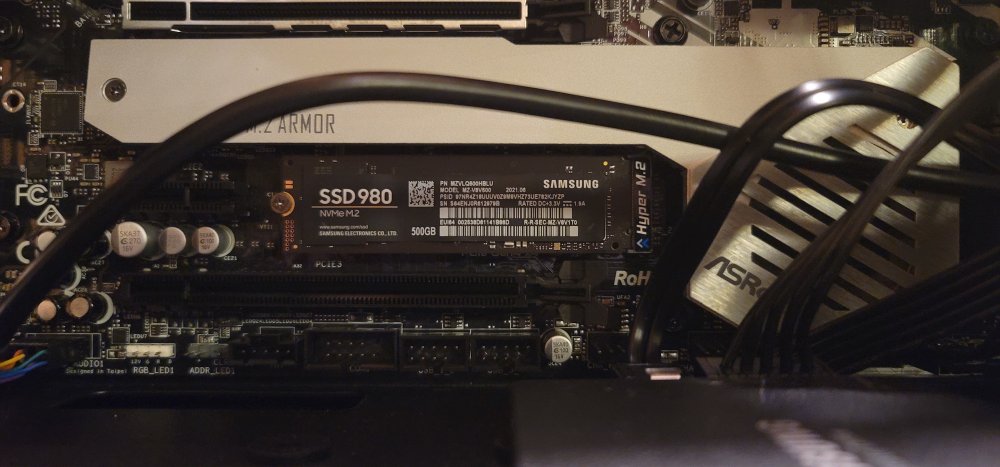
Yes! As soon as I stop the array the temperature drops back to normal. You can see the mounting of the SSD in question in the attached picture and I'm not sure why the chassis didn't come with active cooling for both M.2 slots. The other M.2 slot is right above with a nice heatsink and fan.
-
Hello all, I just updated to 6.10.0-rc2 and noticed that I'm now having issues with my NVMe cache SSDs spike up from 31 C to 84 C. I use this cache drive for Docker containers. I first noticed this issue after I 1) upgraded to rc2, and 2) installed a new container (Jellyfin). After removing the new container the problem seemed to go away until tonight. Any thoughts? Should I downgrade or is my NVMe faulty? Thanks, Brian
-
Yeah, unfortunately I'm also unable to get this container to run. Can't get the console to come up and I keep getting this error in the log: s6-svscanctl: fatal: unable to control /var/run/s6/services: supervisor not listening s6-svscanctl: fatal: unable to control /var/run/s6/services: supervisor not listening s6-svscanctl: fatal: unable to control /var/run/s6/services: supervisor not listening s6-svscanctl: fatal: unable to control /var/run/s6/services: supervisor not listening [cont-finish.d] executing container finish scripts... [cont-finish.d] done. [s6-finish] waiting for services. rtlsdr: using device #0: Generic RTL2832U OEM (Realtek, RTL2838UHIDIR, SN 00000001) warning: /etc/piaware.conf: failed to read config file: error reading "file3": illegal operation on a directory **************************************************** piaware version 6.0 is running, process ID 362 your system info is: Linux 27f269055078 5.13.8-Unraid #1 SMP Wed Aug 4 09:39:46 PDT 2021 x86_64 GNU/Linux [s6-finish] sending all processes the TERM signal. Reloading configuration and reconnecting. warning: /etc/piaware.conf: failed to read config file: error reading "file3": illegal operation on a directory piaware (process 362) is shutting down because it received a shutdown signal (SIGTERM) from the system... piaware (process 362) is exiting... [s6-finish] sending all processes the KILL signal and exiting.
-
Hey, very cool container! I'm getting ADS-B decodes both in the log and showing up on the telemetry window. But I would like to pipe that to tar1090 if that's possible. tar1090 is looking for a BEASTHOST and MLATHOST, so can I use ShinySDR for those inputs to tar1090? Thanks!
-
Hello all, I'm using V. 6.10.0-rc1 and created a share called movies. I selected "No" for "Use cache pool", and cache_nvme is chosen in the select cache pool but is greyed out. Next I used the Unraid terminal to copy from another share to the movies share with the command cp -r /mnt/user/data/files /mnt/user/movies and after the copy I looked at the files in the movies share in the Unraid GUI. It's reporting that the movies folder is located in cache_nvme. Further, I set up the movies share to include Disk 2, and exclude Disk 1. Any ideas why this data is going to the cache pool? Thanks, Brian
-
That did it, thanks!
-
Hello, my apologies for a new user question (I did try searching forum, internet, youtube, etc) about adding shares. I'm running v6.10.0-rc1 on a new build with 3 Seagate BarraCuda 4TB 5400 HDs. When I click on the Shares page, I see 2 shares, "disk 1" and "disk 2". The only button available is "COMPUTE ALL" and I don't see the way to add shares. On the main page I'm not seeing any shares (reports no shares present). Any ideas why I'm not seeing the Add Shares button? Thanks, Brian
-
Thank you!
-
Hello all, I'm thinking about building a Unraid server with 4 drives and an M.2 buffer drive. But, my understanding is that one drive should be a dedicated parity drive (if I want to be able to recover data). So, does that mean that if I were to use 2 TB drives, then I'd effectively have 6TB of storage, and 2TB of parity? If this is the case do all drives have to be the same size or could I get away with a smaller parity drive? Sorry for the noob questions!

