





RichJacot
Members
-
Joined
-
Last visited
Everything posted by RichJacot
-
I'm using it for some of my grafana dashboard items.
-
There was a line in the Unraid-API that was: Container Variable: MQTTBroker: that had hassio in it. I removed that and it solved my issue. Thank you ChatNoir!
-
That was a good idea. It appears the Unraid-API is the one doing it. Anyone know why it would be doing that? And how to stop it? EDIT: I found another thread with this issue. Pursuing that now.
-
I run pihole on a raspberry pi and I see several thousand queries to hassio from my unraid server. Is there a way to find out which docker is doing this? I do no run home assistant. TIA
-
I realize this has been hashed over before but I'm still having issues with my docker and vm icons. Following the instructions it works perfectly (as described) with Safari and Firefox. However... I can not get Chrome to work to save me. I've tried to allow insecure content in the Chrome site setting but that didn't help either. I realize this isn't a browser help thread but has anyone else ran across this and found a workaround? Any help is greatly appreciated.
-
Just checking in. Any updates? Did you get it working and if sow, what did you end up doing?
-
I figured a good share of my issues out. I have all of the array drives showing. My fault! I think I have all of the panels functioning properly with the exception of the docker and vm icons, working on that now, and my fan speeds. This UUD is Great! Thank you!!
-
Over the weekend I deleted all of the related dockers and started from scratch. I still needed to make the host variable a constant with "cube" for some reason but that fixed most of my issues. I'm still working on why it's not picking up my started and stopped VMs then I'll move on to my docker icon issue. Any ideas as to why none of my SAS drives are not showing up in any of the drive dropdowns? (I searched this topic for SAS and SCSI but no results.) I can see all of my other drives (sata, ssd, nvme, flash, unassigned), just no SAS.
-
I replaced my telegraf.conf with yours and changed the outputs.influxdb section and the interface. No errors in the telegraf longs (shown below). I'm going to try to remove telegraf altogether and reinstall it. You can see in the telegraf log that telegraf is picking up my hostname though, so that's odd.
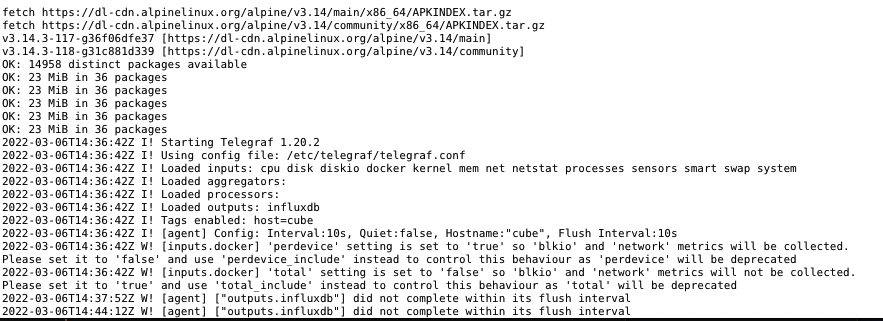
-
I edited some of the panels and put the 192.168.1.17 instead of the 192.168.1.7 it had in there but that didn't affect the icons. I saw there went icons and I saw several other folks have this issue. I hadn't look into those yet. I think the majority of my issues are from the host only showing non. If the lack of icons were my only issue, I'd be sitting pretty.
-
I removed unraid-api and reinstalled it and now I have only one server in the unraid-api UI. I guess this wasn't what's causing my host to be none.
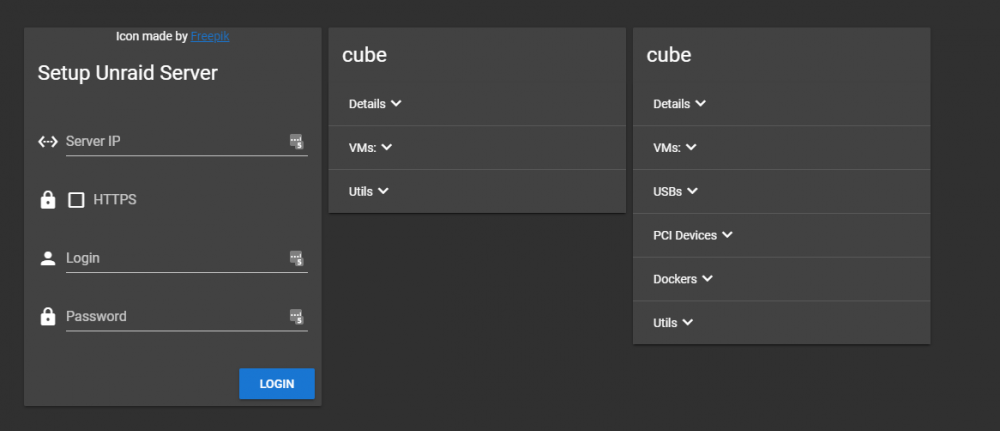
-
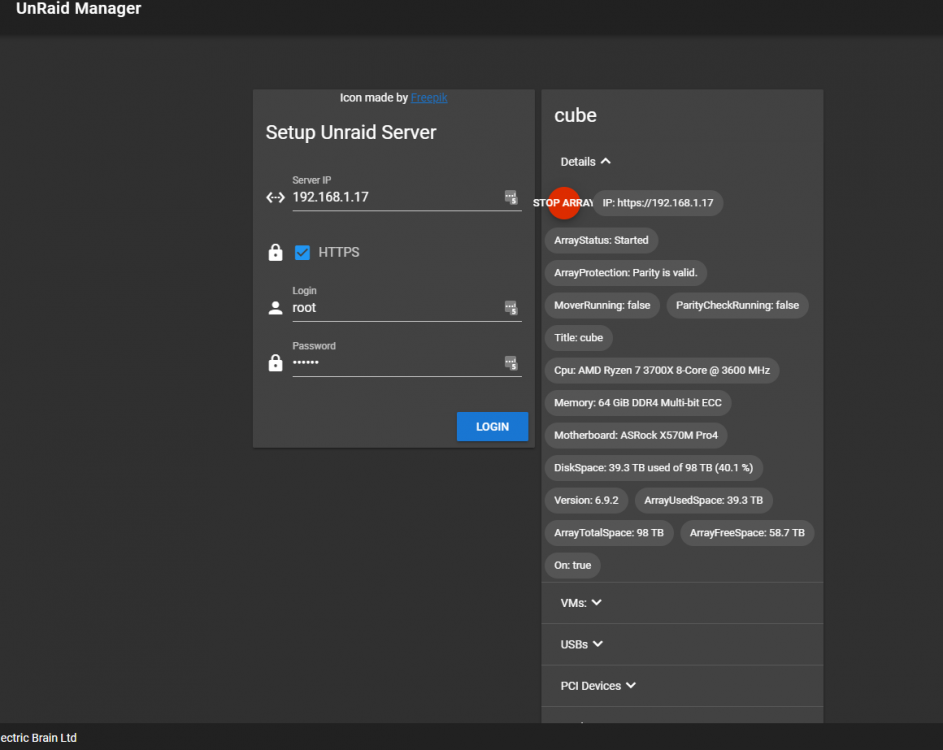
Good Morning, I found something else that might be causing my host (none) issue. In some to the panels, it has the wrong IP. I'm thinking I must have fat fingered it somewhere but I can't find where. I've even grep'd my appdata for the IP and it's not showing up. Below in the lower right you can see it has the IP: 192.168.1.7, where as my unraid server is 192.168.1.17. Wherever this is pulling this from, could that be causing my Host-none issue in the above post? Does anyone know where I can look to find where the 192.168.1.7 is coming from so I can correct it?
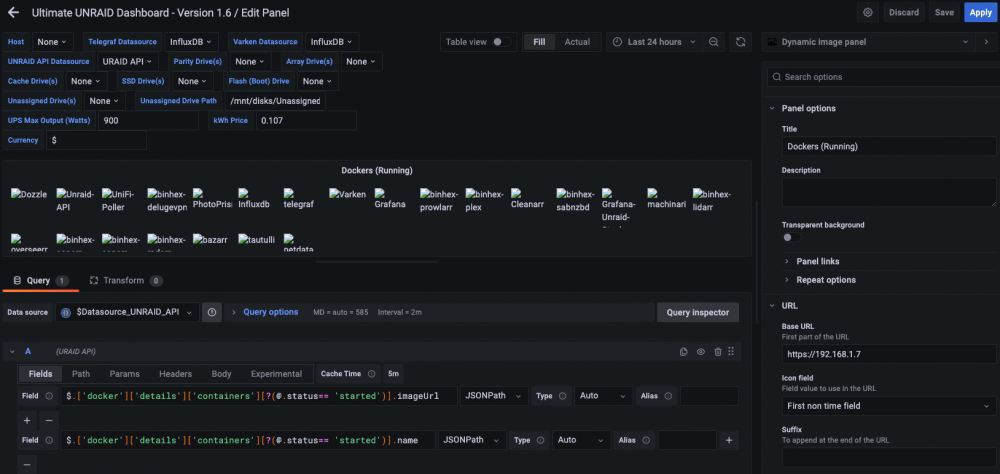
-
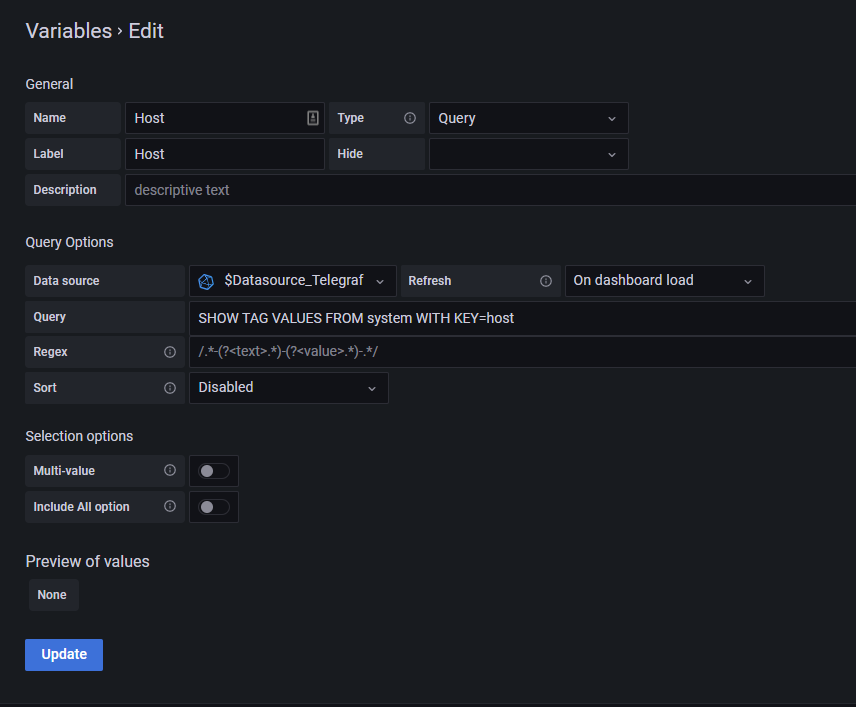
I found it but the preview says 'none'. Otherwise it looks like yours. In my telegraf.conf file it has the below but it seems right because it says if empty use os.Hostname. ## Override default hostname, if empty use os.Hostname() hostname = "" ## If set to true, do no set the "host" tag in the telegraf agent. omit_hostname = false Not sure if this has anything to do with it but I had an issue with the unraid api when I first started it and tried adding this server. I searched through the tread and found where someone had to change their root password to the same thing it was and it worked. I did that and added the server again and it added the second one you see below (which is fully populated in the dropdowns). Could this first one be screwing me up with the host variable? How does one go about removing the bad one?
-
Thank you. I found the search topic option. I didn't know that was there and when I was just searching with the default search bar, I wasn't finding anything helpful. I have another question, In the 1.6 dashboard, I'm not able to select a host (itself). It only has/shows none. As such I can't pick drives, etc. I've reviewed the install at the beginning of this post and searched this topic but I'm coming up empty. Can you tell me what I'm missing to get the host itself in the host dropdown?

-
I found this, which looks like my issue. https://www.reddit.com/r/unRAID/comments/qkgz1c/psa_do_not_update_telegraf_to_latest/ To follow the beginning of this thread, which should i use? telegraf:1.20.2 or telegraf:1.20.2-apline TIA
-
I guessing this is something simple I've done but I've tried several times and I keep getting the same thing. I've even tried removing the /mnt/user/appdata/telegraf dir completely and reinstalling with no success. I can install telegraf:latest and start it if I put no post arguments in. Once I add the post arguments suggested at the beginning of this thread I get the below in the telegraf log and it won't start. /bin/sh: 1: apk: not found Even with a fresh install of telegraf:latest with no post arguments, I start it and then console into telegraf I and run it by hand...I get the same: apk: not found Does anyone have any ideas? TIA
-
Worked great. Easy! Thanks again!!!
-
Thank you both! I'll report back how he makes out.
-
Does anyone have or can point me to the procedure to add a second nvme drive to an existing nvme cache pool and mirror them? Have a friend that has been running on one nmve drive for his cache pool where he houses his appdata, system and domains. He has a second nmve now and would like to create a mirror for redundancy. TIA
-
Anyone?
-
Plex seems to be working fine and I haven't gotten any complaints from my family accessing it remotely...but I was looking through the logs of all of my dockers and found the below in Plex's. I've google searched for the DEBG blah blah no such file or directory error but can't seem to find anything helpful. I check my container config. (even advanced view) and I can't find where "plexmediaserver" is referenced so I'm not sure why Plex is looking for it. Does anyone happen to know what might be causing this and how to correct it? I've included all of the log entries for 1/30 below. TIA 2022-01-30 04:06:11,374 DEBG 'plexmediaserver' stderr output: __code__:194: FutureWarning: The behavior of this method will change in future versions. Use specific 'len(elem)' or 'elem is not None' test instead. 2022-01-30 04:15:04,011 DEBG 'plexmediaserver' stderr output: /usr/lib/plexmediaserver/Resources/Plug-ins-f11334058/LocalMedia.bundle/Contents/Libraries/Shared/mutagen/_id3frames.py:125: ID3Warning: Leftover data: WORS: 'http://tolomada.heavenforum.com/' (from '\x00http://tolomada.heavenforum.com/') ID3Warning) 2022-01-30 04:22:18,179 DEBG 'plexmediaserver' stderr output: ERROR: Error decoding audio frame (Invalid data found when processing input) ERROR: Not enough audio data 2022-01-30 04:22:18,185 DEBG 'plexmediaserver' stderr output: ERROR: Error decoding audio frame (Invalid data found when processing input) ERROR: Not enough audio data 2022-01-30 04:22:30,364 DEBG 'plexmediaserver' stderr output: ERROR: Error decoding audio frame (Invalid data found when processing input) ERROR: Not enough audio data 2022-01-30 04:22:30,372 DEBG 'plexmediaserver' stderr output: ERROR: Error decoding audio frame (Invalid data found when processing input) ERROR: Not enough audio data 2022-01-30 18:15:22,319 DEBG 'plexmediaserver' stderr output: Unable to open: No such file or directory (2) 2022-01-30 18:15:29,557 DEBG 'plexmediaserver' stderr output: Unable to open: No such file or directory (2) 2022-01-30 18:15:29,558 DEBG 'plexmediaserver' stderr output: Unable to open: No such file or directory (2) 2022-01-30 19:03:13,457 DEBG 'plexmediaserver' stderr output: Unable to open: No such file or directory (2) 2022-01-30 19:03:13,499 DEBG 'plexmediaserver' stderr output: Unable to open: No such file or directory (2) 2022-01-30 19:08:30,611 DEBG 'plexmediaserver' stderr output: Unable to open: No such file or directory (2) 2022-01-30 19:08:30,650 DEBG 'plexmediaserver' stderr output: Unable to open: No such file or directory (2) 2022-01-30 19:08:39,964 DEBG 'plexmediaserver' stderr output: Unable to open: No such file or directory (2) 2022-01-30 19:08:40,132 DEBG 'plexmediaserver' stderr output: Unable to open: No such file or directory (2) 2022-01-30 19:10:20,666 DEBG 'plexmediaserver' stderr output: Unable to open: No such file or directory (2) 2022-01-30 19:10:20,723 DEBG 'plexmediaserver' stderr output: Unable to open: No such file or directory (2) 2022-01-31 12:35:51,536 DEBG 'plexmediaserver' stderr output: connect: Operation timed out
-
Thank you!
-
Plex seems to be working fine and I haven't gotten any complaints from my family accessing it remotely...but I was looking through the logs of all of my dockers and found the below in Plex's. I've google searched for the DEBG blah blah no such file or directory but can't seem to find anything. I check my container config. (even advanced view) and I can't find where "plexmediaserver" is referenced so I'm not sure why Plex is looking for it. Does anyone happen to know what might be causing this and how to correct it? I've included all of the log entries for 1/30 below. TIA 2022-01-30 04:06:11,374 DEBG 'plexmediaserver' stderr output: __code__:194: FutureWarning: The behavior of this method will change in future versions. Use specific 'len(elem)' or 'elem is not None' test instead. 2022-01-30 04:15:04,011 DEBG 'plexmediaserver' stderr output: /usr/lib/plexmediaserver/Resources/Plug-ins-f11334058/LocalMedia.bundle/Contents/Libraries/Shared/mutagen/_id3frames.py:125: ID3Warning: Leftover data: WORS: 'http://tolomada.heavenforum.com/' (from '\x00http://tolomada.heavenforum.com/') ID3Warning) 2022-01-30 04:22:18,179 DEBG 'plexmediaserver' stderr output: ERROR: Error decoding audio frame (Invalid data found when processing input) ERROR: Not enough audio data 2022-01-30 04:22:18,185 DEBG 'plexmediaserver' stderr output: ERROR: Error decoding audio frame (Invalid data found when processing input) ERROR: Not enough audio data 2022-01-30 04:22:30,364 DEBG 'plexmediaserver' stderr output: ERROR: Error decoding audio frame (Invalid data found when processing input) ERROR: Not enough audio data 2022-01-30 04:22:30,372 DEBG 'plexmediaserver' stderr output: ERROR: Error decoding audio frame (Invalid data found when processing input) ERROR: Not enough audio data 2022-01-30 18:15:22,319 DEBG 'plexmediaserver' stderr output: Unable to open: No such file or directory (2) 2022-01-30 18:15:29,557 DEBG 'plexmediaserver' stderr output: Unable to open: No such file or directory (2) 2022-01-30 18:15:29,558 DEBG 'plexmediaserver' stderr output: Unable to open: No such file or directory (2) 2022-01-30 19:03:13,457 DEBG 'plexmediaserver' stderr output: Unable to open: No such file or directory (2) 2022-01-30 19:03:13,499 DEBG 'plexmediaserver' stderr output: Unable to open: No such file or directory (2) 2022-01-30 19:08:30,611 DEBG 'plexmediaserver' stderr output: Unable to open: No such file or directory (2) 2022-01-30 19:08:30,650 DEBG 'plexmediaserver' stderr output: Unable to open: No such file or directory (2) 2022-01-30 19:08:39,964 DEBG 'plexmediaserver' stderr output: Unable to open: No such file or directory (2) 2022-01-30 19:08:40,132 DEBG 'plexmediaserver' stderr output: Unable to open: No such file or directory (2) 2022-01-30 19:10:20,666 DEBG 'plexmediaserver' stderr output: Unable to open: No such file or directory (2) 2022-01-30 19:10:20,723 DEBG 'plexmediaserver' stderr output: Unable to open: No such file or directory (2) 2022-01-31 12:35:51,536 DEBG 'plexmediaserver' stderr output: connect: Operation timed out
-
I'm doing something very similar to this. My question is... should I also change my docker directory and default appdata storage location to /mnt/cache/x in the docker settings and default VM storage path and libvirt storage location to /mnt/cache/x? I have them set in the shares to only use cache.
-
Sorry for the noob question but do you add this as a variable? Not sure where to put it. TIA




