





cpu
Members
-
Joined
-
Last visited
Everything posted by cpu
-
Hello, I've recently had a chance to shutdown my Unraid server (due to some electrical maintanance) and it was a time to do parity check - it ended with: Event: Unraid Parity check Subject: Notice [SIGMA] - Parity check finished (475953 errors) Description: Duration: 14 hours, 33 minutes, 47 seconds. Average speed: 152.6 MB/s Importance: warning So far everything is running stable, no problems at all but I decided to run another parity check to see if errors are gone and so far I've got: Total size: 8 TB Elapsed time: 3 hours, 43 minutes Current position: 2.09 TB (26.2 %) Estimated speed: 143.7 MB/sec Estimated finish: 11 hours, 25 minutes Sync errors corrected: 475915 I'm attaching diag report, my only cue is LSI HBA controller - shouldn't be overheating especially now when it's winter time and this room is around 18 degC ambient + 2 front fans are pushing air toward rear of case. Anyone has any idea what to do next - should I run 3rd parity check? I know that my HDDs are 8TB IronWolf which is problematic with unraid >6.9 but I've disabled low current spinup and EPC and since that time I had 0 erros. Also all previous checks were 0 with same drive setup. I have UPS, shutdowns are clean, I suspected that might be some errors during this first parity check as there was unclean shutdown in past but I had hope that during this last check there'll be no errors. sigma-diagnostics-20220122-2238.zip
-
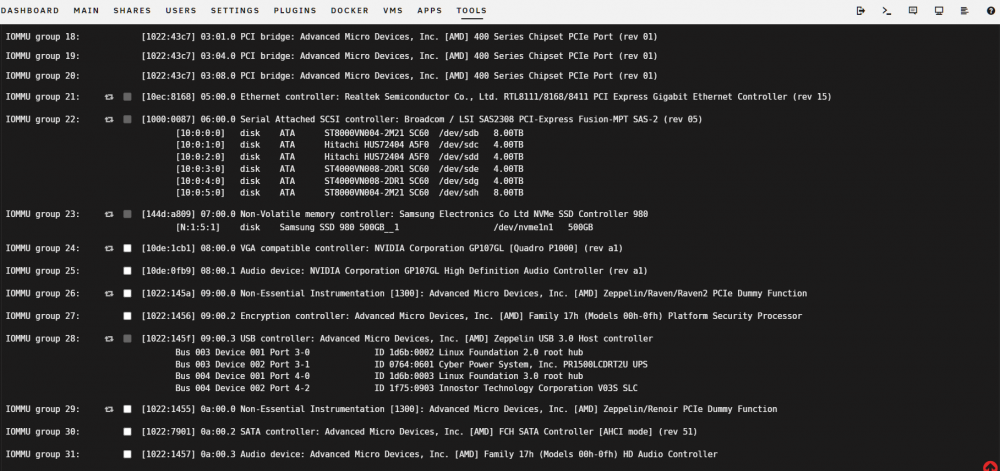
I'm struggling to passthrough on my Quadro P1000 (primary GPU) to Win 10 machine. Any help appreciated. I've dumped vbios with Space Invader video but even with vbios I've got code 43. Does Nvidia block GPU passthrough for Quadro family? I've used at strt of array: echo 0 > /sys/class/vtconsole/vtcon0/bind echo 0 > /sys/class/vtconsole/vtcon1/bind echo efi-framebuffer.0 > /sys/bus/platform/drivers/efi-framebuffer/unbind I've got PCIe ACS override set to 'Both' IOMMU groups: VM template: <?xml version='1.0' encoding='UTF-8'?> <domain type='kvm'> <name>Win10</name> <uuid>1d260a9d-6f57-3777-730e-0ac7ba49f075</uuid> <metadata> <vmtemplate xmlns="unraid" name="Windows 10" icon="windows.png" os="windows10"/> </metadata> <memory unit='KiB'>8388608</memory> <currentMemory unit='KiB'>8388608</currentMemory> <memoryBacking> <nosharepages/> </memoryBacking> <vcpu placement='static'>4</vcpu> <cputune> <vcpupin vcpu='0' cpuset='4'/> <vcpupin vcpu='1' cpuset='10'/> <vcpupin vcpu='2' cpuset='5'/> <vcpupin vcpu='3' cpuset='11'/> </cputune> <os> <type arch='x86_64' machine='pc-q35-4.1'>hvm</type> <loader readonly='yes' type='pflash'>/usr/share/qemu/ovmf-x64/OVMF_CODE-pure-efi.fd</loader> <nvram>/etc/libvirt/qemu/nvram/1d260a9d-6f57-3777-730e-0ac7ba49f075_VARS-pure-efi.fd</nvram> </os> <features> <acpi/> <apic/> <hyperv> <relaxed state='on'/> <vapic state='on'/> <spinlocks state='on' retries='8191'/> <vendor_id state='on' value='none'/> </hyperv> </features> <cpu mode='host-passthrough' check='none' migratable='on'> <topology sockets='1' dies='1' cores='2' threads='2'/> <cache mode='passthrough'/> <feature policy='require' name='topoext'/> </cpu> <clock offset='localtime'> <timer name='hypervclock' present='yes'/> <timer name='hpet' present='no'/> </clock> <on_poweroff>destroy</on_poweroff> <on_reboot>restart</on_reboot> <on_crash>restart</on_crash> <devices> <emulator>/usr/local/sbin/qemu</emulator> <disk type='file' device='disk'> <driver name='qemu' type='raw' cache='writeback'/> <source file='/mnt/user/domains/Windows 10/vdisk1.img'/> <target dev='hdc' bus='virtio'/> <boot order='1'/> <address type='pci' domain='0x0000' bus='0x04' slot='0x00' function='0x0'/> </disk> <disk type='file' device='cdrom'> <driver name='qemu' type='raw'/> <source file='/mnt/user/isos/virtio-win-0.1.208-1.iso'/> <target dev='hdb' bus='sata'/> <readonly/> <address type='drive' controller='0' bus='0' target='0' unit='1'/> </disk> <controller type='usb' index='0' model='qemu-xhci' ports='15'> <address type='pci' domain='0x0000' bus='0x00' slot='0x07' function='0x0'/> </controller> <controller type='pci' index='0' model='pcie-root'/> <controller type='pci' index='1' model='pcie-root-port'> <model name='pcie-root-port'/> <target chassis='1' port='0x8'/> <address type='pci' domain='0x0000' bus='0x00' slot='0x01' function='0x0' multifunction='on'/> </controller> <controller type='pci' index='2' model='pcie-root-port'> <model name='pcie-root-port'/> <target chassis='2' port='0x9'/> <address type='pci' domain='0x0000' bus='0x00' slot='0x01' function='0x1'/> </controller> <controller type='pci' index='3' model='pcie-root-port'> <model name='pcie-root-port'/> <target chassis='3' port='0xa'/> <address type='pci' domain='0x0000' bus='0x00' slot='0x01' function='0x2'/> </controller> <controller type='pci' index='4' model='pcie-root-port'> <model name='pcie-root-port'/> <target chassis='4' port='0xb'/> <address type='pci' domain='0x0000' bus='0x00' slot='0x01' function='0x3'/> </controller> <controller type='pci' index='5' model='pcie-root-port'> <model name='pcie-root-port'/> <target chassis='5' port='0xc'/> <address type='pci' domain='0x0000' bus='0x00' slot='0x01' function='0x4'/> </controller> <controller type='pci' index='6' model='pcie-root-port'> <model name='pcie-root-port'/> <target chassis='6' port='0xd'/> <address type='pci' domain='0x0000' bus='0x00' slot='0x01' function='0x5'/> </controller> <controller type='pci' index='7' model='pcie-root-port'> <model name='pcie-root-port'/> <target chassis='7' port='0xe'/> <address type='pci' domain='0x0000' bus='0x00' slot='0x01' function='0x6'/> </controller> <controller type='pci' index='8' model='pcie-root-port'> <model name='pcie-root-port'/> <target chassis='8' port='0xf'/> <address type='pci' domain='0x0000' bus='0x00' slot='0x01' function='0x7'/> </controller> <controller type='pci' index='9' model='pcie-root-port'> <model name='pcie-root-port'/> <target chassis='9' port='0x10'/> <address type='pci' domain='0x0000' bus='0x00' slot='0x02' function='0x0'/> </controller> <controller type='pci' index='10' model='pcie-to-pci-bridge'> <model name='pcie-pci-bridge'/> <address type='pci' domain='0x0000' bus='0x01' slot='0x00' function='0x0'/> </controller> <controller type='virtio-serial' index='0'> <address type='pci' domain='0x0000' bus='0x02' slot='0x00' function='0x0'/> </controller> <controller type='sata' index='0'> <address type='pci' domain='0x0000' bus='0x00' slot='0x1f' function='0x2'/> </controller> <interface type='bridge'> <mac address='52:54:00:56:b0:c0'/> <source bridge='br0'/> <model type='virtio-net'/> <address type='pci' domain='0x0000' bus='0x03' slot='0x00' function='0x0'/> </interface> <serial type='pty'> <target type='isa-serial' port='0'> <model name='isa-serial'/> </target> </serial> <console type='pty'> <target type='serial' port='0'/> </console> <channel type='unix'> <target type='virtio' name='org.qemu.guest_agent.0'/> <address type='virtio-serial' controller='0' bus='0' port='1'/> </channel> <input type='tablet' bus='usb'> <address type='usb' bus='0' port='1'/> </input> <input type='mouse' bus='ps2'/> <input type='keyboard' bus='ps2'/> <audio id='1' type='none'/> <hostdev mode='subsystem' type='pci' managed='yes'> <driver name='vfio'/> <source> <address domain='0x0000' bus='0x08' slot='0x00' function='0x0'/> </source> <address type='pci' domain='0x0000' bus='0x05' slot='0x00' function='0x0' multifunction='on'/> </hostdev> <hostdev mode='subsystem' type='pci' managed='yes'> <driver name='vfio'/> <source> <address domain='0x0000' bus='0x08' slot='0x00' function='0x1'/> </source> <address type='pci' domain='0x0000' bus='0x05' slot='0x00' function='0x1'/> </hostdev> <memballoon model='none'/> </devices> </domain> Diagnostics: sigma-diagnostics-20211227-1844.zip
-
What about ownership? Have you tried exporting PUID and PGID ?
-
Just set another PATH -> /mnt/disks/[backup] <- I've got unassigned HDD dedicated for backups and it's location is inside /mnt/disks
-
Cheer for that container! Small sugestion - in your template source directory should be set to Read Only as there's no point to have this as Read/Write with full access (especially that someone may use /mnt/user instead of separate RO mount points)
-
At that time I created new share and as I remember I changed appdata settings to export as samba share with r/w access for my super user. Server was unresponsive all time during file transfer - basically during copy operation when I try to do anything else ie. delete folder, access folder with lots of files I've got timeout. Even if folder I want to delete or access is on different hdd (part of array), I tought that it might be smb issue as this is 6.10rc2 but well when I went to terminal and tried to delete folder with mc I had timeout too, then I tried winscp and same story.
-
diagnostics attached sigma-diagnostics-20211121-1557.zip
-
Is it normal that when I start moving a lot of data from one share to another I can't access anything via samba or scp or even in terminal? I started moving media library to /data share for atomic moves and hardlinks and wanted to check few things in mean time - anyway I try to access data I just wait, wait, wait and eventually I've got timeout. I know parity and other two drive are involved but with Ryzen 5 and 64 GB ECC I would assume at least some reasonable access time to data should be possible. // No issues with cables etc as I checked SMART for those errors, all drives are attached to LSI controller in HBA mode.
-
Huh that's simple, cheers saved me tons of time.
-
Whole story first - I just installed second NVME cache with DRAM this time - Samsung 970 Evo Pro and want to get files off old cache which is Samsung 980 Evo, then I thing I'll leave 980 Evo unassigned as dedicated Win10 VM disk. So I need to move my system folder to new cache pool - is it safe to copy data directly between pools -> /mnt/cache1 -> /mnt/cache2 and afterwards set system share to new cache pool (cache2) to make sure mover won't be involved? I'm asking this question because I have docker set to directories and with over 40 docker containers it's huge amount of files so don't want to waste time copying files from cache1 pool to array and then from array to cache2 Also current size of system folder is 31.7 GB according to gui (over 6M files) but when I do: du -sh /mnt/cache 251G /mnt/cache/ Is it counting all symlinks or something?
-
Mine disks are brand new or I should say month+ old and 2 weeks old. Errors started to appear once I installed second 8 TB, with one 8 TB as a parity I had no problems for good month.
-
Glad I found out this thread - LSI + 2 x 8 TB IronWolf - had errors and got both data and parity disabled - but after start stop array errors were gone... issued extended smart scan on all disks - no problems, then one day later in the middle of the night error appeared - looks once rclone started to pull out data from gdrive (set to midnight) disk had to spin up and error. Anyway - SeaChest, disabled both EPC and lowpowerspin - power cycle server - checked again with SeaChest and both things are already disabled. Rebuild now and let's see what's going to happen now. Brand new disks, brand new server and once a week I have issues - and to think that my old Microserver gen8 running xpenology was rock solid. @TDD and @Cessquill - any issues so far or it's stable with that fix?
-
Well a new problem just appeared - parity (month old IronWolf) and brand new replacement have errors - pretty rare situation to be honest but well that's my dagnostics. sigma-diagnostics-20210929-0815.zip
-
And this is my diagnostics file sigma-diagnostics-20210928-2302.zip
-
I had HDD failure and my current setup of HDDs is as follows: 8 TB parity disk 4 TB xfs_encrypted <- this one failed 4 TB xfs_encrypted <- this one is good and running Once I found out that 4 TB died I replaced it with 8 TB brand new disk, assigned to replace missing disk and started rebuilding array. Parity is valid/rebuild is completed -> Finding 0 errors Duration: 13 hours, 10 minutes, 25 seconds. Average speed: 168.7 MB/sec But after reboot I cannot mount disk due to -> Unmountable: Volume not encrypted I started array in maintenance mode and so far with -nv options I have: Phase 1 - find and verify superblock... bad primary superblock - bad magic number !!! So now I need to wait to see if this is recoverable and then I'll have to try xfs_repair - am I right? Any extra steps to follow?
-
Works fine in bridge mode instead of br0. It might be workaround for some folks 🙂
-
F Solution is in this thread already ->
-
I have odd issue - in bridge mode, default ports cannot access webgui (same goes for binhex deluge) but when I change from bridge to custom and give container own IP it works... Tried rebooting unraid, tried transmission vpn too and same problem, without vpn let's say transmission from linuxserver repo it's all ok on same ports. I even tried airvpn instead of nordvpn but that didn't help. Anyone had such problems with gui recently? VPN connection is all ok so don't know how to solve this issue.
