





wildfire305
Members
-
Joined
-
Last visited
Everything posted by wildfire305
-
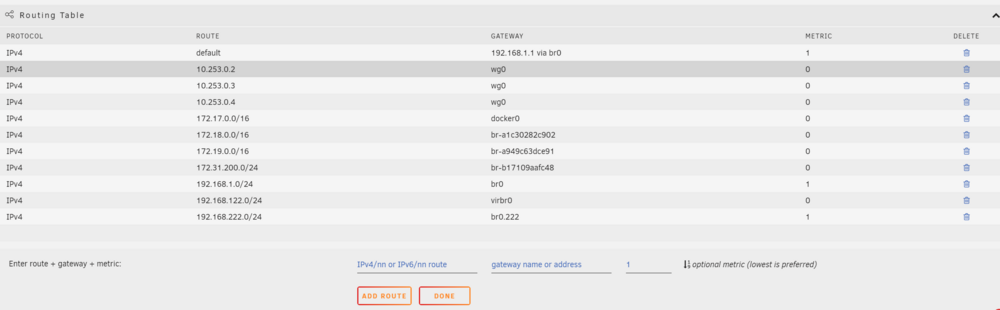
Update: for future generations who may arrive here looking for the same solution. The custom routing table is not maintained or persistent after reboot. I used the userscripts plugin to add this command at start of array. #!/bin/bash ip route add 192.168.222.0/24 dev br0.222
-
At the very least it should have a notice that they are not persistent. I just found this out the hard way and my search led me hear to a 5 year old post.
-
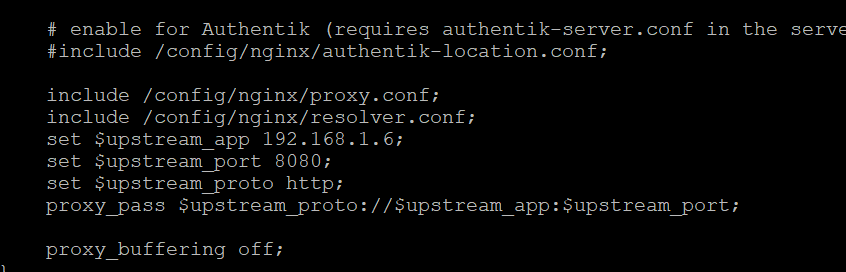
Okay I did it! I put apache guacamole in the proxynet I configured swag to look at that docker for the service. On the guacamole.subdomain.conf file Then I added this: at the end of the routing table in the settings -> network Now I can access guac at guac.myverysecretdomainname.org. In turn the routing table was the key to allow the guac docker to talk to the VM on the separate vlan

-
I did try the --net proxynet - it didn't seem to like that.

-
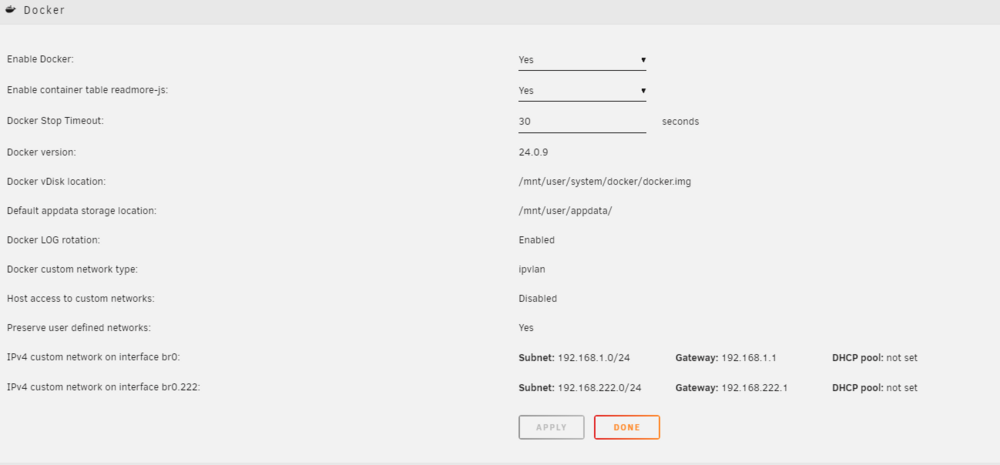
Here is the docker networking settings I am currently using. I switched from the old default macvlan to ipvlan as directed a while back.
-
I really appreciate your help. I have a lot to review. I will post my advanced network config when I have a minute. Would a cheating way be to add an additional swag container on the vlan 222 and route requests to it at the router level work? If that method even works, it probably wastes resources and isn't scalable, but on a home server...scale isn't that important.
-
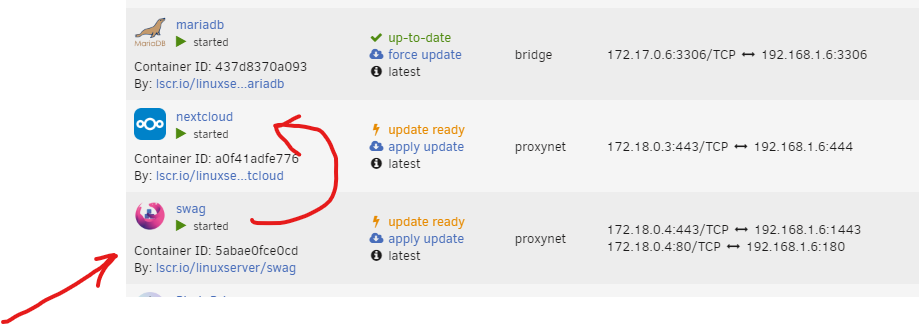
in the above example requests to nextcloud.mydomain.org are routed through swag into nextcloud. The swag container has access to nextcloud container. All of my domain routing hits the swag container. How do I get traffic from swag at vms.mydomain.org through apacheguacamole and into the vm (on separate vlan). I currently have apaceguacamole assigned to the other vlan and I was able to access the vm on that vlan from another computer on that vlan. from the console of the swag container I am unable to ping the apacheguacamole container (expected). I assume, but haven't tried to just put the IP address for the guac container in the swag proxy.confs file for apacheguacamole and see if it works. Will that actually work? I think I'm missing a bridge or firewall rule or something to make the connection between these two. Or is the correct answer a second swag container on the vlan answering requests to that subdomain?

-
I have that set up already using swag container. But I don't know how to bridge the gap between swag on one docker network to Apache guacamole on a separate vlan
-
What type of connection do you have to these drives? I have a couple of servers with raid controllers flashed to IT mode and use 8087 to 4 SATA connectors. I have had two of those special SATA cables fail. I have never found any of those cables that I felt were good quality. They usually throw crc failures in SMART data on the disks when they fail.
-
Hi all, I have successfully set up my first domain and I'm running several services outside of my network through swag. There is one item that intrigues me and I need a little help with direction. I have successfully set up a Windows vm with a program that quite a few of my friends want to use. It is a program that doesn't require Internet and is based locally on the windows vm. I have also set up Apache guacamole and can easily connect to that vm. The next step I completed was isolation of the vm and Apache guacamole docker onto their own vlan to prevent access to my local home network. So it looks like this: home network=192.168.1.x separate vlan 222 for vm and Apache guacamole=192.168.222.x How do I connect clients using a subdomain (i.e. vms.domain.org) to Apache guacamole on a separate vlan using my existing Swag setup (set up on proxynet using spaceinvaderones instructions)? I'm missing the step or process or what I even need to do to "build a bridge" between the two containers swag on the one network and Apache guacamole on the other. I have no issue configuring swag for other dockers on the same network, and have passed through many services this way. I have a unifi router if that information helps and that is controlling the vlan. I have a filtering rule to cut the vm off from the Internet. The vlan it is on is already isolated from the main network (needed to prevent any access from the vm to home network). So in summary, I want to route all traffic from vms.domain.org to Apache guacamole serving vms on a separate vlan through an existing swag container that is already servicing the domain requests.
-
This worked on two of the three servers. I added a reboot in between disable/enable. The third one was resolved by watching the disks that woke up from manual spin down command with find . -mmin -30 This showed that some metadata on existing old files was being modified by an hourly rclone process. Not sure why OneDrive has started modifying metadata on files, but since it gets modified, rclone syncs the changes. If there are no changes the disks don't wake up.
-
This is what I mean when the command to sleep the disks isn't showing up. Usually if I have something keeping the disks awake, I see a lot of "spinning down" followed by "read SMART" when the disks are awoken by the process reading files. I'm not seeing the spinning down and the reads/writes are not increasing in count.
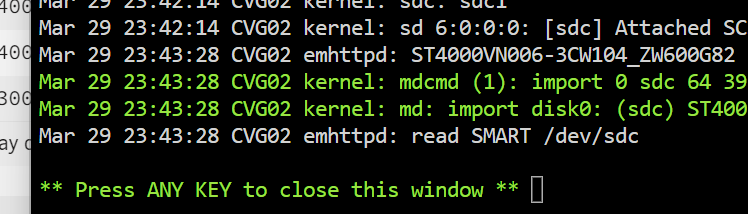
-
The one server I was considering downgrading (cvg05) has now started sleeping on its own. That server only has an rsnapshot container running and a speed test container. The other containers are not used unless the primary server is down and they are started manually. It has no external shares and it pulls backups through ssh from other servers on the network once a day and has no external shares enabled. Nothing is able to write to it by design because it is a backup server, therefore the disks sleep after the backups complete and they stay asleep until the next daily backup. It uses a small SSD cache for appdata, domains, system. It has one VM that boots debian and displays a webpage on a monitor. The other two servers disks remain awake and the drives are not being commanded to sleep according to the disk logs. I can usually see if I have a thing that is keeping the disks awake in the disk logs by seeing them spin up and down, but that isn't showing up. I had previously moved all highly active file activity to a always on zfs pool and the array is now just WORM policy type stuff. My array disks on both servers are only supposed to wake up during Media Streaming activity. This has been a working design for me for the six months prior to the 6.12.9 upgrade.
-
cvg02 and cvg05 have been power cycled since upgrade, tonyserver has not. cvg02-diagnostics-20240329-2344.zip cvg05-diagnostics-20240329-2343.zip tony-diagnostics-20240329-2344.zip
-
After updating to 6.12.9 on all three of my servers, their drives will not spin down automatically. These servers previously spun down as expected after the time-out. Two of them are used once a day and only need to spin up at that time. No configuration changes were made besides updating all plugins before upgrading. Considering downgrading one as part of the diagnosis. Is there a bug in 6.12.9 for disk sleep? Getting diagnostics soon...
-
There is something about this pre-existing zpool that makes unriad unable to create new shares on it from the GUI. I am easily able to create new datasets from the command line and then unraid creates a share (it improperly assigns the dataset generated share primary storage to the array) with the dataset name. Previously in another bug report a user mentioned that behavior (wrong storage assignment) when manually creating datasets from CLI - so that behavior is expected since that isn't the recommended method. ZFS attributes pasted below and error from syslog when attempting to create a share. I did notice that a few attributes do not match my other newly created post-6.12 zpool that adding shares to works fine on. root@CVG02:~# zfs get all snapshot NAME PROPERTY VALUE SOURCE snapshot type filesystem - snapshot creation Fri Nov 11 2:47 2022 - snapshot used 12.8T - snapshot available 1.18T - snapshot referenced 41.5K - snapshot compressratio 1.02x - snapshot mounted yes - snapshot quota none default snapshot reservation none default snapshot recordsize 128K default snapshot mountpoint /mnt/snapshot local snapshot sharenfs off default snapshot checksum on default snapshot compression off local snapshot atime off local snapshot devices on default snapshot exec on default snapshot setuid on default snapshot readonly off default snapshot zoned off default snapshot snapdir hidden default snapshot aclmode discard default snapshot aclinherit restricted default snapshot createtxg 1 - snapshot canmount on default snapshot xattr on default snapshot copies 1 default snapshot version 5 - snapshot utf8only off - snapshot normalization none - snapshot casesensitivity sensitive - snapshot vscan off default snapshot nbmand off default snapshot sharesmb off default snapshot refquota none default snapshot refreservation none default snapshot guid 8916430419615625548 - snapshot primarycache all default snapshot secondarycache all default snapshot usedbysnapshots 0B - snapshot usedbydataset 41.5K - snapshot usedbychildren 12.8T - snapshot usedbyrefreservation 0B - snapshot logbias latency default snapshot objsetid 54 - snapshot dedup off local snapshot mlslabel none default snapshot sync standard default snapshot dnodesize legacy default snapshot refcompressratio 1.00x - snapshot written 41.5K - snapshot logicalused 13.1T - snapshot logicalreferenced 13.5K - snapshot volmode default default snapshot filesystem_limit none default snapshot snapshot_limit none default snapshot filesystem_count none default snapshot snapshot_count none default snapshot snapdev hidden default snapshot acltype off default snapshot context none default snapshot fscontext none default snapshot defcontext none default snapshot rootcontext none default snapshot relatime off default snapshot redundant_metadata all default snapshot overlay on default snapshot encryption off default snapshot keylocation none default snapshot keyformat none default snapshot pbkdf2iters 0 default snapshot special_small_blocks 0 default root@CVG02:~# zpool status snapshot pool: snapshot state: ONLINE scan: scrub canceled on Sat Jul 1 10:11:14 2023 config: NAME STATE READ WRITE CKSUM snapshot ONLINE 0 0 0 raidz1-0 ONLINE 0 0 0 sdk ONLINE 0 0 0 sdi ONLINE 0 0 0 sdj ONLINE 0 0 0 sdg ONLINE 0 0 0 sdl ONLINE 0 0 0 sdf ONLINE 0 0 0 errors: No known data errors Yes, the scrub was cancelled on purpose because I didn't realize I had it as a scheduled cron task AND unraid can now run it on ZFS pools on a schedule. It had just ran a few days prior. I just pasted that so you could see what kind of pool it is - made out of 10yo 3tb Hitachis. Error in syslog when trying to create a share on the zpool named "snapshot". Jul 3 08:27:24 CVG02 shfs: share cache full Jul 3 08:27:24 CVG02 emhttpd: error: shfs_mk_share, 6451: No space left on device (28): ioctl: /newshare Jul 3 08:27:24 CVG02 emhttpd: shcmd (405): rm '/boot/config/shares/newshare.cfg' Jul 3 08:27:24 CVG02 emhttpd: Starting services... Jul 3 08:27:25 CVG02 emhttpd: shcmd (408): /etc/rc.d/rc.samba restart This error makes it sounds like it cannot identify the FS properly as it runs shfs_mk_share rather than zfs create. For comparison - successful share creation on the other newly create zpool: Jul 3 08:33:56 CVG02 shfs: /usr/sbin/zfs create 'cache/newsharenewpool' Jul 3 08:33:56 CVG02 emhttpd: Starting services... Jul 3 08:33:56 CVG02 emhttpd: shcmd (421): chmod 0777 '/mnt/user/newsharenewpool' Jul 3 08:33:56 CVG02 emhttpd: shcmd (422): chown 'nobody':'users' '/mnt/user/newsharenewpool' Jul 3 08:33:56 CVG02 emhttpd: shcmd (423): /etc/rc.d/rc.samba restart Diagnostics attached for posterity. In summary I'm trying to figure out why unraid can't create the datasets on this particular zpool, and if it can be resolved. cvg02-diagnostics-20230703-0829.zip
-
Following Spaceinvader One's absolutely fantastic video of the upcoming (at the time) release of 6.12 I added my existing ZFS pool into the pools after upgrading. After adding it and rebooting - one of the three datasets did not add in properly. I noticed that shares were created to manage the data sets. The one that didn't add properly "rsnapshot" came in empty. I checked the mountpoints both where I had it mounted and where the share put it and they were both empty so I removed the share. (that was a mistake...don't do that! The array can't stop properly because it can't be unmounted). zfs list still shows the dataset still exists, but I'm struggling to figure out how to get it imported properly or access it. Not to worry about the data it's just 9TB of backup data from the main array. I have an additional server backing up an additional copy of all the data. I'm not worried about losing it, but I would like to figure out why it isn't being added properly. After a forced reboot, the share was added back into the shares and remounted, but the directory is empty. It's doing a parity check since it couldn't unmount the removed share. I have attached diagnostics. I'm sure there is a wizardly ZFS command that can help with more information, but I'm a newb on that - help me help you with that info. If I recall there was some unusual things about dataset, but I can't remember the specifics. cvg02-diagnostics-20230616-1917.zip
-
I'm going to mark this as solved. I never would have suspected a plugin for wake on lan to have that much influence on the system stability. I believe it should have a caution label on the plugin. It didn't immediately cause problems, but removing it has resolved the issues I was having. I could imagine folks that like to fire parts cannons at problems being extremely upset at replacing hardware over a silly plugin. I'm not using "server grade" hardware, but I think it's close enough to it when you look at the base chips. And it is standardized enough that everything so far has "just worked".
-
Why then would it not be pulled from the app store or at least have an incompatibility warning? It wasted a lot of my time if it ends up being the cause - so far stable as a rock today and I've been running it at about 400 watts worth of processes.
-
The last one I installed...about a week ago... was the WOL plugin - which appeared to be partially broken. I removed it and performed the same tests and the server did not crash. I have a hard time trusting that as the "fix" though. I would assume that plugin does nothing until you push for it to wake a computer.
-
I was able to reliably get the server to crash when writing to the cache drive ssd 4 out of 4 tries dd'ing 100-200GBs to the cache drive it locked and rebooted every time. This was performed while doing parity checks on the main array and ZFS array. The cache drive (and three of the hard drives) isn't connected to the HBA. I rebooted and checked the ram with 4 passes using MemTest86 v10 - Passed 64GB ECC DDR4. I then rebooted into unraid safe mode (selected from the thumb drive) and have written 500GB to the cache SSD with no hiccups. I was simultaneously scrubbing the cache drive to hammer that disk as hard as I could. No lockups. Smart attributes are clean on that SSD, BTRFS device stats are all 0, scrub is clean. So then I started recreating the same load in safe mode - started a scrub of the unraid array, imported my ZFS pool and started a scrub on it and continued to hammer everything. No lockups whatsoever. All dockers that normally run - running fine (didn't test the others - irrelevant). So, are plugins the primary difference between safe mode and regular mode? If so, I may have a rogue plugin.
-
Maybe that was my fault - changed the command to " dd if=/dev/random of=test.img bs=1M count=1000000 status=progress" and it has completed almost a terrabyte so far of writing - while also performing a full ZFS scrub. I think my previous command ran me out of RAM.
-
Well....that DD command crashed it...looks like maybe I've got a clue.
-
Started this command on the ZFS array to try to rule out write issues with the HBA "dd if=/dev/random of=test.img bs=1G count=500 status=progress" ...while running a zfs scrub - this outta tax it.
-
Server seems to be crashing nearly every day after running mostly solid for a couple years. Where can I start to look. Syslog is mirrored to flash and available if desired. The only events leading up to the crash is the flash backup plugin running every 30 minutes - which seems excessive to me. Sometimes the crash reboots the server, sometimes I have to reboot it manually. Connecting a monitor displays a black screen. Only recent hardware change was a slightly different HBA card (external connectors vs internal). It ran for a couple weeks after that before this crashing though, so I doubt that it is. How can I start to look for clues? I would like to rule out the HBA quickly because it is still returnable. I allow the parity checks after the crashes (4 data + 1 parity + 1 cache on primary array and 6 zfs disk array) - so I think this rules out read issues. Write issues might be ruled out by the nightly backups - main array and cache disk backs up to zfs array. The only real new addition - I added a second server that is pulling a backup from this server over an NFS share on the ZFS filesystem. I switched from a btrfs pool to the ZFS pool a couple months ago. The new backup is putting a heavy read load on that ZFS share - but it still completed last night with no error then 30 minutes later the primary server locked and rebooted at 4:30am - then again at 6:30am. The only scheduled task during that time is a remote server outside of my local network backs up to this server through an rsync docker that has a static IP. I recently found a forum post about switching from macvlan to ipvlan when running custom ip dockers and made that change this morning. cvg02-diagnostics-20221213-0834.zip



