





wildfire305
Members
-
Joined
-
Last visited
Everything posted by wildfire305
-
ls -l -h -R | grep dr- Answered my own question after RTFM.
-
A surface level inspection showed only three folders are affected by these permissions and only at their base. All subdirectories inside the wonkily permissioned base folder are normal. Pictures, Music, Home Videos. I dove into several subdirectories and manually listed permissions (I don't know the syntax to get it to tell me what I want to know in one shot). These are accessed by Plex and Jellyfin. Those apps also access the Movies folder which has normal permissions. I'm not saying those apps are causing the problem, just that they are the first thing I thought of that shares commonality. Those three folders in question are within the media subfolder of the main share Pool. I have some symbolic links to those folders in another share called media. That was used to control specific user access permissions to the media folder - didn't want the kids having the ability to delete or read access to the whole pool. "Home videos" however does not have a symbolic link in the media share - so we can probably rule out that as a cause. Can someone share the command syntax to tell me "if directories recursively have read only permissions and not show other results"? dir /p /s /a:r is what I'm used to (I grew up on dos).
-
Please see the attached Diagnostics. Parity check finished with zero errors. cvg02-diagnostics-20210926-1104.zip
-
I will get back to you on this. I deleted the docker and removed the folder from appdata and reinstalled it and it cleared the error. I got to the webpage ui for the app and I couldn't get the syntax correct to download my channel. I will post the results after I finish dealing with a permission issue.
-
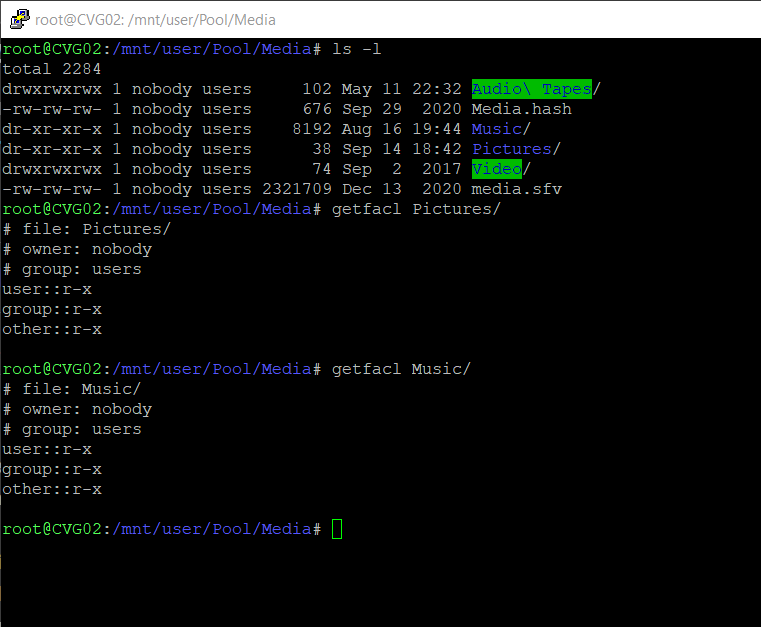
New unraid user, Linux noob here. Tried to do some searches but I'm too scared to apply anything. All data is backed up. Everything has been fine for over a month on the new server with my data until today when I tried to create a new folder inside the base of the pictures folder from a windows 10 computer. It would not create. I am able to create a folder in any subfolder of pictures, just not the base. It is a part of another share so, it is not the problem. I performed ls -l and getfacl and found the same incorrect permissions applied to the music folder and a few subfolders in my videos. Running fix common problems, new permissions, and docker safe permissions did not correct the issue. I can create a directory using the command line in the folder as root user. What is the next step to correcting these permissions and applying them to all the subfolders? How can I find out why the three utilities built-in are not correcting this? I rebooted the server and an automatic parity check began. Not sure why - had zero issues that should have caused that. it is scheduled for the 1st. File verification plugin runs on the 15th. The log gave no specific reason other than to notify me by email that it was happening. Before that the only error is a time synchronization error - the clock on the server is reading the correct time. That will finish in 5 hours and I'll post the result. Full disclosure: This is the first time I've tried to create a folder in the base of pictures since building this server. It may have been this way since the beginning. The original data fill was all copied from a windows 10 share using the rsync command from the server terminal. Thank you for your help!
-
I have NOT tried "turning it off and back on again". Should I?
-
I don't have anything special that I know of. 12 core xeon, 64gb ecc, 3x 3tb array + 2x 3tb parity, 2x 256gb ssd cache in raid 0. I'm a docker noob, but I set the download directory while installing and that was first run (I think). I deleted the app using the unraid gui and reinstalled it and got the same result.
-
I get an error after installing it. I pasted the log below. Starting loop.... Checking for new Videos Traceback (most recent call last): File "main.py", line 8, in <module> pytubDef.loop() File "/app/pytubDef/__init__.py", line 141, in loop checkForNewURL(channelArray[m]) File "/app/pytubDef/__init__.py", line 147, in checkForNewURL for n in range(selectedChannel.video_urls.__len__()): File "/usr/local/lib/python3.8/site-packages/pytube/helpers.py", line 89, in __len__ self.generate_all() File "/usr/local/lib/python3.8/site-packages/pytube/helpers.py", line 105, in generate_all next_item = next(self.gen) File "/usr/local/lib/python3.8/site-packages/pytube/contrib/playlist.py", line 281, in url_generator for page in self._paginate(): File "/usr/local/lib/python3.8/site-packages/pytube/contrib/playlist.py", line 118, in _paginate json.dumps(extract.initial_data(self.html)) File "/usr/local/lib/python3.8/site-packages/pytube/contrib/channel.py", line 78, in html self._html = request.get(self.videos_url) File "/usr/local/lib/python3.8/site-packages/pytube/request.py", line 53, in get response = _execute_request(url, headers=extra_headers, timeout=timeout) File "/usr/local/lib/python3.8/site-packages/pytube/request.py", line 37, in _execute_request return urlopen(request, timeout=timeout) # nosec File "/usr/local/lib/python3.8/urllib/request.py", line 222, in urlopen return opener.open(url, data, timeout) File "/usr/local/lib/python3.8/urllib/request.py", line 531, in open response = meth(req, response) File "/usr/local/lib/python3.8/urllib/request.py", line 640, in http_response response = self.parent.error( File "/usr/local/lib/python3.8/urllib/request.py", line 569, in error return self._call_chain(*args) File "/usr/local/lib/python3.8/urllib/request.py", line 502, in _call_chain result = func(*args) File "/usr/local/lib/python3.8/urllib/request.py", line 649, in http_error_default raise HTTPError(req.full_url, code, msg, hdrs, fp) urllib.error.HTTPError: HTTP Error 404: Not Found
-
This doesn't appear to be an unraid specific problem. Openmedia vault and freenas produced the same result. I plugged it into the windows server next to the unraid box and it worked fine.
-
eSata is running off a pci-e expansion card. I don't think it has that option.
-
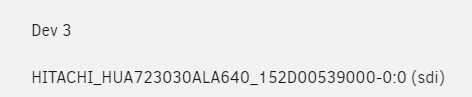
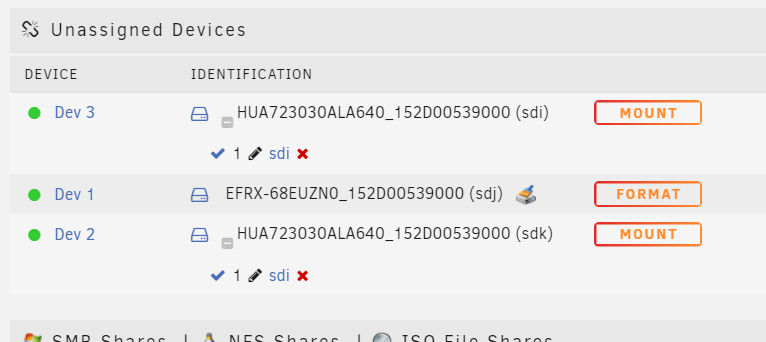
I have a similar problem with my mediasonic probox using USB mode. When I use esata - it works fine. In USB mode the jmicron controller generates a fake serial number for each disk and it causes the same problem as listed above. The fake serial is unique, but unraid (or something) ignores the unique identifier at the end after the hyphen. Is there something I can do to fix this? I don't want to use this enclosure in esata mode, because I have to reboot the server every time to pick up the disks. Planning on using this as a removeable backup. each disk is identified with the model then the serial (fake from enclosure identified by slot) -0:0 is slot one. -0:1 is slot two, -0:2 is slot 3, and -0:3 is slot 4.
-
When you created the share on windows did you set the permissions in windows. By default it is read only.
-
Now that it has settled down, I'm seeing one thread per disk when it's running through my larger files. My disks are Very old 3TB that struggle to hit above 140MB for most of the disk surface. I like what you've done there with the plugin. Usually developers throw the whole system at every file and then it just sits there at 50 MB/s with 24 cores trying to shatter the platter and make dead the head. I always seem to have to reduce these things or tune them to my setup, but you guys did it right by default. If you're hashing an SSD more cores the better, but I'm rarely hashing my ssd's.
-
Wow, Blake 3 is very fast. How many threads is the plugin set to use? I have 24 threads, but my disks top out at 160 MB/s pulling one file. Which is what they did with MD5. Obviously the disks are the bottleneck. I can see it really rip through the tiny files though much faster than anything else.
-
Is it possible to run snapraid on the unraid array? This gives a third level of parity with undelete and file verification/recovery in one step. i already have the recycle bin and file verification plugins, but these do not offer a recovery for slightly corrupt files. And yes, I also have backups.
-
I was thinking about this same Idea. Unraid PLUS snapraid. Could a person use snapraid in an OMV VM (or natively on the baremetal) to backup to a third "parity" disk to allow for file level corruption restoration and provide a delayed snapshot backup of the server? I'm already running the file verification plugin. Is there anything I'm not thinking of that is already baked into the OS? I'm running two parity right now, but nothing except my backups will stop file corruption. And it really sucks if you unknowingly overwrite a backup file with a corrupt file. If I start getting parity errors, I presently have no way to recover files, only check them. Unless I recover from a backup. My backups are powered off and disconnected except for once a month. My cloud backup syncs the important stuff daily. I'm looking for a live snapshot with maybe a 24 hour delay type of backup and snapraid was the first thing I could think of, but it requires another disk (which I already have and an empty slot in the server).
-
Is there an easy way (or slightly difficult) to attach a four disk pool, update it with a back up of the array, and then disconnect it. While keeping everything live? Or would this best be a tesk left to a separate computer? If I were to do it with the existing server, what filesystem would you recommend? I have a little tiny bit of experience with mergefs. The use case would be an offline backup of the server. I'm already using a windows blue iris server to live sync and upload to cloud for my local backup and off site backup. Thanks, Theron
-
Oh, and I agree with what you are saying BTW.
-
To summarize my long winded original post, I'll ask a question: How are all of you doing OFFLINE disconnected powered off backups IF you are using multiple disks? I don't want to buy a new disk that everything fits on because I need the parity on the offline setup as well which requires multiple disks. Also - not doing a hardware raid box - I don't trust it for what I can afford. I own one, but I have only ever used it as JBOD.
-
That's just a test rig I threw together from spare parts. The primary server is internal sata connections and an esata card with one disk sitting in a 4 bay esata enclosure. The OFFLINE enclosure would be connected by esata at bootup - hot-plugging esata isn't supported on my setup. All the smart info goes through all the enclosures I own or I stop owning them. I've found all of the items I'm using to have been tested and reliable for a few years or less. The newest piece of hardware is from May. I also have par2 files with all of my important stuff because testing backblaze restores revealed their server data had corrupted 25 files of my 5 TB of data. 3-2-1 off plus parity for the parity and checksums for all is the way I roll since "the incident" in 2001 - RIP 200GB of mp3s.
-
Noob here. I tried searching, but I'm struggling to find a simple answer. I'm trying out Unraid on a separate Xeon 4 core 8GB test system with 2tb x 2 + 3tb x 2 of my spare disks in a 4 disk usb hard drive dock. My current "server" is a Xeon 12 core 64GB windows 10 pro system with drivepool + snapraid (3tb x 4). To back this system up, I use another drivepool + snapraid enclosure of (2tb x 2 + 3tb x 2) This enclosure has usb 3 and esata. After setting up the primary array on the main server using the above 3tb x 4 discs... Is my understanding correct that I could use the external 4 disc box with btrfs as a "pool" and continue to attach it once a month, rsync to it, shut it down and disconnect it? Will it hold it's pool settings? In the software, will I need to remove each disk from the pool and unmount before disconnecting the enclosure? total span btrfs will likely be used configured as a pool. I tested this theory with a spare two disk enclosure that I had to see if it works and it seems to work fine. I want to know how fragile is disconnecting and reconnecting pools at will. 1. Would it be wiser to full shutdown, connect enclosure and start up, sync, shutdown, disconnect - or will this method produce a bunch of "missing disk" errors on the next boot? Method 2. If Live, do I need to start and stop array, assemble and disassemble pool, mount and unmount the 4 enclosure disks every time I want to use this offline box? Method 3. Open to other suggestions - I could also keep the offline backup as it configured because I will have a fulltime blue iris windows 10 computer running (I already know about the docker, don't want all my eggs in one basket). However, the BTRFS filesystem seems like it could be more efficient and less time consuming than snapraid. I have set up mergefs with snapraid on an omv system gui, and I really don't want to manage that from the command line on unraid (unless it's easier than I think). My primary skillset is DOS and windows and hardware. I'm a rookie in linux but adapting quickly to the CLI. I'm also still running a very old OMV 5 system because it's 32-bit and runs a very important FTP. I like OMV - very simple and reliable and probably best suited for single purpose applications. However, Unraid is what I want for my main server - a lot more features and the 24 thread xeon would be wasted on OMV in my opinion. I also intend on switching from backblaze personal to B2 (and reducing my backup size) unless I can find a reliable way get the blue iris computer to send to backblaze personal and somehow "lie" about the network share from unraid. I tried a few backdoors and it seems like the devs have thought of everything. Is there no way to mount a unraid share as a physical disc in a w10 VM? does the Mac-in-a-box method work? If there's a secret that we need to keep a secret - PM me.
