





Mr.meowgi
Members
-
Joined
-
Last visited
-
Any plans to add dumbkan?
-
Ive been getting this error daily for as long as i can remember usbhid-ups[14966]: nut_libusb_get_report: Input/Output Error usbhid-ups[14966]: #012Reconnecting. If you saw "nut_libusb_get_interrupt: Input/Output Error" or similar message in the log above, try setting "pollonly" flag in "ups.conf" options section for this driver! usbhid-ups[14966]: nut_libusb_get_string: Pipe error But I don’t know how to set the pollonly flag. Any idea how? also i get lots of errors like this one that fills up and i dont know why. nginx: 2024/04/30 12:35:07 [alert] 12245#12245: worker process 21789 exited on signal 6
-
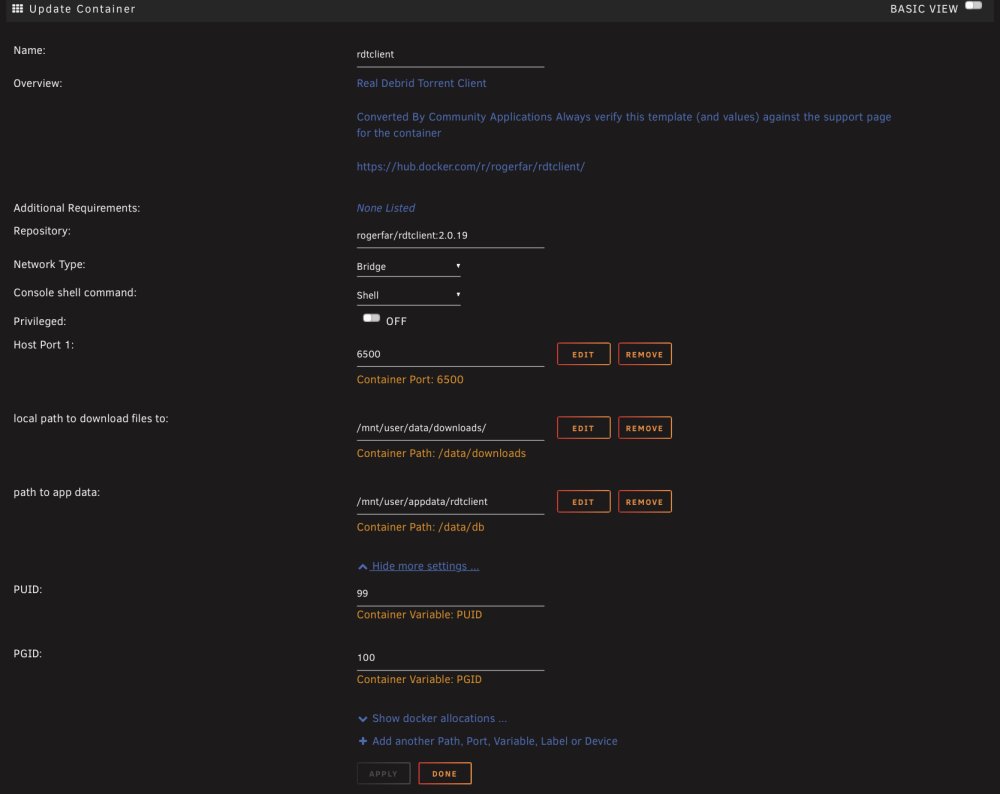
Hello guys just wanted to update the thread as of the date of this comment i have found and fixed my issue, it was “RDT-CLIENT” docker ignoring PUID and PGID, more info on their github so my fix was to add both PUID and a PGID variables to the template and set those to the same IDs as my arr containers.
-
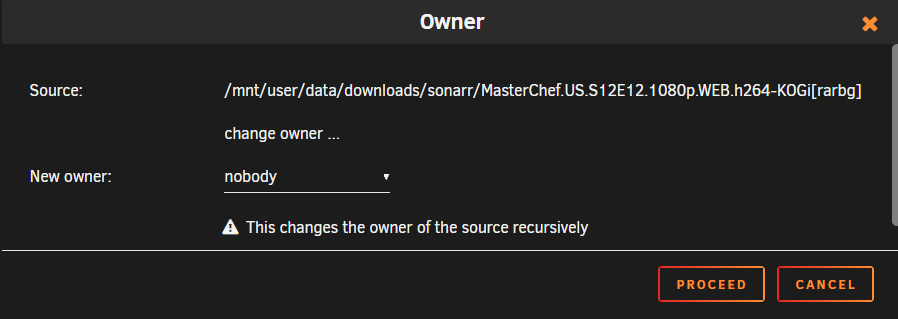
Yup this is exactly what I do but instead to the new files that have UNKNOWN as the owner, I did it your way unfortunately any new other files still show up as UNKNOWN. Unless im doing it wrong? Is it selecting the download folder > owner button > new owner > nobody ?
-
Tried this from within docker as well as the edit button on the docker page from unraid itself and it didn’t seem to work.
-
Hey guys sorry for the late update but unfortunately i have not found an easy way to fix this yet. Mind you ive not fixed it myself yet but i have found some information from a reddit post and to summarize it’s a problem with the New permissions tool being broken.
-
I see, I am thinking about downgrading too but I don’t know what is the safest way to do it without losing my appdata.
-
Im glad im not alone on this, I just wish they would acknowledge this bug on the future releases. Maybe if more people with the same problem come out
-
Aren't these solutions the same thing as just running docker safe new perms or new perms? I tried to follow the instructions "fix2" from the second link you sent and created a user script for the user script plugin, but I get this error when I run it as for the first link you sent my appdata shows the correct folder permissions owner:nobody, running this command does nothing for me. i dont have plex so i assume i should do it to the arr folders? I don't know why it works for other people by just running the tools new perms and docker safe new perms but for me it only works for the current files and every new file will not respect the new permissions.
-
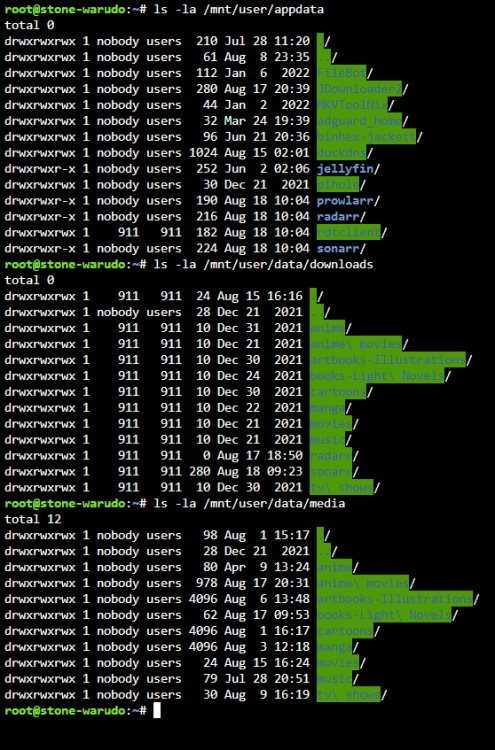
OS: unraid 6.10.3, issue started from 6.10 and was not existent on 6.9.2 Steps to reproduce: start a download from either sonarr or radarr Expected result: content automatically moves to the respected folder. Actual result: new downloads are set as owner UNKNOWN and within sonarr/radarr there is an error: " Couldn't import episode /data/downloads/sonarr/MasterChef.US.S12E12.1080p.WEB.h264-KOGi[rarbg]/MasterChef.US.S12E12.1080p.WEB.h264-KOGi.mkv: Access to the path '/data/downloads/sonarr/MasterChef.US.S12E12.1080p.WEB.h264-KOGi[rarbg]/MasterChef.US.S12E12.1080p.WEB.h264-KOGi.mkv' is denied." More details: I have followed the TRaSH Guide for unraid so I believe I should have the correct paths data ├── downloads │ ├── movies │ ├── music │ ├── radarr │ ├── sonarr │ └── tv └── media ├── movies ├── music └── tv here is a screenshot: I've been doing this manually ever since updating to 6.10.x changing each file ownership to nobody and then refresh sonarr/radarr resulting on the files being moved. but then I found a temporary fix from different posts onthe forum, reddit, and discord is to try "Docker safe new perms" and also "new permissions", what this does is only temporary, and it only affects current files, any other file downloaded from sonarr/radarr within "/mnt/user/data/downloads" will have UKNOWN as the owner. Any suggestions welcomed, maybe I missed something, or my paths got messed up? let me know if there is more information needed, thank you for taking the time to read all this!

-
Hello I’d like to report a bug with dynamix system stats, using iPad while on portrait mode the page just loads are refreshes quickly not allowing me to do anything. But on landscape mode it loads and functions perfectly.
-
Hello i was wondering for the troddit template what do you mean “Generated by running” on the description of NEXTAUTH_SECRET:? What do we have to fill in?
-
Do we need to enable reconstruct write on disk settings for it to work? Mine is set to auto
-
hello, i am using your docker container and i cannot use the UI on my ipad or iphone unless the connection is unnectrypted. It seems like the interface is not touch friendly as i have to drag my finger on the screen and a mouse pointer shows up. Is there a workaround for this? thank you!
-
Thanks! I was concerned about this but wasnt too sure since the case seems like can give lots of airflow, should i also do something about stock fans for the case?





