





flaggart
Members
-
Joined
-
Last visited
Everything posted by flaggart
-
Thankyou for the suggestions but unfortunately I've tried these ideas. I have tried binhex and official. I have added the claim token inside the docker config and I am signed into plex in the webgui. I have lifetime plexpass.
-
I am using the official Plex docker. I have tried with and without the kernel parameter. In the plex logs, there are errors stating "Failed to initialise VAAPI connection: -1 (unknown libva error)".
-
@ich777 Hello again, I wonder if you would be willing to revisit this issue now that the latest beta includes kernel 6.8.12? I have a fresh install of 7.0.0 beta1 on the Framework Intel i5-1240P motherboard. I have installed Intel GPU Top and GPU statistics. The GPU shows as Alderlake_p (Gen12) @ /dev/dr/card0 and is also listed as available in the Plex transcoder configuration. I have tried setting i915.enable_guc=3 as a kernel parameter, but alas Plex will only use the CPU for transcoding. Thanks for any help.
-
I have tested today unraid with kernel 6.7.5 and still have same issue Intel Alderlake_p (Gen12) @ /dev/dri/card0 shows in intel_gpu_top and in plex settings it is selectable, but it is not used on transcode
-
That sucks. But thanks for helping.
-
Tried with 3 versions now. I used the PLEX_CLAIM method, same result.


-
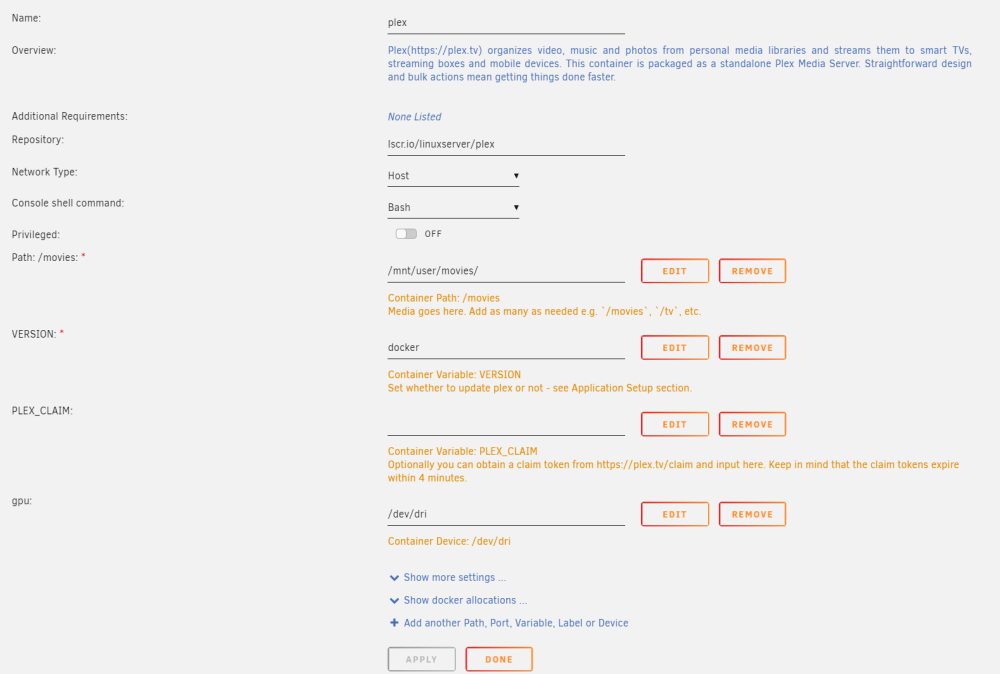
Thankyou both for your help with this so far. @ich777 I created i915.conf and rebooted. No change. Here is the docker config, I am using linuxserver however I also tried the official docker with the same result: I don't know what the necessary steps for Plex with the claim are. The Plex server webconfig shows it is claimed under my Plex account, which has PlexPass.
-
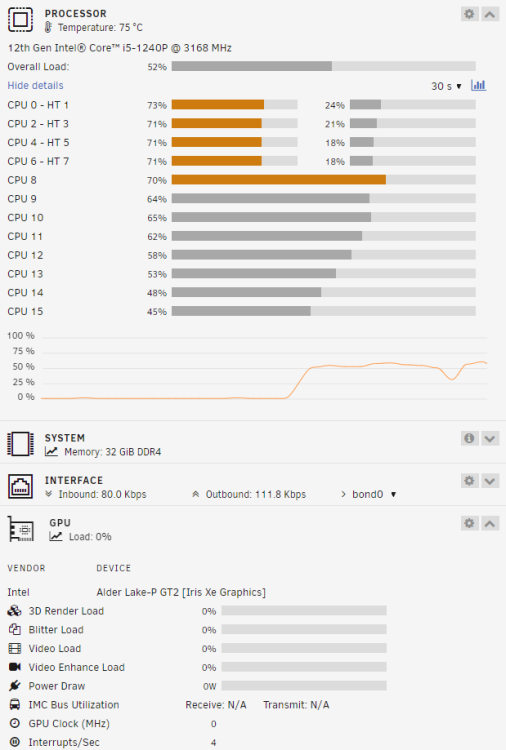
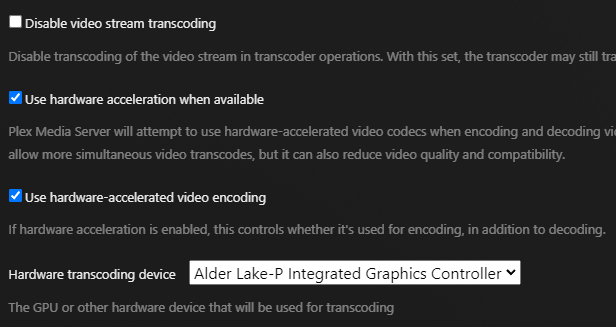
Running Plex with a single transcode, hits the CPU, no GPU usage: Visible in Plex: Errors in Plex log: Jan 22, 2024 09:09:53.968 [22679530531640] DEBUG - [Req#367/Transcode] Codecs: testing h264 (decoder) with hwdevice vaapi Jan 22, 2024 09:09:53.968 [22679530531640] DEBUG - [Req#367/Transcode] Codecs: hardware transcoding: testing API vaapi for device '/dev/dri/renderD128' (Alder Lake-P Integrated Graphics Controller) Jan 22, 2024 09:09:53.968 [22679530531640] ERROR - [Req#367/Transcode] [FFMPEG] - Failed to initialise VAAPI connection: -1 (unknown libva error).

-
Yes, it is in docker config and I am able to select the GPU in Plex web config, but it can never actually initialize or use it
-
Hello I am unable to get hardware transcoding working at all with an i5-1240P (Alderlake CPU in Framework mainboard). I am able to select the GPU in Plex web config, but it can never actually initialize or use it: Jan 22, 2024 09:09:53.968 [22679530531640] DEBUG - [Req#367/Transcode] Codecs: testing h264 (decoder) with hwdevice vaapi Jan 22, 2024 09:09:53.968 [22679530531640] DEBUG - [Req#367/Transcode] Codecs: hardware transcoding: testing API vaapi for device '/dev/dri/renderD128' (Alder Lake-P Integrated Graphics Controller) Jan 22, 2024 09:09:53.968 [22679530531640] ERROR - [Req#367/Transcode] [FFMPEG] - Failed to initialise VAAPI connection: -1 (unknown libva error). Unraid 6.12.6 Tried linuxserver and official Plex docker Any ideas? Thanks
-
Hello, I am considering a project with a 12th-gen Framework laptop mainboard - https://frame.work/gb/en/products/mainboard-12th-gen-intel-core?v=FRANGACP06 I currently have a reasonably large Unraid NAS, the main purpose for which is a plex server. This is composed of the Unraid host, which is an unremarkable ATX pc case, and 2x 4U cases for the drives (up to 15 drives in each). The drives in each 4U case are connected to 4 ports on an internal SAS expander, which then connects via two external mini-SAS cables to the Unraid box. The Unraid box has a single HBA with 4 external ports (9206-16e). I have upgraded my framework laptop to AMD, and have the 12th gen mainboard in the CoolerMaster case, waiting for something interesting to do. I am intrigued to use it for Unraid due to low power usage, the intel CPU being good for plex transcoding, and because it has 4x Thunderbolt ports. . To connect my drives, I am considering going Thunderbolt -> NVME -> pci-e by buying 2x thunderbolt NVME adapters, and 2x ADT-Link NVME to pci-e adapters (such as https://www.adt.link/product/R42SR.html, there are lots of variants). I can then place one of these inside each of my 4U cases, and put a 2-port SAS HBA card (e.g. 9207-8i) in each ADT-Link pci-e slot to connect to the drives via the SAS expander. I am not looking for ultimate speed, just ease of connectivity, and ultra low power usage. I see reviews for some Thunderbolt NVME adapters to be quite low, e.g. 1 to 1.5 Gbit/sec, but others approach 2.5, which would be sufficient (across 15 drives this would be 166 MB/sec during Unraid parity check). Interested to see if anyone has thought of doing similar, or anyone who has experience of speeds using Thunderbolt - > NVME -> pci-e or similar. (PS. Why not Thunderbolt to pci-e directly? Well, these options seem less than ideal as most solutions are geared towards external GPU usage, and are either very expensive / bulky, or are less easy to power (e.g., requires PSU connected via ATX 24-pin, assuming the card is high power). Maybe I am wrong and someone can share a good solution for this approach?)
-
https://www.highpoint-tech.com/rs6430ts-overview 1x 8-Bay JBOD Tower Storage It seems cheaper for me to buy this directly from Highpoint with international shipping than it is to source the older 6418S locally.
-
I think I was overthinking it. Any hard link created by these apps will initially be on cache, and mover will move onto array disks. Presumably it is clever enough to move the file and then make the hard link on the same disk filesystem. This seems to be the case from looking at the output of "find /mnt/disk1/ -type f -not links 1", and therefore I can just use rsync with -H flag to move files from one disk to another preserving hard links. I think it is unlikely there are any hard links that span different disks but are hard-linked across the array filesystem.
-
Hello I use the regular tools such as Sonarr, Radarr etc which keep downloaded files and make a hard copy in the final library location. I want to move all data off of one disk in the array to free it up so that it can be used as second parity disk instead. I realize I can't just dumb copy all of the files from that disk to other disks, as this would lose the hard links and take more disk space as a result. I know that the mover script checks files on the cache disk to see if they are hard links, and I assume if they are, it then finds the original file, and instead of moving from the cache to the destination disk, it instead creates a new hard link. My question is - is there an existing tool I can use to empty one of my disks in this way, or will I need to make a similar script which checks each file to see if it is a hard link, and if so find the original file, etc etc... Thanks
-
Hello This information is really useful and has inspired be to revamp my setup. I wonder if someone could explain why the single port link speed between HBA and expander would be 2400MB/s rather than 3000MB/s (6gbit * 4 lanes = 24gbit or 3000MB/s). Intended setup: 1x 9207-8e in a PCI-e 3.0 8x slot (max 7.877 GB/s) Single links in to 2x RES2SV240 16 disks per expander, all support SATA3 Would this not provide 3000MB/s to each expander, and therefore up to 187.5MB/sec per disk - rather than 2400MB/s and 150MB/s? Thanks
-
Replugged, Unraid-Kernel-Helper Plugin still says no custom loaded modules found. Output of "lsusb -v" attached lsusb.txt
-
Yes, it is USB. I've rebooted several times and tried all USB ports - I thought I was going mad and not overwriting the boot files properly!! It seems there are a few reports of 5990 not being detected regardless of drivers, so not sure TBS drivers would make any difference, but if it is no hassle for you it would be nice to test The device is listed under lsusb but /dev/dvb does not exist and it does not show up under your plugin.
-
Ah, I see. I tried LibreELEC but it does not detect my TBS 5990. Thanks anyway.
-
Hello Sorry if I am being a bit thick here, but all I wan't to do is build 6.8.3 with TBS drivers. There is no mention of how to specify this using env on docker hub or the first post here. Can someone please advise? Thanks
-
I had the same issue after update. Browser (Vivaldi) would not load the client and had this JS error. It worked fine in Chromium, and was fine after I unpinned the tab in Vivaldi and reloaded the page, ensuring adblock+tracker protection was off.
-
I am not sure which drive area you mean if you mean the white 4x drive bay directly above the PSU - there should not be any issues with this regardless of cables? if you mean the space with velcro strap to the left of the PSU in the images above, I think I had to orient the drive length ways so that the connectors were pointing towards the cable-management hole through to the other chamber. This matches the more recent image from stuntman83 above.
-
I retired it towards the end of 2019, so it had a good 4.5 years. I had three fans in the drive chamber using Fan Auto Control to ramp up with drive temp and never had an issue. If anything, the 4 drives in the main chamber were the ones that got the hottest so I'd suggest putting drives there that maybe have less use or fewer platters, whatever makes them less likely to heat up. In terms of vibration / noise, I had the box in the same room I slept in for a few years. I would not describe it as quiet but it wasn't bothersome.
-
I would also like this. In its absence I have been referring to this post which suggests the same information is available without the tool.
-
I just used the velcro straps that were already there - I think they are supposed to be for cable management, it wasn't the greatest arrangement. I just settled for one drive there.
-
It is a: OWC OWCMM52T35 - OWC Multi-Mount 3.5 to 5.25 Bracket I have also used a "Nexus DoubleTwin" for the same purpose.



