





tyrindor
Members
-
Joined
-
Last visited
Everything posted by tyrindor
-
So many variables I don't know where to start looking to be honest. Might be helpful to post your setup in text form for those that haven't watched the video/can't remember the video. I changed nothing, everything is default but adding a user and changing the IP. - Installed the docker via community apps - set the docker directory to my SSD cache drive (10GB size). Set the openvpn directory to that same folder. - I signed into openvpn webui via admin and set my IP address under "server network settings". - Set up a user, gave him the .msi for OpenVPN Connect, and he connected - That's it, speeds are super slow. I've been told you don't want to VPN host on common local networks (192.168.0.1), but no way that's causing the speed problem? I have opened port 1194 in my router, though port checkers claim 1194 is still closed. If I remove the port rule from my router, he can't connect so it's definitely opening it. Router is a Netgear R7000, followed the exact steps showed on their website. He's using a custom built pfsense router with about a billion settings, so no idea what it could be doing. Tempted to try removing both routers and doing a direction connection between two computers, but I doubt it's a router problem. Had this exact same problem 3 years ago when using a built-in router VPN as well, but we figured it was due to the router's slow processor. Next logical step I can think of is to use the intregrated openVPN feature in my Netgear R7000 router and see if it's better/worse/the same.... EDIT1: Perhaps an ISP is throttling openVPN but I don't see how to enable SSH 80 or SSL 443? https://airvpn.org/topic/14971-am-i-crazy-or-is-my-isp-throttling-openvpn/ EDIT2: Further reading, here's a guy claiming this only happens when transferring from SMB to windows (what we're doing): https://forum.pfsense.org/index.php?topic=51341.0 - "SO_SNDBUF and SO_RCVBUF socket options in Samba. The recommended settings of 8192 cause a significant performance hit when transferring files over a VPN. Changing the settings to 65536 cured the problem completely.". How do I do this? EDIT2 is interesting. I have no idea how to change it though I'm afraid. And I don't want to ruin you day completely but saw something last night you should probably be aware of. https://www.bleepingcomputer.com/news/security/cert-warns-users-to-stop-using-two-netgear-router-models-due-to-security-flaw/ I see lots of tweaks people suggest but I can't figure how to get them to work. I don't understand how to edit client and server configs. The client config is intregrated in the .msi file you download, and the server config is vastly different format than any other openvpn config I see... For example, to increase MTU size would this be right?: { "Default": { "admin_ui.https.ip_address": "all", "admin_ui.https.port": "943", "tun-mtu": "48000", "auth.ldap.0.name": "My LDAP servers", These are the tweaks im trying to apply... https://community.openvpn.net/openvpn/wiki/Gigabit_Networks_Linux
-
So many variables I don't know where to start looking to be honest. Might be helpful to post your setup in text form for those that haven't watched the video/can't remember the video. I changed nothing, everything is default but adding a user and changing the IP. - Installed the docker via community apps - set the docker directory to my SSD cache drive (10GB size). Set the openvpn directory to that same folder. - I signed into openvpn webui via admin and set my IP address under "server network settings". - Set up a user, gave him the .msi for OpenVPN Connect, and he connected - That's it, speeds are super slow. I've been told you don't want to VPN host on common local networks (192.168.0.1), but no way that's causing the speed problem? I have opened port 1194 in my router, though port checkers claim 1194 is still closed. If I remove the port rule from my router, he can't connect so it's definitely opening it. Router is a Netgear R7000, followed the exact steps showed on their website. He's using a custom built pfsense router with about a billion settings, so no idea what it could be doing. Tempted to try removing both routers and doing a direction connection between two computers, but I doubt it's a router problem. Had this exact same problem 3 years ago when using a built-in router VPN as well, but we figured it was due to the router's slow processor. Next logical step I can think of is to use the intregrated openVPN feature in my Netgear R7000 router and see if it's better/worse/the same.... EDIT1: Perhaps an ISP is throttling openVPN but I don't see how to enable SSH 80 or SSL 443? https://airvpn.org/topic/14971-am-i-crazy-or-is-my-isp-throttling-openvpn/ EDIT2: Further reading, here's a guy claiming this only happens when transferring from SMB to windows (what we're doing): https://forum.pfsense.org/index.php?topic=51341.0 - "SO_SNDBUF and SO_RCVBUF socket options in Samba. The recommended settings of 8192 cause a significant performance hit when transferring files over a VPN. Changing the settings to 65536 cured the problem completely.". How do I do this?
-
Followed the above video, didn't get cert SSL or dynamic DNS setup because I am just making sure it works first. With two 1000/500Mbps fiber connections between the host and client, only seeing about 2MB/s speeds in both directions. Processor on both systems is under 50%. Any ideas? I expected at least 20-50MB/s on these connections.
-
Just finished up moving the last of my ~138TB of data. No problems after disabling my A/V. Strange that it would randomly block the commands in firefox/chrome. This plugin was a lifesaver.
-
I mentioned browsers because the app is using some features that require browser support. I've mostly baked support directly into the app, but it seems some browsers are more finicky about it Generally, Chrome has been the most compliant, that's why I suggested to use it. But, if it's still not working for you, can you try Chrome, open the dev tools and see what, if any, errors are showing up in the console ? It was definitely my AV (NOD32) causing it, adding the unRAID server to it's exclude list, and so far no issues for over a day.
-
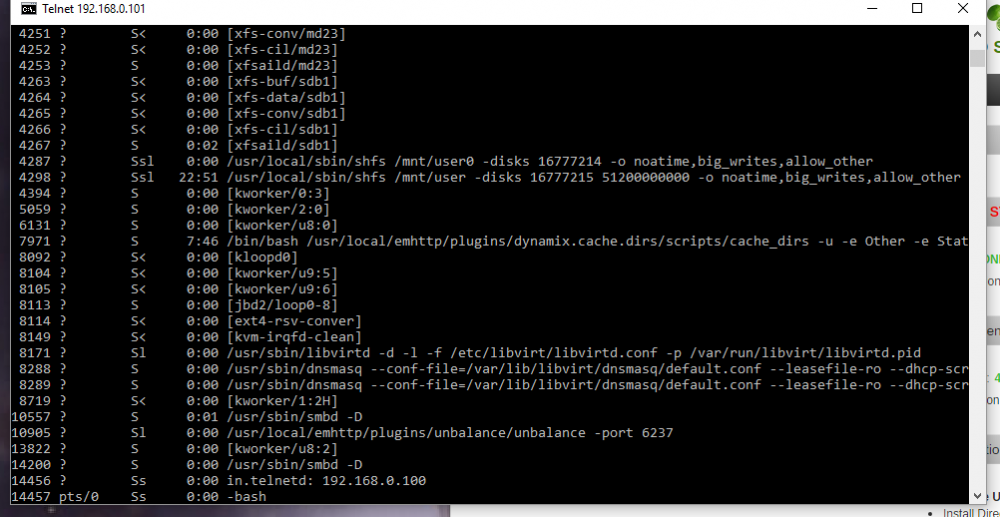
I thought it could be something like that. I'll look into it. Hmm, it's still happening on Chrome.. but it's different. When I click "calculate" nothing happens at all now (no calculating animation icon, nothing). After that, the whole WebUI does not work, all the buttons do nothing. Restarting the WebUI fixes it, but hitting calculate once again just makes it all stop working again. Tried reinstalling the plugin, same thing. EDIT: I believe it is caused by NOD32 anti-virus. Will test further. I also noticed some leftover processes that (may or may not) be related to this plugin. I killed them all and it didn't fix the issue, then I tried disabling my A/V, then it was working again. It could have been a delay until the processes were fully terminated, if I figure out the direct cause i'll post again.
-
Which browser are you using ? Can you try from a different one ? (I haven't had any problems with Chrome) Your right, it actually is caused by using firefox it seems.
-
Doing it again. Stopped plugin, deleted log, started plugin, added share, then clicked calculate. It's sitting there doing the calculating animation, the cmdline box doesn't pop up at all. The plugin does not acknowledge I hit the calculate button according to the log. I can't seem to fix it again, even after a complete server restart. The only way to fix it seems to wait a random amount of time. What I am doing is checking 1 "from" disk, and unchecking all but 1 "to" disk. Not sure if this is the cause, because the plugin insists on rechecking all the "to" disks whenever I change the "from" disk. When it starts working again, i'll leave all the "to" disks checked and see if it still happens. I: 2016/04/28 08:23:17 unbalance.go:28: unBALANCE v1.4.0-513.d128a6b starting up ... I: 2016/04/28 08:23:17 unbalance.go:38: Using config file /boot/config/plugins/unbalance/unbalance.conf ... I: 2016/04/28 08:23:17 server.go:45: Starting service Server ... I: 2016/04/28 08:23:17 server.go:62: Serving files from /usr/local/emhttp/plugins/unbalance I: 2016/04/28 08:23:17 server.go:93: Server started listening on :6237 I: 2016/04/28 08:23:17 core.go:75: starting service Core ... I: 2016/04/28 08:23:17 unbalance.go:48: Press Ctrl+C to stop ... I: 2016/04/28 08:23:19 core.go:131: Sending config I: 2016/04/28 08:23:19 unraid.go:373: Unraid Box Condition: &{NumDisks:23 NumProtected:24 Synced:1969-12-31 18:00:00 -0600 CST SyncErrs:0 Resync:0 ResyncPos:0 State:STARTED Size:93006521708544 Free:45696479588352 NewFree:45696479588352} I: 2016/04/28 08:23:19 unraid.go:374: Unraid Box SourceDiskName: I: 2016/04/28 08:23:19 unraid.go:375: Unraid Box BytesToMove: 0 I: 2016/04/28 08:23:19 unraid.go:386: Id(1); Name(disk1); Path(/mnt/disk1); Device(sdw); Type(Data); FsType(reiserfs); Free(706.9G); NewFree(706.9G); Size(2.7T); Serial(WDC_WD30EZRS-00J99B0_WD-WCAWZ0794407); Status(DISK_OK); Bin(<nil>) I: 2016/04/28 08:23:19 unraid.go:386: Id(2); Name(disk2); Path(/mnt/disk2); Device(sdx); Type(Data); FsType(reiserfs); Free(698.4G); NewFree(698.4G); Size(2.7T); Serial(WDC_WD30EZRS-00J99B0_WD-WCAWZ0787306); Status(DISK_OK); Bin(<nil>) I: 2016/04/28 08:23:19 unraid.go:386: Id(3); Name(disk3); Path(/mnt/disk3); Device(sdc); Type(Data); FsType(reiserfs); Free(575.9G); NewFree(575.9G); Size(2.7T); Serial(WDC_WD30EZRX-00MMMB0_WD-WCAWZ1441285); Status(DISK_OK); Bin(<nil>) I: 2016/04/28 08:23:19 unraid.go:386: Id(4); Name(disk4); Path(/mnt/disk4); Device(sdd); Type(Data); FsType(reiserfs); Free(302.3G); NewFree(302.3G); Size(2.7T); Serial(WDC_WD30EZRX-00MMMB0_WD-WCAWZ1112721); Status(DISK_OK); Bin(<nil>) I: 2016/04/28 08:23:19 unraid.go:386: Id(5); Name(disk5); Path(/mnt/disk5); Device(sde); Type(Data); FsType(reiserfs); Free(780.4G); NewFree(780.4G); Size(2.7T); Serial(WDC_WD30EZRX-00MMMB0_WD-WCAWZ1112024); Status(DISK_OK); Bin(<nil>) I: 2016/04/28 08:23:19 unraid.go:386: Id(6); Name(disk6); Path(/mnt/disk6); Device(sdz); Type(Data); FsType(reiserfs); Free(432.7G); NewFree(432.7G); Size(2.7T); Serial(WDC_WD30EZRX-00MMMB0_WD-WCAWZ1280638); Status(DISK_OK); Bin(<nil>) I: 2016/04/28 08:23:19 unraid.go:386: Id(7); Name(disk7); Path(/mnt/disk7); Device(sdy); Type(Data); FsType(reiserfs); Free(375.3G); NewFree(375.3G); Size(2.7T); Serial(WDC_WD30EZRS-00J99B0_WD-WCAWZ0621891); Status(DISK_OK); Bin(<nil>) I: 2016/04/28 08:23:19 unraid.go:386: Id(; Name(disk8); Path(/mnt/disk8); Device(sdq); Type(Data); FsType(reiserfs); Free(385.6G); NewFree(385.6G); Size(2.7T); Serial(WDC_WD30EZRX-00MMMB0_WD-WCAWZ1537981); Status(DISK_OK); Bin(<nil>) I: 2016/04/28 08:23:19 unraid.go:386: Id(9); Name(disk9); Path(/mnt/disk9); Device(sdp); Type(Data); FsType(reiserfs); Free(413.2G); NewFree(413.2G); Size(2.7T); Serial(WDC_WD30EZRX-00MMMB0_WD-WCAWZ2396436); Status(DISK_OK); Bin(<nil>) I: 2016/04/28 08:23:19 unraid.go:386: Id(10); Name(disk10); Path(/mnt/disk10); Device(sdk); Type(Data); FsType(reiserfs); Free(474.1G); NewFree(474.1G); Size(2.7T); Serial(WDC_WD30EZRX-00MMMB0_WD-WCAWZ1234582); Status(DISK_OK); Bin(<nil>) I: 2016/04/28 08:23:19 unraid.go:386: Id(11); Name(disk11); Path(/mnt/disk11); Device(sdl); Type(Data); FsType(reiserfs); Free(317.7G); NewFree(317.7G); Size(2.7T); Serial(WDC_WD30EZRX-00MMMB0_WD-WCAWZ2361646); Status(DISK_OK); Bin(<nil>) I: 2016/04/28 08:23:19 unraid.go:386: Id(12); Name(disk12); Path(/mnt/disk12); Device(sdm); Type(Data); FsType(reiserfs); Free(547.1G); NewFree(547.1G); Size(2.7T); Serial(WDC_WD30EZRX-00MMMB0_WD-WCAWZ2367485); Status(DISK_OK); Bin(<nil>) I: 2016/04/28 08:23:19 unraid.go:386: Id(13); Name(disk13); Path(/mnt/disk13); Device(sdn); Type(Data); FsType(reiserfs); Free(596G); NewFree(596G); Size(2.7T); Serial(WDC_WD30EZRX-00MMMB0_WD-WCAWZ2377366); Status(DISK_OK); Bin(<nil>) I: 2016/04/28 08:23:19 unraid.go:386: Id(14); Name(disk14); Path(/mnt/disk14); Device(sdo); Type(Data); FsType(reiserfs); Free(497.5G); NewFree(497.5G); Size(2.7T); Serial(WDC_WD30EZRX-00MMMB0_WD-WCAWZ2204686); Status(DISK_OK); Bin(<nil>) I: 2016/04/28 08:23:19 unraid.go:386: Id(15); Name(disk15); Path(/mnt/disk15); Device(sds); Type(Data); FsType(reiserfs); Free(985.1G); NewFree(985.1G); Size(3.6T); Serial(WDC_WD40EFRX-68WT0N0_WD-WCC4E0323564); Status(DISK_OK); Bin(<nil>) I: 2016/04/28 08:23:19 unraid.go:386: Id(16); Name(disk16); Path(/mnt/disk16); Device(sdt); Type(Data); FsType(reiserfs); Free(955.3G); NewFree(955.3G); Size(3.6T); Serial(WDC_WD40EFRX-68WT0N0_WD-WCC4E0320243); Status(DISK_OK); Bin(<nil>) I: 2016/04/28 08:23:19 unraid.go:386: Id(17); Name(disk17); Path(/mnt/disk17); Device(sdu); Type(Data); FsType(reiserfs); Free(892.3G); NewFree(892.3G); Size(3.6T); Serial(WDC_WD40EFRX-68WT0N0_WD-WCC4E0323083); Status(DISK_OK); Bin(<nil>) I: 2016/04/28 08:23:19 unraid.go:386: Id(18); Name(disk18); Path(/mnt/disk18); Device(sdj); Type(Data); FsType(reiserfs); Free(3.6T); NewFree(3.6T); Size(3.6T); Serial(WDC_WD40EFRX-68WT0N0_WD-WCC4E0323101); Status(DISK_OK); Bin(<nil>) I: 2016/04/28 08:23:19 unraid.go:386: Id(19); Name(disk19); Path(/mnt/disk19); Device(sdr); Type(Data); FsType(xfs); Free(1001.3G); NewFree(1001.3G); Size(1.8T); Serial(WDC_WD2002FAEX-007BA0_WD-WMAY05129495); Status(DISK_OK); Bin(<nil>) I: 2016/04/28 08:23:19 unraid.go:386: Id(20); Name(disk20); Path(/mnt/disk20); Device(sdg); Type(Data); FsType(xfs); Free(4.6T); NewFree(4.6T); Size(7.3T); Serial(ST8000AS0002-1NA17Z_Z840GJB8); Status(DISK_OK); Bin(<nil>) I: 2016/04/28 08:23:19 unraid.go:386: Id(21); Name(disk21); Path(/mnt/disk21); Device(sdv); Type(Data); FsType(xfs); Free(7.3T); NewFree(7.3T); Size(7.3T); Serial(ST8000AS0002-1NA17Z_Z840GJ42); Status(DISK_OK); Bin(<nil>) I: 2016/04/28 08:23:19 unraid.go:386: Id(22); Name(disk22); Path(/mnt/disk22); Device(sdh); Type(Data); FsType(xfs); Free(7.3T); NewFree(7.3T); Size(7.3T); Serial(ST8000AS0002-1NA17Z_Z840EJLT); Status(DISK_OK); Bin(<nil>) I: 2016/04/28 08:23:19 unraid.go:386: Id(23); Name(disk23); Path(/mnt/disk23); Device(sdi); Type(Data); FsType(xfs); Free(7.3T); NewFree(7.3T); Size(7.3T); Serial(ST8000AS0002-1NA17Z_Z840G77J); Status(DISK_OK); Bin(<nil>) I: 2016/04/28 08:23:19 unraid.go:386: Id(24); Name(cache); Path(/mnt/cache); Device(sdb); Type(Cache); FsType(xfs); Free(800.1G); NewFree(800.1G); Size(931.1G); Serial(Samsung_SSD_840_EVO_1TB_S1D9NSAF214743E); Status(DISK_OK); Bin(<nil>) I: 2016/04/28 08:23:21 core.go:200: Adding folder (/TV Shows)
-
Sorry to hear that tyrindor. I'll take a look at your log and check for anything unusual. EDIT: Took a look, but I don't see any invocation of the Calculate command. Unless you have trimmed the log, there should be a line similar to this I: 2016/02/27 12:02:49 core.go:299: Running calculate operation ... I: 2016/02/27 12:02:49 core.go:332: calculateBestFit:Begin:srcDisk(/mnt/disk19); dstDisks(18) Wonder if the plugin isn't receiving the command when I click the button? I deleted the log, restarted the plugin again, and it started working again. I have no idea why that would fix it, may be unrelated. Though, the last time I had this happen I did the same thing and I'm pretty sure it fixed it then too. Really strange, wonder if it's caused by the log getting too big.
-
Had to go back to transferring over the network. The above problem where it just sits there forever "calculating" came back and it just wouldn't stop. Restarted the server 3 times, restarted the plugin even more times, no idea why it happens or how it fixes itself. No one else has this happen? Here's the last part of my log, everything after the last successful transfer. log.zip
-
I actually have an issue now. The plugin is refusing to calculate, it just sits there forever processing. Tried restarting the entire server 2 times to make sure it wasn't some hanged process. EDIT: Restart the plugin a bunch of time, checking same boxes from disk 4 to disk 14, pressing calculate, etc. Then it randomly worked on the ~5th try of doing the exact same process. *shrug*
-
Agreed, I also run 2 servers that are pretty dang close to yours. I have a bunch of 3/4TB reds too, and just made the switch to Seagate Archive drives. Haven't got them yet, still a bit worried about overall performance of them.
-
Does this program follow share rules? AKA if My movie share has a split of "0" will it ensure that all folder structures get put on the same drives? Is there a way to stop it from transferring? I've been transferring 100TB of data for weeks now, slowly converting to XFS at roughly ~60-90MB/s (limited by my local network). I get about 120+ MB/s by bypassing my network with this plugin, and no longer have to leave my desktop computer on during transfers. Been looking for this plugin for ages, wish I knew it existed sooner.
-
I get same problem. How do we set up a config file? All I want to do is access another unRAID server and vice versa.
-
I can't get it to start in Unraid 6, nothing in logs about it from what I can tell. I tried the old version, and the new version just posted. I have 3 servers I attempted to get it to work on and it was working fine before the upgrade. I put cache_dirs on the flash drive(s), and I set this line in go script: /boot/cache_dirs -w EDIT: If I manually telnet into my servers and invoke the process manually, it works. Something not quite right, doesn't seem to load correctly from the go file. My exact "go" file: # Start the Management Utility /usr/local/sbin/emhttp & echo nameserver 192.168.0.1 >/etc/resolv.conf echo 192.168.0.102 UNRAID2 >>/etc/hosts sleep 30; blockdev --setra 2048 /dev/md* /boot/cache_dirs -w syslog.txt
-
Stock Settings vs Automatic Mode "Best Bang" Settings (2 Servers) 60MB/s to 113MB/s 53MB/s to 83MB/s I am a bit worried about low memory though since they are much higher than my old settings. During parity sync I am showing this for free low memory: Server 1: 172024 which was set to 4736/2176/2176 Server 2: 544440 which was set to 3328/1536/1536 I should be fine then? This is while running my only 4 plugins: SickBeard, SABnzbd, Cache Dirs, and the new SF-based WebGUI. Amazing results, better than expected.
-
After installing benni-chan's tranmission plugin cache_dirs no longer starts/works. No errors that I can see. Nothing about cache_dirs in the log, even though it's still in my go script. http://lime-technology.com/forum/index.php?topic=17606.0 My go file: #!/bin/bash # Start the Management Utility /usr/local/sbin/emhttp & installpkg /boot/packages/simpleFeatures-0.9b-unraid-speeding_ant.tgz echo nameserver 192.168.0.1 >/etc/resolv.conf echo 192.168.0.102 UNRAID >>/etc/hosts sleep 30; blockdev --setra 2048 /dev/md* /boot/cache_dirs -w Tried moving cache_dirs above simplefeature, same thing. Manually starting cache_dirs after transmission has launched (with the same "/boot/cache_dirs -w" command) starts it, and it starts to cache.. but it never finishes and it loses it's cached data very fast.
-
Joe does this look right to you? /boot/cache_dirs -w -d 2 -e "cache" -a '-noleaf -name Jukebox -prune -o -print' What I want to happen: Caches all my shares, two directories deep. I assume Tower/Media/Movies is 2 depth? Media is the share name. I want it to cache the contents of movies folder, but no folders inside of it. Ignores the Jukebox subfolder in one of my shares. Ignores my cache drive since it's always spun up, it doesn't need to be cached. Thanks.
-
I have a 3TB Western Digital Green on the way to replace my 2TB parity drive. I'm kind of skeptical using the 1.12 preclear script... I'm pretty much a noob when it comes to this stuff. I've used the script without issues on WD20EADS and WD20EARS (with and without jumpers). So what should I change? I've downloaded 1.12. Now when I put my drive in, do I just run it normally with "/boot/preclear_disk.sh /dev/XXX" or is there some extra command lines I should do? When it's done how can I make sure it was correctly done? Thanks.
-
I found a minor bug with the exclude directory command. If I have this in my 'go' file: /boot/cache_dirs -w -e "Other Files" Syslog shows: Apr 18 01:45:00 Server cache_dirs: ---------- caching directories --------------- Apr 18 01:45:00 Server cache_dirs: Movies and TV Shows Apr 18 01:45:00 Server cache_dirs: ---------------------------------------------- Apr 18 01:45:00 Server cache_dirs: ERROR: excluded directory "Other Files" does not exist. ---- If I have this in my 'go' file: /boot/cache_dirs -w Syslog shows: Apr 18 01:45:00 Server cache_dirs: ---------- caching directories --------------- Apr 18 01:45:00 Server cache_dirs: Movies and TV Shows Apr 18 01:45:00 Server cache_dirs: Other Files Apr 18 01:45:00 Server cache_dirs: ---------------------------------------------- It's removing "Other Files" from the cache directory but I still get a directory error. Just a minor thing, as it seems to be working correctly.
-
Only "Top level" directories can be excluded using the -e option. I never wrote it to be able to exclude directories further down the hierarchy. Use -e "Other Files" or you can edit the program at around line 372 is this: dir_list=`build_dir_list` change it to dir_list=`build_dir_list | grep -v "Steam"` and then you don't need to use any -e options, unless there is an additional different top level directory you wish to exclude. Make sure you use an editor that is linux friendly and does not add carriage returns to the ends of lines. (edit the file using "mc" and you'll be fine) Thanks Joe.
-
but then... Yup, I did exactly how he shows it on the main post. My friend who has unraid also cannot get the exclude commands to work. I completely removed the mod for now because it's taking 30-40 minutes to cache everytime.
-
I'm apparently a noob or something because I can't get this to exclude a directory. /boot/cache_dirs -w -e "Steam" is in my go file. It still caches my Steam folder. Location of the folder: \\SERVER\Other Files\Steam Please help, this folder has around 350,000 files in it and takes around 30-40 minutes to cache.
-
Cache Dirs doesn't seem to be working correctly for me anymore? I can't even access hard drives with 35 files on them without unraid spinning the drive up. It seems random, sometimes it spins them up and othertimes it doesn't. After a few hours cache_dir seems to have completely loss it's cache and every drive must be spun up when I access them. I recently upgraded to 1.6.5, and it seems to have made it worse.. any ideas? Heres my go file: #!/bin/bash # Start the Management Utility /usr/local/sbin/emhttp & /boot/unmenu/uu /boot/cache_dirs -w echo nameserver 192.168.0.1 >/etc/resolv.conf echo 192.168.0.200 Server >>/etc/hosts sleep 30; blockdev --setra 2048 /dev/md* cd /boot/packages && find . -name '*.auto_install' -type f -print | sort | xargs -n1 sh -c
-
Can someone give me a standard command to cache everything on my unRAID server? I'm currently using: /boot/cache_dirs -d 10 -w However, disk 1 likes to spin up when browsing certain directories (like pictures, or program installers). Is this normal?
