





pyrater
Members
-
Joined
-
Last visited
Everything posted by pyrater
-
Can anyone help me figure out why HW transcoding is no longer working??? I just reinstalled the latest docker and i can no longer get it to work. M/B: ASRock - Z370M Pro4 CPU: Intel® Core™ i5-8400 CPU Transcoding to /ramdisk (8GB) "Use hardware acceleration when available" settings enabled Unraid 6.5.0 root@HAL9000:/ramdisk# chown -R nobody:users /dev/dri chown: cannot access '/dev/dri': No such file or directory root@HAL9000:/ramdisk# ls -alh /dev/dri /bin/ls: cannot access '/dev/dri': No such file or directory root@HAL9000:/ramdisk# lsmod | grep i915 i915 1138688 0 iosf_mbi 16384 1 i915 drm_kms_helper 122880 1 i915 drm 294912 2 i915,drm_kms_helper intel_gtt 20480 1 i915 i2c_algo_bit 16384 2 igb,i915 i2c_core 36864 6 i2c_algo_bit,igb,i2c_i801,i915,drm_kms_helper,drm video 36864 1 i915 backlight 16384 2 video,i915 button 16384 1 i915 root@HAL9000:/ramdisk# Syscfg label unRAID OS GUI Mode menu default kernel /bzimage append pcie_acs_override=downstream initrd=/bzroot,/bzroot-gui i915.alpha_support=1 NVM got it working, needed to adjust my go file to include modprobe i915 chown -R nobody:users /dev/dri chmod -R 777 /dev/dri #copy docker-shell script cp /boot/custom/docker-shell /usr/local/bin #make 8gb ramdisk mkdir /ramdisk mount -t tmpfs -o size=8192m tmpfs /ramdisk # Start the Management Utility /usr/local/sbin/emhttp &
-
I was able to get it to work using this method.
-
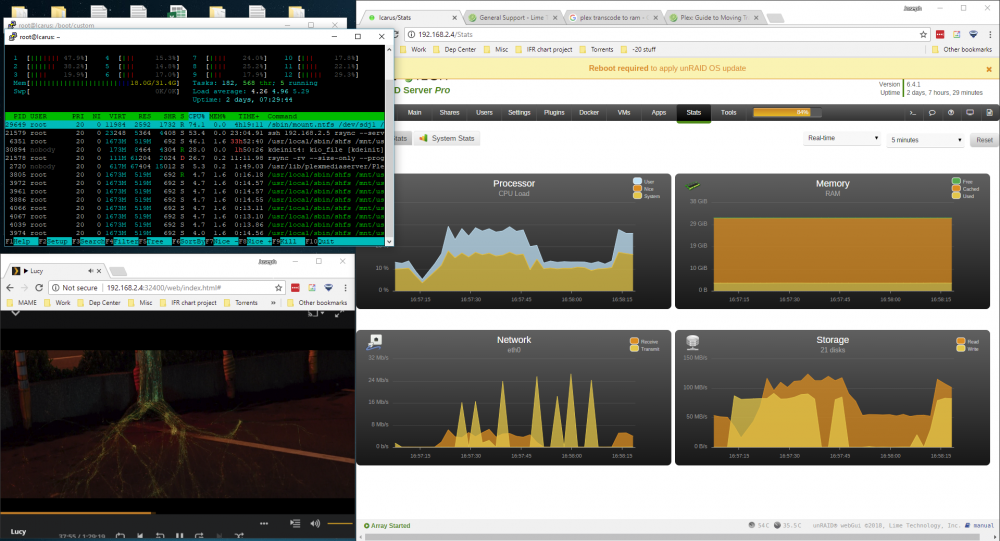
Since doing this i keep getting: errors about low disk space unable to convert. I have 32 gb of ram and htop reports 22 gb in use. However when i look at my logs i see: Mar 17, 2018 16:50:33.422 [0x14c7793fd700] WARN - Low disk space: 176.4MB source file, 15.64GB capacity, 252.42MB available on "/transcode/Transcode/Sessions" Which makes ZERO sense. anyone have any tips or ideas? EDIT: I guess this no longer works without doing manual changes to the docker which will be wiped with each update.

-
thank you CHBMB, this fixed it! you rock.
-
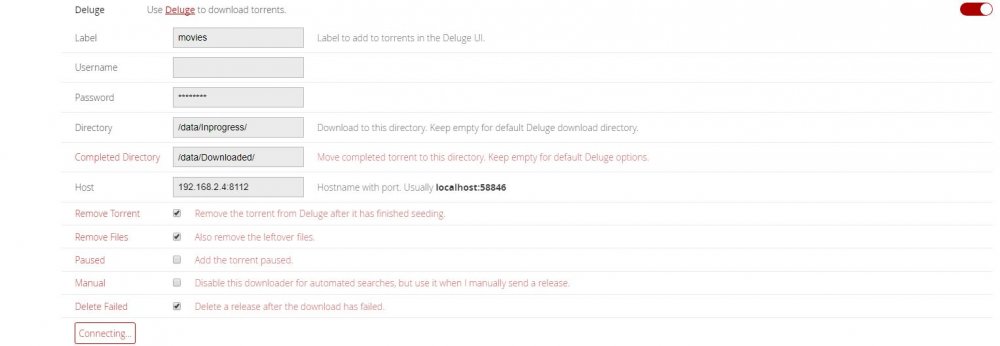
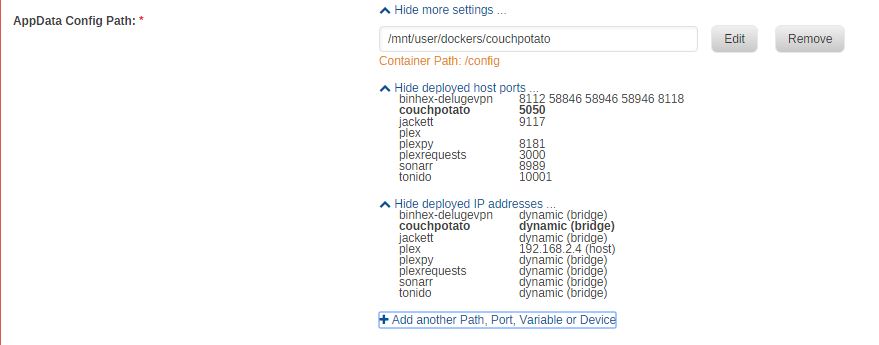
here are my mappings
-
hhaha
-
I counted it (25 posts per page) and quoted above. its the post about disabling Privoxy. Which in my case didnt help.
-
CP RunCMD root@localhost:# /usr/local/emhttp/plugins/dynamix.docker.manager/scripts/docker run -d --name='couchpotato' --net='bridge' --privileged=true -e TZ="America/Chicago" -e HOST_OS="unRAID" -e 'PUID'='99' -e 'PGID'='100' -p '5050:5050/tcp' -v '/mnt/user/Downloading/':'/downloads':'rw' -v '/mnt/user/Data/Movies/':'/movies':'rw' -v '/mnt/user':'/unraid':'rw' -v '/mnt/user/Downloading/':'/data':'rw' -v '/mnt/user/dockers/couchpotato':'/config':'rw' 'linuxserver/couchpotato' 05b44fde914c33cebbe1eff70677b2c58386c7f32aa8ab364756001901f676f3 The command finished successfully! root@05b44fde914c:/app/couchpotato$ ifconfig eth0 Link encap:Ethernet HWaddr 02:42:AC:11:00:07 inet addr:172.17.0.7 Bcast:0.0.0.0 Mask:255.255.0.0 UP BROADCAST RUNNING MULTICAST MTU:1500 Metric:1 RX packets:434 errors:0 dropped:0 overruns:0 frame:0 TX packets:270 errors:0 dropped:0 overruns:0 carrier:0 collisions:0 txqueuelen:0 RX bytes:215147 (210.1 KiB) TX bytes:279251 (272.7 KiB) lo Link encap:Local Loopback inet addr:127.0.0.1 Mask:255.0.0.0 UP LOOPBACK RUNNING MTU:65536 Metric:1 RX packets:0 errors:0 dropped:0 overruns:0 frame:0 TX packets:0 errors:0 dropped:0 overruns:0 carrier:0 collisions:0 txqueuelen:1000 RX bytes:0 (0.0 B) TX bytes:0 (0.0 B)
-
Deluge runcmd root@localhost:# /usr/local/emhttp/plugins/dynamix.docker.manager/scripts/docker run -d --name='binhex-delugevpn' --net='bridge' --privileged=true -e TZ="America/Chicago" -e HOST_OS="unRAID" -e 'VPN_ENABLED'='yes' -e 'VPN_USER'='xxxxxxx' -e 'VPN_PASS'='xxxxxxx' -e 'VPN_PROV'='pia' -e 'VPN_OPTIONS'='' -e 'STRICT_PORT_FORWARD'='yes' -e 'ENABLE_PRIVOXY'='no' -e 'LAN_NETWORK'='192.168.2.0/24' -e 'NAME_SERVERS'='209.222.18.222,37.235.1.174,8.8.8.8,209.222.18.218,37.235.1.177,8.8.4.4' -e 'DEBUG'='false' -e 'UMASK'='000' -e 'PUID'='99' -e 'PGID'='100' -p '8112:8112/tcp' -p '58846:58846/tcp' -p '58946:58946/tcp' -p '58946:58946/udp' -p '8118:8118/tcp' -v '/mnt/user/Downloading/':'/data':'rw' -v '/mnt/user':'/unraid':'rw' -v '/mnt/user/dockers/binhex-delugevpn':'/config':'rw' 'binhex/arch-delugevpn' 010f00bbe6c6457c923364c484eec4415354336df6a4ff92e7915728c11de25b AND IFCONFIG [root@010f00bbe6c6 /]# ifconfig eth0: flags=4163<UP,BROADCAST,RUNNING,MULTICAST> mtu 1500 inet 172.17.0.8 netmask 255.255.0.0 broadcast 0.0.0.0 ether 02:42:ac:11:00:08 txqueuelen 0 (Ethernet) RX packets 1487 bytes 1099117 (1.0 MiB) RX errors 0 dropped 0 overruns 0 frame 0 TX packets 1019 bytes 541224 (528.5 KiB) TX errors 0 dropped 0 overruns 0 carrier 0 collisions 0 lo: flags=73<UP,LOOPBACK,RUNNING> mtu 65536 inet 127.0.0.1 netmask 255.0.0.0 loop txqueuelen 1000 (Local Loopback) RX packets 639 bytes 167655 (163.7 KiB) RX errors 0 dropped 0 overruns 0 frame 0 TX packets 639 bytes 167655 (163.7 KiB) TX errors 0 dropped 0 overruns 0 carrier 0 collisions 0 tun0: flags=4305<UP,POINTOPOINT,RUNNING,NOARP,MULTICAST> mtu 1500 inet xx.x.xx.xx netmask 255.255.255.255 destination xx.x.xx.x unspec 00-00-00-00-00-00-00-00-00-00-00-00-00-00-00-00 txqueuelen 100 (UNSPEC) RX packets 32 bytes 3050 (2.9 KiB) RX errors 0 dropped 0 overruns 0 frame 0 TX packets 237 bytes 34661 (33.8 KiB) TX errors 0 dropped 0 overruns 0 carrier 0 collisions 0
-
correct
-
this is post 154
-
that gives an instant connection failed whereas the "good ip" takes forever to not work lol
-
your signature is Sent from my LG-H815 using Tapatalk
-
how can i view the docker run command? I normally just let the webgui do it.
-
sadly that didnt fix it.
-
that was oddly specific lol thanx
-
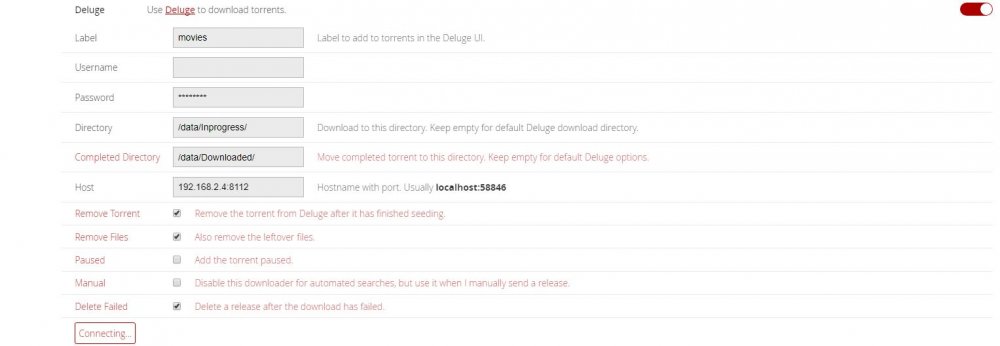
is there a trick to get CP to work with Binhex-deluge ? It will not connect! It will however use backhole but then i lose automation... It doesnt connect and says check logs, which are empty... I have tried: localhost:8112 127.0.0.1:8112 192.168.2.4:8112
-
I have this error repeatly rapidly in my logs, 11 pages in under 5 mins......
-
Wow i am so stupid..... I fixed mine.... make sure your on the right subnet. AKA Docker was set to 192.168.1.0 and i am on 192.168.2.0
-
If i disable the vpn in the params it boots up fine. Which of course defeats the purpose of using this docker lol.
-
Always here is the output from deluge.log [iNFO ] 12:15:15 configmanager:70 Setting config directory to: /config [iNFO ] 12:15:15 daemon:124 Deluge daemon 1.3.13 [iNFO ] 12:15:15 configmanager:70 Setting config directory to: /config [iNFO ] 12:15:15 core:85 Starting libtorrent 1.0.9.0 session.. [WARNING ] 12:15:15 core:192 Failed to load lt state: [Errno 2] No such file or directory: '/config/session.state' [iNFO ] 12:15:15 rpcserver:367 Starting DelugeRPC server localhost:58846 [WARNING ] 12:15:15 preferencesmanager:303 Unable to read DHT state file: [Errno 2] No such file or directory: '/config/dht.state' [iNFO ] 12:15:18 torrentmanager:650 Successfully loaded state file: /config/state/torrents.state [iNFO ] 12:15:18 rpcserver:204 Deluge Client connection made from: 127.0.0.1:34210 [iNFO ] 12:15:18 rpcserver:204 Deluge Client connection made from: 127.0.0.1:34212 [iNFO ] 12:15:18 rpcserver:224 Deluge client disconnected: Connection to the other side was lost in a non-clean fashion: Connection lost. [iNFO ] 12:15:18 rpcserver:204 Deluge Client connection made from: 127.0.0.1:34304 [iNFO ] 12:15:18 rpcserver:224 Deluge client disconnected: Connection to the other side was lost in a non-clean fashion: Connection lost.
-
ErrorWarningSystemArrayLogin 2016-10-27 18:43:32.362107 [info] Starting Supervisor... 2016-10-27 18:43:32,678 CRIT Set uid to user 0 2016-10-27 18:43:32,678 INFO Included extra file "/etc/supervisor/conf.d/delugevpn.conf" during parsing 2016-10-27 18:43:32,684 INFO supervisord started with pid 1 2016-10-27 18:43:33,686 INFO spawned: 'start-script' with pid 110 2016-10-27 18:43:33,690 INFO spawned: 'webui-script' with pid 111 2016-10-27 18:43:33,693 INFO spawned: 'deluge-script' with pid 112 2016-10-27 18:43:33,696 INFO spawned: 'privoxy-script' with pid 113 2016-10-27 18:43:33,703 DEBG 'start-script' stdout output: [info] VPN is enabled, beginning configuration of VPN 2016-10-27 18:43:33,703 INFO success: start-script entered RUNNING state, process has stayed up for > than 0 seconds (startsecs) 2016-10-27 18:43:33,703 INFO success: webui-script entered RUNNING state, process has stayed up for > than 0 seconds (startsecs) 2016-10-27 18:43:33,704 INFO success: deluge-script entered RUNNING state, process has stayed up for > than 0 seconds (startsecs) 2016-10-27 18:43:33,704 INFO success: privoxy-script entered RUNNING state, process has stayed up for > than 0 seconds (startsecs) 2016-10-27 18:43:33,707 DEBG 'deluge-script' stdout output: [info] deluge config file already exists, skipping copy 2016-10-27 18:43:33,708 DEBG 'deluge-script' stdout output: [info] VPN is enabled, checking VPN tunnel local ip is valid 2016-10-27 18:43:33,710 DEBG 'privoxy-script' stdout output: [info] Privoxy set to disabled 2016-10-27 18:43:33,711 DEBG fd 22 closed, stopped monitoring <POutputDispatcher at 47683840451072 for <Subprocess at 47683840325464 with name privoxy-script in state RUNNING> (stdout)> 2016-10-27 18:43:33,711 DEBG fd 26 closed, stopped monitoring <POutputDispatcher at 47683840451504 for <Subprocess at 47683840325464 with name privoxy-script in state RUNNING> (stderr)> 2016-10-27 18:43:33,712 INFO exited: privoxy-script (exit status 0; expected) 2016-10-27 18:43:33,712 DEBG received SIGCLD indicating a child quit 2016-10-27 18:43:33,715 DEBG 'start-script' stdout output: [info] VPN strong certs defined, copying to /config/openvpn/... 2016-10-27 18:43:33,723 DEBG 'start-script' stdout output: [debug] Environment variables defined as follows 2016-10-27 18:43:33,723 DEBG 'start-script' stdout output: BASH=/bin/bash BASHOPTS=cmdhist:complete_fullquote:extquote:force_fignore:hostcomplete:interactive_comments:progcomp:promptvars:sourcepath BASH_ALIASES=() BASH_ARGC=() BASH_ARGV=() BASH_CMDS=() BASH_LINENO=([0]="0") BASH_SOURCE=([0]="/root/start.sh") BASH_VERSINFO=([0]="4" [1]="3" [2]="42" [3]="1" [4]="release" [5]="x86_64-unknown-linux-gnu") BASH_VERSION='4.3.42(1)-release' DEBUG=true DIRSTACK=() ENABLE_PRIVOXY=false EUID=0 ) HOME=/home/nobody HOSTNAME=be363c89dfff HOSTTYPE=x86_64 HOST_OS=unRAID IFS=$' \t\n' LANG=en_GB.UTF-8 LAN_NETWORK=192.168.1.0/24 MACHTYPE=x86_64-unknown-linux-gnu NAME_SERVERS=8.8.8.8,37.235.1.174,8.8.4.4,37.235.1.177 OPTERR=1 OPTIND=1 OSTYPE=linux-gnu PATH=/usr/local/sbin:/usr/local/bin:/usr/sbin:/usr/bin:/sbin:/bin PGID=100 PIPESTATUS=([0]="0") PPID=1 PS4='+ ' PUID=99 PWD=/ SHELL=/bin/bash SHELLOPTS=braceexpand:hashall:interactive-comments SHLVL=1 STRONG_CERTS=yes SUPERVISOR_ENABLED=1 SUPERVISOR_GROUP_NAME=start-script SUPERVISOR_PROCESS_NAME=start-script TERM=xterm TZ=America/Denver UID=0 VPN_CONFIG=/config/openvpn/openvpn.ovpn VPN_DEVICE_TYPE=tun VPN_ENABLED=yes VPN_PASS=XXXXXXXXXXXXXXX VPN_PORT=1198 VPN_PROTOCOL=udp VPN_PROV=pia VPN_REMOTE=nl.privateinternetaccess.com VPN_USER=XXXXXXXXXXXXX _='[debug] Environment variables defined as follows' [debug] Directory listing of files in /config/openvpn as follows 2016-10-27 18:43:33,730 DEBG 'start-script' stdout output: total 12 drwxrwxrwx 1 nobody users 73 Oct 27 18:43 . drwxrwxr-x 1 nobody users 266 Oct 27 18:41 .. -rwxr-xr-x 1 root root 2719 Oct 27 18:43 ca.rsa.4096.crt -rwxr-xr-x 1 root root 1214 Oct 27 18:43 crl.rsa.4096.pem -rwxr-xr-x 1 root root 223 Oct 27 18:43 openvpn.ovpn 2016-10-27 18:43:33,730 DEBG 'start-script' stdout output: [debug] Contents of ovpn file /config/openvpn/openvpn.ovpn as follows... 2016-10-27 18:43:33,732 DEBG 'start-script' stdout output: client dev tun resolv-retry infinite nobind persist-key cipher aes-256-cbc auth sha256 tls-client remote-cert-tls server auth-user-pass comp-lzo verb 1 reneg-sec 0 crl-verify crl.rsa.4096.pem ca ca.rsa.4096.crt disable-occ 2016-10-27 18:43:33,732 DEBG 'start-script' stdout output: [info] VPN config file (ovpn extension) is located at /config/openvpn/openvpn.ovpn 2016-10-27 18:43:33,737 DEBG 'start-script' stdout output: [warn] VPN provider remote port incorrect, overriding to 1197 2016-10-27 18:43:33,819 DEBG 'start-script' stdout output: [info] Default route for container is 172.17.0.1 [info] Setting permissions recursively on /config/openvpn... 2016-10-27 18:43:33,830 DEBG 'start-script' stdout output: [info] Adding 8.8.8.8 to /etc/resolv.conf 2016-10-27 18:43:33,837 DEBG 'start-script' stdout output: [info] Adding 37.235.1.174 to /etc/resolv.conf 2016-10-27 18:43:33,843 DEBG 'start-script' stdout output: [info] Adding 8.8.4.4 to /etc/resolv.conf 2016-10-27 18:43:33,850 DEBG 'start-script' stdout output: [info] Adding 37.235.1.177 to /etc/resolv.conf 2016-10-27 18:43:33,850 DEBG 'start-script' stdout output: [debug] Show name servers defined for container 2016-10-27 18:43:33,851 DEBG 'start-script' stdout output: # Generated entries: nameserver 8.8.8.8 nameserver 192.168.2.1 nameserver 8.8.4.4 nameserver 8.8.8.8 nameserver 37.235.1.174 nameserver 8.8.4.4 nameserver 37.235.1.177 2016-10-27 18:43:33,851 DEBG 'start-script' stdout output: [debug] Show name resolution for VPN endpoint nl.privateinternetaccess.com 2016-10-27 18:43:34,059 DEBG 'start-script' stdout output: ;; ->>HEADER<<- opcode: QUERY, rcode: NOERROR, id: 51687 ;; flags: qr rd ra ; QUERY: 1, ANSWER: 13, AUTHORITY: 0, ADDITIONAL: 0 ;; QUESTION SECTION: ;; nl.privateinternetaccess.com. IN A ;; ANSWER SECTION: nl.privateinternetaccess.com. 300 IN A 46.166.138.169 nl.privateinternetaccess.com. 300 IN A 46.166.186.236 nl.privateinternetaccess.com. 300 IN A 109.201.152.227 nl.privateinternetaccess.com. 300 IN A 109.201.138.248 nl.privateinternetaccess.com. 300 IN A 109.201.154.144 nl.privateinternetaccess.com. 300 IN A 46.166.186.219 nl.privateinternetaccess.com. 300 IN A 46.166.190.191 nl.privateinternetaccess.com. 300 IN A 46.166.138.152 nl.privateinternetaccess.com. 300 IN A 46.166.137.240 nl.privateinternetaccess.com. 300 IN A 46.166.137.228 nl.privateinternetaccess.com. 300 IN A 46.166.138.131 nl.privateinternetaccess.com. 300 IN A 46.166.138.157 nl.privateinternetaccess.com. 300 IN A 46.166.138.138 ;; AUTHORITY SECTION: ;; ADDITIONAL SECTION: ;; Query time: 204 msec ;; SERVER: 37.235.1.177 ;; WHEN: Thu Oct 27 18:43:33 2016 ;; MSG SIZE rcvd: 254 2016-10-27 18:43:34,066 DEBG 'start-script' stdout output: [info] Adding 192.168.1.0/24 as route via docker eth0 2016-10-27 18:43:34,067 DEBG 'start-script' stdout output: [info] ip route defined as follows... -------------------- 2016-10-27 18:43:34,069 DEBG 'start-script' stdout output: default via 172.17.0.1 dev eth0 172.17.0.0/16 dev eth0 proto kernel scope link src 172.17.0.2 192.168.1.0/24 via 172.17.0.1 dev eth0 2016-10-27 18:43:34,069 DEBG 'start-script' stdout output: -------------------- 2016-10-27 18:43:34,075 DEBG 'start-script' stdout output: [debug] Modules currently loaded for kernel 2016-10-27 18:43:34,077 DEBG 'start-script' stdout output: Module Size Used by md_mod 36275 11 tun 16556 0 xt_nat 1849 4 veth 4665 0 ipt_MASQUERADE 1213 5 nf_nat_masquerade_ipv4 1865 1 ipt_MASQUERADE iptable_nat 1831 1 nf_conntrack_ipv4 5810 2 nf_nat_ipv4 4327 1 iptable_nat iptable_filter 1528 2 ip_tables 9422 2 iptable_filter,iptable_nat nf_nat 9852 3 nf_nat_ipv4,xt_nat,nf_nat_masquerade_ipv4 forcedeth 48700 0 kvm_amd 45452 0 kvm 268324 1 kvm_amd k10temp 2932 0 sata_mv 23743 11 sata_nv 18882 1 pata_amd 10543 0 acpi_cpufreq 6306 0 2016-10-27 18:43:34,077 DEBG 'start-script' stdout output: [info] iptable_mangle module not supported, attempting to load... 2016-10-27 18:43:34,079 DEBG 'start-script' stderr output: modprobe: FATAL: Module iptable_mangle not found in directory /lib/modules/4.4.26-unRAID 2016-10-27 18:43:34,080 DEBG 'start-script' stdout output: [warn] iptable_mangle module not supported, you will not be able to connect to Deluge webui or Privoxy outside of your LAN 2016-10-27 18:43:34,128 DEBG 'start-script' stdout output: [info] iptables defined as follows... -------------------- 2016-10-27 18:43:34,130 DEBG 'start-script' stdout output: -P INPUT DROP -P FORWARD ACCEPT -P OUTPUT DROP -A INPUT -i tun0 -j ACCEPT -A INPUT -s 172.17.0.0/16 -d 172.17.0.0/16 -j ACCEPT -A INPUT -i eth0 -p udp -m udp --sport 1197 -j ACCEPT -A INPUT -i eth0 -p tcp -m tcp --dport 8112 -j ACCEPT -A INPUT -i eth0 -p tcp -m tcp --sport 8112 -j ACCEPT -A INPUT -s 192.168.1.0/24 -i eth0 -p tcp -m tcp --dport 58846 -j ACCEPT -A INPUT -p udp -m udp --sport 53 -j ACCEPT -A INPUT -p icmp -m icmp --icmp-type 0 -j ACCEPT -A INPUT -i lo -j ACCEPT -A OUTPUT -o tun0 -j ACCEPT -A OUTPUT -s 172.17.0.0/16 -d 172.17.0.0/16 -j ACCEPT -A OUTPUT -o eth0 -p udp -m udp --dport 1197 -j ACCEPT -A OUTPUT -o eth0 -p tcp -m tcp --dport 8112 -j ACCEPT -A OUTPUT -o eth0 -p tcp -m tcp --sport 8112 -j ACCEPT -A OUTPUT -d 192.168.1.0/24 -o eth0 -p tcp -m tcp --sport 58846 -j ACCEPT -A OUTPUT -p udp -m udp --dport 53 -j ACCEPT -A OUTPUT -p icmp -m icmp --icmp-type 8 -j ACCEPT -A OUTPUT -o lo -j ACCEPT 2016-10-27 18:43:34,130 DEBG 'start-script' stdout output: -------------------- [info] Starting OpenVPN... 2016-10-27 18:43:34,143 DEBG 'start-script' stdout output: Thu Oct 27 18:43:34 2016 OpenVPN 2.3.11 x86_64-unknown-linux-gnu [sSL (OpenSSL)] [LZO] [EPOLL] [MH] [iPv6] built on May 12 2016 Thu Oct 27 18:43:34 2016 library versions: OpenSSL 1.0.2h 3 May 2016, LZO 2.09 Thu Oct 27 18:43:34 2016 WARNING: file 'credentials.conf' is group or others accessible 2016-10-27 18:43:34,143 DEBG 'start-script' stdout output: Thu Oct 27 18:43:34 2016 WARNING: No server certificate verification method has been enabled. See http://openvpn.net/howto.html#mitm for more info. 2016-10-27 18:43:34,199 DEBG 'start-script' stdout output: Thu Oct 27 18:43:34 2016 UDPv4 link local: [undef] Thu Oct 27 18:43:34 2016 UDPv4 link remote: [AF_INET]109.201.152.226:1197 2016-10-27 18:43:35,177 DEBG 'start-script' stdout output: Thu Oct 27 18:43:35 2016 [237dce7889fc9a964f36f065f7e6cd4e] Peer Connection Initiated with [AF_INET]109.201.152.226:1197 2016-10-27 18:43:37,433 DEBG 'start-script' stdout output: Thu Oct 27 18:43:37 2016 TUN/TAP device tun0 opened Thu Oct 27 18:43:37 2016 do_ifconfig, tt->ipv6=0, tt->did_ifconfig_ipv6_setup=0 Thu Oct 27 18:43:37 2016 /usr/bin/ip link set dev tun0 up mtu 1500 2016-10-27 18:43:37,434 DEBG 'start-script' stdout output: Thu Oct 27 18:43:37 2016 /usr/bin/ip addr add dev tun0 local 10.38.10.6 peer 10.38.10.5 2016-10-27 18:43:37,441 DEBG 'start-script' stdout output: Thu Oct 27 18:43:37 2016 Initialization Sequence Completed 2016-10-27 18:43:37,493 DEBG 'deluge-script' stdout output: [info] Deluge daemon not running, marking as first run 2016-10-27 18:43:39,111 DEBG 'deluge-script' stdout output: [info] All checks complete, starting Deluge... 2016-10-27 18:43:39,369 INFO reaped unknown pid 653 2016-10-27 18:43:39,369 DEBG received SIGCLD indicating a child quit 2016-10-27 18:43:39,850 DEBG 'webui-script' stdout output: [info] Starting Deluge webui... 2016-10-27 18:43:40,324 DEBG 'deluge-script' stdout output: Setting random_port to False.. Configuration value successfully updated. 2016-10-27 18:43:40,874 DEBG 'deluge-script' stdout output: Setting listen_ports to (29460, 29460).. Configuration value successfully updated. 2016-10-27 18:43:40,927 DEBG 'deluge-script' stdout output: [debug] VPN incoming port is 29460 [debug] Deluge incoming port is 29460 [debug] VPN IP is 10.X.X.X [debug] Deluge IP is 10.X.X.X [debug] Sleeping for 10 mins before rechecking listen interface and port (port checking is for PIA only)
-
I had to reinstall this docker due to an issue i created lol. Anyway it will not start and it is stuck The log is below: 2016-10-27 18:43:39,369 INFO reaped unknown pid 653 2016-10-27 18:43:39,369 DEBG received SIGCLD indicating a child quit 2016-10-27 18:43:39,850 DEBG 'webui-script' stdout output: [info] Starting Deluge webui... 2016-10-27 18:43:40,324 DEBG 'deluge-script' stdout output: Setting random_port to False.. Configuration value successfully updated. 2016-10-27 18:43:40,874 DEBG 'deluge-script' stdout output: Setting listen_ports to (29460, 29460).. Configuration value successfully updated. 2016-10-27 18:43:40,927 DEBG 'deluge-script' stdout output: [debug] VPN incoming port is 29460 [debug] Deluge incoming port is 29460 [debug] VPN IP is 10.X.X.X [debug] Deluge IP is 10.X.X.X [debug] Sleeping for 10 mins before rechecking listen interface and port (port checking is for PIA only) Any tips to access the web gui?
-
is there a updated/better version of cache dir?
-
I like the new For System Builders slide show!


