





mikey6283
Members
-
Joined
-
Last visited
Everything posted by mikey6283
-
I followed you instruction I believe everything is on pool? Should i change the appdata to Yes or leave on Prefer as the error message is still there after reboot?

-
If the appdata share is not set to be cache-only, then the mover program will cause your docker applications to become inoperable when it runs (6.1.x). Under 6.2+, this setting should not affect the operation of the application, but it will definitely impact significantly the performance of the application. Fix it via I have my appdata set to Yes, yet i have the above response. Is there a solution?
-
This is sound advice i have spent weeks trying to sort out broken ffmep error . I use the hwaccel _args using the one for intel below <10th Gen which my system is run on until i noticed that you were using the same Chip i5-6500 so i tried your solution voila it work. leaving well alone for awhile before adding other cameras and tweeking. Thanks
-
Thank that fixed it , I only downloaded vfio-pci.cfg to see if there was a way to delete the original . Obviously i made it worst. Thanks i now see the TPU running now to sort out my config and FFMPEG For inforamtion only i binded the TPU in TOOL-> System Devices originally as i am struggling with Docker Frigate as it is Frigate is running in HASSIO but on CPU. so i was trying to,load the TPU's in a VM
-
Diagnostics as requested. Thanks tower-diagnostics-20211122-1743.zip
-
correction The script is incorrect i used /sys/bus/pci/drivers/vfio-pci/unbind
-
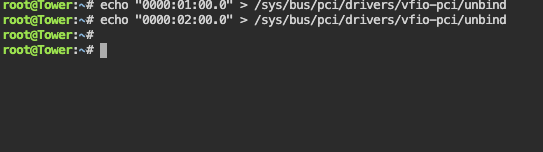
The answer is there Yes I saw this post and unchecked the TPU in Dveice and rebooted . I also tried to unbind by echo "0000:01:00.0" > /sys/user/pci/drivers/vfio-pci/unbind. however, its not unbinding. I have tried this numerous times

-
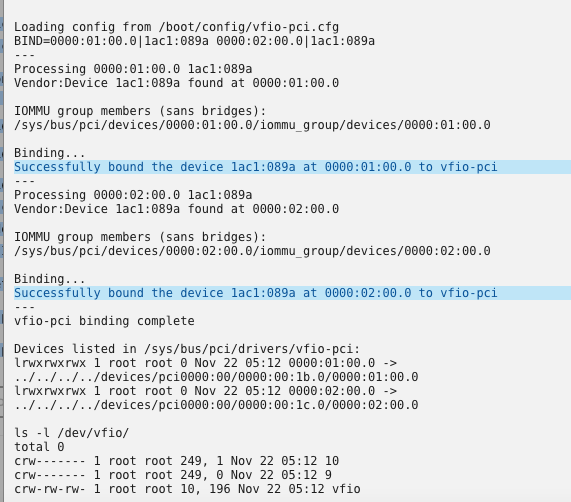
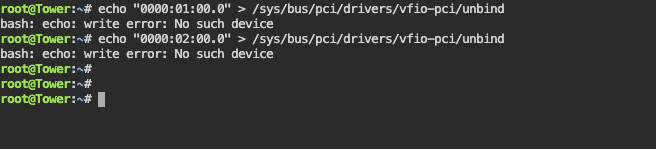
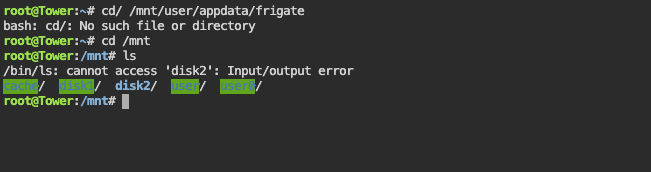
yayitazale Do you have the array started an working on unraid? It looks like you have some failure on disk2. Did you change the bind point to the array share or you are writting still directly to the disk? Thanks you are correct i have a faulty disk in my array so i have removed it and had to set up my unraid. Now the coral drivers are not loaded. there seem to be a problem as i cannot click on the logo to see if they are running just. I understand that my TPU are binded to Vfio-pci . I have tried to unbind them without success, any points how to unbind them. I have laso rebooted but nothing is happening. I await your comments thanks
-
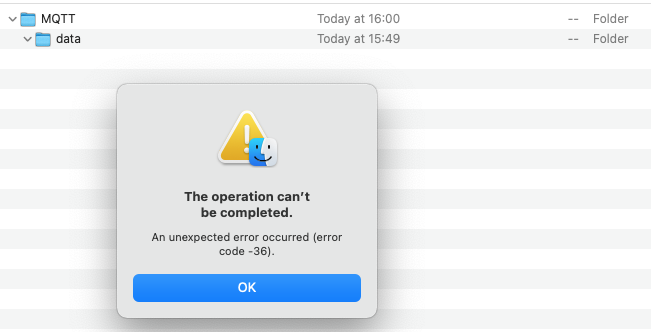
I have had to install Frigate/ Mgtt plugin again as they both stopped working. Now I am unable to get Spants Mgtt to statr and Frigate seems not to be configure correctly. when I try to insert my config thru smb I am unable to insert it due to the diretory for Frigate is not there. Instead MQTT is there . If i try thru the terminal I have the same error Input/Output as MQTT. Any advise would be appreciated.
-
I have just downloaded Spants /MQTT again after mqtt and frigate container stoped and will not start. I have no idea why this is happened . I would be grateful for any advice on how to solve this. Tried the web etc without any luck.

-
Hi I have checked VLC and i can see the image however only with rtsp:// admin: xxxx. I will try on blakeblackshear github thanks for replay
-
I keep on getting these RTMP errors [2021-11-20 16:48:56] watchdog.garage_driveway ERROR : You may have invalid args defined for this camera. [2021-11-20 16:48:56] ffmpeg.garage_driveway.detect ERROR : [rtsp @ 0x55eb04b9aa80] method DESCRIBE failed: 401 Unauthorized [2021-11-20 16:48:56] ffmpeg.garage_driveway.detect ERROR : rtsp://192.168.0.51/flv?port=1935&app=bcs&stream=channel0_ext.bcs&user=admin&password=Garage1: Server returned 401 Unauthorized (authorization failed) [2021-11-20 16:48:56] ffmpeg.front_driveway.record_rtmp ERROR : [rtsp @ 0x561e264f8e80] method DESCRIBE failed: 401 Unauthorized [2021-11-20 16:48:56] ffmpeg.front_driveway.record_rtmp ERROR : rtsp://192.168.0.48/flv?port=1935&app=bcs&stream=channel0_main.bcs&user=admin&password=Front1: Server returned 401 Unauthorized (authorization failed) [2021-11-20 16:48:56] watchdog.front_driveway INFO : Terminating the existing ffmpeg process... [2021-11-20 16:48:56] watchdog.front_driveway INFO : Waiting for ffmpeg to exit gracefully... [2021-11-20 16:48:56] ffmpeg.garage_driveway.record_rtmp ERROR : [rtsp @ 0x55c266776e80] method DESCRIBE failed: 401 Unauthorized [2021-11-20 16:48:56] ffmpeg.garage_driveway.record_rtmp ERROR : rtsp://192.168.0.51/flv?port=1935&app=bcs&stream=channel0_main.bcs&user=admin&password=Garage1: Server returned 401 Unauthorized (authorization failed) [2021-11-20 16:48:56] watchdog.garage_driveway INFO : Terminating the existing ffmpeg process... [2021-11-20 16:48:56] watchdog.garage_driveway INFO : Waiting for ffmpeg to exit gracefully... [2021-11-20 16:48:56] frigate.video INFO : front_driveway: ffmpeg sent a broken frame. memoryview assignment: lvalue and rvalue have different structures [2021-11-20 16:48:56] frigate.video INFO : front_driveway: ffmpeg process is not running. exiting capture thread... [2021-11-20 16:48:56] frigate.video INFO : garage_driveway: ffmpeg sent a broken frame. memoryview assignment: lvalue and rvalue have different structures [2021-11-20 16:48:56] frigate.video INFO : garage_driveway: ffmpeg process is not running. exiting capture thread... Config is as follows : I initially had the path as http://reolink_ 192.168 XXXX but i was getting the same errors. Running TPU.
-
SaveIIm hi if you go to PI Hut https://thepihut.com/products/google-coral-m-2-accelerator-a-e-key they have some in stock they may be able to help.
-
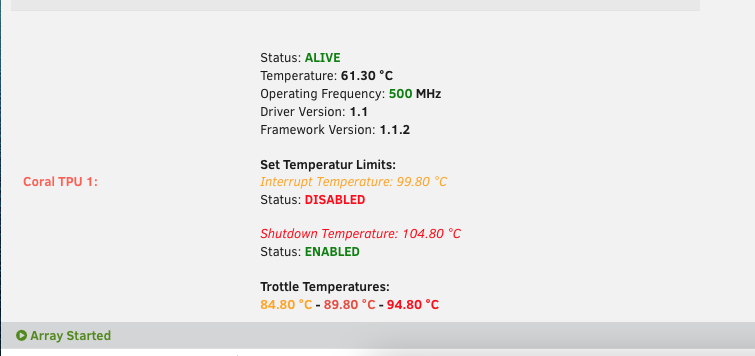
ich777 thanks for the confirmation . I had read in various post that you could only use 1 lane , however i took a chance as the other unit were out of stock at the time and some thing is better than nothing but still struggling to get it right. I will get there in the end. At one point i had it working in Proxmox for a while unRaid is a friendlier system for a newbie. So the edgetpu will work with 1 lane in a m2 slot as it is found by the software? thanks again
-
Hi yayitazale Yes i did install the drivers from unraid and are installed As i have seem that TPU is installed and found . I have PCI Dual edgetpu installed, I realize that i will be only able to use 1 unit. Thanks for the reply , i have followed your instruction and made the adjustment and I have looked at the link provide previously however I have a different error regarding mqtt ? I am unable to solve this config as i have serval time in the last hour. If and when i am to get Frigate working how can storage the clips and recordings to disks 2 in my array would the path be /mnt/disks2/frigate/clips /mnt/disks/frigate/recordings to path /media/frigate ? or something elsee [s6-init] making user provided files available at /var/run/s6/etc...exited 0. [s6-init] ensuring user provided files have correct perms...exited 0. [fix-attrs.d] applying ownership & permissions fixes... [fix-attrs.d] done. [cont-init.d] executing container initialization scripts... [cont-init.d] done. [services.d] starting services [services.d] done. [2021-11-18 19:11:01] frigate.app INFO : Starting Frigate (0.9.4-26ae608) ************************************************************* ************************************************************* *** Your config file is not valid! *** *** Please check the docs at *** *** https://docs.frigate.video/configuration/index *** ************************************************************* ************************************************************* *** Config Validation Errors *** ************************************************************* 4 validation errors for FrigateConfig mqtt field required (type=value_error.missing) detectors -> mqtt -> host extra fields not permitted (type=value_error.extra) detectors -> mqtt -> password extra fields not permitted (type=value_error.extra) detectors -> mqtt -> user extra fields not permitted (type=value_error.extra) ************************************************************* *** End Config Validation Errors *** ************************************************************* [cmd] python3 exited 1 [cont-finish.d] executing container finish scripts... [cont-finish.d] done. [s6-finish] waiting for services. [s6-finish] sending all processes the TERM signal. [s6-finish] sending all processes the KILL signal and exiting. mqtt: host: 192.168.0.81 # user: mikey # password: mqtt6283 detectors: coral: type: edgetpu device: pci database: path: /media/frigate/frigate.db cameras: front_driveway: ffmpeg: hwaccel_args: - -hwaccel - vaapi - -hwaccel_device - /dev/dri/renderD128 - -hwaccel_output_format - yuv420p input_args: - -avoid_negative_ts - make_zero - -fflags - nobuffer+genpts+discardcorrupt - -flags - low_delay - -strict - experimental - -analyzeduration - 1000M - -probesize - 1000M - -rw_timeout - "5000000" inputs: - path: http://reolink_192.168.0.48/flv?port=1935&app=bcs&stream=channel0_main.bcs&user=admin&password=Front1 roles: - record - rtmp - path: http://reolink_192.168.0.48/flv?port=1935&app=bcs&stream=channel0_ext.bcs&user=admin&password=Front1 roles: - detect detect: width: 640 height: 480 fps: 7 garage_driveway: ffmpeg: hwaccel_args: - -hwaccel - vaapi - -hwaccel_device - /dev/dri/renderD128 - -hwaccel_output_format - yuv420p input_args: - -avoid_negative_ts - make_zero - -fflags - nobuffer+genpts+discardcorrupt - -flags - low_delay - -strict - experimental - -analyzeduration - 1000M - -probesize - 1000M - -rw_timeout - "5000000" inputs: - path: http://reolink_192.168.0.51/flv?port=1935&app=bcs&stream=channel0_main.bcs&user=admin&password=Garage roles: - record - rtmp - path: http://reolink_192.168.0.51/flv?port=1935&app=bcs&stream=channel0_ext.bcs&user=admin&password=Garage1 roles: - detect output_args: record: -f segment -segment_time 60 -segment_format mp4 -reset_timestamps 1 -strftime 1 -c copy detect: width: 640 height: 480 fps: 7 record: enabled: True retain_days: 0 events: retain: default: 10
-
Hi just started with unRaid a total newbie i am having many problems with the Edge TPU creating many errors regarding ffmeg. I have started off with a simple config which works with the CPU but not with the Coral TPU. i have created configs for my type of camera Reolink as per the Frigate information with out success. i have attached error report from unraid dockers logs and config.yml any help would be appreciated. Frigate ffmpeg error.rtf config.yml


