






Andrea P.
Members
-
Joined
-
Last visited
-
Yeah, thank both of you. I still have Unraid stopped and "frozen". I tried to remove a disk and attach it to a different PC to try some recovery, however I'm partially prone to delete everything and restart. The files I found after the software analysis are totally without structure, so no folders, no filenames (not even partial). Surely, I recovered all the really critical stuff thanks to the recycle bin in the old Qnap that I used as timed backup, because the ignorant Rsync I set up deleted everything in there too, but fortunately Qnap moved all the deleted files to its bin. All the other old archives aren't critical, and it will be a pain to rebuild them. First because I'd need additional storage to do the recovery, and I don't have it (maybe I could remove one of the two Parity HDDs I use in Unraid, but it's still too little). Then, I could end up with hundreds of old copies, and/or partially unreadable pieces, so I'm really discouraged and I'm leaving all the stuff as it is right now. Well, I'd say to close the topic and mark it as solved, at least I learned a thing or two about the risks with mounting folders in the Dockers... damn, that Docker update got me by surprise...
-
So, let's say that probably / almost certainly the Nextcloud update caused that mess. Of course, it's my fault for having installed it so easily, thinking that a Docker container could be relatively safe as a QNAP app on my former NAS... Now, what can I do to try a restore / undelete? Surely the files didn't move to any recycle bin. In my old, myopic understanding, they're still on the HDDs, just marked as "deleted" and their space marked as available for reuse (of course, some block could have been overwritten, no problem about that). Is there any tool / terminal command I can use to search for them?
-
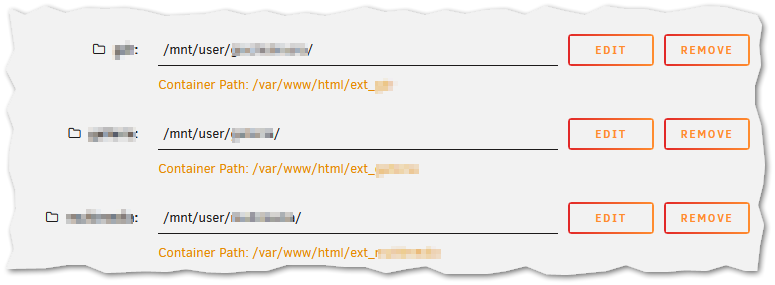
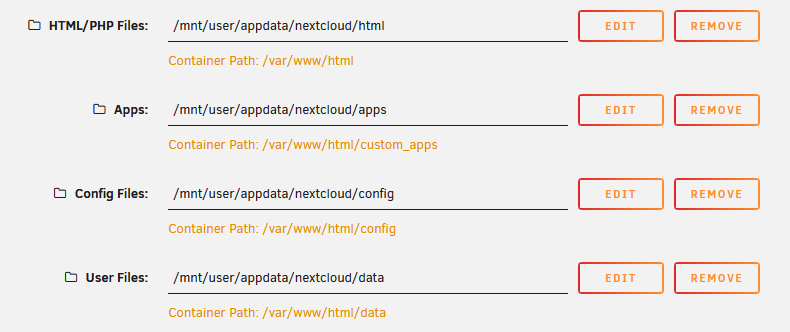
With this command: docker logs --since 48h Nextcloud 2>&1 | grep -Ei 'delete|deleted|unlink|remove|scan|external|trash|error|exception' | tail -500 I got several lines that left me baffled, like those ones (I changed the names of the folders, here): Also, several: Don't tell me that nextcloud did a mess with the mounts ext_1 ext_2 ext_3 while it was trying to update himself... 😨 Also, I see that when I start it, after a while it goes down, and of course it doesn't work. This was the setting I used in the Docker setup: This is the first part of the Docker setup: Honestly, I can't remember if I selected /var/www/html/etcetc as the "base" folder to mount my external mounts, and/or if I followed some guide, however if the Nextcloud rsync did something in those folders, surely it got my files too :-/
-
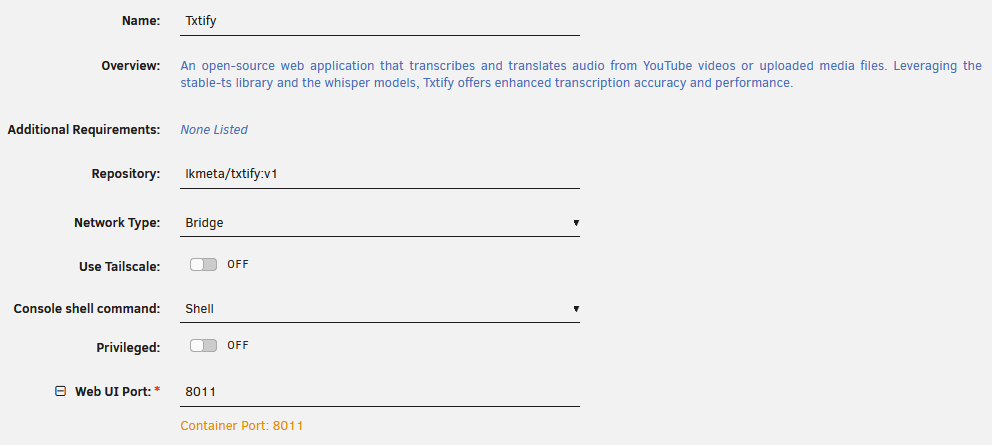
Thanks for the first reply. I stopped schedule for: - Appdata Backup - User Scripts I also have this one, don't know if could be problematic: Dynamix Cache Directories This is the script I used for mirroring: #!/bin/bash if mountpoint -q /mnt/remotes/NASQNAP112_backups; then rsync -avh --progress --delete --stats /mnt/user/1/ /mnt/remotes/NASQNAP/1_backup/ rsync -avh --progress --delete --stats /mnt/user/2/ /mnt/remotes/NASQNAP/2_backup/ rsync -avh --progress --delete --stats /mnt/user/3/ /mnt/remotes/NASQNAP/3_backup/ else echo "NAS QNAP ko!" exit 1 fi No, I don't think so. I use Nextcloud that has linked mounts to several unraid shares, however I use it thru Tailscale. Thinking about it, apparently the three shares I mounted for use them as "external" in Nextcloud are those totally zeroed, while I can't be totally sure about it. And/or maybe the Mariadb that it's installed 'cause it's necessary for Nextcloud? Txtify has very few settings in the configuration. No mentions about the shares it can use. The elevated setting is off. I'm also trying to do some elementary check with the help of chatgpt. Sadly, I'm not a pro-linux user... The various .Recycle.Bin and .Trash-99 are empty, just one of them has some file, not important, for a share not important.
-
Hi everyone. I don't know what went wrong tonight, but today I noticed that almost all my shares are empty. I checked with the built-in file manager, and I also checked the individual disks by running some ls commands in the terminal. It's like something selected almost all the files and hit Delete. Dumbly enough, I have a script that runs rsync to another mini NAS for my most important data, of course mirroring everything, because I don't have that much space on that machine. I see that those folders are empty too (but fortunately, this NAS has a recycle bin, and I'm finding some files in there), so the script did its job... 😣 I really can't imagine what went wrong. The last parity check was run about two weeks ago, so I don't think it was that, although I have Parity Check Tuning that cut the task in pieces, and stops if the HDDs become too warm etc. I also had the Txtify Docker container running and working on transcribing some text. I was testing it in the afternoon, and I noticed that the progress windows were stuck at a random percentage, but I don't know if that could have been the culprit. I have several HDDs, two of which are set as parity drives. So, the question is: I'll probably never find out what happened (although I hope you might be able to find something in the Diagnostics...), but is there any terminal command that can perform some sort of undelete, scanning all those HDDs for files that MAYBE are still physically there? Of course, thanks in advance! nastower-diagnostics-20260917-1929.zip
-
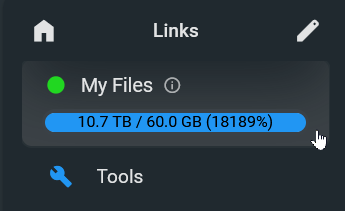
I think I's somewhat near to the solution. First thing first, I edited the config.yaml I had in appdata, this way: server: port: 80 # port to listen on baseURL: "/" # base URL for the server, the subpath that the server is running on. logging: - levels: "info|warning|error" # separated list of log levels to enable. (eg. "info|warning|error|debug") database: "data/database.db" # path to the database file sources: # validate:required,dive validate:required,dive - path: "/srv" # validate:required name: "My Files" config: defaultUserScope: "/" defaultEnabled: false createUserDir: false I used path /srv (instead of /srv/users). Also, with the last three lines, the system doesn't create a subdirectory "users" like it did before, and it doesn't create sub-subdirectories with the various user names. So, I have no more all those folders in Unraid created for every user that FileBrowser creates. Then, I added the additional locations. I mounted each of them inside filebrowser /mnt Unraid > FileBrowser multimedia > mnt/media_unraid books > mnt/books_unraid gallery > mnt/gallery_unraid I also modified the first location that was included in the initial docker configuration: FileBrowserFiles > mnt/filebrowser_unraid Apparently, it's working. However, it seems to me that indexing isn't working. EDIT: probably here the problem was some file with wrong permission inside appdata/filebrowserQuantum Now it looks ok, while of course it shows lot of TBs / 60GB, where 60GB is the container drive made by Unraid, while the TBs are the unraid shares mapped to filebrowser. Finally, I have a weird behaviour. A couple of locations seem to work correctly. In a single one, when I browse their subfolders or I click some of the files inside, it brings a red error (something went really wrong) and it shuts the docker down!!! 😑 I tried to reset the permissions for the folders and files using "Docker Safe New Perms" but nothing changed. I also double-checked several folders and files manually browsing them in Unraid, and I find no apparent problem.
-
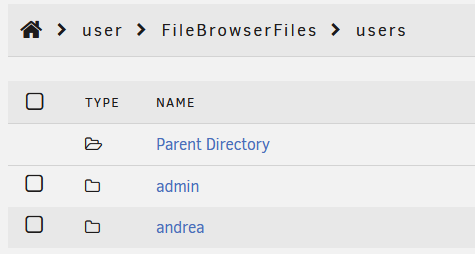
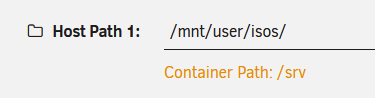
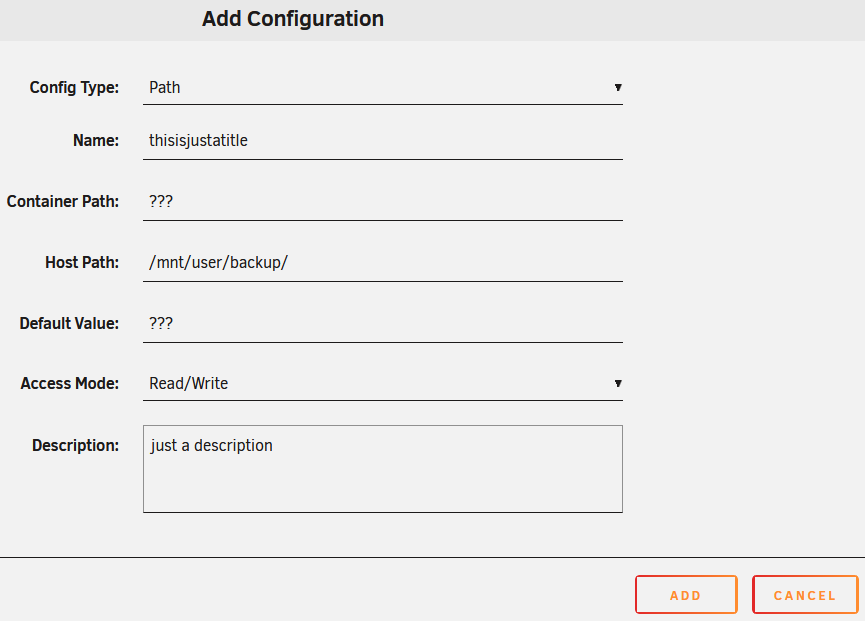
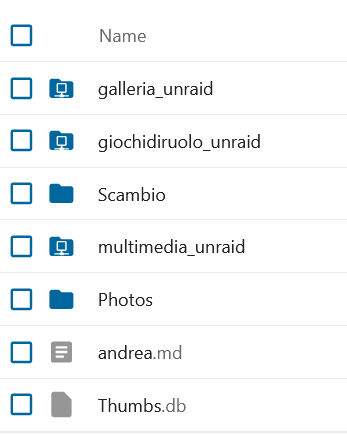
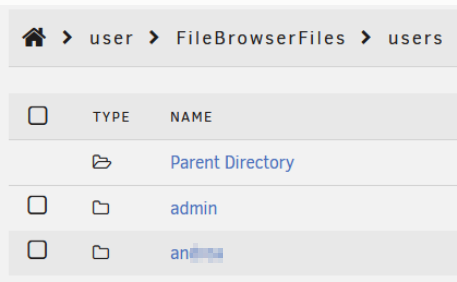
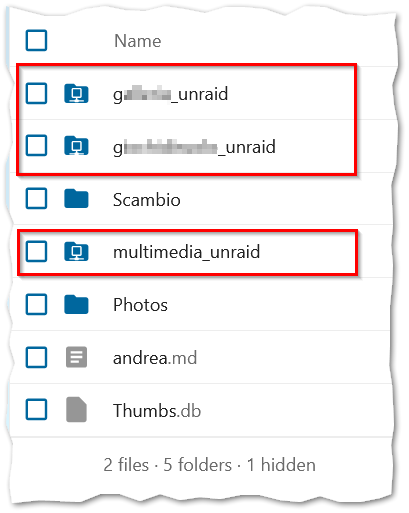
So, about this part that really interest me, right now. I'm trying to undestand how to make it in the right way, however I didn't find a way, AND I don't know if I'm totally lost. In short, doing the "standard" installation, I did a standard Unraid Share (called FileBrowserFiles). When in the docker webui I start to create users, and in those users I start to upload files and create folders, I see that those files and folders stay "isolated". Ie. even the admin can't easily browse and access to other user's "spaces". Manually checking the Unraid Share, I see that in the share I initially created (FileBrowerFile) there's a folder that I manually created with Terminal commands during installation (users). Inside that users folder there are the folders that FileBrowser creates each time I add a user inside it, and it by default gives the user the permission to browse, upload, download files and folders inside their specific subfolder. I discovered that I can let each user, admin included, to start from the container root, that it sees as "/", but that in Unraid it's mapped on user/FileBrowserFiles This is nice because I understand that during installation if I choose another Unraid share, for example this one I already have, I can use that as "FileBrowserFiles root": NOPE! I was wrong. Because when I return to FileBrowser, and I go in the users details, I see: But I got an error when I click it: So FileBrowser thinks it should have a subfolder "users" inside that share. That's make my initial idea wobbly, because if instead of that "isos" I chose as example, I'd like to choose my "Multimedia" share already configured with folders etc. for all the other Apps that I have inside and outside Unraid, then I still can't be able to let all my FileBrowser users to access them. Final doubt / request. I see that the container edit window let me to add other locations: This apparently could be a solution (I did something like that in Nextcloud, it let me to "link" several unraid shares to its subfolders that I see as sort of "network folders" (see the last screenshot below). However, I can't understand how to map my additional shares to the container (what folder name should I choose in the Container Path? Does the editor create the folders?). Aaand, If I can create those folders and link them correctly, from what I was seeing before, "/" is still inside a .../users Unraid folder, so I can still have those additional folders available to all the users easily. Am I wrong? Am I doing weird assumptions? Of course, super thanks to anyone giving me useful suggestions! 💜



-
I had problems with this part. Apparently, Unraid isn't happy with shares containing a space character inside. In the Share window It gives us a warning about it. Also, when I try to navigate it in the Terminal window I have problems with it. I humbly suggest you to change the instructions, including a similar Share with no space, something like FileBrowserFiles
-
Well, I indeed need a better, more modern solution. I actually use Nextcloud, and it's somewhat working, but really slow and stumbling on bigger pdf files. I suppose that FileBrowser could be a cool solution, simply I didn't had the courage to mount mnt/user, and simply followed the instructions found on youtube guide, so I created a new (empty) share and gave it the access to that one. If you say that I can share mnt/user and have it not touched (in terms of file permissions etc.) I'll try to edit FileBrowser to point it there.
-
Oh, wow, I'm scared like hell to do things like this one 🙂 Sure, I'm just a noob, however I always suppose that big apps like this one need a brand-new empty space to start with, so I followed the indications that I found (ie. creating a new share, pointing at it). Let it to point to my main share without knowing if I'll end with a milled empty space where I had all my data it scares me A LOT!
-
I can confirm, I tried to install the docker following the instructions, but it didn't start. So I removed that /data part and it finally started. PS: maybe this isn't the App I was looking for... From what I see, it looks into the share that I created manually at the start (FileBrowser Files). In there I find the folder that I create into the web UI, and the files I put inside. However, I can't see the other shares I have in Unraid. Is there a way to expose even the other shares? I'm searching for a lighter substitute of Nextcloud (in nextcould I can map other Unraid shares, it's working but slowly, and sometime the clients lose the connection with the server).
-
(Ouch, I did the command while my array was already started in Normal mode) However, after the command, I stopped the array and restarted it in Normal mode, and now I see the drive connected to the pool. I see some standard folders and files, and the Lost+Found folder with (empty) folders and some file named as random numbers. So, now I have two remaining doubts: 1) Is there still the chance I totally lost some file? I suppose there's no easy way to understand it. 2) Those Lost+Found files, should I simply try to move them to another folder, then, try to randomly apply a file extension hoping that they will be usable again? EDIT: about this point I found there's a linux command that I can launch in the folder: file * EDIT: marked the topic as Solved. However, if you have suggestions about those two points, I'm listening.
-
Ok, the command ended. Now what? In Main, the drive is still shown as unmountable. Should I stop the array and start it again? Or, is the drive still unmountable even from now on, so I need a way to manually mount it, check the files, then at the end blank it and re-add it to the pool as a blank drive?
-
Hi! I try to keep this as short as possible. In the past I had problems with drives (maybe the controller, mabye the wire, maybe the whole hardware not high-level - more a noob-lab Frankestein...), however I simply removed the bad drive (or blanked it) then re-attached, and the whole thing come alive again, after the usual parity rebuilt. I never lost anything, and I usually could have used the Unraid server in the meantime. This time probably I did a mess, so I'm here simply to understand if I can recover the files (I have a manual backup for the important things, just not so recent). In short: even this time I had a drive with the "x" in Main. I removed it and I substitute it with a used Western Digital I had here, unused. The last thing I saw was the usual parity rebuilding. Today I see that the WD drive shows in Main as partially full (as the old one was), but the file in it are "gone" After a reboot I get "Unmountable: wrong or no file system" on that drive. From my totally noob point of view, I suppose that the parity rebuilding went bad, so the system initially thought that all was good instead. Now the question is: may I try to access to the "unmountable" HDD, hoping for recovering what I can? With the started array I tried to do a xfs_repair /dev/md4p1, but I got: Phase 1 - find and verify superblock... - reporting progress in intervals of 15 minutes Phase 2 - using internal log - zero log... ERROR: The filesystem has valuable metadata changes in a log which needs to be replayed. Mount the filesystem to replay the log, and unmount it before re-running xfs_repair. If the filesystem is a snapshot of a mounted filesystem, you may need to give mount the nouuid option. If you are unable to mount the filesystem, then use the -L option to destroy the log and attempt a repair. Note that destroying the log may cause corruption -- please attempt a mount of the filesystem before doing this. I read that I could do the same command with a -L in addition, to discard the journal and trying again, but I'm really scared to do that, and I don't know if doing it could impact on the rest of the Unraid. I'm not desperate, I have an (old...) backup, so I'll probably lose only the last month, not so critical, data, however I'm not sure what those data are, so even a file list could be useful to understand what I'm really losing. Any suggestion is really welcome. Thanks in advance. PS: I had the chance to copy this part of the Log before the reboot: Jun 2 04:59:12 nastower kernel: Call Trace: Jun 2 04:59:24 nastower kernel: XFS (md4p1): Internal error !(flags & XFS_DABUF_MAP_HOLE_OK) at line 2751 of file fs/xfs/libxfs/xfs_da_btree.c. Caller xfs_dabuf_map.constprop.0+0x1ba/0x2a0 Jun 2 04:59:24 nastower kernel: CPU: 7 UID: 0 PID: 2625731 Comm: find Tainted: P O 6.12.54-Unraid #1 Jun 2 04:59:24 nastower kernel: Tainted: [P]=PROPRIETARY_MODULE, [O]=OOT_MODULE Jun 2 04:59:24 nastower kernel: Call Trace: Jun 2 04:59:36 nastower kernel: XFS (md4p1): Internal error !(flags & XFS_DABUF_MAP_HOLE_OK) at line 2751 of file fs/xfs/libxfs/xfs_da_btree.c. Caller xfs_dabuf_map.constprop.0+0x1ba/0x2a0 Jun 2 04:59:36 nastower kernel: CPU: 2 UID: 0 PID: 2626829 Comm: find Tainted: P O 6.12.54-Unraid #1 Jun 2 04:59:36 nastower kernel: Tainted: [P]=PROPRIETARY_MODULE, [O]=OOT_MODULE Jun 2 04:59:36 nastower kernel: Call Trace: Jun 2 04:59:49 nastower kernel: XFS (md4p1): Internal error !(flags & XFS_DABUF_MAP_HOLE_OK) at line 2751 of file fs/xfs/libxfs/xfs_da_btree.c. Caller xfs_dabuf_map.constprop.0+0x1ba/0x2a0 Jun 2 04:59:49 nastower kernel: CPU: 12 UID: 0 PID: 2627870 Comm: find Tainted: P O 6.12.54-Unraid #1 Jun 2 04:59:49 nastower kernel: Tainted: [P]=PROPRIETARY_MODULE, [O]=OOT_MODULE Jun 2 04:59:49 nastower kernel: Call Trace: Jun 2 05:00:01 nastower kernel: XFS (md4p1): Internal error !(flags & XFS_DABUF_MAP_HOLE_OK) at line 2751 of file fs/xfs/libxfs/xfs_da_btree.c. Caller xfs_dabuf_map.constprop.0+0x1ba/0x2a0 Jun 2 05:00:01 nastower kernel: CPU: 13 UID: 0 PID: 2628928 Comm: find Tainted: P O 6.12.54-Unraid #1 Jun 2 05:00:01 nastower kernel: Tainted: [P]=PROPRIETARY_MODULE, [O]=OOT_MODULE Jun 2 05:00:01 nastower kernel: Call Trace: Jun 2 05:00:14 nastower kernel: XFS (md4p1): xfs_difree_inobt: xfs_inobt_get_rec() returned error -117. Jun 2 05:00:14 nastower kernel: XFS (md4p1): xfs_inactive_ifree: xfs_ifree returned error -117 Jun 2 05:00:14 nastower kernel: XFS (md4p1): xfs_difree_inobt: xfs_inobt_lookup() returned error -5. Jun 2 05:00:14 nastower kernel: XFS (md4p1): xfs_difree_inobt: xfs_inobt_lookup() returned error -5. Jun 2 05:00:14 nastower kernel: XFS (md4p1): xfs_difree_inobt: xfs_inobt_lookup() returned error -5. Jun 2 05:00:14 nastower kernel: XFS (md4p1): xfs_difree: xfs_ialloc_read_agi() returned error -5. Jun 2 05:00:20 nastower kernel: XFS (md4p1): Metadata I/O Error (0x1) detected at xfs_inactive_if nastower-diagnostics-20260602-0845.zip
-
Here I am, just to throw a Thank You. I'm almost a noob user, needing a NAS at home, capable of putting just a couple of ccommands in the Terminal or following a tutorial on YouTube. I got Unraid only for a reason: no worries about HDD dimensions and combinations, no worries for the PC hardware. I used it as a sort of secondary NAS, then I convinced to keep it as primary. I had an extra old Intel i3 with 8GB DDR3 RAM and an Asus motherboard with 6 SATA. I decided to do a sort of upgrade, with limited budget. I bought an used Ryzen 7 3700X, a cheap chinese motherboard, a cheap M.2 6x SATA controller, and I recovered some DDR4 RAM I had in a drawer... I moved all the HDDs, I moved the USB key with Unraid, I turned on the PC, and BAM! I had my NAS upgraded. This is exactly what I wanted. No mo fear about the HDDs, no more fear about the hardware. Hope it goes this way for a while. And maybe, that we'll get cheaper upgrade for the updates...


