





wambo
Members
-
Joined
-
Last visited
Everything posted by wambo
-
Yes, that part seems easy. My real problem is how to get the "old"/"rescued" data back into the system - since the original drive won't be recognized anymore - even though I can mount it with a USB-Sata adapter. (that makes me wonder whether one of my cables internally are broken - can't test that before I get a new SATA drive though) Should I copy the files onto the new drives once installed, or can I just move them onto the HDDs? Or is there a way to make the system "take" the "stand-in" nvme disk and just "continue" buiseness (and then I add a Sata for redundancy and replace the nvme in a 3rd step) ?
-
-
Hey there, after I noticed some problems with syncthing, it turned out the SSD of my (bigger) cache pool has given out (lots of read errors, couldnt be mounted, filesystem not recognized in unraid...) - I managed to copy the partition on my Desktop, the drive didn't seem faulty there actually but I'm gonna replace the drive with 2 drives now, so I have parity... Until those drives arrive, I was thinking of using an nVME in an USB enclosure as replacement - I mirrored the faulty disk onto that, but it turns out I can't just add this device to the pool and keep using it. So I can still mount the "stand-in" drive and copy over the files manually. But this is where I'm not sure: where should I copy the files to, so Unraid won't be confused? Onto the Pool (as if the mover has already moved them?) onto the new SSD (once they're here)? Or is Unraid agnostic to "on which disk" files are lying, as long as they're still in the proper share?
-
When trying to update a specific docker config, I was presented with an error about failing to stop the docker, and thus failing to start up the container with the new config. I tried to stop and then kill this container via cli (docker kill <containername> ) which also failed ( cannot stop container: <container-id>: tried to kill container, but did not receive an exit event ). I tried to stop the docker engine via the webinterface - which seemed to succeed, but upon starting it again docker daemon was unresponsive. I then tried to reboot from the webinterface - which send a message to all ssh connections, but didn't seem to do anything else. I tried again with shutdown (repeatedly) and in the end with shutting down the array manually. But this also failed and stayed forever (~20h+) on "Stopping Array - stopping services" (or similar) status. I'll add diagnostics from the point but as far as I can see there is nothing out of the ordinary in the syslogs. In the end I resorted to a hard reset, lacking other options. After this hard reset and starting docker, the container (Cloudflare DDNS) reacts without issues, so I still suspect some other system service being the hidden cause. This might be related to the linked issue below, but if it is then the thread also did not reach to the point of identifying the failing service. unraid-diagnostics-20230221-2135.zip
-
For now it seems as if uninstalling GPUstat solved the issue. Has been running fine ever since. --- Edit Spoke to early (mabye?) I noticed I couldn't stop a docker container, tried to stop the docker service, which did not start back up. Trying to reboot failed and stopping the array is not coming to an end. Might be related or might not be related... Feb 21 20:37:10 <SERVER> nginx: 2023/02/21 20:37:10 [error] 22153#22153: *3456794 upstream timed out (110: Connection timed out) while reading response header from upstream, client: <client.ip>, server: , request: "POST /webGui/include/Boot.php HTTP/2.0", upstream: "fastcgi://unix:/var/run/php5-fpm.sock", host: "<serverip:sslport>", referrer: "https://<server:port>/Settings/DockerSettings" Found another one in the syslog 😕 Although this is probably connected to docker not responding.
-
This is not a permanently reoccurring error, and it doesn't seem to start after boot but a after quite some time of running, so I don't see any reason that justifies setting everything up again (or does "redo the flash drive" refer to copy&pasting to a new drive? - Seems even less likely to improve anything). "Just format and install again" is just so windows like, I really didn't expect to hear that Until now we've established that it does not affect many areas of the system. but does affect the UI of Unraid, not the nginx but it's "upstream" - I was hoping someone could shed some light on what that would be, and whether I could test for its health next time it happens ( if it happens). It's possibly that it was GPUstat or at least connected with my GPU (nvidia P400) because that is a rather new component, and I did not use it much previously.
-
I tried a the `powerdown -r` after getting a hint about gpustats plugin causing issues. But looks like this script did not fully go through. Shares are still accessible, ssh is unresponsive (although not getting refused or anything, just nothing happening after typing that command). I had to hardreset the system. About the failed powerdown the guess (from discord) is that a service was hanging. Still no further clue about the underlying issue.
-
AFAIK already quite a while ago. Not sure whether I can control that via CLI. Is there anything that hints you to believe I did not? Or is that just the first reaction to anything webui related? But following that link showed me how to disabled ssl just to verify - this also shows the same behaviour (on a different port now of course) --> So same behaviour on http. So I am going to turn ssl back on. ..... After we can fix this issue. Why can I turn it off via CLI but not on ?
-
trying to access my Unraid Server via browser (hostname.localtld / LAN IP/ Myservers LINK) results in eternal loading symbols. I am assuming only the webinterface is affected, because dockers, ssh, shares all seem fine. I tried restarting the nginx with `/etc/rc.c/rc.nginx reload` but other than canceling the currently loading browser tabs to a "error 500" nothing changed. When I checked the My Servers page, I noticed it said that the servers was not connected, so I restarted the unraid-api as well, which brought back the green light in My Servers, but otherwise did not change anything. I tried to create a diagnostics file (via ssh), but the process also just continues running. I have tailed syslog for a bit, but all I'm seeing are errors like this: Feb 4 17:34:35 <SERVERNAME> nginx: 2023/02/04 17:34:35 [error] 22319#22319: *1228637 upstream timed out (110: Connection timed out) while reading response header from upstream, client: 2001:9e8:222d:af00:5cc6:dd32:XXXX:YYYY, server: , request: "GET /favicon.ico HTTP/2.0", subrequest: "/auth-request.php", upstream: "fastcgi://unix:/var/run/php5-fpm.sock", host: "<SERVERNAME>.<LOCALTLD>:<PORT>", referrer: "https://<SERVERNAME>.<LOCALTLD>:<PORT>/Apps" Feb 4 17:34:35 <SERVERNAME> nginx: 2023/02/04 17:34:35 [error] 22319#22319: *1228637 auth request unexpected status: 504 while sending to client, client: 2001:9e8:222d:af00:5cc6:dd32:XXXX:YYYY, server: , request: "GET /favicon.ico HTTP/2.0", host: "<SERVERNAME>.<LOCALTLD>:<PORT>", referrer: "https://<SERVERNAME>.<LOCALTLD>:<PORT>/Apps I'll also attach the syslog. It might be unrelated, but I've had the UI be unresponsive once before this week, when I used the Theme Engine. In a video tutorial I heard a warning about not submitting twice after loading from css input (too late), and this seemed to crash my UI as well. Weirdly enough when I tried to restart the UI (or rather nginx) ssh also became unresponsive so I reset my server. SSH is fine right now, so I am not sure these are related. --- Edit: I found another thing might've stopped working: `nvidia-smi`, when I call this it also takes forever, so I suspect that the driver crashed or something? I am not sure how this could relate to the webui though, I am sure I the only thing showing on the monitor was a CLI, not the UI (when I started the server, disconnected the monitor since) --- syslog-anon.zip
-
There is LuckyBackup, running a GUI for rsync in a docker. It look a bit old-fashioned, but it let's you organize stuff into multiple profiles and different tasks (1 per folder basically). I am syncing backups between 2 locations (or sometimes even a third) connected via VPN to get an offsite copy. I have a profile for each location's backups, and then I have a task for each folder: - folder for system partition backups of that location (basically where Veeam, EaseUsBackupToDo, Macrium Reflect or whatever software saves laptop/desktop images to. - folder for network drive (photos and such) - folder for data folders I that are "backupped" with syncthing to not make the system backup too big I can even access the shares provided by the rsync deamon on my Synology NAS (which wouldn't work out of the box vice versa, because there is no daemon running on unraid by default). The config is a bit fiddly and it's not robust (as in trying again if connection breaks). But you can setup shedules. For now I still run it manually. What rsync has problems with is backing up a big number of small files, so I'm looking into different solutions for photos and documents. Maybe I'll take a look at Amanda or another "orchestrated" solution.
-
OK, right now my thoughts are going towards an a new scanner with actual document feeding system 😕 But I don't get mail that often even XD
-
Hello party people, I have an (older) printer/scanner/copy device, that can connect via USB/LAN/Wifi and I was quite happy with it - until now. I've never really used my phone to print stuff, but that is one of the functions that are not available. It's a Brother MFC-J315W I can start a scan from the printer, and it would arrive at my pc, but this would need brothers own drivers to work (afaik), also it would usually arrive as .jpg so in the last years I always started a scan from my PC - and the device needs to be running. It also has a SD card slot, but when I tested it today, it couldn't recognize 2 properly formatted cards, so that seems broken. But the printer is located just above my unraid server, so I thought there must be a better solution. What I want to do: start a scan from the printer, without having any other device running and have it saved in one of my file shares. Optionally it would be cool to connect this later on with document management tools, but should be easy. What would be cool - if it came with the solution, would be a platform to easily print from my phone/laptop or other devices, that don't have brother drivers installed. Since there are drivers for linux available, I thought it should be possible to create a debian based docker container, pass-through the printer (as USB device), mount one of the shares, install the drivers (print/scan/scan from button) and... voila? Are there any docker images that are meant for this already? Or which basic image could I use, to receive regular security updates from upstream? Or are there any other clever solutions for this? I'm a bit afraid of setting up and maintaining my own docker
-
I managed to add the dockermod git, but since I sync my vaults via GitHub I cannot use password authentication. I tried copying a working (on another device) config and keys into ~/.ssh then /config/.ssh and /config/.config/.ssh but none of them seem to be working Edit: I found out that known_hosts keys gets created in /root/.ssh so I moved my files there and that worked. Also make sure to adjust filepaths in the config, I had my Identityfiles with absolute paths like "~/.ssh/key1" and such Also found out: ~/ is actually mapped to /vaults/ ?? Shouldn't that be mapped to /root/ for root user? And, it looks like the user running obsidian is 'abc', whose home folder is /config. I was about to complain that it should be /vaults (so they would pop up when you go "open from folder", but with /config it will find /config/.ssh Soooo, I guess don't open the shell from unraid / docker menu, but use xterm instead. You'll still have to change ownership of files, bc the files I moved into appdata/obsidian/config folder had root as owner. So to do that I went via the unraid/docker menu, cause I do not know the root password in the container and logs me in as root But again it turns out: no password needed to run sudo commands as user 'abc' so you can also do this as user abc: sudo chown abc:abc -R /config/.ssh I also needed to adjust permissions: sudo chmod 700 /config/.ssh sudo chmod 600 /config/.ssh/* sudo chmod 644 /config/.ssh/*.pub So I first put the more restrictive 600 -rw------- on all files in the folder and then I add 644 -rw-r--r-- on the publickeys only. And now it works
-
I understand the idea about privacy, but its still a clear downgrade of other functionality - without the option to switch. What I was wondering: was that supposed to be the internal (LAN) IP? I would've thought it should be the external (WAN) IP. Isn't this also rather "flat" security, since the full Domain (inkl. the IP) is propagated to a big number of DNS servers? What about making the DNS assignment optionally available as wildcard (= [IP].[HASH]... and [HASH]... would both work) ?
-
so with this change, MyServers basically doesnt work like a dynamic DNS anymore, since the URL changes everytime my IP changes? I'm sure I'm missing something, because that feels so much more like a downgrade...
-
I don't know whether it worked before, but when I try to access my remotes (mounted via UAD) and try to access the remotes folder in Filebrowser I get some waiting time and then the "something really went wrong." Any idea what could be wrong? I can access the remotes from bash and also from unraid integrated filebrowser.
-
Well, no, works properly again (after reboot). I'm just curious what caused this 😕
-
My luckybackup container just stopped tonight. In the overview it says stopped, but the log keeps producing this: e":"open /var/lib/docker/containers/418940da6b84ae0ba2c385e3813f934a3c54ed46090ffae434c6fbee4bed2e64/418940da6b84ae0ba2c385e3813f934a3c54ed46090ffae434c6fbee4bed2e64-json.log: read-only file system"} And trying to start it gets Error 403. I think it is stopped indeed, but trying to remove the container with `docker rm luckyBackup` yields this error: Error response from daemon: container 418940da6b84ae0ba2c385e3813f934a3c54ed46090ffae434c6fbee4bed2e64: driver "btrfs" failed to remove root filesystem: Failed to destroy btrfs snapshot /var/lib/docker/btrfs/subvolumes for ef115edb20b76af217f8d1dd2e541a9c6920d5c1dac0737e9e1205ba06c1152b: read-only file system I'll investigate more later today
-
What I'm questioning is why I would have lower pressure at the end of my push-disks-pull tunnel than on the openings with "atmosphere" pressure. Even if my fans did almost nothing, they'd still create higher pressure - the same as the rear fan would create lower pressure. and the air coming in from the bottom, would at least "sweep" along some of the air from the disk bundle (if that works only a bit), so its not too detrimental the only one "bad" would be "in through pcie" - which really needs a lot of pressure difference, to force the air around that bend instead I cannot monitor the airflow with smoke, but I can still test whether there's relevant airflow through openings... with light tissue... and I can be a bit sure that there's no air going into the back. But either way, I can keep the disks cool enough, I only have to dial in to do it with a bit less rpm so it's not too audible. ( I regret not having ordered pwm fans...)
-
Well the bequiet silentwings 3 are also among those... "silent but still a lot of throughput" The problem is that at max speed they're all still audible (or they're artifically throttled) I'll test with this setup (and some slight changes) for now, and when I open the case next time, I'll tape the bottom and pcie closed (shouldnt be too complicated). And then I have a manual fan control card coming (but its got some longer delivery time), with that I can probably fine tune things to a nice 80% rpm level which isnt as loud.
-
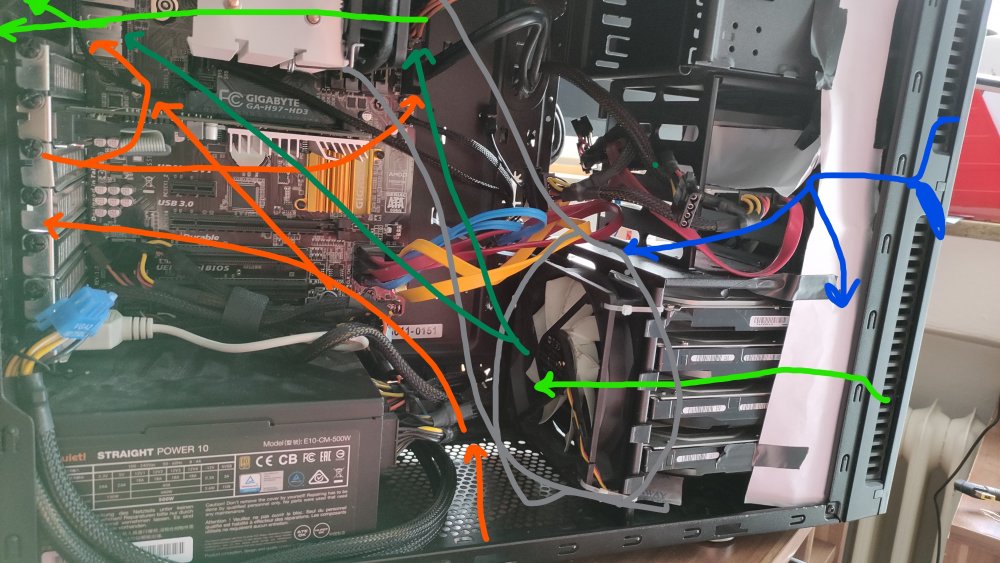
I've literally never seen anything like that (okay maybe except on servers) Are you really saying the air might flow in from the pcie slots, or from the bottom and go out on through the rear fan, so the air pushed into the front wont make it out? (orange: bad, unwanted, unexpected airflow) Because other than the bottom there's really no big holes anywhere that would make sense in terms of unwanted airflow. I could try to build a "funnel" from the pull fan after the disks up to the cpu fan. (grey) but I dont really think that would work properly (and I'm not sure how to build it... Green is the wanted airflow, where dark green is flow that might not be there right now. Blue is the top fan, I really dont see a way to redirect it to the bottom, so the only thing I could do is lower that top front one even more. (to make sure green reaches the cpu/rear fan, and not blue)
-
Haha. I need to remember that Anyways, I did a quick sound test (closed the case) and found that the rear fan was still a bit too loud, so I switched it to "normal", the MB says ~700 rpm (fullspeed was 1500rpm iirc). Still have the option to make the rear one 7v manually, as well as increasing the one pulling through the disks (if 12V can do more than the MB 4PIN on fullspeed). But for now I'll put it back into its corner, and find out how the noise feels over time and how the disk temps behave. (edit: nah, not particularly happy about the noise)
-
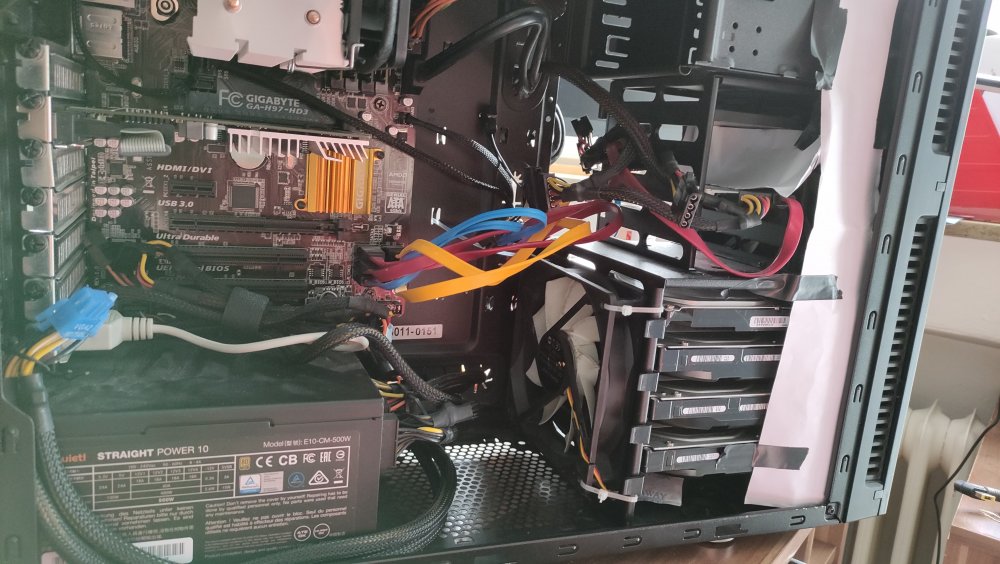
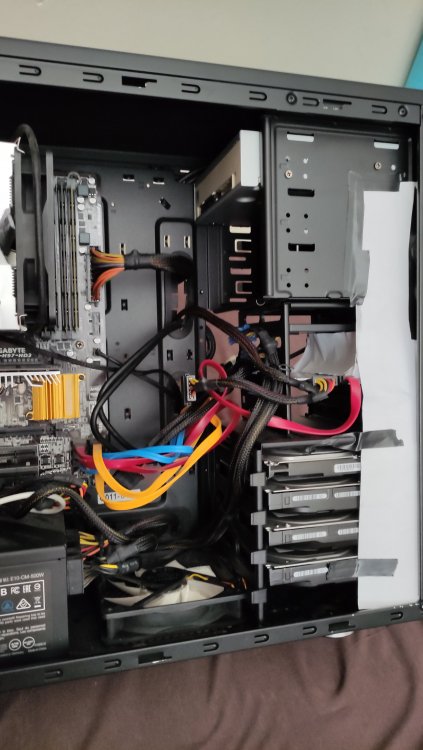
God damnit. Yeah I had it blow out before I flipped it (even the dust filter told me so XD) But I like my solution now even better (and its the correct way now :D) Not proud of the cable management btw. gonna try to bundle up the sata cables a bit, but there aren't too many things between the disks and the outlet
-
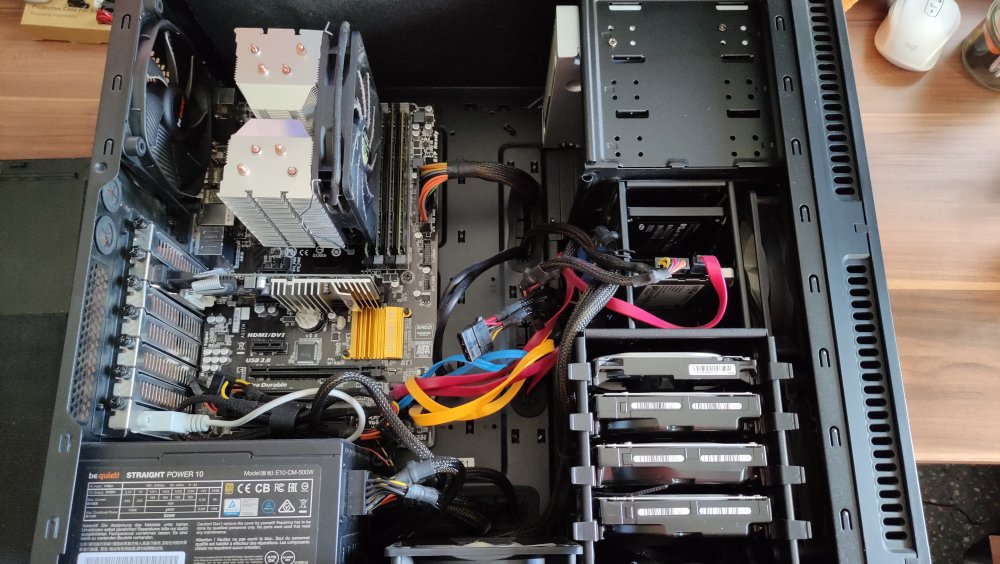
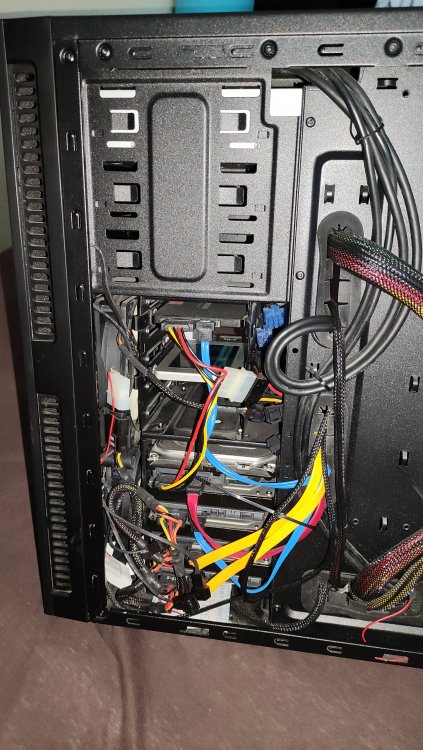
So I was away for the weekend but heey, today is a holyday. I made some pictures, top is as it was until now. Bottom Front and Back are the bequiet fans, the bottom and front top are the cooltek original ones. The other 2 pictures after modification: - turned the bottom fan to become an outlet (this was a fail, it was an outlet before already XD) - put some paper/tape below the lowest HDD, so air flows through the gaps - put some paper/tape on the left side, so air doesnt flow past the side - I couldnt really find a way to seal off on the right side, since there's all the cables - I put a tape paper in front of the top of the top fan, to redirect air towards bottom Also I changed some things about the connection: The MB has 3 sys fan headers, 1x 3PIN 2x4PIN, but I only have 3 PIN fans, didn't check BIOS setting yet, I hope it can handle 3 PIN fans... - connected the front bottom (bequiet) to the 3PIN header - gonna try to give it a constant fan curve as high as I can bear the noise - connected the back and bottom fans to the 4PIN headers - back fan also constant high fan curve, and gonna use the bottom one to test around how it affects - the bequiet fans came with a IDE -> 5/7/12V header, so I put the front top fan on 7V for now But generally: shrouding the front fans is kidn of hard because of the small gap to the 1,25"(?) disks, and that cage doesnt have holes on the bottom **Edit:** Okay, the 3PIN header cannot be controlled, its just full speed (which is fine for the bequiet I suppose. and the 4PIN ones... I'm not sure about, they give a rpm reading, and I can control them with the settings, but the "manual" control is a based on pwm/degree system temperature, which obviously doesnt do anything about my disks. So I can go witht he silent, fullspeed, or normal preset. I will run the bequiet fans (top bottom and back) on fullspeed with the sys3 header (and hope thy're quiet enough), and run the other 2 on the 4PIN (adjustable) fan headers. One issue though: the bottom fan doesnt like being upside down 😕 it sounds like its slightly scraping on something, but its not a cable on top or the case on the bottom, so I think it is where the fan (the propellor/rotor) is hanging from the static part... I think I might just have it stand in front of the disks and secure it with cable ties
-
Ah, I ran the Mover without the sheduler filters, and that did the trick (except for a few apps that I uninstalled, and 1-2 that I moved manually) I'll keep my eye out to see whether it happens again though.



